Repository navigation
Configuration & Secrets Guide
NewsAlerts enforces strict security and environment separation to protect your sensitive API keys, session cookies, and bot tokens.
Under no circumstances are secrets, tokens, or configuration files committed to git repositories or included in build artifacts.
All settings and secrets reside strictly in the operating system's standard user application storage, automatically created and provisioned on first launch:
| Operating System | Central Application Directory (APP_DIR) |
Fallback Location |
|---|---|---|
| Windows |
%APPDATA%\NewsAlerts\ (C:\Users\<user>\AppData\Roaming\NewsAlerts\) |
$HOME/.newsalerts\ |
| macOS | ~/Library/Application Support/NewsAlerts/ |
$HOME/.newsalerts/ |
| Linux / BSD |
$XDG_CONFIG_HOME/NewsAlerts/ (default ~/.config/NewsAlerts/) |
$HOME/.newsalerts/ |
-
Environment Variable: Set
NEWSALERTS_DIRorNEWSALERTS_HOME(e.g.export NEWSALERTS_DIR=$HOME/.newsalerts) to explicitly direct all data storage to any custom folder. -
Dotfolder Detection: If
$HOME/.newsalertsexists on disk, NewsAlerts automatically prioritizes and uses it across all platforms. -
Automated Provisioning: Zero manual directory setup is required. The terminal automatically invokes
mkdir(parents=True, exist_ok=True)and createsconfig.jsonwith default settings upon first launch.
-
config.json: Primary runtime settings (scan filters, strategy toggles, audio preferences, Telegram credentials, TradingView session cookies). -
keys.toml(Optional): Standalone secret storage file for headless environments or manual editing. -
tape_history.json: Rolling 4-day tape history cache (up to 5,000 prints). -
app.log: Rolling terminal diagnostics and connection logs.
- Never commit
.env,keys.toml, orconfig.jsonto any git branch. - In-app settings are automatically validated and written atomically with file locks.
- Automated pre-commit and CI workflows scan for credential patterns on every build.
Use the Backup & Sync tab in Settings to safeguard your configuration, export setups, or reset state:
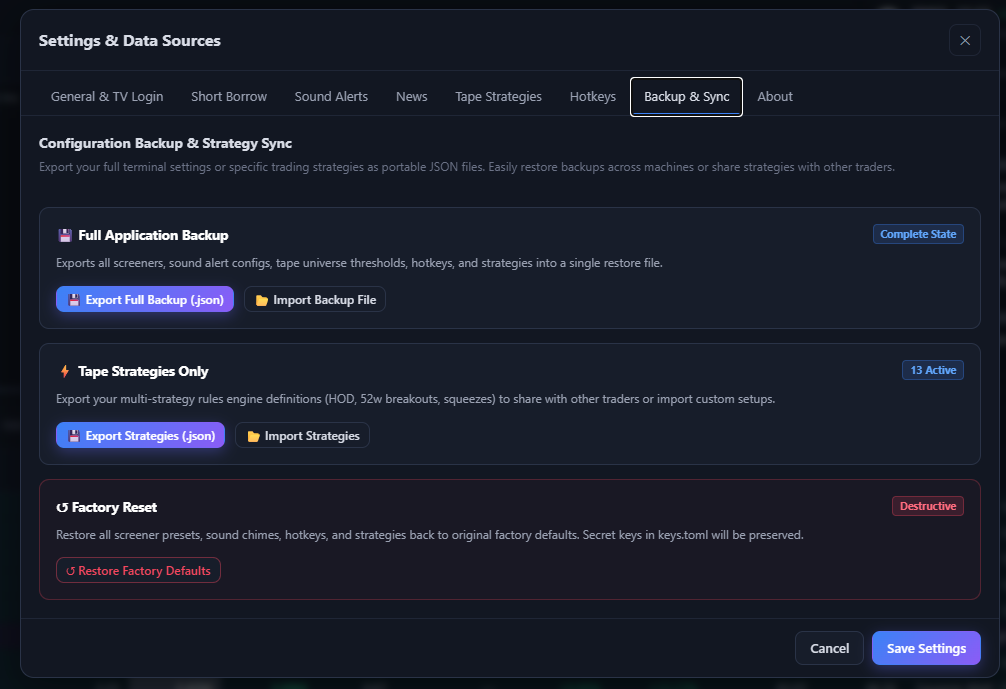
Settings → Backup & Sync: Full application backup, strategy definition sync, and destructive factory reset.
-
Full Application Backup (
Complete State):-
💾 Export Full Backup (.json): Click to generate a complete portable JSON snapshot of all screeners, sound alert paths, volume settings, tape universe thresholds, hotkeys, and strategies. -
📂 Import Backup File: Validates JSON schema and restores terminal state across machines or after reinstallation with immediate live-reload.
-
-
Tape Strategies Only Sync (
N Active):-
💾 Export Strategies (.json): Share your multi-strategy rules engine definitions (HOD, 52w breakouts, squeezes) with other traders. -
📂 Import Strategies: Import custom setups directly into your active tape without altering your personal screener filters or API keys.
-
-
Factory Reset Safeguard (
Destructive):-
↺ Restore Factory Defaults: Restore all screener presets, sound chimes, hotkeys, and strategies back to original factory defaults. Secret keys stored inkeys.tomlwill be strictly preserved.
-