Repository navigation
Real Time Momentum Screener
The Momentum Screener is the core scanning engine of NewsAlerts. It continuously monitors thousands of US equities across NASDAQ, NYSE, and AMEX to isolate the highest-velocity intraday runners.
-
Instant
NEWSymbol Inbound Badge: When a ticker crosses your filter thresholds for the first time in a trading session, an emeraldNEWbadge appears adjacent to the symbol. The badge pulses and remains active for 90 seconds to ensure you never miss a newly emerging breakout. -
Dynamic Column Sorting: Click any column header to sort in ascending or descending order:
- Symbol: Ticker symbol with company brand logo.
- Price ($): Real-time last trade price.
- Change (%): Intraday % change from previous close.
- Volume: Cumulative intraday traded shares.
-
Float: Total tradable shares (e.g.
1.2M,4.5M). -
Borrow Status: Institutional shortability locates (
ETB,HTB,NO BORROW). - Relative Volume: 5-minute and daily relative volume surge multiples.
-
1-Click TradingView Watchlist Quick-Add (
+): Every screener row includes a dedicated quick-add+button next to the ticker. Clicking it instantly qualifies the exchange and appends the symbol to your selected TradingView cloud watchlist (visible in real-time on TradingView Desktop), accompanied by a 3-second green flickering glow (✓). -
1-Click Broker Banned / Closing-Only Blacklist (
🚫): Every screener row includes a dedicated🚫button next to the ticker. If an active stock is placed in "closing-only" status or rejected by your broker (e.g. Interactive Brokers margin restrictions or penny stock rules on symbols likeYMAT), click🚫to immediately blacklist it. When the topbar[🚫 Banned: ON]filter is active, banned symbols are immediately hidden from both the Screener and Tape, and alert chimes are suppressed.
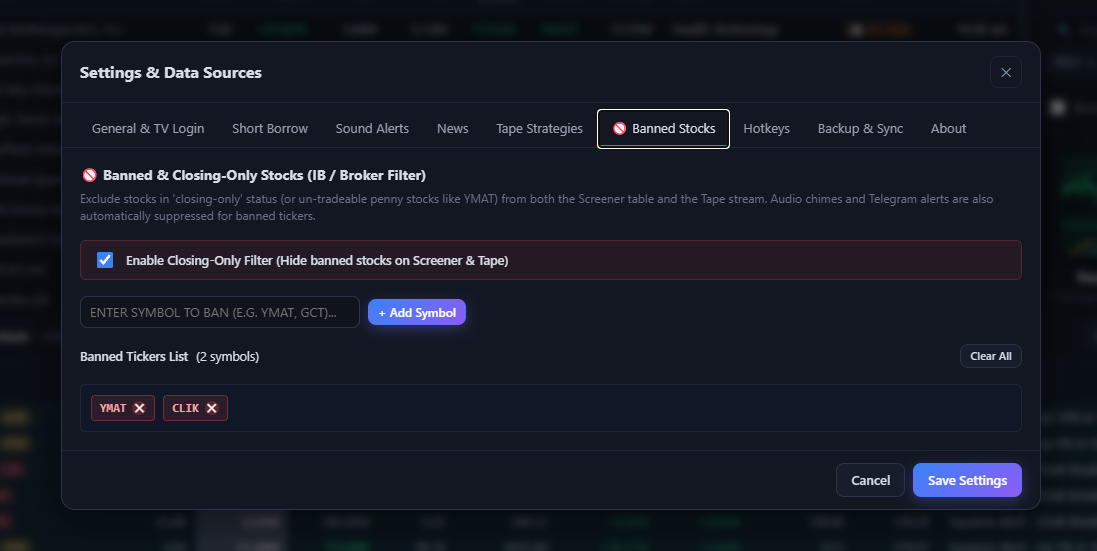
Settings & Data Sources: Banned & Closing-Only Stocks manager with interactive chips, manual symbol add input, active filter toggle, and clear all.
-
Configurable Screening Criteria:
Adjust screening filters in real time via the Settings modal (
Shotkey):- Minimum & Maximum Price: Target low-priced small caps (e.g., $1.00 to $20.00).
- Minimum % Change: Filter out low-volatility tickers (e.g., minimum +10% or +20%).
- Maximum Float: Focus strictly on explosive low-float equities (e.g., Float < 10M or < 20M shares).
- Minimum Volume: Exclude illiquid stocks (e.g., minimum 500k shares traded).