Repository navigation
Running Momentum Tape
The Running Momentum Tape provides a high-velocity stream of High of Day (HOD) and Squeeze Breakout prints inspired by professional Ross Cameron / Warrior-Trading style momentum desks.
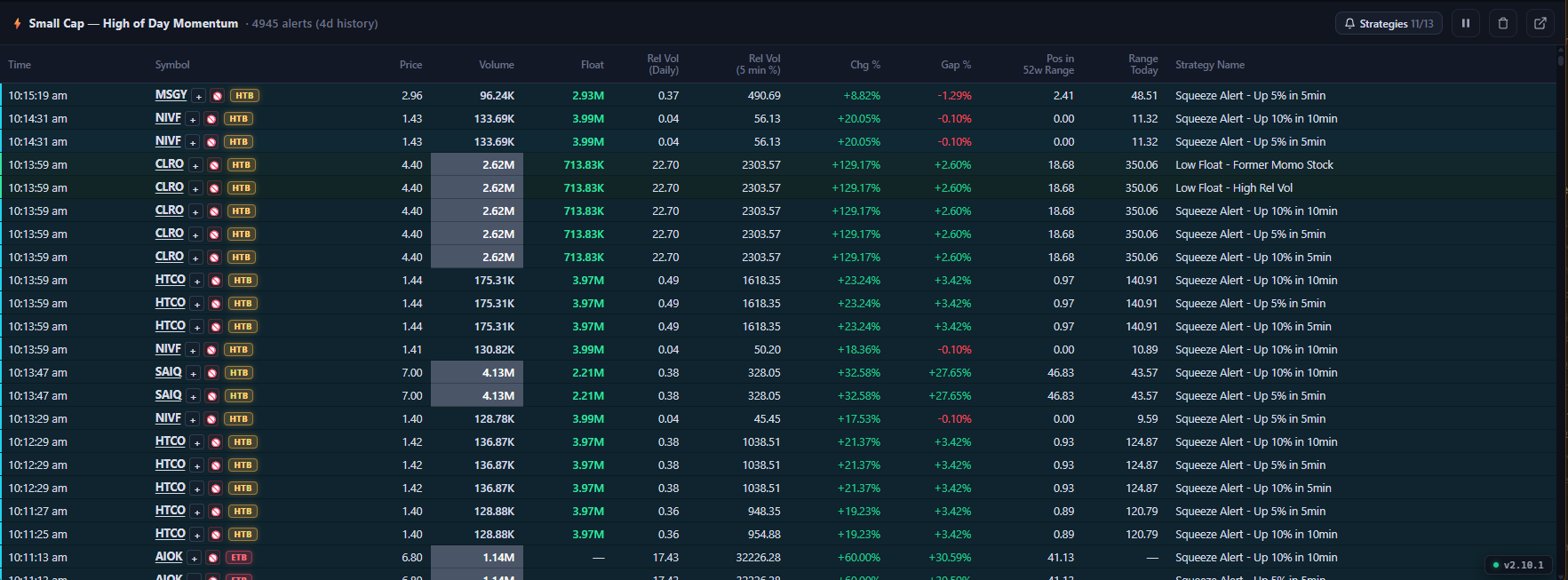
Running Momentum Tape: Live HOD prints, large-cap momentum squeezes (SMCI), color-coded strategy tags, and 4-day local disk history.
- High-Velocity Momentum Prints: Every time a monitored stock hits a new High of Day or triggers a surge condition, a color-coded print is pushed to the tape.
-
Large-Cap & Micro-Cap Squeeze Coverage:
Monitors low-float micro-caps (e.g.
AHT,NCPL) alongside high-profile institutional momentum runners (e.g.SMCI,NVDA,TSLA). -
5-Minute Relative Volume Acceleration:
Prints display real-time 5-minute relative volume surges (e.g.
+42,900% 5m rVol), signaling institutional block buying or aggressive retail retail crowding. -
Monotonic Squeeze Progression:
During active surge windows (5m / 10m), subsequent alerts for the same symbol & strategy require strictly higher prices (
price > last_alert_price), eliminating repetitive noise on flat consolidations. -
Pop-Out Detached Window:
Press
Ton your keyboard or click the Pop-Out icon (⧉) in the Tape header to launch a dedicated, borderless floating tape window for multi-monitor setups. -
Pause & Scroll Lock:
Press
Spaceor click⏸to freeze tape scrolling during rapid cascades while inbound events continue queuing (New events ↑).
Active traders can toggle momentum strategies on the fly without ever leaving the tape view:
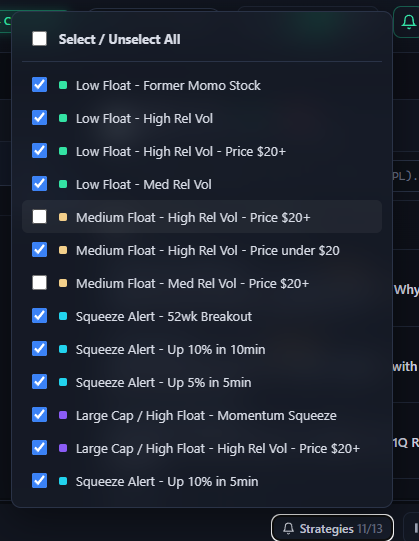
Tape header quick-toggle dropdown: One-click strategy toggles with matching color bullets and master select/unselect.
-
One-Click Header Menu: Click the
🔔 Strategies 11/13button on the tape header to open the floating checklist. - Master Batch Toggle: Check or uncheck Select / Unselect All to isolate a single setup in seconds.
-
Color Bullet Indicators:
- 🟢 Mint Bullet: Low Float Momo & RelVol Surges
- 🟡 Sand Bullet: Medium Float Momentum
- 🟣 Violet Bullet: Large Cap / High Float Squeezes
- Instant Client-Side Filtering: Toggling any strategy immediately hides/shows matching historical rows and mutes associated audio chimes and Telegram alerts.
-
Strict Upward Surge Geometry & Anti-Spam: Squeeze alerts (
Up 5% in 5min,Up 10% in 10min) enforce strictly upward rolling trajectories near the surge crest (price >= max_p * 0.975). Flat consolidation phases, pullback selloffs, and duplicate alerts at the same price are automatically suppressed.
Unlike web-based scanners that erase your tape history the moment you refresh or close the browser, NewsAlerts features automated local disk persistence:
-
Storage File:
tape_history.jsonlocated in%APPDATA%\NewsAlerts\(Windows),~/Library/Application Support/NewsAlerts/(macOS), or~/.config/NewsAlerts/(Linux). - Capacity: Retains up to 5,000 historical momentum prints.
- Automatic Pruning: Automatically purges prints older than 4 days (96 hours).
- Off-Hours & Weekend Review: Re-open NewsAlerts on Saturday or Sunday to study historical breakout prints, volume surges, and catalyst timings from the entire previous trading week.
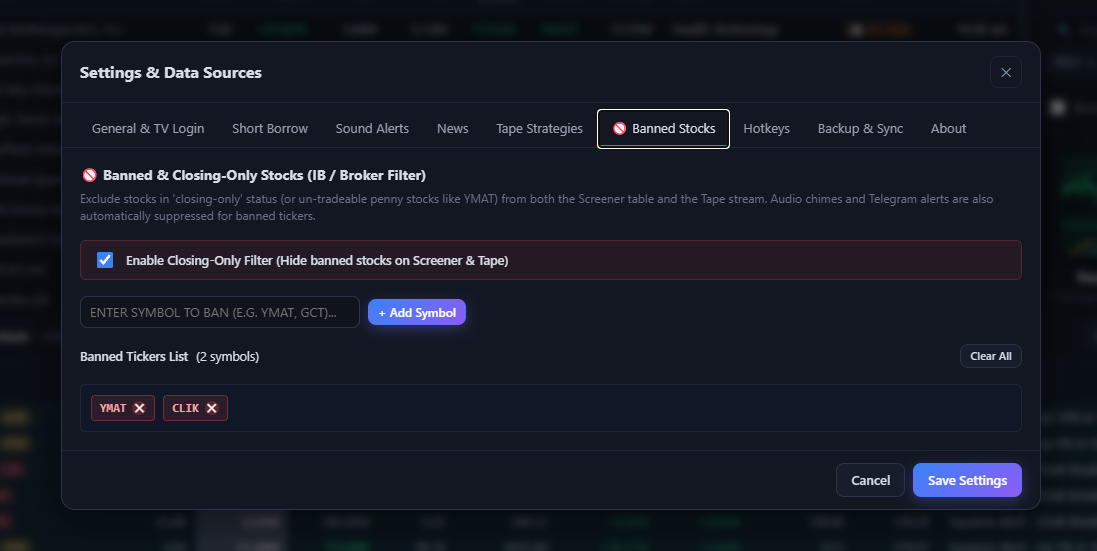
Each event card on the running tape features a dedicated 🚫 blacklist button alongside the symbol. Clicking it adds the symbol to your banned tickers list. When the topbar [🚫 Banned: ON] filter is active, tape prints for banned stocks are automatically hidden from view and audio chimes are suppressed.