Repository navigation
User Guide
Host Imagus Bridge is a Firefox add-on that works next to Imagus Reborn. It opens full-size pictures and plays videos from the sites you choose, through Imagus Reborn and HIB's own gallery and video player.
HIB works only on the sites you add (toolbar button → Tools → Manage Sites). On every other site it does nothing: it does not read, change or collect anything from the page. HIB sends nothing to its developer or to any server of its own: no tracking, no analytics, no account.
The pictures on this page are made with a demo library and generated clips, so no real site, title or personal data is shown. For a step-by-step walk-through on a real site, see the Tutorial.
Quick start (short version; the Tutorial shows every step)
- Install Imagus Reborn, then HIB.
- Open a site you want to use and click the HIB toolbar button. Switch HIB on for the site (Add Image Site, or add it under Tools → Manage Sites).
- Videos: hover a card for the hover delay (1–10 seconds, your choice). When the video is ready the card shows a − mark. Right-click the card and the HIB player opens on top of the page.
- Pictures: pages that hide a picture behind a second page are resolved for you and open in HIB's gallery (previous / next, counter, Escape to close).

Hover a card: the dashed outline and the − mark show that the video is ready. Right-click to play.

Switch HIB on or off for the current site, set the default volume, start muted, pick the subtitle language that is shown first, and set the hover delay. Pick Card lets you point at the cards on a page HIB did not recognise; Tools opens the tools page.

- MP4, HLS and DASH videos, a seek bar that shows what is buffered, volume, full screen, adjustable jump and volume steps.
- Remembers where you stopped each episode.
- Styled (ASS) subtitles drawn with libass, plus SRT and VTT. Pick the language, make the text smaller or larger with A− / A+, switch the subtitles on and off with CC.
- On sites that offer several resolutions (for example 360p / 480p / 720p / 1080p) a Resolution selector appears in the control bar, and HLS streams with several qualities get a Quality selector. They are mouse-only: the arrow keys keep meaning volume (↑ ↓) and jump (← →).
- Video pieces are kept in memory only, one video at a time, and cleared when you close the player.

Colours, italics, bold and sizes of styled subtitles are kept.

In Tools → Beta features you can switch on a Download button in the player (off by default). It saves the video, only the subtitle language you are watching, and a separate sound file when the stream has one. Nothing is joined or converted.

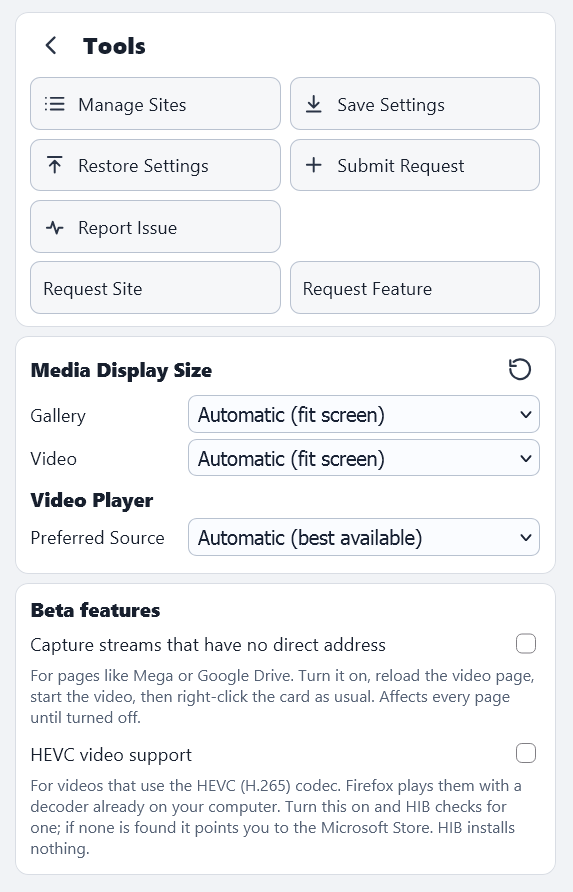
- Manage Sites – the short list of sites HIB may act on.
- Media Display Size – gallery and video size (automatic, 960×540 up to 4K, or custom) and the preferred video source.
- Beta features (both off by default) – Capture streams that have no direct address and HEVC video support (HEVC plays through a decoder already on your computer; HIB installs nothing).

Settings are saved as dated bookmarks in one HIB folder and restored from inside the toolbar: no file chooser, no copy and paste.

Report Issue, Request Site and Request Feature open a pre-filled GitHub page and save a report file for you to attach. Nothing is posted by HIB. Addresses in the report have their query part removed, and cookies, logins and passwords are never collected.
- Support depends on each website and can stop working when a site changes. If a video does not open, try hovering again, or use Report Issue.
- Some servers send each connection slowly. HIB then keeps filling its local copy while playback waits; the Resolution selector lets you pick a lower quality.
- Firefox shows "Access your data for all websites" because a video often comes from a different host than the page you added, so HIB must be allowed to reach it. It still checks your site list first.
Source code and licence: https://github.com/molitar/host-imagus-bridge