Repository navigation
Releases
v0.1.4

 montjeffrey
Jeffrey Montoya
28cc051
montjeffrey
Jeffrey Montoya
A fix release: no more console windows popping up on Windows.
What's fixed
- The agent no longer flashes a Terminal window about once a minute. On Windows machines where
pool installset the agent up to start at logon (an install from a non-elevated shell), each call the agent made to thetailscalecommand-line tool opened a new console, which Windows 11 shows as a Terminal window. The agent now startstailscalewithout a console. Agents installed to start at boot weren't affected.
Build and release changes
- Every GitHub Action the build and release workflows use is pinned to an exact commit, and CI now scans the full history for leaked secrets with gitleaks.
- The workflows use
actions/checkoutv7 andactions/setup-gov7.
Install
- Download the binary for your platform below, and
SHA256SUMS. - Verify it:
- Linux/macOS:
sha256sum -c SHA256SUMS --ignore-missing - Windows:
Get-FileHash pool-0.1.4-windows-amd64.exeand compare. - Build provenance:
gh attestation verify pool-0.1.4-windows-amd64.exe --repo montjeffrey/compute-pool
- Linux/macOS:
- Rename it to
pool(orpool.exe) and put it on yourPATH.
To upgrade a Windows agent, run pool install with the same flags as before from an elevated shell, so the agent keeps starting at boot.
See the v0.1.0 notes for what pool does, and SECURITY.md before you run an agent.
Known limits
- Binaries are not code-signed yet. Windows may show "Unknown publisher" or a SmartScreen warning, and on a PC with Smart App Control turned on it may refuse to run them at all ("An Application Control policy has blocked this file"). Smart App Control judges each file separately, so one release can run while the next is blocked. On macOS, clear the quarantine flag with
xattr -d com.apple.quarantine pool. - From a non-elevated shell,
pool installcan't read the running agent's flags, so it says so instead of confirming them.
v0.1.3
montjeffrey
Jeffrey Montoya
e1a7ea2
montjeffrey
Jeffrey Montoya
A fix release: pool install now applies new flags straight away.
What's fixed
- Re-running
pool installrestarts the agent with its new flags. Before, the task was updated but an agent that was already running kept its old flags until it next restarted: the watchdog trigger could relaunch the old agent mid-install, and Task Scheduler then ignored the new start. Install now stops the agent again after registering the task, starts it, and checks that the running agent has the new flags. It reports an error if the old flags are still in use or no agent started. - Running
pool installorpool uninstallfrom the installed copy works. Agents are now found by their command line instead of their path, and the process running the command is never stopped.
This removes the v0.1.2 known limit about restarting the agent by hand.
Install
- Download the binary for your platform below, and
SHA256SUMS. - Verify it:
- Linux/macOS:
sha256sum -c SHA256SUMS --ignore-missing - Windows:
Get-FileHash pool-0.1.3-windows-amd64.exeand compare. - Build provenance:
gh attestation verify pool-0.1.3-windows-amd64.exe --repo montjeffrey/compute-pool
- Linux/macOS:
- Rename it to
pool(orpool.exe) and put it on yourPATH.
To upgrade a Windows agent, run pool install with the same flags as before from an elevated shell, so the agent keeps starting at boot.
See the v0.1.0 notes for what pool does, and SECURITY.md before you run an agent.
Known limits
- Binaries are not code-signed yet. Windows may show "Unknown publisher" or a SmartScreen warning, and on a PC with Smart App Control turned on it may refuse to run them at all ("An Application Control policy has blocked this file"). Smart App Control judges each file separately, so one release can run while the next is blocked. On macOS, clear the quarantine flag with
xattr -d com.apple.quarantine pool. - From a non-elevated shell,
pool installcan't read the running agent's flags, so it says so instead of confirming them.
v0.1.2
montjeffrey
Jeffrey Montoya
b4fa403
montjeffrey
Jeffrey Montoya
A performance release: shipped programs start faster, and files an agent already has are no longer uploaded again.
What's new
- Shipped programs start without a new antivirus scan per task. Each task used to get a fresh copy of the shipped program, and Windows Defender scans every new program file before it runs: about half a second per task on a laptop. The program now runs as a hard link to the agent's cached copy, which is checked against its SHA-256 before every use. Other shipped files are still copied, so a task can't change another task's input.
- No re-uploads between runs. The client now asks an agent for its cached copy before sending a file, so a new
pool mapdoesn't re-send the same program to every slot.
On a desktop plus a laptop lending 8 cores, a CPU-bound batch now runs 1.31× faster than on the desktop alone (1.09× with v0.1.1), and the laptop does a third of the work instead of a sixth.
Upgrade both the agents and the device you send jobs from to get both improvements. Older clients and agents still work with these.
Install
- Download the binary for your platform below, and
SHA256SUMS. - Verify it:
- Linux/macOS:
sha256sum -c SHA256SUMS --ignore-missing - Windows:
Get-FileHash pool-0.1.2-windows-amd64.exeand compare. - Build provenance:
gh attestation verify pool-0.1.2-windows-amd64.exe --repo montjeffrey/compute-pool
- Linux/macOS:
- Rename it to
pool(orpool.exe) and put it on yourPATH.
See the v0.1.0 notes for what pool does, and SECURITY.md before you run an agent.
Known limits
- Binaries are not code-signed yet. Windows may show "Unknown publisher" or a SmartScreen warning, and on a PC with Smart App Control turned on it may refuse to run them at all ("An Application Control policy has blocked this file"). Smart App Control judges each file separately, so one release can run while the next is blocked. On macOS, clear the quarantine flag with
xattr -d com.apple.quarantine pool. - Re-running
pool installwith new flags doesn't restart an agent that is already running, so the new flags apply only after the agent restarts. Restart it withStop-ScheduledTaskandStart-ScheduledTaskon the "compute-pool agent" task.
v0.1.1
montjeffrey
Jeffrey Montoya
8d7b3c5
montjeffrey
Jeffrey Montoya
A packaging release: no changes to how pool behaves.
What's new
- Windows version details.
pool.exenow shows its product name, version and copyright under Properties → Details. - Signed release tag. The
v0.1.1tag, and the commits it covers from now on, are signed and show as Verified on GitHub.
Install
- Download the binary for your platform below, and
SHA256SUMS. - Verify it:
- Linux/macOS:
sha256sum -c SHA256SUMS --ignore-missing - Windows:
Get-FileHash pool-0.1.1-windows-amd64.exeand compare.
- Linux/macOS:
- Rename it to
pool(orpool.exe) and put it on yourPATH.
See the v0.1.0 notes for what pool does, and SECURITY.md before you run an agent.
Known limits
- Binaries are not code-signed yet. Windows may show "Unknown publisher" or a SmartScreen warning, and on a PC with Smart App Control turned on it may refuse to run them at all ("An Application Control policy has blocked this file"). Smart App Control judges each file separately, so one release can run while the next is blocked. On macOS, clear the quarantine flag with
xattr -d com.apple.quarantine pool.
v0.1.0
First release of pool: share CPU between your own devices over Tailscale.
What it does
pool runruns a command on the least-loaded device (or one you name) and streams its output back.pool mapsplits work into one task per number, line or file and spreads it over every free slot on every device. It ships files with--ship, brings results back with--collect, retries on another device if one fails, and starts backup copies of slow final tasks.- Scheduling that respects the owner. Agents pause on battery or when the CPU is busy, and jobs run at low priority.
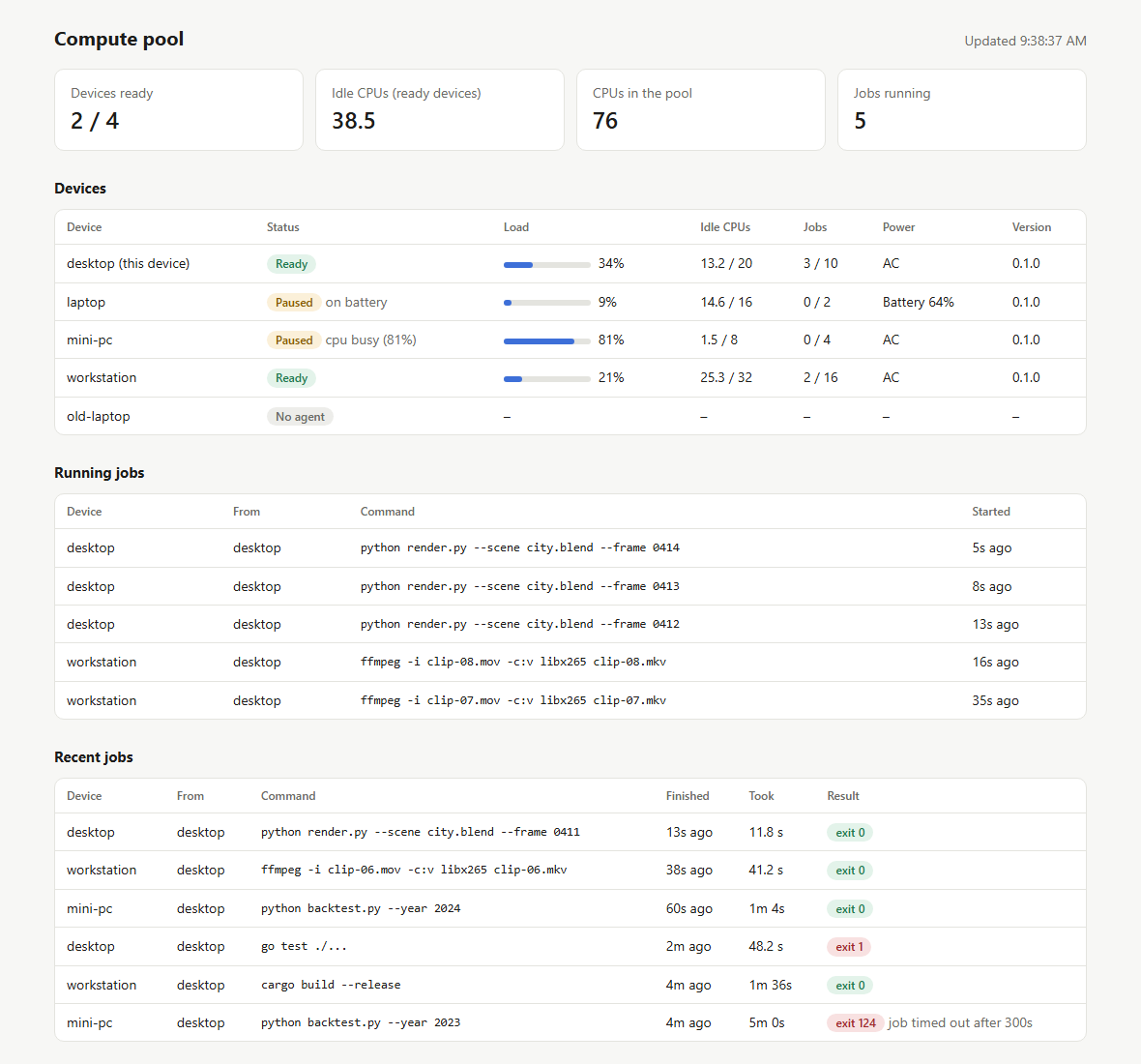
pool install(Windows) runs the agent in the background as your own user, restarts it within a minute if it stops, and survives sleep and network changes.pool dashboardis a live view of devices and jobs.
Measured on a desktop plus a laptop lending 8 cores: 1.28× faster on a CPU-bound batch, about 90% of the best possible for those two machines.
Security
An agent runs whatever an allowed device sends it, so access control is the core of the design:
- It accepts only devices that you own in your tailnet and that are named on its allow list.
- It refuses requests from web pages and DNS rebinding.
- The client never sends jobs or files to devices someone else controls.
See SECURITY.md for the threat model and known limits before you run an agent.
Install
- Download the binary for your platform below, and
SHA256SUMS. - Verify it:
- Linux/macOS:
sha256sum -c SHA256SUMS --ignore-missing - Windows:
Get-FileHash pool-0.1.0-windows-amd64.exeand compare.
- Linux/macOS:
- Rename it to
pool(orpool.exe) and put it on yourPATH. - With Tailscale signed in on each device, run
pool install --allow <your other devices>(Windows) orpool agent --allow …, then runpool nodes.
| Platform | File |
|---|---|
| Windows x64 / Arm | pool-0.1.0-windows-amd64.exe, pool-0.1.0-windows-arm64.exe |
| Linux x64 / Arm | pool-0.1.0-linux-amd64, pool-0.1.0-linux-arm64 |
| macOS Intel / Apple silicon | pool-0.1.0-darwin-amd64, pool-0.1.0-darwin-arm64 |
Known limits
- Unsigned binaries. Windows SmartScreen or Smart App Control may warn about or block the binaries. On macOS, clear the quarantine flag with
xattr -d com.apple.quarantine pool. pool installis Windows-only. On Linux and macOS, runpool agentfrom a systemd user service or a launchd agent.- Tested with real devices on Windows only. Linux and macOS pass the full test suite in CI.