Repository navigation
Releases
PhotoCraft for Android 0.23.1-1

PhotoCraft for Android
A desktop-class image editor, rebuilt for Android tablets.


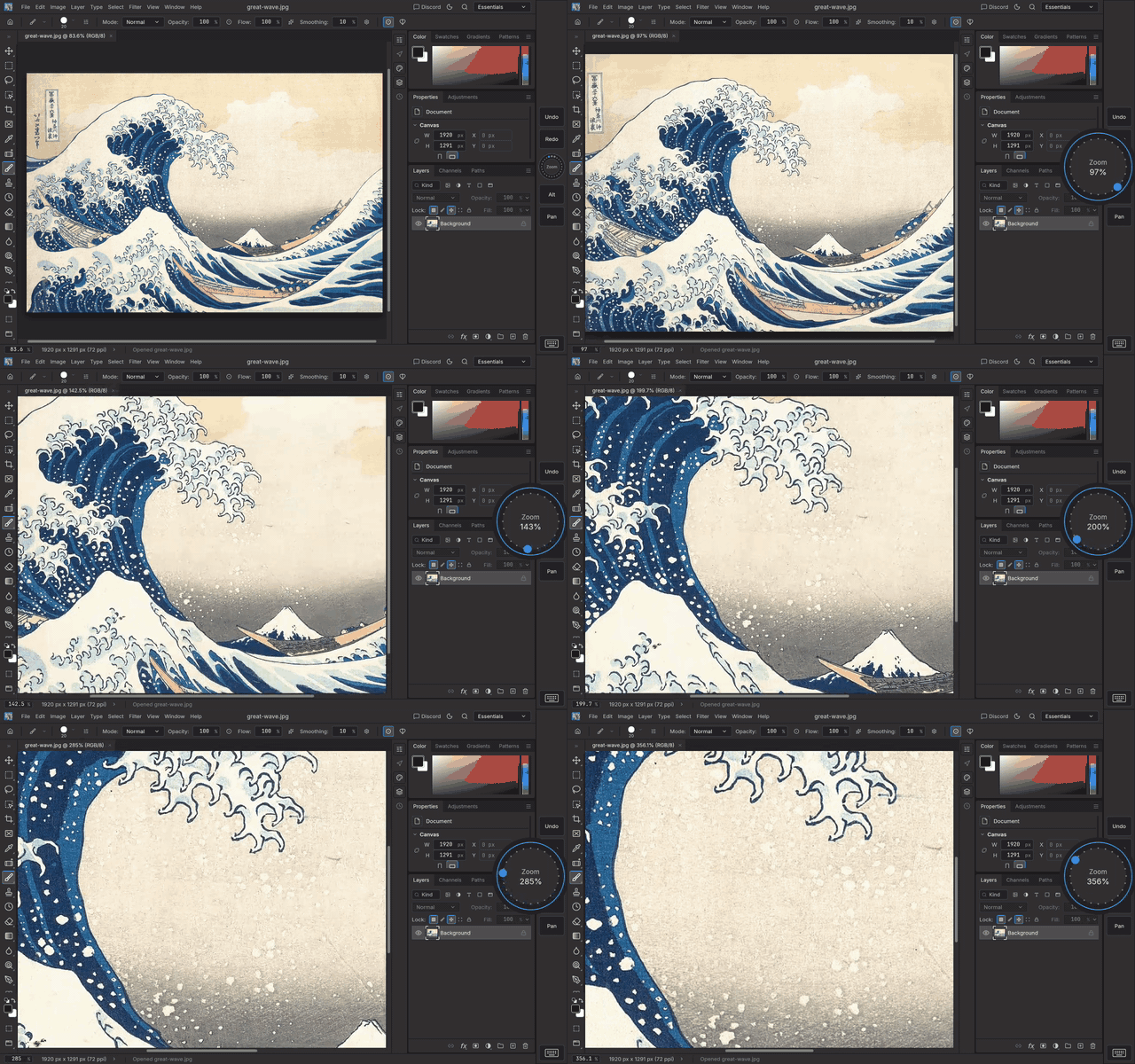
| 🎛️ Shortcut Pad | ✒️ Real pen support | ⌨️ Keyboards that work |
|---|---|---|
| ExpressKeys-style touch keys and a spin wheel for zoom, rotate, brush size and undo. Hold Alt while you draw. | Pressure, tilt and the eraser end on Wacom EMR, S Pen and USI pens. | Ctrl, Alt and Shift shortcuts on hardware keyboards, plus an on-screen keyboard key for shortcuts without one. |
| 📂 Real PSD files | 🔄 Updates itself | 🖥️ The full engine |
| Open, edit and save layered PSDs from any folder or app, through Android's file picker or Share. | New builds are offered inside the app. One tap to install. | Same layers, masks, adjustments, brushes and type as the desktop app, running on your tablet's GPU. |
| 🤏 Multi-touch gestures | 🖐️ Palm rejection | 👆 Touch-friendly lists |
| Pinch to zoom, twist to rotate and drag with two fingers to pan, all at once. Two-finger tap undoes, three-finger tap redoes, and each tap can run any shortcut. | Rest your hand on the screen while you draw: fingers are ignored while the pen is on or near it. One finger can draw, move the canvas, or do nothing. | Swipe to scroll menus, brush and layer lists, with momentum. Hold a brush or layer, then drag, to reorder it. |
Status: functional prototype for arm64 tablets (Android 8.0+), signed with a debug key for
sideloading. Unofficial community port of PhotoCraft;
not made or supported by its developers or ArtCraft.
New in this build
- Updated to PhotoCraft 0.23.1 (from 0.20.1), with almost two thousand upstream changes:
fixes and improvements across tools, type, layers, file formats and dialogs
(releases). - Translations now come from PhotoCraft's shared translation project and are built into the
app as before.
Also in 0.20.1-2: Android's status bar shows with the app below it, or full screen from
Window › Layout › Show Android Status Bar (#34), and number boxes in dialogs open the keyboard
again (#32).
Also in 0.20.1-1: layer checkboxes and Shortcut Pad keys that stay held with a double tap (#28),
the mouse wheel (#29) and the brush outline following a mouse (#27), and PhotoCraft 0.20.1.
Also in 0.17.0-4: File › Save As asks for the format first (PSD, .pcraft, PNG, JPEG, TIFF and
more) (#26).
Also in 0.17.0-3: the app icon fits round launcher icons.
Also in 0.17.0-2: Save As keeps the name you type, and File › Save keeps working after the app
restarts or updates.
Also in 0.17.0-1: updated to PhotoCraft 0.17.0 (from 0.16.0), with over a thousand upstream
changes (0.17.0), and tablets
no longer switching to the phone layout when the on-screen keyboard opens.
Also in 0.16.0-7: number boxes like Opacity no longer open the on-screen keyboard, and
Window › On-Screen Keyboard chooses whether the keyboard shrinks the app or covers it.
Also in 0.16.0-6: the brush cursor follows a hovering pen, the built-in brushes are set up for a
pen (pressure sets the size, drawing tools lean with tilt), and an experimental Low latency ink
option (#11).
Also in 0.16.0-5: rounded screen corners (#21), a menu bar that scrolls sideways on phones, the
Shortcut Pad below the options bar, the layout moving above the keyboard right away, and a new
trackpad cursor.
Also in 0.16.0-4: the menu and options bars split around a phone's front camera (#21),
two-finger pan and pinch-zoom in the Liquify preview (#20), Quick Export as PNG saving a proper
file (#18), and perspective rulers set up from the Ruler tool.
Also in 0.16.0-3: tapping a tool and then touching again with the trackpad cursor moves the
cursor instead of dragging, and a ring shows while the cursor holds the button.
Also in 0.16.0-2: perspective rulers like Clip Studio Paint's, with a snap on/off button in the
options bar, saved with .pcraft files.
Also in 0.16.0-1: updated to PhotoCraft 0.16.0 (from 0.14.0), with hundreds of upstream fixes
and improvements. Full lists: 0.15.1,
0.16.0.
Also in 0.14.0-7: Preferences fits a phone on every page.
Also in 0.14.0-6: Edit › Preferences › Export Settings… and Import Settings… (#17).
Also in 0.14.0-5: trackpad cursor options (acceleration, resting a finger to hold the button,
two-finger tap to right-click), all off by default, and instant clicks over menus with the
trackpad cursor.
Also in 0.14.0-4: the trackpad cursor (#4), experimental finger pressure, and dialogs that
preview on the canvas staying out of the way on phones.
Also in 0.14.0-3: your settings are included in Android's app backup, so they should come back
if you reinstall (#17).
Also in 0.14.0-2: autosave works, and saves a few seconds after your last change so work comes
back if Android closes the app (#16).
Also in 0.14.0-1: updated to PhotoCraft 0.14.0 (GIMP XCF files, DDS saving, Content-Aware Move,
faster Smart Blur and more), and changing a text layer's font no longer deletes layers (#15).
Also in 0.11.1-4: typing in boxes near the bottom of the screen, and copy and paste in text
boxes.
Also in 0.11.1-3: better battery life (no redrawing while idle), a Switch to Eraser and back pen
button choice, and the S Pen working with its button held on some Samsung tablets.
Also in 0.11.1-2: your theme is kept between launches, long menus scroll with a tap, and pen
input arrives sooner (#10).
Also in 0.11.1-1: Chinese, Japanese and Korean text, the pen eraser button, typing on the canvas,
the interface moving above the keyboard, font import and Blur Gallery on phones.
Also in 0.11.1: updated to PhotoCraft 0.11.1, with a resizable Preferences window, layered TIFFs
that open with their layers in Photoshop, full-resolution Content-Aware Fill previews, crop
fixes and faster PNG saving.
Also in this build (from 0.10.0-x and 0.9.0-x): the phone layout with slide-out panels, full screen in three steps, a swipeable options bar, right-click by holding a finger or with the pen's buttons, Pen buttons settings with lights, Shortcut Pad key colours, PhotoCraft 0.10.0, no keyboard popping up when the font list opens, importing your own fonts (Type › Import Font…) and your
tablet's fonts in the Type tool, no dot when lifting the pen, swipe to scroll brush and layer
lists, touch gestures, palm rejection and Window › Touch Input.
Shortcut Pad
A slim strip on the left or right edge of the window with 2 to 10 touch keys (4 by default)
split above and below a wheel, like a pen tablet's ExpressKeys and Touch Ring, for working
without a keyboard. Keys shrink evenly to fit shorter screens.
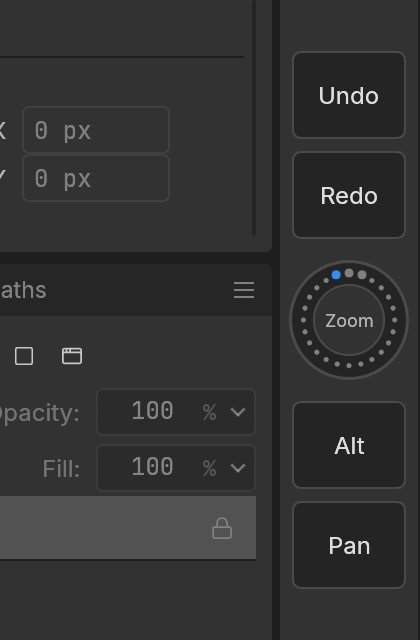
- Keys press a shortcut while touched.
Ctrl+Z,BorTabact once; a modifier on its own
(Alt,Shift,Ctrl) orSpaceis held while your finger stays on the key, so the pen can
Alt-click or pan meanwhile. Defaults: Undo, Redo, Alt, Pan. - Wheel: press the ring and a large ring opens beside the pad; spin your finger around it.
Clockwise zooms in, rotates the view, grows or hardens the brush, or redoes;
counter-clockwise the opposite. Changes are smooth, and the ring shows the live value (zoom %,
angle, size, hardness). Tap the centre to switch function. - Full screen key: full screen keeping the tool and options bars, then the canvas alone, then back.
- Keyboard key (bottom): opens the on-screen keyboard; its letters work as shortcuts.
- Window › Shortcut Pad: show or hide it, put it on the left or right, and Shortcut Pad
Settings… to choose the number of keys, set each key's label, colour and shortcut (16 presets or any
combination you type) and the functions the wheel cycles through, plus the large ring's size and the wheel's
sensitivity. Settings are kept between launches.
Build: commit 231fa9bb on android-port, based on PhotoCraft 0.23.1 (upstream main as of 2026-11-14). Checked on the Android Emulator and a tablet. Installs as an update over earlier builds; your settings are kept.
How it fits together
PhotoCraftActivity.java (extends GameActivity)       libphotocraft_android.so (this crate)
 ├─ dispatchTouchEvent / dispatchGenericMotionEvent ──JNI──▶ photocraft-tablet::android ─▶ StylusFeed
 │    (pressure, AXIS_TILT, AXIS_ORIENTATION, tool type)        (pure mapping: tablet::motion)
 ├─ Storage Access Framework pickers   ◀──files──▶  bridge.rs (request.json / answer.json / sync/)
 ├─ Open with / Share  ──────────────────files──▶  bridge/incoming ─▶ app inbox
 └─ GameActivity ──▶ android-activity ──▶ winit ──▶ eframe (wgpu: Vulkan, GLES fallback)
                                                     └─▶ PhotocraftApp (photocraft-ui-egui, unchanged)
- Rendering: eframe's native runner o...
PhotoCraft for Android 0.20.1-2
PhotoCraft for Android
A desktop-class image editor, rebuilt for Android tablets.

| 🎛️ Shortcut Pad | ✒️ Real pen support | ⌨️ Keyboards that work |
|---|---|---|
| ExpressKeys-style touch keys and a spin wheel for zoom, rotate, brush size and undo. Hold Alt while you draw. | Pressure, tilt and the eraser end on Wacom EMR, S Pen and USI pens. | Ctrl, Alt and Shift shortcuts on hardware keyboards, plus an on-screen keyboard key for shortcuts without one. |
| 📂 Real PSD files | 🔄 Updates itself | 🖥️ The full engine |
| Open, edit and save layered PSDs from any folder or app, through Android's file picker or Share. | New builds are offered inside the app. One tap to install. | Same layers, masks, adjustments, brushes and type as the desktop app, running on your tablet's GPU. |
| 🤏 Multi-touch gestures | 🖐️ Palm rejection | 👆 Touch-friendly lists |
| Pinch to zoom, twist to rotate and drag with two fingers to pan, all at once. Two-finger tap undoes, three-finger tap redoes, and each tap can run any shortcut. | Rest your hand on the screen while you draw: fingers are ignored while the pen is on or near it. One finger can draw, move the canvas, or do nothing. | Swipe to scroll menus, brush and layer lists, with momentum. Hold a brush or layer, then drag, to reorder it. |
Status: functional prototype for arm64 tablets (Android 8.0+), signed with a debug key for
sideloading. Unofficial community port of PhotoCraft;
not made or supported by its developers or ArtCraft.
New in this build
- Status bar (#34): Android's status bar now shows at the top, with the app below it, so the
menu bar is clear of the clock and the screen's corners. For full screen as before, turn off
Window › Layout › Show Android Status Bar. - Typing values (#32): number boxes in dialogs (New Document, Canvas Size, Image Size and
others) open the keyboard again. Boxes in the options bar and panels still don't, so you can
drag them. - Updated to the latest PhotoCraft (upstream main as of 2026-11-09), with a Preview
checkbox in Liquify, a choice of which side the toolbar sits on, and many fixes.
Also in 0.20.1-1: layer checkboxes and Shortcut Pad keys that stay held with a double tap (#28),
the mouse wheel (#29) and the brush outline following a mouse (#27), and PhotoCraft 0.20.1.
Also in 0.17.0-4: File › Save As asks for the format first (PSD, .pcraft, PNG, JPEG, TIFF and
more) (#26).
Also in 0.17.0-3: the app icon fits round launcher icons.
Also in 0.17.0-2: Save As keeps the name you type, and File › Save keeps working after the app
restarts or updates.
Also in 0.17.0-1: updated to PhotoCraft 0.17.0 (from 0.16.0), with over a thousand upstream
changes (0.17.0), and tablets
no longer switching to the phone layout when the on-screen keyboard opens.
Also in 0.16.0-7: number boxes like Opacity no longer open the on-screen keyboard, and
Window › On-Screen Keyboard chooses whether the keyboard shrinks the app or covers it.
Also in 0.16.0-6: the brush cursor follows a hovering pen, the built-in brushes are set up for a
pen (pressure sets the size, drawing tools lean with tilt), and an experimental Low latency ink
option (#11).
Also in 0.16.0-5: rounded screen corners (#21), a menu bar that scrolls sideways on phones, the
Shortcut Pad below the options bar, the layout moving above the keyboard right away, and a new
trackpad cursor.
Also in 0.16.0-4: the menu and options bars split around a phone's front camera (#21),
two-finger pan and pinch-zoom in the Liquify preview (#20), Quick Export as PNG saving a proper
file (#18), and perspective rulers set up from the Ruler tool.
Also in 0.16.0-3: tapping a tool and then touching again with the trackpad cursor moves the
cursor instead of dragging, and a ring shows while the cursor holds the button.
Also in 0.16.0-2: perspective rulers like Clip Studio Paint's, with a snap on/off button in the
options bar, saved with .pcraft files.
Also in 0.16.0-1: updated to PhotoCraft 0.16.0 (from 0.14.0), with hundreds of upstream fixes
and improvements. Full lists: 0.15.1,
0.16.0.
Also in 0.14.0-7: Preferences fits a phone on every page.
Also in 0.14.0-6: Edit › Preferences › Export Settings… and Import Settings… (#17).
Also in 0.14.0-5: trackpad cursor options (acceleration, resting a finger to hold the button,
two-finger tap to right-click), all off by default, and instant clicks over menus with the
trackpad cursor.
Also in 0.14.0-4: the trackpad cursor (#4), experimental finger pressure, and dialogs that
preview on the canvas staying out of the way on phones.
Also in 0.14.0-3: your settings are included in Android's app backup, so they should come back
if you reinstall (#17).
Also in 0.14.0-2: autosave works, and saves a few seconds after your last change so work comes
back if Android closes the app (#16).
Also in 0.14.0-1: updated to PhotoCraft 0.14.0 (GIMP XCF files, DDS saving, Content-Aware Move,
faster Smart Blur and more), and changing a text layer's font no longer deletes layers (#15).
Also in 0.11.1-4: typing in boxes near the bottom of the screen, and copy and paste in text
boxes.
Also in 0.11.1-3: better battery life (no redrawing while idle), a Switch to Eraser and back pen
button choice, and the S Pen working with its button held on some Samsung tablets.
Also in 0.11.1-2: your theme is kept between launches, long menus scroll with a tap, and pen
input arrives sooner (#10).
Also in 0.11.1-1: Chinese, Japanese and Korean text, the pen eraser button, typing on the canvas,
the interface moving above the keyboard, font import and Blur Gallery on phones.
Also in 0.11.1: updated to PhotoCraft 0.11.1, with a resizable Preferences window, layered TIFFs
that open with their layers in Photoshop, full-resolution Content-Aware Fill previews, crop
fixes and faster PNG saving.
Also in this build (from 0.10.0-x and 0.9.0-x): the phone layout with slide-out panels, full screen in three steps, a swipeable options bar, right-click by holding a finger or with the pen's buttons, Pen buttons settings with lights, Shortcut Pad key colours, PhotoCraft 0.10.0, no keyboard popping up when the font list opens, importing your own fonts (Type › Import Font…) and your
tablet's fonts in the Type tool, no dot when lifting the pen, swipe to scroll brush and layer
lists, touch gestures, palm rejection and Window › Touch Input.
Shortcut Pad
A slim strip on the left or right edge of the window with 2 to 10 touch keys (4 by default)
split above and below a wheel, like a pen tablet's ExpressKeys and Touch Ring, for working
without a keyboard. Keys shrink evenly to fit shorter screens.
- Keys press a shortcut while touched.
Ctrl+Z,BorTabact once; a modifier on its own
(Alt,Shift,Ctrl) orSpaceis held while your finger stays on the key, so the pen can
Alt-click or pan meanwhile. Defaults: Undo, Redo, Alt, Pan. - Wheel: press the ring and a large ring opens beside the pad; spin your finger around it.
Clockwise zooms in, rotates the view, grows or hardens the brush, or redoes;
counter-clockwise the opposite. Changes are smooth, and the ring shows the live value (zoom %,
angle, size, hardness). Tap the centre to switch function. - Full screen key: full screen keeping the tool and options bars, then the canvas alone, then back.
- Keyboard key (bottom): opens the on-screen keyboard; its letters work as shortcuts.
- Window › Shortcut Pad: show or hide it, put it on the left or right, and Shortcut Pad
Settings… to choose the number of keys, set each key's label, colour and shortcut (16 presets or any
combination you type) and the functions the wheel cycles through, plus the large ring's size and the wheel's
sensitivity. Settings are kept between launches.
Build: commit de0e3d0a on android-port, based on PhotoCraft 0.20.1 (upstream main as of 2026-11-09). Checked on the Android Emulator and a tablet. Installs as an update over earlier builds; your settings are kept.
How it fits together
PhotoCraftActivity.java (extends GameActivity)       libphotocraft_android.so (this crate)
 ├─ dispatchTouchEvent / dispatchGenericMotionEvent ──JNI──▶ photocraft-tablet::android ─▶ StylusFeed
 │    (pressure, AXIS_TILT, AXIS_ORIENTATION, tool type)        (pure mapping: tablet::motion)
 ├─ Storage Access Framework pickers   ◀──files──▶  bridge.rs (request.json / answer.json / sync/)
 ├─ Open with / Share  ──────────────────files──▶  bridge/incoming ─▶ app inbox
 └─ GameActivity ──▶ android-activity ──▶ winit ──▶ eframe (wgpu: Vulkan, GLES fallback)
                                                     └─▶ PhotocraftApp (photocraft...
PhotoCraft for Android 0.20.1-1
PhotoCraft for Android
A desktop-class image editor, rebuilt for Android tablets.

| 🎛️ Shortcut Pad | ✒️ Real pen support | ⌨️ Keyboards that work |
|---|---|---|
| ExpressKeys-style touch keys and a spin wheel for zoom, rotate, brush size and undo. Hold Alt while you draw. | Pressure, tilt and the eraser end on Wacom EMR, S Pen and USI pens. | Ctrl, Alt and Shift shortcuts on hardware keyboards, plus an on-screen keyboard key for shortcuts without one. |
| 📂 Real PSD files | 🔄 Updates itself | 🖥️ The full engine |
| Open, edit and save layered PSDs from any folder or app, through Android's file picker or Share. | New builds are offered inside the app. One tap to install. | Same layers, masks, adjustments, brushes and type as the desktop app, running on your tablet's GPU. |
| 🤏 Multi-touch gestures | 🖐️ Palm rejection | 👆 Touch-friendly lists |
| Pinch to zoom, twist to rotate and drag with two fingers to pan, all at once. Two-finger tap undoes, three-finger tap redoes, and each tap can run any shortcut. | Rest your hand on the screen while you draw: fingers are ignored while the pen is on or near it. One finger can draw, move the canvas, or do nothing. | Swipe to scroll menus, brush and layer lists, with momentum. Hold a brush or layer, then drag, to reorder it. |
Status: functional prototype for arm64 tablets (Android 8.0+), signed with a debug key for
sideloading. Unofficial community port of PhotoCraft;
not made or supported by its developers or ArtCraft.
New in this build
- Layer checkboxes (#28): each layer has a checkbox next to its eye. Tap it to add the layer
to the selection or take it out, like Ctrl-click, without a keyboard. Turn them off with
Selection Checkboxes in the Layers panel menu. - Lock a Shortcut Pad key (#28): double-tap a key (Ctrl, Alt or any shortcut) to keep it held
after you lift your finger, so Ctrl can stay on while the pen clicks layers. Tap it again to
let go. - Mouse wheel (#29): a mouse wheel or trackpad scrolls menus, lists and the canvas, and
Ctrl or Alt with the wheel zooms, as on a desktop. - Mouse cursor (#27): with a mouse (DeX or Bluetooth) the brush outline follows the pointer,
and the arrow hides over the canvas while a brush tool is picked. - Updated to PhotoCraft 0.20.1 (from 0.17.0), with over a thousand upstream changes
(releases).
Also in 0.17.0-4: File › Save As asks for the format first (PSD, .pcraft, PNG, JPEG, TIFF and
more) (#26).
Also in 0.17.0-3: the app icon fits round launcher icons.
Also in 0.17.0-2: Save As keeps the name you type, and File › Save keeps working after the app
restarts or updates.
Also in 0.17.0-1: updated to PhotoCraft 0.17.0 (from 0.16.0), with over a thousand upstream
changes (0.17.0), and tablets
no longer switching to the phone layout when the on-screen keyboard opens.
Also in 0.16.0-7: number boxes like Opacity no longer open the on-screen keyboard, and
Window › On-Screen Keyboard chooses whether the keyboard shrinks the app or covers it.
Also in 0.16.0-6: the brush cursor follows a hovering pen, the built-in brushes are set up for a
pen (pressure sets the size, drawing tools lean with tilt), and an experimental Low latency ink
option (#11).
Also in 0.16.0-5: rounded screen corners (#21), a menu bar that scrolls sideways on phones, the
Shortcut Pad below the options bar, the layout moving above the keyboard right away, and a new
trackpad cursor.
Also in 0.16.0-4: the menu and options bars split around a phone's front camera (#21),
two-finger pan and pinch-zoom in the Liquify preview (#20), Quick Export as PNG saving a proper
file (#18), and perspective rulers set up from the Ruler tool.
Also in 0.16.0-3: tapping a tool and then touching again with the trackpad cursor moves the
cursor instead of dragging, and a ring shows while the cursor holds the button.
Also in 0.16.0-2: perspective rulers like Clip Studio Paint's, with a snap on/off button in the
options bar, saved with .pcraft files.
Also in 0.16.0-1: updated to PhotoCraft 0.16.0 (from 0.14.0), with hundreds of upstream fixes
and improvements. Full lists: 0.15.1,
0.16.0.
Also in 0.14.0-7: Preferences fits a phone on every page.
Also in 0.14.0-6: Edit › Preferences › Export Settings… and Import Settings… (#17).
Also in 0.14.0-5: trackpad cursor options (acceleration, resting a finger to hold the button,
two-finger tap to right-click), all off by default, and instant clicks over menus with the
trackpad cursor.
Also in 0.14.0-4: the trackpad cursor (#4), experimental finger pressure, and dialogs that
preview on the canvas staying out of the way on phones.
Also in 0.14.0-3: your settings are included in Android's app backup, so they should come back
if you reinstall (#17).
Also in 0.14.0-2: autosave works, and saves a few seconds after your last change so work comes
back if Android closes the app (#16).
Also in 0.14.0-1: updated to PhotoCraft 0.14.0 (GIMP XCF files, DDS saving, Content-Aware Move,
faster Smart Blur and more), and changing a text layer's font no longer deletes layers (#15).
Also in 0.11.1-4: typing in boxes near the bottom of the screen, and copy and paste in text
boxes.
Also in 0.11.1-3: better battery life (no redrawing while idle), a Switch to Eraser and back pen
button choice, and the S Pen working with its button held on some Samsung tablets.
Also in 0.11.1-2: your theme is kept between launches, long menus scroll with a tap, and pen
input arrives sooner (#10).
Also in 0.11.1-1: Chinese, Japanese and Korean text, the pen eraser button, typing on the canvas,
the interface moving above the keyboard, font import and Blur Gallery on phones.
Also in 0.11.1: updated to PhotoCraft 0.11.1, with a resizable Preferences window, layered TIFFs
that open with their layers in Photoshop, full-resolution Content-Aware Fill previews, crop
fixes and faster PNG saving.
Also in this build (from 0.10.0-x and 0.9.0-x): the phone layout with slide-out panels, full screen in three steps, a swipeable options bar, right-click by holding a finger or with the pen's buttons, Pen buttons settings with lights, Shortcut Pad key colours, PhotoCraft 0.10.0, no keyboard popping up when the font list opens, importing your own fonts (Type › Import Font…) and your
tablet's fonts in the Type tool, no dot when lifting the pen, swipe to scroll brush and layer
lists, touch gestures, palm rejection and Window › Touch Input.
Shortcut Pad
A slim strip on the left or right edge of the window with 2 to 10 touch keys (4 by default)
split above and below a wheel, like a pen tablet's ExpressKeys and Touch Ring, for working
without a keyboard. Keys shrink evenly to fit shorter screens.
- Keys press a shortcut while touched.
Ctrl+Z,BorTabact once; a modifier on its own
(Alt,Shift,Ctrl) orSpaceis held while your finger stays on the key, so the pen can
Alt-click or pan meanwhile. Defaults: Undo, Redo, Alt, Pan. - Wheel: press the ring and a large ring opens beside the pad; spin your finger around it.
Clockwise zooms in, rotates the view, grows or hardens the brush, or redoes;
counter-clockwise the opposite. Changes are smooth, and the ring shows the live value (zoom %,
angle, size, hardness). Tap the centre to switch function. - Full screen key: full screen keeping the tool and options bars, then the canvas alone, then back.
- Keyboard key (bottom): opens the on-screen keyboard; its letters work as shortcuts.
- Window › Shortcut Pad: show or hide it, put it on the left or right, and Shortcut Pad
Settings… to choose the number of keys, set each key's label, colour and shortcut (16 presets or any
combination you type) and the functions the wheel cycles through, plus the large ring's size and the wheel's
sensitivity. Settings are kept between launches.
Build: commit a121c6b4 on android-port, based on PhotoCraft 0.20.1 (upstream main as of 2026-11-05). Checked on the Android Emulator and a tablet. Installs as an update over earlier builds; your settings are kept.
How it fits together
PhotoCraftActivity.java (extends GameActivity)       libphotocraft_android.so (this crate)
 ├─ dispatchTouchEvent / dispatchGenericMotionEvent ──JNI──▶ photocraft-tablet::android ─▶ StylusFeed
 │    (pressure, AXIS_TILT, AXIS_ORIENTATION, tool type)        (pure mapping: tablet::motion)
 ├─ Storage Access Framework pickers   ◀──files──▶  bridge.rs (request.json / answer.json / sync/)
 ├─ Open with / Share  ──────────────────files──▶  bridge/incoming ─▶ app inbox
 └─ GameActivity ──▶ android-activity ──▶ winit ──▶ eframe (wgpu: Vulka...
PhotoCraft for Android 0.17.0-4
PhotoCraft for Android
A desktop-class image editor, rebuilt for Android tablets.

| 🎛️ Shortcut Pad | ✒️ Real pen support | ⌨️ Keyboards that work |
|---|---|---|
| ExpressKeys-style touch keys and a spin wheel for zoom, rotate, brush size and undo. Hold Alt while you draw. | Pressure, tilt and the eraser end on Wacom EMR, S Pen and USI pens. | Ctrl, Alt and Shift shortcuts on hardware keyboards, plus an on-screen keyboard key for shortcuts without one. |
| 📂 Real PSD files | 🔄 Updates itself | 🖥️ The full engine |
| Open, edit and save layered PSDs from any folder or app, through Android's file picker or Share. | New builds are offered inside the app. One tap to install. | Same layers, masks, adjustments, brushes and type as the desktop app, running on your tablet's GPU. |
| 🤏 Multi-touch gestures | 🖐️ Palm rejection | 👆 Touch-friendly lists |
| Pinch to zoom, twist to rotate and drag with two fingers to pan, all at once. Two-finger tap undoes, three-finger tap redoes, and each tap can run any shortcut. | Rest your hand on the screen while you draw: fingers are ignored while the pen is on or near it. One finger can draw, move the canvas, or do nothing. | Swipe to scroll menus, brush and layer lists, with momentum. Hold a brush or layer, then drag, to reorder it. |
Status: functional prototype for arm64 tablets (Android 8.0+), signed with a debug key for
sideloading. Unofficial community port of PhotoCraft;
not made or supported by its developers or ArtCraft.
New in this build
- Save As in any format (#26): File › Save As asks for the format first (PSD, PSB,
PhotoCraft .pcraft, OpenRaster, TIFF, PDF, PNG, JPEG, WebP and more), then Android's save
screen opens with the name in that format. Before, Android's save screen always saved a PSD.
JPEG, TIFF, Targa and DDS still ask for their options after you pick the folder.
Also in 0.17.0-3: the app icon fits round launcher icons.
Also in 0.17.0-2: Save As keeps the name you type, and File › Save keeps working after the app
restarts or updates.
Also in 0.17.0-1: updated to PhotoCraft 0.17.0 (from 0.16.0), with over a thousand upstream
changes (0.17.0), and tablets
no longer switching to the phone layout when the on-screen keyboard opens.
Also in 0.16.0-7: number boxes like Opacity no longer open the on-screen keyboard, and
Window › On-Screen Keyboard chooses whether the keyboard shrinks the app or covers it.
Also in 0.16.0-6: the brush cursor follows a hovering pen, the built-in brushes are set up for a
pen (pressure sets the size, drawing tools lean with tilt), and an experimental Low latency ink
option (#11).
Also in 0.16.0-5: rounded screen corners (#21), a menu bar that scrolls sideways on phones, the
Shortcut Pad below the options bar, the layout moving above the keyboard right away, and a new
trackpad cursor.
Also in 0.16.0-4: the menu and options bars split around a phone's front camera (#21),
two-finger pan and pinch-zoom in the Liquify preview (#20), Quick Export as PNG saving a proper
file (#18), and perspective rulers set up from the Ruler tool.
Also in 0.16.0-3: tapping a tool and then touching again with the trackpad cursor moves the
cursor instead of dragging, and a ring shows while the cursor holds the button.
Also in 0.16.0-2: perspective rulers like Clip Studio Paint's, with a snap on/off button in the
options bar, saved with .pcraft files.
Also in 0.16.0-1: updated to PhotoCraft 0.16.0 (from 0.14.0), with hundreds of upstream fixes
and improvements. Full lists: 0.15.1,
0.16.0.
Also in 0.14.0-7: Preferences fits a phone on every page.
Also in 0.14.0-6: Edit › Preferences › Export Settings… and Import Settings… (#17).
Also in 0.14.0-5: trackpad cursor options (acceleration, resting a finger to hold the button,
two-finger tap to right-click), all off by default, and instant clicks over menus with the
trackpad cursor.
Also in 0.14.0-4: the trackpad cursor (#4), experimental finger pressure, and dialogs that
preview on the canvas staying out of the way on phones.
Also in 0.14.0-3: your settings are included in Android's app backup, so they should come back
if you reinstall (#17).
Also in 0.14.0-2: autosave works, and saves a few seconds after your last change so work comes
back if Android closes the app (#16).
Also in 0.14.0-1: updated to PhotoCraft 0.14.0 (GIMP XCF files, DDS saving, Content-Aware Move,
faster Smart Blur and more), and changing a text layer's font no longer deletes layers (#15).
Also in 0.11.1-4: typing in boxes near the bottom of the screen, and copy and paste in text
boxes.
Also in 0.11.1-3: better battery life (no redrawing while idle), a Switch to Eraser and back pen
button choice, and the S Pen working with its button held on some Samsung tablets.
Also in 0.11.1-2: your theme is kept between launches, long menus scroll with a tap, and pen
input arrives sooner (#10).
Also in 0.11.1-1: Chinese, Japanese and Korean text, the pen eraser button, typing on the canvas,
the interface moving above the keyboard, font import and Blur Gallery on phones.
Also in 0.11.1: updated to PhotoCraft 0.11.1, with a resizable Preferences window, layered TIFFs
that open with their layers in Photoshop, full-resolution Content-Aware Fill previews, crop
fixes and faster PNG saving.
Also in this build (from 0.10.0-x and 0.9.0-x): the phone layout with slide-out panels, full screen in three steps, a swipeable options bar, right-click by holding a finger or with the pen's buttons, Pen buttons settings with lights, Shortcut Pad key colours, PhotoCraft 0.10.0, no keyboard popping up when the font list opens, importing your own fonts (Type › Import Font…) and your
tablet's fonts in the Type tool, no dot when lifting the pen, swipe to scroll brush and layer
lists, touch gestures, palm rejection and Window › Touch Input.
Shortcut Pad
A slim strip on the left or right edge of the window with 2 to 10 touch keys (4 by default)
split above and below a wheel, like a pen tablet's ExpressKeys and Touch Ring, for working
without a keyboard. Keys shrink evenly to fit shorter screens.
- Keys press a shortcut while touched.
Ctrl+Z,BorTabact once; a modifier on its own
(Alt,Shift,Ctrl) orSpaceis held while your finger stays on the key, so the pen can
Alt-click or pan meanwhile. Defaults: Undo, Redo, Alt, Pan. - Wheel: press the ring and a large ring opens beside the pad; spin your finger around it.
Clockwise zooms in, rotates the view, grows or hardens the brush, or redoes;
counter-clockwise the opposite. Changes are smooth, and the ring shows the live value (zoom %,
angle, size, hardness). Tap the centre to switch function. - Full screen key: full screen keeping the tool and options bars, then the canvas alone, then back.
- Keyboard key (bottom): opens the on-screen keyboard; its letters work as shortcuts.
- Window › Shortcut Pad: show or hide it, put it on the left or right, and Shortcut Pad
Settings… to choose the number of keys, set each key's label, colour and shortcut (16 presets or any
combination you type) and the functions the wheel cycles through, plus the large ring's size and the wheel's
sensitivity. Settings are kept between launches.
Build: commit 0eda9d40 on android-port, based on PhotoCraft 0.17.0 (upstream main as of 2026-10-30). Checked on the Android Emulator. Installs as an update over earlier builds; your settings are kept.
How it fits together
PhotoCraftActivity.java (extends GameActivity)       libphotocraft_android.so (this crate)
 ├─ dispatchTouchEvent / dispatchGenericMotionEvent ──JNI──▶ photocraft-tablet::android ─▶ StylusFeed
 │    (pressure, AXIS_TILT, AXIS_ORIENTATION, tool type)        (pure mapping: tablet::motion)
 ├─ Storage Access Framework pickers   ◀──files──▶  bridge.rs (request.json / answer.json / sync/)
 ├─ Open with / Share  ──────────────────files──▶  bridge/incoming ─▶ app inbox
 └─ GameActivity ──▶ android-activity ──▶ winit ──▶ eframe (wgpu: Vulkan, GLES fallback)
                                                     └─▶ PhotocraftApp (photocraft-ui-egui, unchanged)
- Rendering: eframe's native runner on winit's GameActivity backend. wgpu uses Vulkan, or
OpenGL ES 3 where Vulkan is missing; the GPU canvas is used whenever the adapter is a real GPU. - Pen (Wacom EMR, S Pen, USI): winit forwards only pressure (as touch force). The Activity
reads everyMotionEvent's pressure, tilt, orientation and tool type (including historical
samples) and passes them to Rust through one JNI method with primitive arguments.
photocraft-tablet'smotionmodule turns Android's polar tilt (angle from the normal plus
direction) into the W3CtiltX/tiltYpair the brush engine uses, and flags the eraser end,
which switches to the Eraser t...
PhotoCraft for Android 0.17.0-3
PhotoCraft for Android
A desktop-class image editor, rebuilt for Android tablets.

| 🎛️ Shortcut Pad | ✒️ Real pen support | ⌨️ Keyboards that work |
|---|---|---|
| ExpressKeys-style touch keys and a spin wheel for zoom, rotate, brush size and undo. Hold Alt while you draw. | Pressure, tilt and the eraser end on Wacom EMR, S Pen and USI pens. | Ctrl, Alt and Shift shortcuts on hardware keyboards, plus an on-screen keyboard key for shortcuts without one. |
| 📂 Real PSD files | 🔄 Updates itself | 🖥️ The full engine |
| Open, edit and save layered PSDs from any folder or app, through Android's file picker or Share. | New builds are offered inside the app. One tap to install. | Same layers, masks, adjustments, brushes and type as the desktop app, running on your tablet's GPU. |
| 🤏 Multi-touch gestures | 🖐️ Palm rejection | 👆 Touch-friendly lists |
| Pinch to zoom, twist to rotate and drag with two fingers to pan, all at once. Two-finger tap undoes, three-finger tap redoes, and each tap can run any shortcut. | Rest your hand on the screen while you draw: fingers are ignored while the pen is on or near it. One finger can draw, move the canvas, or do nothing. | Swipe to scroll menus, brush and layer lists, with momentum. Hold a brush or layer, then drag, to reorder it. |
Status: functional prototype for arm64 tablets (Android 8.0+), signed with a debug key for
sideloading. Unofficial community port of PhotoCraft;
not made or supported by its developers or ArtCraft.
New in this build
- A round app icon that fits: the kitsune now sits inside circle, squircle and rounded-square
launcher icons, instead of being cropped or shrunk onto a white circle.
Also in 0.17.0-2: Save As keeps the name you type, and File › Save keeps working after the app
restarts or updates.
Also in 0.17.0-1: updated to PhotoCraft 0.17.0 (from 0.16.0), with over a thousand upstream
changes (0.17.0), and tablets
no longer switching to the phone layout when the on-screen keyboard opens.
Also in 0.16.0-7: number boxes like Opacity no longer open the on-screen keyboard, and
Window › On-Screen Keyboard chooses whether the keyboard shrinks the app or covers it.
Also in 0.16.0-6: the brush cursor follows a hovering pen, the built-in brushes are set up for a
pen (pressure sets the size, drawing tools lean with tilt), and an experimental Low latency ink
option (#11).
Also in 0.16.0-5: rounded screen corners (#21), a menu bar that scrolls sideways on phones, the
Shortcut Pad below the options bar, the layout moving above the keyboard right away, and a new
trackpad cursor.
Also in 0.16.0-4: the menu and options bars split around a phone's front camera (#21),
two-finger pan and pinch-zoom in the Liquify preview (#20), Quick Export as PNG saving a proper
file (#18), and perspective rulers set up from the Ruler tool.
Also in 0.16.0-3: tapping a tool and then touching again with the trackpad cursor moves the
cursor instead of dragging, and a ring shows while the cursor holds the button.
Also in 0.16.0-2: perspective rulers like Clip Studio Paint's, with a snap on/off button in the
options bar, saved with .pcraft files.
Also in 0.16.0-1: updated to PhotoCraft 0.16.0 (from 0.14.0), with hundreds of upstream fixes
and improvements. Full lists: 0.15.1,
0.16.0.
Also in 0.14.0-7: Preferences fits a phone on every page.
Also in 0.14.0-6: Edit › Preferences › Export Settings… and Import Settings… (#17).
Also in 0.14.0-5: trackpad cursor options (acceleration, resting a finger to hold the button,
two-finger tap to right-click), all off by default, and instant clicks over menus with the
trackpad cursor.
Also in 0.14.0-4: the trackpad cursor (#4), experimental finger pressure, and dialogs that
preview on the canvas staying out of the way on phones.
Also in 0.14.0-3: your settings are included in Android's app backup, so they should come back
if you reinstall (#17).
Also in 0.14.0-2: autosave works, and saves a few seconds after your last change so work comes
back if Android closes the app (#16).
Also in 0.14.0-1: updated to PhotoCraft 0.14.0 (GIMP XCF files, DDS saving, Content-Aware Move,
faster Smart Blur and more), and changing a text layer's font no longer deletes layers (#15).
Also in 0.11.1-4: typing in boxes near the bottom of the screen, and copy and paste in text
boxes.
Also in 0.11.1-3: better battery life (no redrawing while idle), a Switch to Eraser and back pen
button choice, and the S Pen working with its button held on some Samsung tablets.
Also in 0.11.1-2: your theme is kept between launches, long menus scroll with a tap, and pen
input arrives sooner (#10).
Also in 0.11.1-1: Chinese, Japanese and Korean text, the pen eraser button, typing on the canvas,
the interface moving above the keyboard, font import and Blur Gallery on phones.
Also in 0.11.1: updated to PhotoCraft 0.11.1, with a resizable Preferences window, layered TIFFs
that open with their layers in Photoshop, full-resolution Content-Aware Fill previews, crop
fixes and faster PNG saving.
Also in this build (from 0.10.0-x and 0.9.0-x): the phone layout with slide-out panels, full screen in three steps, a swipeable options bar, right-click by holding a finger or with the pen's buttons, Pen buttons settings with lights, Shortcut Pad key colours, PhotoCraft 0.10.0, no keyboard popping up when the font list opens, importing your own fonts (Type › Import Font…) and your
tablet's fonts in the Type tool, no dot when lifting the pen, swipe to scroll brush and layer
lists, touch gestures, palm rejection and Window › Touch Input.
Shortcut Pad
A slim strip on the left or right edge of the window with 2 to 10 touch keys (4 by default)
split above and below a wheel, like a pen tablet's ExpressKeys and Touch Ring, for working
without a keyboard. Keys shrink evenly to fit shorter screens.
- Keys press a shortcut while touched.
Ctrl+Z,BorTabact once; a modifier on its own
(Alt,Shift,Ctrl) orSpaceis held while your finger stays on the key, so the pen can
Alt-click or pan meanwhile. Defaults: Undo, Redo, Alt, Pan. - Wheel: press the ring and a large ring opens beside the pad; spin your finger around it.
Clockwise zooms in, rotates the view, grows or hardens the brush, or redoes;
counter-clockwise the opposite. Changes are smooth, and the ring shows the live value (zoom %,
angle, size, hardness). Tap the centre to switch function. - Full screen key: full screen keeping the tool and options bars, then the canvas alone, then back.
- Keyboard key (bottom): opens the on-screen keyboard; its letters work as shortcuts.
- Window › Shortcut Pad: show or hide it, put it on the left or right, and Shortcut Pad
Settings… to choose the number of keys, set each key's label, colour and shortcut (16 presets or any
combination you type) and the functions the wheel cycles through, plus the large ring's size and the wheel's
sensitivity. Settings are kept between launches.
Build: commit 9b5dae19 on android-port, based on PhotoCraft 0.17.0 (upstream main as of 2026-10-30). Checked on the Android Emulator. Installs as an update over earlier builds; your settings are kept.
How it fits together
PhotoCraftActivity.java (extends GameActivity)       libphotocraft_android.so (this crate)
 ├─ dispatchTouchEvent / dispatchGenericMotionEvent ──JNI──▶ photocraft-tablet::android ─▶ StylusFeed
 │    (pressure, AXIS_TILT, AXIS_ORIENTATION, tool type)        (pure mapping: tablet::motion)
 ├─ Storage Access Framework pickers   ◀──files──▶  bridge.rs (request.json / answer.json / sync/)
 ├─ Open with / Share  ──────────────────files──▶  bridge/incoming ─▶ app inbox
 └─ GameActivity ──▶ android-activity ──▶ winit ──▶ eframe (wgpu: Vulkan, GLES fallback)
                                                     └─▶ PhotocraftApp (photocraft-ui-egui, unchanged)
- Rendering: eframe's native runner on winit's GameActivity backend. wgpu uses Vulkan, or
OpenGL ES 3 where Vulkan is missing; the GPU canvas is used whenever the adapter is a real GPU. - Pen (Wacom EMR, S Pen, USI): winit forwards only pressure (as touch force). The Activity
reads everyMotionEvent's pressure, tilt, orientation and tool type (including historical
samples) and passes them to Rust through one JNI method with primitive arguments.
photocraft-tablet'smotionmodule turns Android's polar tilt (angle from the normal plus
direction) into the W3CtiltX/tiltYpair the brush engine uses, and flags the eraser end,
which switches to the Eraser tool as on the desktop. Samples feed the sameStylusFeedas
the desktop tablet monitors, so Pen Pressure/Tilt brush dynamics, Preferences › Tools › Use
Tablet Pressure and the pressure curve all apply. - Files: File › Open and Save As ...
PhotoCraft for Android 0.17.0-2
PhotoCraft for Android
A desktop-class image editor, rebuilt for Android tablets.

| 🎛️ Shortcut Pad | ✒️ Real pen support | ⌨️ Keyboards that work |
|---|---|---|
| ExpressKeys-style touch keys and a spin wheel for zoom, rotate, brush size and undo. Hold Alt while you draw. | Pressure, tilt and the eraser end on Wacom EMR, S Pen and USI pens. | Ctrl, Alt and Shift shortcuts on hardware keyboards, plus an on-screen keyboard key for shortcuts without one. |
| 📂 Real PSD files | 🔄 Updates itself | 🖥️ The full engine |
| Open, edit and save layered PSDs from any folder or app, through Android's file picker or Share. | New builds are offered inside the app. One tap to install. | Same layers, masks, adjustments, brushes and type as the desktop app, running on your tablet's GPU. |
| 🤏 Multi-touch gestures | 🖐️ Palm rejection | 👆 Touch-friendly lists |
| Pinch to zoom, twist to rotate and drag with two fingers to pan, all at once. Two-finger tap undoes, three-finger tap redoes, and each tap can run any shortcut. | Rest your hand on the screen while you draw: fingers are ignored while the pen is on or near it. One finger can draw, move the canvas, or do nothing. | Swipe to scroll menus, brush and layer lists, with momentum. Hold a brush or layer, then drag, to reorder it. |
Status: functional prototype for arm64 tablets (Android 8.0+), signed with a debug key for
sideloading. Unofficial community port of PhotoCraft;
not made or supported by its developers or ArtCraft.
New in this build
- Save As keeps the name you type: the name typed in the save picker is used (a name without
an extension gets the format's), instead of falling back to Untitled-1 when the extension
differed. - File › Save keeps working after a restart: Save As now keeps write access to the file, so
saving back still works after the app restarts or updates.
Also in 0.17.0-1: updated to PhotoCraft 0.17.0 (from 0.16.0), with over a thousand upstream
changes (0.17.0), and tablets
no longer switching to the phone layout when the on-screen keyboard opens.
Also in 0.16.0-7: number boxes like Opacity no longer open the on-screen keyboard, and
Window › On-Screen Keyboard chooses whether the keyboard shrinks the app or covers it.
Also in 0.16.0-6: the brush cursor follows a hovering pen, the built-in brushes are set up for a
pen (pressure sets the size, drawing tools lean with tilt), and an experimental Low latency ink
option (#11).
Also in 0.16.0-5: rounded screen corners (#21), a menu bar that scrolls sideways on phones, the
Shortcut Pad below the options bar, the layout moving above the keyboard right away, and a new
trackpad cursor.
Also in 0.16.0-4: the menu and options bars split around a phone's front camera (#21),
two-finger pan and pinch-zoom in the Liquify preview (#20), Quick Export as PNG saving a proper
file (#18), and perspective rulers set up from the Ruler tool.
Also in 0.16.0-3: tapping a tool and then touching again with the trackpad cursor moves the
cursor instead of dragging, and a ring shows while the cursor holds the button.
Also in 0.16.0-2: perspective rulers like Clip Studio Paint's, with a snap on/off button in the
options bar, saved with .pcraft files.
Also in 0.16.0-1: updated to PhotoCraft 0.16.0 (from 0.14.0), with hundreds of upstream fixes
and improvements. Full lists: 0.15.1,
0.16.0.
Also in 0.14.0-7: Preferences fits a phone on every page.
Also in 0.14.0-6: Edit › Preferences › Export Settings… and Import Settings… (#17).
Also in 0.14.0-5: trackpad cursor options (acceleration, resting a finger to hold the button,
two-finger tap to right-click), all off by default, and instant clicks over menus with the
trackpad cursor.
Also in 0.14.0-4: the trackpad cursor (#4), experimental finger pressure, and dialogs that
preview on the canvas staying out of the way on phones.
Also in 0.14.0-3: your settings are included in Android's app backup, so they should come back
if you reinstall (#17).
Also in 0.14.0-2: autosave works, and saves a few seconds after your last change so work comes
back if Android closes the app (#16).
Also in 0.14.0-1: updated to PhotoCraft 0.14.0 (GIMP XCF files, DDS saving, Content-Aware Move,
faster Smart Blur and more), and changing a text layer's font no longer deletes layers (#15).
Also in 0.11.1-4: typing in boxes near the bottom of the screen, and copy and paste in text
boxes.
Also in 0.11.1-3: better battery life (no redrawing while idle), a Switch to Eraser and back pen
button choice, and the S Pen working with its button held on some Samsung tablets.
Also in 0.11.1-2: your theme is kept between launches, long menus scroll with a tap, and pen
input arrives sooner (#10).
Also in 0.11.1-1: Chinese, Japanese and Korean text, the pen eraser button, typing on the canvas,
the interface moving above the keyboard, font import and Blur Gallery on phones.
Also in 0.11.1: updated to PhotoCraft 0.11.1, with a resizable Preferences window, layered TIFFs
that open with their layers in Photoshop, full-resolution Content-Aware Fill previews, crop
fixes and faster PNG saving.
Also in this build (from 0.10.0-x and 0.9.0-x): the phone layout with slide-out panels, full screen in three steps, a swipeable options bar, right-click by holding a finger or with the pen's buttons, Pen buttons settings with lights, Shortcut Pad key colours, PhotoCraft 0.10.0, no keyboard popping up when the font list opens, importing your own fonts (Type › Import Font…) and your
tablet's fonts in the Type tool, no dot when lifting the pen, swipe to scroll brush and layer
lists, touch gestures, palm rejection and Window › Touch Input.
Shortcut Pad
A slim strip on the left or right edge of the window with 2 to 10 touch keys (4 by default)
split above and below a wheel, like a pen tablet's ExpressKeys and Touch Ring, for working
without a keyboard. Keys shrink evenly to fit shorter screens.
- Keys press a shortcut while touched.
Ctrl+Z,BorTabact once; a modifier on its own
(Alt,Shift,Ctrl) orSpaceis held while your finger stays on the key, so the pen can
Alt-click or pan meanwhile. Defaults: Undo, Redo, Alt, Pan. - Wheel: press the ring and a large ring opens beside the pad; spin your finger around it.
Clockwise zooms in, rotates the view, grows or hardens the brush, or redoes;
counter-clockwise the opposite. Changes are smooth, and the ring shows the live value (zoom %,
angle, size, hardness). Tap the centre to switch function. - Full screen key: full screen keeping the tool and options bars, then the canvas alone, then back.
- Keyboard key (bottom): opens the on-screen keyboard; its letters work as shortcuts.
- Window › Shortcut Pad: show or hide it, put it on the left or right, and Shortcut Pad
Settings… to choose the number of keys, set each key's label, colour and shortcut (16 presets or any
combination you type) and the functions the wheel cycles through, plus the large ring's size and the wheel's
sensitivity. Settings are kept between launches.
Build: commit 47317584 on android-port, based on PhotoCraft 0.17.0 (upstream main as of 2026-10-30). Checked on the Android Emulator. Installs as an update over earlier builds; your settings are kept.
How it fits together
PhotoCraftActivity.java (extends GameActivity)       libphotocraft_android.so (this crate)
 ├─ dispatchTouchEvent / dispatchGenericMotionEvent ──JNI──▶ photocraft-tablet::android ─▶ StylusFeed
 │    (pressure, AXIS_TILT, AXIS_ORIENTATION, tool type)        (pure mapping: tablet::motion)
 ├─ Storage Access Framework pickers   ◀──files──▶  bridge.rs (request.json / answer.json / sync/)
 ├─ Open with / Share  ──────────────────files──▶  bridge/incoming ─▶ app inbox
 └─ GameActivity ──▶ android-activity ──▶ winit ──▶ eframe (wgpu: Vulkan, GLES fallback)
                                                     └─▶ PhotocraftApp (photocraft-ui-egui, unchanged)
- Rendering: eframe's native runner on winit's GameActivity backend. wgpu uses Vulkan, or
OpenGL ES 3 where Vulkan is missing; the GPU canvas is used whenever the adapter is a real GPU. - Pen (Wacom EMR, S Pen, USI): winit forwards only pressure (as touch force). The Activity
reads everyMotionEvent's pressure, tilt, orientation and tool type (including historical
samples) and passes them to Rust through one JNI method with primitive arguments.
photocraft-tablet'smotionmodule turns Android's polar tilt (angle from the normal plus
direction) into the W3CtiltX/tiltYpair the brush engine uses, and flags the eraser end,
which switches to the Eraser tool as on the desktop. Samples feed the sameStylusFeedas
the desktop tablet monitors, so Pen Pressure/Tilt brush dynamics, Preferences › Tools › Use
Tablet Pressure an...
PhotoCraft for Android 0.17.0-1
PhotoCraft for Android
A desktop-class image editor, rebuilt for Android tablets.

| 🎛️ Shortcut Pad | ✒️ Real pen support | ⌨️ Keyboards that work |
|---|---|---|
| ExpressKeys-style touch keys and a spin wheel for zoom, rotate, brush size and undo. Hold Alt while you draw. | Pressure, tilt and the eraser end on Wacom EMR, S Pen and USI pens. | Ctrl, Alt and Shift shortcuts on hardware keyboards, plus an on-screen keyboard key for shortcuts without one. |
| 📂 Real PSD files | 🔄 Updates itself | 🖥️ The full engine |
| Open, edit and save layered PSDs from any folder or app, through Android's file picker or Share. | New builds are offered inside the app. One tap to install. | Same layers, masks, adjustments, brushes and type as the desktop app, running on your tablet's GPU. |
| 🤏 Multi-touch gestures | 🖐️ Palm rejection | 👆 Touch-friendly lists |
| Pinch to zoom, twist to rotate and drag with two fingers to pan, all at once. Two-finger tap undoes, three-finger tap redoes, and each tap can run any shortcut. | Rest your hand on the screen while you draw: fingers are ignored while the pen is on or near it. One finger can draw, move the canvas, or do nothing. | Swipe to scroll menus, brush and layer lists, with momentum. Hold a brush or layer, then drag, to reorder it. |
Status: functional prototype for arm64 tablets (Android 8.0+), signed with a debug key for
sideloading. Unofficial community port of PhotoCraft;
not made or supported by its developers or ArtCraft.
New in this build
- Updated to PhotoCraft 0.17.0 (from 0.16.0), with over a thousand upstream changes,
including a new font field you can type a font name into. Full list:
0.17.0. - Tablets stay tablets with the keyboard open: opening the on-screen keyboard on a tablet
held sideways no longer switches PhotoCraft to the phone layout.
Also in 0.16.0-7: number boxes like Opacity no longer open the on-screen keyboard, and
Window › On-Screen Keyboard chooses whether the keyboard shrinks the app or covers it.
Also in 0.16.0-6: the brush cursor follows a hovering pen, the built-in brushes are set up for a
pen (pressure sets the size, drawing tools lean with tilt), and an experimental Low latency ink
option (#11).
Also in 0.16.0-5: rounded screen corners (#21), a menu bar that scrolls sideways on phones, the
Shortcut Pad below the options bar, the layout moving above the keyboard right away, and a new
trackpad cursor.
Also in 0.16.0-4: the menu and options bars split around a phone's front camera (#21),
two-finger pan and pinch-zoom in the Liquify preview (#20), Quick Export as PNG saving a proper
file (#18), and perspective rulers set up from the Ruler tool.
Also in 0.16.0-3: tapping a tool and then touching again with the trackpad cursor moves the
cursor instead of dragging, and a ring shows while the cursor holds the button.
Also in 0.16.0-2: perspective rulers like Clip Studio Paint's, with a snap on/off button in the
options bar, saved with .pcraft files.
Also in 0.16.0-1: updated to PhotoCraft 0.16.0 (from 0.14.0), with hundreds of upstream fixes
and improvements. Full lists: 0.15.1,
0.16.0.
Also in 0.14.0-7: Preferences fits a phone on every page.
Also in 0.14.0-6: Edit › Preferences › Export Settings… and Import Settings… (#17).
Also in 0.14.0-5: trackpad cursor options (acceleration, resting a finger to hold the button,
two-finger tap to right-click), all off by default, and instant clicks over menus with the
trackpad cursor.
Also in 0.14.0-4: the trackpad cursor (#4), experimental finger pressure, and dialogs that
preview on the canvas staying out of the way on phones.
Also in 0.14.0-3: your settings are included in Android's app backup, so they should come back
if you reinstall (#17).
Also in 0.14.0-2: autosave works, and saves a few seconds after your last change so work comes
back if Android closes the app (#16).
Also in 0.14.0-1: updated to PhotoCraft 0.14.0 (GIMP XCF files, DDS saving, Content-Aware Move,
faster Smart Blur and more), and changing a text layer's font no longer deletes layers (#15).
Also in 0.11.1-4: typing in boxes near the bottom of the screen, and copy and paste in text
boxes.
Also in 0.11.1-3: better battery life (no redrawing while idle), a Switch to Eraser and back pen
button choice, and the S Pen working with its button held on some Samsung tablets.
Also in 0.11.1-2: your theme is kept between launches, long menus scroll with a tap, and pen
input arrives sooner (#10).
Also in 0.11.1-1: Chinese, Japanese and Korean text, the pen eraser button, typing on the canvas,
the interface moving above the keyboard, font import and Blur Gallery on phones.
Also in 0.11.1: updated to PhotoCraft 0.11.1, with a resizable Preferences window, layered TIFFs
that open with their layers in Photoshop, full-resolution Content-Aware Fill previews, crop
fixes and faster PNG saving.
Also in this build (from 0.10.0-x and 0.9.0-x): the phone layout with slide-out panels, full screen in three steps, a swipeable options bar, right-click by holding a finger or with the pen's buttons, Pen buttons settings with lights, Shortcut Pad key colours, PhotoCraft 0.10.0, no keyboard popping up when the font list opens, importing your own fonts (Type › Import Font…) and your
tablet's fonts in the Type tool, no dot when lifting the pen, swipe to scroll brush and layer
lists, touch gestures, palm rejection and Window › Touch Input.
Shortcut Pad
A slim strip on the left or right edge of the window with 2 to 10 touch keys (4 by default)
split above and below a wheel, like a pen tablet's ExpressKeys and Touch Ring, for working
without a keyboard. Keys shrink evenly to fit shorter screens.
- Keys press a shortcut while touched.
Ctrl+Z,BorTabact once; a modifier on its own
(Alt,Shift,Ctrl) orSpaceis held while your finger stays on the key, so the pen can
Alt-click or pan meanwhile. Defaults: Undo, Redo, Alt, Pan. - Wheel: press the ring and a large ring opens beside the pad; spin your finger around it.
Clockwise zooms in, rotates the view, grows or hardens the brush, or redoes;
counter-clockwise the opposite. Changes are smooth, and the ring shows the live value (zoom %,
angle, size, hardness). Tap the centre to switch function. - Full screen key: full screen keeping the tool and options bars, then the canvas alone, then back.
- Keyboard key (bottom): opens the on-screen keyboard; its letters work as shortcuts.
- Window › Shortcut Pad: show or hide it, put it on the left or right, and Shortcut Pad
Settings… to choose the number of keys, set each key's label, colour and shortcut (16 presets or any
combination you type) and the functions the wheel cycles through, plus the large ring's size and the wheel's
sensitivity. Settings are kept between launches.
Build: commit 2d2fab8b on android-port, based on PhotoCraft 0.17.0 (upstream main as of 2026-10-30). Checked on the Android Emulator. Installs as an update over earlier builds; your settings are kept.
How it fits together
PhotoCraftActivity.java (extends GameActivity)       libphotocraft_android.so (this crate)
 ├─ dispatchTouchEvent / dispatchGenericMotionEvent ──JNI──▶ photocraft-tablet::android ─▶ StylusFeed
 │    (pressure, AXIS_TILT, AXIS_ORIENTATION, tool type)        (pure mapping: tablet::motion)
 ├─ Storage Access Framework pickers   ◀──files──▶  bridge.rs (request.json / answer.json / sync/)
 ├─ Open with / Share  ──────────────────files──▶  bridge/incoming ─▶ app inbox
 └─ GameActivity ──▶ android-activity ──▶ winit ──▶ eframe (wgpu: Vulkan, GLES fallback)
                                                     └─▶ PhotocraftApp (photocraft-ui-egui, unchanged)
- Rendering: eframe's native runner on winit's GameActivity backend. wgpu uses Vulkan, or
OpenGL ES 3 where Vulkan is missing; the GPU canvas is used whenever the adapter is a real GPU. - Pen (Wacom EMR, S Pen, USI): winit forwards only pressure (as touch force). The Activity
reads everyMotionEvent's pressure, tilt, orientation and tool type (including historical
samples) and passes them to Rust through one JNI method with primitive arguments.
photocraft-tablet'smotionmodule turns Android's polar tilt (angle from the normal plus
direction) into the W3CtiltX/tiltYpair the brush engine uses, and flags the eraser end,
which switches to the Eraser tool as on the desktop. Samples feed the sameStylusFeedas
the desktop tablet monitors, so Pen Pressure/Tilt brush dynamics, Preferences › Tools › Use
Tablet Pressure and the pressure curve all apply. - Files: File › Open and Save As show Android's document pickers. Picked documents are copied
into app-private storage and opened from there. Saving writes the private copy, then the
Ac...
PhotoCraft for Android 0.16.0-7
PhotoCraft for Android
A desktop-class image editor, rebuilt for Android tablets.

| 🎛️ Shortcut Pad | ✒️ Real pen support | ⌨️ Keyboards that work |
|---|---|---|
| ExpressKeys-style touch keys and a spin wheel for zoom, rotate, brush size and undo. Hold Alt while you draw. | Pressure, tilt and the eraser end on Wacom EMR, S Pen and USI pens. | Ctrl, Alt and Shift shortcuts on hardware keyboards, plus an on-screen keyboard key for shortcuts without one. |
| 📂 Real PSD files | 🔄 Updates itself | 🖥️ The full engine |
| Open, edit and save layered PSDs from any folder or app, through Android's file picker or Share. | New builds are offered inside the app. One tap to install. | Same layers, masks, adjustments, brushes and type as the desktop app, running on your tablet's GPU. |
| 🤏 Multi-touch gestures | 🖐️ Palm rejection | 👆 Touch-friendly lists |
| Pinch to zoom, twist to rotate and drag with two fingers to pan, all at once. Two-finger tap undoes, three-finger tap redoes, and each tap can run any shortcut. | Rest your hand on the screen while you draw: fingers are ignored while the pen is on or near it. One finger can draw, move the canvas, or do nothing. | Swipe to scroll menus, brush and layer lists, with momentum. Hold a brush or layer, then drag, to reorder it. |
Status: functional prototype for arm64 tablets (Android 8.0+), signed with a debug key for
sideloading. Unofficial community port of PhotoCraft;
not made or supported by its developers or ArtCraft.
New in this build
- No keyboard for number boxes: tapping Opacity, Flow, Size or any other number box no
longer opens the on-screen keyboard, which then closed as soon as you slid the value. Slide or
scrub them as before; a hardware keyboard can still type into them, and the Shortcut Pad's
keyboard key still opens the keyboard on purpose. Text boxes open it as usual. - Window › On-Screen Keyboard: choose Shrink the Screen to Fit (the app moves up above
the keyboard, as before) or Cover the Screen (the keyboard sits over the bottom of the app
and nothing moves). Your choice is kept.
Also in 0.16.0-6: the brush cursor follows a hovering pen, the built-in brushes are set up for a
pen (pressure sets the size, drawing tools lean with tilt), and an experimental Low latency ink
option (#11).
Also in 0.16.0-5: rounded screen corners (#21), a menu bar that scrolls sideways on phones, the
Shortcut Pad below the options bar, the layout moving above the keyboard right away, and a new
trackpad cursor.
Also in 0.16.0-4: the menu and options bars split around a phone's front camera (#21),
two-finger pan and pinch-zoom in the Liquify preview (#20), Quick Export as PNG saving a proper
file (#18), and perspective rulers set up from the Ruler tool.
Also in 0.16.0-3: tapping a tool and then touching again with the trackpad cursor moves the
cursor instead of dragging, and a ring shows while the cursor holds the button.
Also in 0.16.0-2: perspective rulers like Clip Studio Paint's, with a snap on/off button in the
options bar, saved with .pcraft files.
Also in 0.16.0-1: updated to PhotoCraft 0.16.0 (from 0.14.0), with hundreds of upstream fixes
and improvements. Full lists: 0.15.1,
0.16.0.
Also in 0.14.0-7: Preferences fits a phone on every page.
Also in 0.14.0-6: Edit › Preferences › Export Settings… and Import Settings… (#17).
Also in 0.14.0-5: trackpad cursor options (acceleration, resting a finger to hold the button,
two-finger tap to right-click), all off by default, and instant clicks over menus with the
trackpad cursor.
Also in 0.14.0-4: the trackpad cursor (#4), experimental finger pressure, and dialogs that
preview on the canvas staying out of the way on phones.
Also in 0.14.0-3: your settings are included in Android's app backup, so they should come back
if you reinstall (#17).
Also in 0.14.0-2: autosave works, and saves a few seconds after your last change so work comes
back if Android closes the app (#16).
Also in 0.14.0-1: updated to PhotoCraft 0.14.0 (GIMP XCF files, DDS saving, Content-Aware Move,
faster Smart Blur and more), and changing a text layer's font no longer deletes layers (#15).
Also in 0.11.1-4: typing in boxes near the bottom of the screen, and copy and paste in text
boxes.
Also in 0.11.1-3: better battery life (no redrawing while idle), a Switch to Eraser and back pen
button choice, and the S Pen working with its button held on some Samsung tablets.
Also in 0.11.1-2: your theme is kept between launches, long menus scroll with a tap, and pen
input arrives sooner (#10).
Also in 0.11.1-1: Chinese, Japanese and Korean text, the pen eraser button, typing on the canvas,
the interface moving above the keyboard, font import and Blur Gallery on phones.
Also in 0.11.1: updated to PhotoCraft 0.11.1, with a resizable Preferences window, layered TIFFs
that open with their layers in Photoshop, full-resolution Content-Aware Fill previews, crop
fixes and faster PNG saving.
Also in this build (from 0.10.0-x and 0.9.0-x): the phone layout with slide-out panels, full screen in three steps, a swipeable options bar, right-click by holding a finger or with the pen's buttons, Pen buttons settings with lights, Shortcut Pad key colours, PhotoCraft 0.10.0, no keyboard popping up when the font list opens, importing your own fonts (Type › Import Font…) and your
tablet's fonts in the Type tool, no dot when lifting the pen, swipe to scroll brush and layer
lists, touch gestures, palm rejection and Window › Touch Input.
Shortcut Pad
A slim strip on the left or right edge of the window with 2 to 10 touch keys (4 by default)
split above and below a wheel, like a pen tablet's ExpressKeys and Touch Ring, for working
without a keyboard. Keys shrink evenly to fit shorter screens.
- Keys press a shortcut while touched.
Ctrl+Z,BorTabact once; a modifier on its own
(Alt,Shift,Ctrl) orSpaceis held while your finger stays on the key, so the pen can
Alt-click or pan meanwhile. Defaults: Undo, Redo, Alt, Pan. - Wheel: press the ring and a large ring opens beside the pad; spin your finger around it.
Clockwise zooms in, rotates the view, grows or hardens the brush, or redoes;
counter-clockwise the opposite. Changes are smooth, and the ring shows the live value (zoom %,
angle, size, hardness). Tap the centre to switch function. - Full screen key: full screen keeping the tool and options bars, then the canvas alone, then back.
- Keyboard key (bottom): opens the on-screen keyboard; its letters work as shortcuts.
- Window › Shortcut Pad: show or hide it, put it on the left or right, and Shortcut Pad
Settings… to choose the number of keys, set each key's label, colour and shortcut (16 presets or any
combination you type) and the functions the wheel cycles through, plus the large ring's size and the wheel's
sensitivity. Settings are kept between launches.
Build: commit 0714ff94 on android-port, based on PhotoCraft 0.16.0 (upstream as of 2026-10-26). Installs as an update over earlier builds; your settings are kept.
How it fits together
PhotoCraftActivity.java (extends GameActivity)       libphotocraft_android.so (this crate)
 ├─ dispatchTouchEvent / dispatchGenericMotionEvent ──JNI──▶ photocraft-tablet::android ─▶ StylusFeed
 │    (pressure, AXIS_TILT, AXIS_ORIENTATION, tool type)        (pure mapping: tablet::motion)
 ├─ Storage Access Framework pickers   ◀──files──▶  bridge.rs (request.json / answer.json / sync/)
 ├─ Open with / Share  ──────────────────files──▶  bridge/incoming ─▶ app inbox
 └─ GameActivity ──▶ android-activity ──▶ winit ──▶ eframe (wgpu: Vulkan, GLES fallback)
                                                     └─▶ PhotocraftApp (photocraft-ui-egui, unchanged)
- Rendering: eframe's native runner on winit's GameActivity backend. wgpu uses Vulkan, or
OpenGL ES 3 where Vulkan is missing; the GPU canvas is used whenever the adapter is a real GPU. - Pen (Wacom EMR, S Pen, USI): winit forwards only pressure (as touch force). The Activity
reads everyMotionEvent's pressure, tilt, orientation and tool type (including historical
samples) and passes them to Rust through one JNI method with primitive arguments.
photocraft-tablet'smotionmodule turns Android's polar tilt (angle from the normal plus
direction) into the W3CtiltX/tiltYpair the brush engine uses, and flags the eraser end,
which switches to the Eraser tool as on the desktop. Samples feed the sameStylusFeedas
the desktop tablet monitors, so Pen Pressure/Tilt brush dynamics, Preferences › Tools › Use
Tablet Pressure and the pressure curve all apply. - Files: File › Open and Save As show Android's document pickers. Picked documents are copied
into app-private storage and opened from there. Saving writes the private copy, then the
Activity copies i...
PhotoCraft for Android 0.16.0-6
PhotoCraft for Android
A desktop-class image editor, rebuilt for Android tablets.

| 🎛️ Shortcut Pad | ✒️ Real pen support | ⌨️ Keyboards that work |
|---|---|---|
| ExpressKeys-style touch keys and a spin wheel for zoom, rotate, brush size and undo. Hold Alt while you draw. | Pressure, tilt and the eraser end on Wacom EMR, S Pen and USI pens. | Ctrl, Alt and Shift shortcuts on hardware keyboards, plus an on-screen keyboard key for shortcuts without one. |
| 📂 Real PSD files | 🔄 Updates itself | 🖥️ The full engine |
| Open, edit and save layered PSDs from any folder or app, through Android's file picker or Share. | New builds are offered inside the app. One tap to install. | Same layers, masks, adjustments, brushes and type as the desktop app, running on your tablet's GPU. |
| 🤏 Multi-touch gestures | 🖐️ Palm rejection | 👆 Touch-friendly lists |
| Pinch to zoom, twist to rotate and drag with two fingers to pan, all at once. Two-finger tap undoes, three-finger tap redoes, and each tap can run any shortcut. | Rest your hand on the screen while you draw: fingers are ignored while the pen is on or near it. One finger can draw, move the canvas, or do nothing. | Swipe to scroll menus, brush and layer lists, with momentum. Hold a brush or layer, then drag, to reorder it. |
Status: functional prototype for arm64 tablets (Android 8.0+), signed with a debug key for
sideloading. Unofficial community port of PhotoCraft;
not made or supported by its developers or ArtCraft.
New in this build
- Brush cursor while the pen hovers: hold the pen just above the screen and the brush
outline follows it, so you can see where and how big the brush is before you touch down. Menus
and buttons highlight under a hovering pen too. - Brushes set up for a pen: pressure now sets the size of every built-in brush except the
stamp-style effects (Spatter, Stipple, Confetti, Sparkle, Foliage, Halftone Dots and the
texture brushes). Pencils, chalk, charcoal, pastel, crayon, calligraphy and bristle brushes
also lean with the pen: tilt it to shade with the side of the tip. Pick a brush again after
updating to get the new settings; your own saved brushes aren't changed. - Low latency ink (experimental, #11): in Window › Touch Input Settings… › Pen. While you
draw with the Brush or Pencil, a plain line in the brush colour is drawn straight to the screen
from each pen sample, ahead of the app's own frame, so the line keeps up with the pen tip.
The real stroke replaces it when you lift the pen. Off by default; Android 10 or later. Soft
brushes show a hard line until you lift for now.
Also in 0.16.0-5: rounded screen corners (#21), a menu bar that scrolls sideways on phones, the
Shortcut Pad below the options bar, the layout moving above the keyboard right away, and a new
trackpad cursor.
Also in 0.16.0-4: the menu and options bars split around a phone's front camera (#21),
two-finger pan and pinch-zoom in the Liquify preview (#20), Quick Export as PNG saving a proper
file (#18), and perspective rulers set up from the Ruler tool.
Also in 0.16.0-3: tapping a tool and then touching again with the trackpad cursor moves the
cursor instead of dragging, and a ring shows while the cursor holds the button.
Also in 0.16.0-2: perspective rulers like Clip Studio Paint's, with a snap on/off button in the
options bar, saved with .pcraft files.
Also in 0.16.0-1: updated to PhotoCraft 0.16.0 (from 0.14.0), with hundreds of upstream fixes
and improvements. Full lists: 0.15.1,
0.16.0.
Also in 0.14.0-7: Preferences fits a phone on every page.
Also in 0.14.0-6: Edit › Preferences › Export Settings… and Import Settings… (#17).
Also in 0.14.0-5: trackpad cursor options (acceleration, resting a finger to hold the button,
two-finger tap to right-click), all off by default, and instant clicks over menus with the
trackpad cursor.
Also in 0.14.0-4: the trackpad cursor (#4), experimental finger pressure, and dialogs that
preview on the canvas staying out of the way on phones.
Also in 0.14.0-3: your settings are included in Android's app backup, so they should come back
if you reinstall (#17).
Also in 0.14.0-2: autosave works, and saves a few seconds after your last change so work comes
back if Android closes the app (#16).
Also in 0.14.0-1: updated to PhotoCraft 0.14.0 (GIMP XCF files, DDS saving, Content-Aware Move,
faster Smart Blur and more), and changing a text layer's font no longer deletes layers (#15).
Also in 0.11.1-4: typing in boxes near the bottom of the screen, and copy and paste in text
boxes.
Also in 0.11.1-3: better battery life (no redrawing while idle), a Switch to Eraser and back pen
button choice, and the S Pen working with its button held on some Samsung tablets.
Also in 0.11.1-2: your theme is kept between launches, long menus scroll with a tap, and pen
input arrives sooner (#10).
Also in 0.11.1-1: Chinese, Japanese and Korean text, the pen eraser button, typing on the canvas,
the interface moving above the keyboard, font import and Blur Gallery on phones.
Also in 0.11.1: updated to PhotoCraft 0.11.1, with a resizable Preferences window, layered TIFFs
that open with their layers in Photoshop, full-resolution Content-Aware Fill previews, crop
fixes and faster PNG saving.
Also in this build (from 0.10.0-x and 0.9.0-x): the phone layout with slide-out panels, full screen in three steps, a swipeable options bar, right-click by holding a finger or with the pen's buttons, Pen buttons settings with lights, Shortcut Pad key colours, PhotoCraft 0.10.0, no keyboard popping up when the font list opens, importing your own fonts (Type › Import Font…) and your
tablet's fonts in the Type tool, no dot when lifting the pen, swipe to scroll brush and layer
lists, touch gestures, palm rejection and Window › Touch Input.
Shortcut Pad
A slim strip on the left or right edge of the window with 2 to 10 touch keys (4 by default)
split above and below a wheel, like a pen tablet's ExpressKeys and Touch Ring, for working
without a keyboard. Keys shrink evenly to fit shorter screens.
- Keys press a shortcut while touched.
Ctrl+Z,BorTabact once; a modifier on its own
(Alt,Shift,Ctrl) orSpaceis held while your finger stays on the key, so the pen can
Alt-click or pan meanwhile. Defaults: Undo, Redo, Alt, Pan. - Wheel: press the ring and a large ring opens beside the pad; spin your finger around it.
Clockwise zooms in, rotates the view, grows or hardens the brush, or redoes;
counter-clockwise the opposite. Changes are smooth, and the ring shows the live value (zoom %,
angle, size, hardness). Tap the centre to switch function. - Full screen key: full screen keeping the tool and options bars, then the canvas alone, then back.
- Keyboard key (bottom): opens the on-screen keyboard; its letters work as shortcuts.
- Window › Shortcut Pad: show or hide it, put it on the left or right, and Shortcut Pad
Settings… to choose the number of keys, set each key's label, colour and shortcut (16 presets or any
combination you type) and the functions the wheel cycles through, plus the large ring's size and the wheel's
sensitivity. Settings are kept between launches.
Build: commit e1caac00 on android-port, based on PhotoCraft 0.16.0 (upstream as of 2026-10-26). Checked on a pen tablet. Installs as an update over earlier builds; your settings are kept.
How it fits together
PhotoCraftActivity.java (extends GameActivity)       libphotocraft_android.so (this crate)
 ├─ dispatchTouchEvent / dispatchGenericMotionEvent ──JNI──▶ photocraft-tablet::android ─▶ StylusFeed
 │    (pressure, AXIS_TILT, AXIS_ORIENTATION, tool type)        (pure mapping: tablet::motion)
 ├─ Storage Access Framework pickers   ◀──files──▶  bridge.rs (request.json / answer.json / sync/)
 ├─ Open with / Share  ──────────────────files──▶  bridge/incoming ─▶ app inbox
 └─ GameActivity ──▶ android-activity ──▶ winit ──▶ eframe (wgpu: Vulkan, GLES fallback)
                                                     └─▶ PhotocraftApp (photocraft-ui-egui, unchanged)
- Rendering: eframe's native runner on winit's GameActivity backend. wgpu uses Vulkan, or
OpenGL ES 3 where Vulkan is missing; the GPU canvas is used whenever the adapter is a real GPU. - Pen (Wacom EMR, S Pen, USI): winit forwards only pressure (as touch force). The Activity
reads everyMotionEvent's pressure, tilt, orientation and tool type (including historical
samples) and passes them to Rust through one JNI method with primitive arguments.
photocraft-tablet'smotionmodule turns Android's polar tilt (angle from the normal plus
direction) into the W3CtiltX/tiltYpair the brush engine uses, and flags the eraser end,
which switches to the Eraser tool as on the desktop. Samples feed the sameStylusFeedas
the desktop ...
PhotoCraft for Android 0.16.0-5
PhotoCraft for Android
A desktop-class image editor, rebuilt for Android tablets.

| 🎛️ Shortcut Pad | ✒️ Real pen support | ⌨️ Keyboards that work |
|---|---|---|
| ExpressKeys-style touch keys and a spin wheel for zoom, rotate, brush size and undo. Hold Alt while you draw. | Pressure, tilt and the eraser end on Wacom EMR, S Pen and USI pens. | Ctrl, Alt and Shift shortcuts on hardware keyboards, plus an on-screen keyboard key for shortcuts without one. |
| 📂 Real PSD files | 🔄 Updates itself | 🖥️ The full engine |
| Open, edit and save layered PSDs from any folder or app, through Android's file picker or Share. | New builds are offered inside the app. One tap to install. | Same layers, masks, adjustments, brushes and type as the desktop app, running on your tablet's GPU. |
| 🤏 Multi-touch gestures | 🖐️ Palm rejection | 👆 Touch-friendly lists |
| Pinch to zoom, twist to rotate and drag with two fingers to pan, all at once. Two-finger tap undoes, three-finger tap redoes, and each tap can run any shortcut. | Rest your hand on the screen while you draw: fingers are ignored while the pen is on or near it. One finger can draw, move the canvas, or do nothing. | Swipe to scroll menus, brush and layer lists, with momentum. Hold a brush or layer, then drag, to reorder it. |
Status: functional prototype for arm64 tablets (Android 8.0+), signed with a debug key for
sideloading. Unofficial community port of PhotoCraft;
not made or supported by its developers or ArtCraft.
New in this build
- Rounded corners: on phones with rounded screen corners, controls that sat in a corner's
curve move clear of it, and the Shortcut Pad's end keys move in from the corners (#21). - Menu bar on phones keeps its normal spacing and scrolls sideways with a swipe when it
doesn't fit, instead of squeezing the menu names together. - Shortcut Pad now starts below the options bar, so the menu bar and options bar use the
full width of the screen. - Front camera: the menu and options bars split around the camera in the right place after
moving the Shortcut Pad to the other side or hiding it. - On-screen keyboard: the layout moves above the keyboard as soon as it opens or closes,
instead of on the next touch. - Trackpad cursor has a new rounded arrow with an outline and shadow.
Also in 0.16.0-4: the menu and options bars split around a phone's front camera (#21),
two-finger pan and pinch-zoom in the Liquify preview (#20), Quick Export as PNG saving a proper
file (#18), and perspective rulers set up from the Ruler tool.
Also in 0.16.0-3: tapping a tool and then touching again with the trackpad cursor moves the
cursor instead of dragging, and a ring shows while the cursor holds the button.
Also in 0.16.0-2: perspective rulers like Clip Studio Paint's, with a snap on/off button in the
options bar, saved with .pcraft files.
Also in 0.16.0-1: updated to PhotoCraft 0.16.0 (from 0.14.0), with hundreds of upstream fixes
and improvements. Full lists: 0.15.1,
0.16.0.
Also in 0.14.0-7: Preferences fits a phone on every page.
Also in 0.14.0-6: Edit › Preferences › Export Settings… and Import Settings… (#17).
Also in 0.14.0-5: trackpad cursor options (acceleration, resting a finger to hold the button,
two-finger tap to right-click), all off by default, and instant clicks over menus with the
trackpad cursor.
Also in 0.14.0-4: the trackpad cursor (#4), experimental finger pressure, and dialogs that
preview on the canvas staying out of the way on phones.
Also in 0.14.0-3: your settings are included in Android's app backup, so they should come back
if you reinstall (#17).
Also in 0.14.0-2: autosave works, and saves a few seconds after your last change so work comes
back if Android closes the app (#16).
Also in 0.14.0-1: updated to PhotoCraft 0.14.0 (GIMP XCF files, DDS saving, Content-Aware Move,
faster Smart Blur and more), and changing a text layer's font no longer deletes layers (#15).
Also in 0.11.1-4: typing in boxes near the bottom of the screen, and copy and paste in text
boxes.
Also in 0.11.1-3: better battery life (no redrawing while idle), a Switch to Eraser and back pen
button choice, and the S Pen working with its button held on some Samsung tablets.
Also in 0.11.1-2: your theme is kept between launches, long menus scroll with a tap, and pen
input arrives sooner (#10).
Also in 0.11.1-1: Chinese, Japanese and Korean text, the pen eraser button, typing on the canvas,
the interface moving above the keyboard, font import and Blur Gallery on phones.
Also in 0.11.1: updated to PhotoCraft 0.11.1, with a resizable Preferences window, layered TIFFs
that open with their layers in Photoshop, full-resolution Content-Aware Fill previews, crop
fixes and faster PNG saving.
Also in this build (from 0.10.0-x and 0.9.0-x): the phone layout with slide-out panels, full screen in three steps, a swipeable options bar, right-click by holding a finger or with the pen's buttons, Pen buttons settings with lights, Shortcut Pad key colours, PhotoCraft 0.10.0, no keyboard popping up when the font list opens, importing your own fonts (Type › Import Font…) and your
tablet's fonts in the Type tool, no dot when lifting the pen, swipe to scroll brush and layer
lists, touch gestures, palm rejection and Window › Touch Input.
Shortcut Pad
A slim strip on the left or right edge of the window with 2 to 10 touch keys (4 by default)
split above and below a wheel, like a pen tablet's ExpressKeys and Touch Ring, for working
without a keyboard. Keys shrink evenly to fit shorter screens.
- Keys press a shortcut while touched.
Ctrl+Z,BorTabact once; a modifier on its own
(Alt,Shift,Ctrl) orSpaceis held while your finger stays on the key, so the pen can
Alt-click or pan meanwhile. Defaults: Undo, Redo, Alt, Pan. - Wheel: press the ring and a large ring opens beside the pad; spin your finger around it.
Clockwise zooms in, rotates the view, grows or hardens the brush, or redoes;
counter-clockwise the opposite. Changes are smooth, and the ring shows the live value (zoom %,
angle, size, hardness). Tap the centre to switch function. - Full screen key: full screen keeping the tool and options bars, then the canvas alone, then back.
- Keyboard key (bottom): opens the on-screen keyboard; its letters work as shortcuts.
- Window › Shortcut Pad: show or hide it, put it on the left or right, and Shortcut Pad
Settings… to choose the number of keys, set each key's label, colour and shortcut (16 presets or any
combination you type) and the functions the wheel cycles through, plus the large ring's size and the wheel's
sensitivity. Settings are kept between launches.
Build: commit d901ff90 on android-port, based on PhotoCraft 0.16.0 (upstream as of 2026-10-26). Checked on a Pixel 10 Pro. Installs as an update over earlier builds; your settings are kept.
How it fits together
PhotoCraftActivity.java (extends GameActivity)       libphotocraft_android.so (this crate)
 ├─ dispatchTouchEvent / dispatchGenericMotionEvent ──JNI──▶ photocraft-tablet::android ─▶ StylusFeed
 │    (pressure, AXIS_TILT, AXIS_ORIENTATION, tool type)        (pure mapping: tablet::motion)
 ├─ Storage Access Framework pickers   ◀──files──▶  bridge.rs (request.json / answer.json / sync/)
 ├─ Open with / Share  ──────────────────files──▶  bridge/incoming ─▶ app inbox
 └─ GameActivity ──▶ android-activity ──▶ winit ──▶ eframe (wgpu: Vulkan, GLES fallback)
                                                     └─▶ PhotocraftApp (photocraft-ui-egui, unchanged)
- Rendering: eframe's native runner on winit's GameActivity backend. wgpu uses Vulkan, or
OpenGL ES 3 where Vulkan is missing; the GPU canvas is used whenever the adapter is a real GPU. - Pen (Wacom EMR, S Pen, USI): winit forwards only pressure (as touch force). The Activity
reads everyMotionEvent's pressure, tilt, orientation and tool type (including historical
samples) and passes them to Rust through one JNI method with primitive arguments.
photocraft-tablet'smotionmodule turns Android's polar tilt (angle from the normal plus
direction) into the W3CtiltX/tiltYpair the brush engine uses, and flags the eraser end,
which switches to the Eraser tool as on the desktop. Samples feed the sameStylusFeedas
the desktop tablet monitors, so Pen Pressure/Tilt brush dynamics, Preferences › Tools › Use
Tablet Pressure and the pressure curve all apply. - Files: File › Open and Save As show Android's document pickers. Picked documents are copied
into app-private storage and opened from there. Saving writes the private copy, then the
Activity copies it back to the document (when the provider grants write access; otherwise a
message suggests Save As). Documents sent from other apps ("Open with", "Share") open in a new
tab...