Repository navigation
Releases
SelfSemester 0.7.1

Build a course your way.
Choose what a course includes (#4). On the review step, keep or drop each kind of graded work the plan has. Drop them all for a lessons-only course with no marks and no transcript entry. Lessons can be brief, standard or in depth, and text only if you'd rather not have figures or sound.
Choose how hard Claude works on it. Build levels go from Quick (Sonnet at low effort, no rewrites, a short reading list) to Maximum (Fable at the highest effort, up to three rewrites, the longest reading list), or Custom to set each part. Before you start you see the number of Claude calls, rough usage compared with a Standard build and the expected time.
Pause building (#2) at any point. A step that's running stops straight away and starts again when you continue.
Fixed (#3): after a usage limit, Resume now left the course showing "Paused" while it was already building again.
Existing courses and data carry over; the database moves to schema v7 with a backup first. The full list is in CHANGELOG.md.
SelfSemester 0.7.0
Lessons you can hear and try, with the tools you choose.
What's new
- Lessons you can hear. Language, music and other courses where sound matters have play buttons right where each
word, tone, phrase or chord is taught. Recordings by native speakers come from Wikimedia Commons (free licences
only, credited under each lesson); when none exists, a voice on your computer reads it or the app makes the notes.
Listening tests hide the pinyin or spelling. Turn online lookups off in Settings, Lesson sounds. - Interactive figures. Lessons can have sliders, small simulations and self-checking drills. Each one runs sealed
off in its own frame, with no internet and no access to your files or the rest of the app. - Tools you choose. After installing, SelfSemester asks what you plan to study and offers the common tools:
geometry and graphing, sheet music, 3D molecules and world maps. A course that needs something else (such as chess
rules for a chess course) asks at its review step before installing it. Settings, Tools lists everything the
app uses in plain words, with Install and Remove. Tools can't change while a course is being built. - Tool files come from this project's tools-1
release and are checked against the copies the app expects before they're used.
Updating
Download SelfSemester_0.7.0_x64-setup.exe below and run it. Your courses, marks and materials are kept, and nothing
in the database changes in this version. The tool picker appears once after you update.
The installer isn't code-signed, so Windows SmartScreen may warn about an unknown publisher: choose More info, Run
anyway. To check the download, compare Get-FileHash with the .sha256 file next to it.
The full list of changes is in CHANGELOG.md.
SelfSemester 0.7.0 test build (Mandarin course included)
Test build, not an official release. For trying the app with a finished course, without building one first.
This is SelfSemester 0.7.0 (same app as the 0.7.0 release) with one course already loaded: Mandarin Chinese 101: A Short Starter Course in Speaking, 3 units. All lessons, homework, quizzes and the final assessment are open, and every deadline is moved to the end of 2027 so nothing locks while you test.
To run: download the zip, unzip the whole folder, double-click Start SelfSemester (test).cmd. Windows may say the app isn't signed ("More info" → "Run anyway"). It keeps its data in the test-data folder next to it, so it won't touch a normal install, and deleting the folder removes it.
Lessons, recordings and auto-marked quizzes work on their own. Marking written answers uses Claude Code like the normal app (see the README).
The recordings are from Wikimedia Commons under CC0, CC BY and CC BY-SA and are credited in CREDITS.txt and under each lesson. Details in README-TEST.txt.
Please report anything odd in issues and say it's the test build.
SHA-256 of the zip: b3fd4500b934d0eaa0000da6eff0b431f1b1b6e0174fc05d4698324e02d4490d
SelfSemester 0.6.0
Build a course from documents you already have, and grow it while it runs.
What's new
- Attach your own documents. Any lesson or piece of work in the course builder can have PDFs, Word files,
slides, spreadsheets, text, images, audio or video attached (up to 50 MB each). A lesson can be just a document,
and a piece of work can be just a worksheet. Text and Markdown files can become the lesson text in one click. - Start small. A new course asks only for a name and a first lesson. Course details, grading, more weeks and
graded work are optional and folded away until you want them. - Add to a course while it runs. A published course you wrote has an Add to this course section on its
Modules tab: add a week, or homework, a quiz, an assignment, a test, an exam or a project to any week. Nothing
already released or marked changes, and grade shares are recalculated. - Organised folders. Exported courses keep files by week and by piece of work (
01 Week name\lesson files\,
01 Week name\work files\01 Homework title\), and importing brings them back. - Learners see a lesson's files above it, and a piece of work's files with its instructions, and open them in their
usual app.
Updating
Download SelfSemester_0.6.0_x64-setup.exe below and run it. Your courses, marks and materials are kept, and nothing
in the database changes in this version.
The installer isn't code-signed, so Windows SmartScreen may warn about an unknown publisher: choose More info, Run
anyway. To check the download, compare Get-FileHash with the .sha256 file next to it.
Pictures of the new screens are in docs/SCREENSHOTS.md,
and the full list of changes is in CHANGELOG.md.
SelfSemester 0.5.0
The biggest update so far: lessons with real figures, a new look you can make your own, and a page that shows how
your studying is going.
What's new
- Figures in lessons. Graphs are drawn by the app straight from the maths, so a curve always matches its
equation. Diagrams such as forces, molecules and flowcharts are drawn for each lesson. Every figure is numbered and
captioned, and anything adapted from an openly licensed source is credited. Maths is typeset with LaTeX. - Themes and display options. Light, dark or follow Windows, nine themes including sepia and high contrast, any
accent colour, text size, density and corners. Visual effects and animation can be turned down on slower computers. - Insights. Streaks, study time against a daily goal, an activity calendar, mark trends and what's due in the
coming weeks. Study time is counted only while you're actually using a lesson or work page, and stays on your
computer. - Clearer marks and feedback. Results open with a score ring and letter grade, then a bar and comment for each
rubric line and a short list of what to revise. Instant feedback shows ticks and crosses. - Fits any window. Panels rearrange as you resize, and the sidebar shrinks to icons in a small window.
- Ctrl+K to jump to any page or course.
- A What's new section in Settings, a redesigned classroom, transcript and course builder, and many smaller fixes.
Updating
Download SelfSemester_0.5.0_x64-setup.exe below and run it. Your courses, marks and materials are kept, and the app
backs up your data before upgrading it (the database moves to schema version 6, which adds study time). The terms
gained a section on figures and trademarks, so the first-launch notice is shown once more.
The installer isn't code-signed, so Windows SmartScreen may warn about an unknown publisher: choose More info, Run
anyway. To check the download, compare Get-FileHash with the .sha256 file next to it.
Pictures of every screen and example lessons are in docs/SCREENSHOTS.md,
and the full list of changes is in CHANGELOG.md.
Tools for lessons (tools-1)
Files for SelfSemester's optional tools (0.7.0 and later). You don't need to download anything here: the app fetches
the files for the tools you choose and checks each one against the SHA-256 in tools/catalog.json.
| Tool | Files from | Licence |
|---|---|---|
| Geometry and graphing | JSXGraph 1.10.1 | MIT (also LGPL-3.0) |
| Sheet music | abcjs 6.4.4 | MIT |
| 3D molecules | 3Dmol.js 2.4.2 | BSD-3-Clause |
| World maps | D3 7.9.0, topojson-client 3.1.0, world-atlas 2.0.2 (Natural Earth data, public domain) | ISC |
| Chess rules | chess.js 0.13.4 (wrapped to load as a plain script) | BSD-2-Clause |
Each tool's licence files are included. To install tools on a computer without internet, put these files in a
tool-packs folder inside %LOCALAPPDATA%\SelfSemester.
SelfSemester 0.4.1

SelfSemester 0.4.0: your work is kept across updates
Download: SelfSemester_0.4.0_x64-setup.exe below under Assets, then run it (no administrator rights needed). It updates an older version in place and keeps all your courses. Windows SmartScreen will warn that the publisher is unknown because the installer isn't code-signed: choose More info → Run anyway. The .sha256 file has its checksum. Full install steps, including building it yourself, are in the README. Full history in CHANGELOG.md.
Your work is kept across updates
Why: installing a new version should never cost you a course, a mark or a file you added.
- Installing a new version replaces only the program. Your courses, materials, submissions, marks and transcript
stay where they are (%LOCALAPPDATA%\SelfSemesterandDocuments\SelfSemester), and so does a draft in the course
builder. Uninstalling leaves them too. - Before a new version opens your data for the first time (and upgrades the database), it now copies the database
and every course's files toDocuments\SelfSemester\Backups, outside the program folder. The last 5 backups are
kept. - If SelfSemester starts and finds your data missing but a backup exists, it restores the newest one by itself and
says so. - Settings → Your data and backups lists the backups, shows what happened at start-up, and has a
Back up now button.
A ready-made installer
- Each release now has a Windows installer to download, built by GitHub Actions from the tagged source
(.github/workflows/release.yml), with a SHA-256 checksum next to it. The README explains downloading it as well
as building it yourself.
About the version number
This is 0.4.0, not 1.0.0. Having an installer doesn't make the app finished: 1.0.0 will mean it has had real use,
its data format is settled and updates from then on keep working without surprises.
SelfSemester 0.3.0: a classroom for every course
Download: SelfSemester_0.3.0_x64-setup.exe below under Assets, then run it (no administrator rights needed). Windows SmartScreen will warn that the publisher is unknown because the installer isn't code-signed: choose More info → Run anyway. The .sha256 file has its checksum. Full install steps, including building it yourself, are in the README. Full history in CHANGELOG.md.
The database moves to schema version 5. Existing courses keep everything and get a course code and colour picked
for them.
A classroom for every course
Why: a course should feel like being enrolled somewhere: one place that says where to start, what's due, how
you're doing and what the rules are. The layout follows common guidance for online courses (a clear "start here",
learning outcomes, a syllabus, the same structure every week, progress per module, deadlines first, readable and
keyboard-friendly), not any particular product's design.
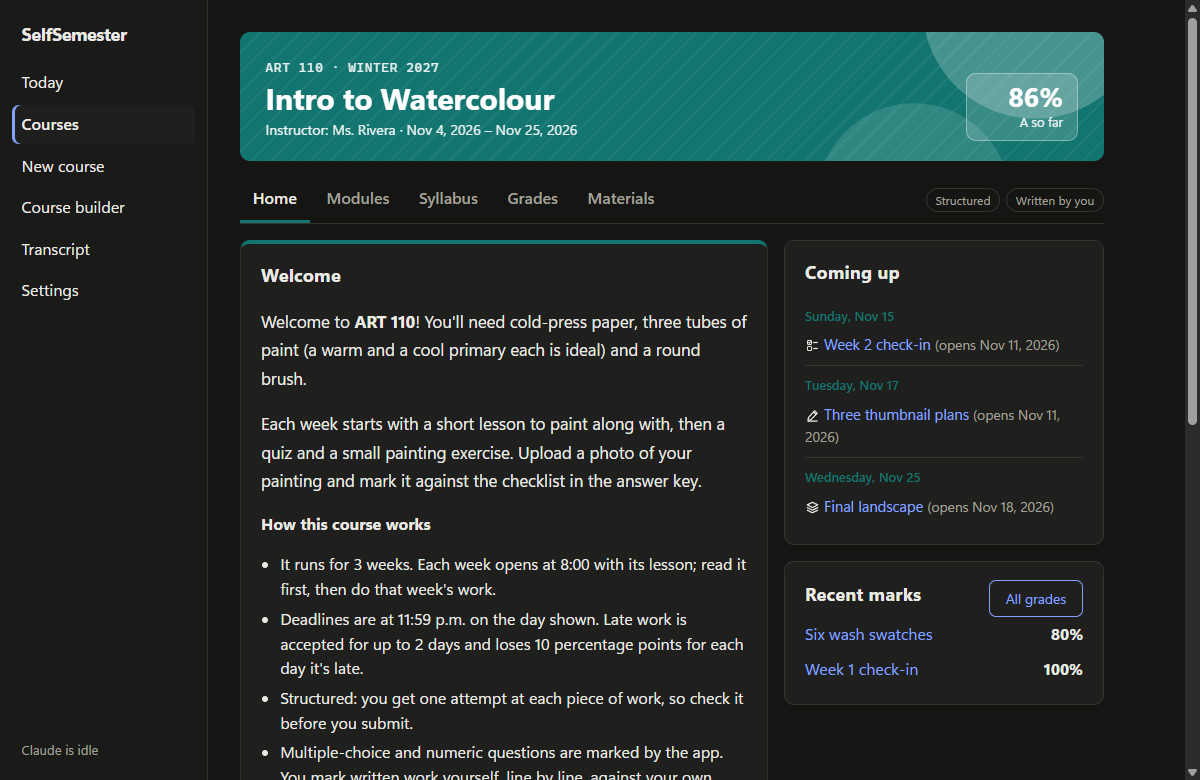
- Every running course opens on a classroom with a coloured banner (course code, term, instructor, dates, current
mark) and the same five tabs:- Home: a welcome and how the course works, what to do next, a progress bar for each week, what's coming up
over the next three weeks, and recent marks. - Modules: each week with its objectives, then its lesson and work, each with a clear status (to read, due
soon, overdue, being marked, the mark). - Syllabus: the course description, learning outcomes, a schedule, how grades are weighted, the letter scale,
and the policies (deadlines, attempts, marking, honesty, accessibility). - Grades: the current mark, how much of the grade is decided, averages by category and every graded item.
- Materials: your materials, the reading list and every lesson.
- Home: a welcome and how the course works, what to do next, a progress bar for each week, what's coming up
- Lessons and work show which course they belong to, link back to its tabs, and have Previous and Next
buttons that follow the course order. - Courses is now a dashboard of course cards, with finished courses listed separately.
Course builder: the details of a real course
- The builder is laid out in four steps (course details, grading, weeks and work, publish), with an outline that
ticks each step off and a live preview of the course card. - New course details: course code, term, instructor, banner colour, a welcome message and learning outcomes. Each
week gets objectives ("by the end of this week you can..."). They show up on the classroom pages and travel with
folder export and import. - Grade weights are entered as percentages, with the share each kind will really get once unused kinds drop out.
Smaller things
- Marks and instant feedback name lines "Question 1", "Question 2" instead of the question's internal id.
- The terms (DISCLAIMER.md and the first-launch notice) now cover courses you write yourself: they're your own
content, and only material you have the right to use should go into them. Because the terms changed, the notice is
shown once more. - New screenshots in the README.
SelfSemester 0.2.0: Sandbox mode, review mode and the course builder
Build it from source with the steps in the README (git checkout v0.2.0). Full history in CHANGELOG.md.
The database moves to schema version 4. Existing courses are kept as they are and run in Structured mode, which is
how every course worked before.
Your own materials
Why: to give Claude your textbook, past notes or what your teacher wants, so the course is built around them.
- Each course page has a Your materials section. Add PDFs, images and text files (notes, data, code), up to
30 MB each, or write a note in the app. They're copied into the course folder, so the originals can be moved or
deleted. - Claude reads them when it plans the course, writes each unit and marks your work. Anything added after a unit is
written is used for marking only.
Structured and Sandbox modes
Why: some courses should feel like the real thing; others are for practice, where trying again matters more
than the first mark.
- Each course picks a mode when you enrol (or publish one you wrote yourself):
- Structured: one attempt per assessment, marked strictly, and the late policy applies.
- Sandbox: resubmit as often as you like, with no late penalties. Your latest attempt counts. The answer key
stays hidden until you choose to see it, which closes that item. Late work is taken until a week after the
course's last deadline. Claude's marking points at what to rethink rather than giving the answers away.
- Sandbox courses are marked as such on the transcript.
Instant feedback
Why: waiting for Claude's marks shouldn't mean waiting to find out whether the quick answers were right.
- When you submit, the multiple-choice and numeric questions are checked straight away and shown as right or
wrong while Claude marks the rest against the rubric.
Review mode
Why: a mark and a comment don't always explain enough.
- Every marked item has a Review with Claude thread. Ask about the questions, the feedback or why marks were
given or lost; Claude answers with the item, your work, the rubric and the mark in front of it. It can't change a
mark. In a Sandbox course whose key is still hidden, it guides rather than giving answers. - Each message uses a little of your plan, and goes through the same queue as everything else, so a usage limit
pauses it rather than losing it. A reply that fails says so in the thread.
Course builder (no Claude)
Why: to run a course you write yourself, such as one a teacher set or one Claude can't do well, with the same
schedule, deadlines and transcript.
- Course builder in the sidebar: write the syllabus, units, lessons (Markdown and LaTeX), graded work,
questions (multiple choice, number, short or long answer), answer keys and rubrics. It saves as you type and
lists anything that stops the course from being published. - Publishing schedules it like any other course. Multiple-choice and numeric questions are marked by the app;
written answers are marked by you, line by line, against your own answer key. Claude is never called. - Export to a folder writes the draft to Documents\SelfSemester\Course builder as
course.jsonplus a
lesson.mdandwork.jsonfor each unit, to edit in any text editor. Import a folder reads it back as a new
draft.
Fixes
- When two marks or submissions for one item share the same second (quick Sandbox retries), the newest one is now
always the one shown and counted.