Repository navigation
SelfSemester 0.3.0: a classroom for every course

Download: SelfSemester_0.3.0_x64-setup.exe below under Assets, then run it (no administrator rights needed). Windows SmartScreen will warn that the publisher is unknown because the installer isn't code-signed: choose More info → Run anyway. The .sha256 file has its checksum. Full install steps, including building it yourself, are in the README. Full history in CHANGELOG.md.
The database moves to schema version 5. Existing courses keep everything and get a course code and colour picked
for them.
A classroom for every course
Why: a course should feel like being enrolled somewhere: one place that says where to start, what's due, how
you're doing and what the rules are. The layout follows common guidance for online courses (a clear "start here",
learning outcomes, a syllabus, the same structure every week, progress per module, deadlines first, readable and
keyboard-friendly), not any particular product's design.
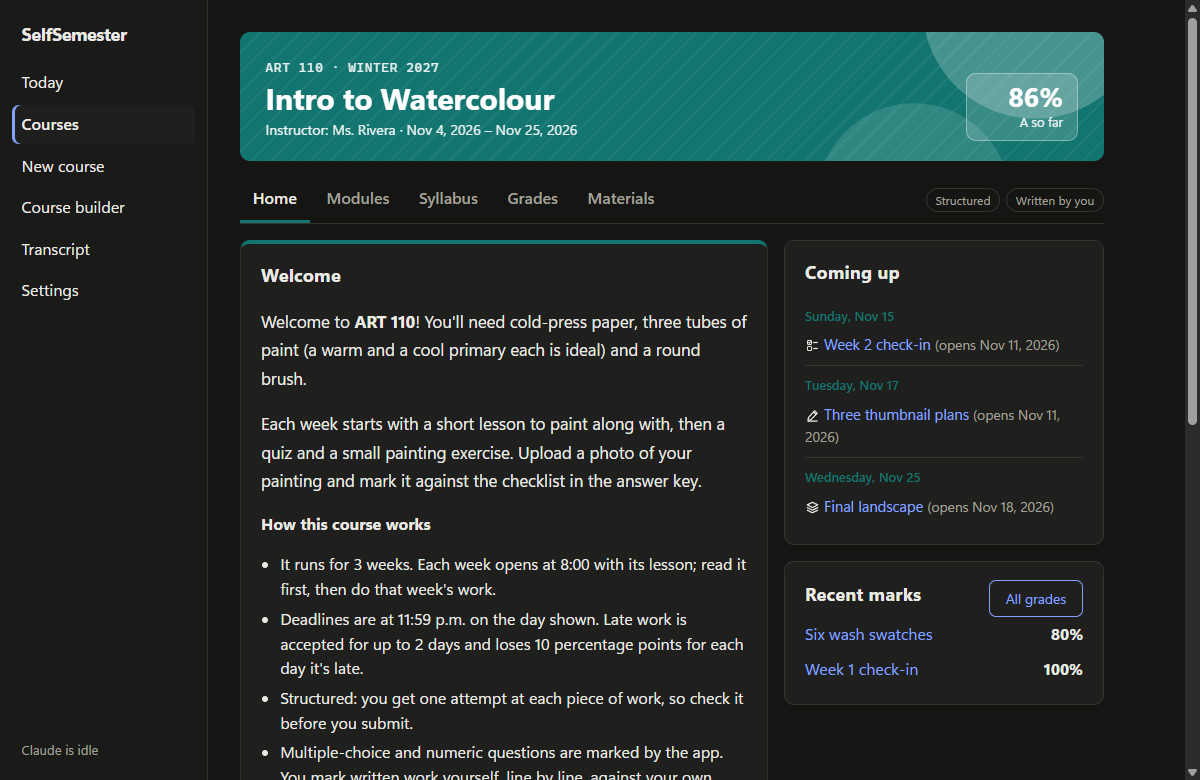
- Every running course opens on a classroom with a coloured banner (course code, term, instructor, dates, current
mark) and the same five tabs:- Home: a welcome and how the course works, what to do next, a progress bar for each week, what's coming up
over the next three weeks, and recent marks. - Modules: each week with its objectives, then its lesson and work, each with a clear status (to read, due
soon, overdue, being marked, the mark). - Syllabus: the course description, learning outcomes, a schedule, how grades are weighted, the letter scale,
and the policies (deadlines, attempts, marking, honesty, accessibility). - Grades: the current mark, how much of the grade is decided, averages by category and every graded item.
- Materials: your materials, the reading list and every lesson.
- Home: a welcome and how the course works, what to do next, a progress bar for each week, what's coming up
- Lessons and work show which course they belong to, link back to its tabs, and have Previous and Next
buttons that follow the course order. - Courses is now a dashboard of course cards, with finished courses listed separately.
Course builder: the details of a real course
- The builder is laid out in four steps (course details, grading, weeks and work, publish), with an outline that
ticks each step off and a live preview of the course card. - New course details: course code, term, instructor, banner colour, a welcome message and learning outcomes. Each
week gets objectives ("by the end of this week you can..."). They show up on the classroom pages and travel with
folder export and import. - Grade weights are entered as percentages, with the share each kind will really get once unused kinds drop out.
Smaller things
- Marks and instant feedback name lines "Question 1", "Question 2" instead of the question's internal id.
- The terms (DISCLAIMER.md and the first-launch notice) now cover courses you write yourself: they're your own
content, and only material you have the right to use should go into them. Because the terms changed, the notice is
shown once more. - New screenshots in the README.