Repository navigation
Releases
Homescape 0.4.0

New furniture and fixtures from your requests. Thanks to @xfaith (#10) and @cucamacuca (#8, #9)!
What's new
- Kitchen island (#9): 1.2 to 3.6 m long, with a seating overhang for bar stools and an optional built-in sink and dishwasher. Pick "Kitchen island" or "Island with sink" in Kitchen and appliances.
- L-shaped sectional sofa (#10): left or right corner, with an adjustable second arm. People sit and pets nap on every cushion.
- U-shaped stairs (#10): two flights with a half landing; people, pets and walk mode use both. Walls along the stairs, on one or both sides, hold furniture and wall items.
- Tall kitchen cabinet (#10): a pantry, oven and microwave, or fridge column whose doors open.
- Blender (#10): the contents spin while it is on.
- Garage door width (#10): 2.2 to 5.5 m, with a "Double garage door" card.
- Christmas tree (#8): a height from 0.6 to 5 m, in a pot or planted outdoors.
- The item search finds types and English names too, like Ottoman or Rice cooker.
- The room bar scrolls with a regular mouse wheel.
Install
Home Assistant OS or Supervised (app): go to Settings > Apps > Install app, open the top-right menu, choose Repositories and add https://github.com/muratozturkdev/homescape. Install Homescape, start it and turn on Show in sidebar. If it is already installed, update it from Settings > Apps.
Container or Core: download homescape-0.4.0-www.zip below, unzip it into /config/www/homescape/ and add a Webpage dashboard for /local/homescape/index.html.
Both ways are described in docs/home-assistant.md.
homescape-0.4.0-www.zip SHA-256: a5b0a8299e120b761ad0167dd758bd77b209ea6de9adf407964c931341ae6873
License
GPL-3.0-or-later. The libraries, fonts and sounds keep their own licenses (THIRD_PARTY_NOTICES.md).
Contributors


Assets 3
Homescape 0.3.1
A small follow-up to 0.3.0.
What's new
- Wall openings: a passage with no door, 0.6 to 4 m wide, at door height or up to the ceiling. Pick "Wall opening" in Doors and windows, or set a door's Type to Opening. Put one or more in a wall to leave only part of it standing, for example a short stub between an open kitchen and the living room. People, pets, light and walk mode pass through.
- The build bar's category tabs and item cards now scroll with a regular mouse wheel.
Install
Home Assistant OS or Supervised (app): go to Settings > Apps > Install app, open the top-right menu, choose Repositories and add https://github.com/muratozturkdev/homescape. Install Homescape, start it and turn on Show in sidebar. If it is already installed, update it from Settings > Apps.
Container or Core: download homescape-0.3.1-www.zip below, unzip it into /config/www/homescape/ and add a Webpage dashboard for /local/homescape/index.html.
Both ways are described in docs/home-assistant.md.
homescape-0.3.1-www.zip SHA-256: 556ea66deb3b98943d508de8cabe87a1bfd377a2bd9d8aa9c108c835d508e29b
License
GPL-3.0-or-later. The libraries, fonts and sounds keep their own licenses (THIRD_PARTY_NOTICES.md).
Homescape 0.3.0
Open kitchens, half walls, sliding glass doors, double windows, an apartment mode and 63 new items. Thanks to @xfaith (#6), @Walidenko (#7) and @cucamacuca (#5) for the ideas and the help.
What's new
- Kitchen islands (#6): counters, the stove, sink, dishwasher, oven and fridge can stand away from a wall; near a wall they still stick to it. A counter in an island has no wall cabinets.
- Half walls (#6): in edit mode every wall can be full height, half height (1.05 m) or open, from the room card's Walls list or by clicking the wall. Light passes over a half wall; people, pets and walk mode do not.
- Sliding glass doors (#6): 1.2 to 3.6 m wide, the panel slides open with its door sensor, and daylight comes in like through a window.
- Double windows (#7): two sashes that open from the middle; bind a left and a right sensor and each sash follows its own.
- Fixed windows (#5): one pane that never opens.
- Apartment mode: for a flat, set the home type to Apartment and the building floor. No roof, the street the right number of floors below your balcony, and the entrance opens onto the stairwell.
- 63 new items:
- Lights: night light, floodlight, light panels, neon sign.
- Climate: portable AC, wood stove, extractor fan.
- Media: turntable, floor speaker, streaming box, smart display, voice assistant (with its ring states).
- Security and smart devices: safe, fire extinguisher, chime, parking sensor, smart home hub, server rack, solar inverter, phone on a charger (see-through while you are away), UPS.
- Kitchen and bathroom: toaster, multicooker, chest freezer, wine fridge, ironing board, bathroom scale, electric toothbrush, sauna.
- Furniture and decor: bar stool, crib, pouf, coat rack, treadmill, exercise bike, yoga mat, piano, office chair, wall clock with the real time, alarm clock, vase, photo frame, candles, Christmas tree, wall shelf, hanging plant, standing mirror, memo board with your to-do list.
- Pets, garden and garage: pet fountain, pet door, pet cage, chicken coop, hose reel, rain barrel, greenhouse, hammock, patio heater, fire pit, bird feeder, generator, ladder, skylight, column.
- Beds come in single, double and king, and the sofa has a two-seat option.
Upgrade note
Plans are now saved in format 8. Homescape 0.2.x never writes over them: it stops syncing until it is updated, so update every copy of Homescape that uses the same Home Assistant user.
Install
Home Assistant OS or Supervised (app): go to Settings > Apps > Install app, open the top-right menu, choose Repositories and add https://github.com/muratozturkdev/homescape. Install Homescape, start it and turn on Show in sidebar. If it is already installed, update it from Settings > Apps.
Container or Core: download homescape-0.3.0-www.zip below, unzip it into /config/www/homescape/ and add a Webpage dashboard for /local/homescape/index.html.
Both ways are described in docs/home-assistant.md.
homescape-0.3.0-www.zip SHA-256: fe19314f17b8a09b6d79bf2284504d66d58f9b6d9771c5d719450486b0729ae5
License
GPL-3.0-or-later. The libraries, fonts and sounds keep their own licenses (THIRD_PARTY_NOTICES.md).
Contributors

Assets 3
Homescape 0.2.1
Two fixes from your reports. Thanks to @Walidenko for both.
Fixes
- Average temperature (#3): only indoor rooms count, so terraces, balconies and gardens no longer pull it up. They still show their own temperature.
- LED strip length (#4): in edit mode the strip's card has a length slider; the strip, its glow and its light follow it. A strip slides in at the end of its wall and is never longer than the wall.
- Installing or updating the app now builds exactly this release.
Install
Home Assistant OS or Supervised (app): go to Settings > Apps > Install app, open the top-right menu, choose Repositories and add https://github.com/muratozturkdev/homescape. Install Homescape, start it and turn on Show in sidebar. If it is already installed, update it from Settings > Apps.
Container or Core: download homescape-0.2.1-www.zip below, unzip it into /config/www/homescape/ and add a Webpage dashboard for /local/homescape/index.html.
Both ways are described in docs/home-assistant.md.
homescape-0.2.1-www.zip SHA-256: 79c0fd6d0f4e67f48498119a29039522fdacf149a9a7f5ea086bfe28a442d466
License
GPL-3.0-or-later. The libraries, fonts and sounds keep their own licenses (THIRD_PARTY_NOTICES.md).
Contributors
Assets 3
Homescape 0.2.0
Open-plan rooms: walls can now be left out, while every room stays a room of its own.
What's new
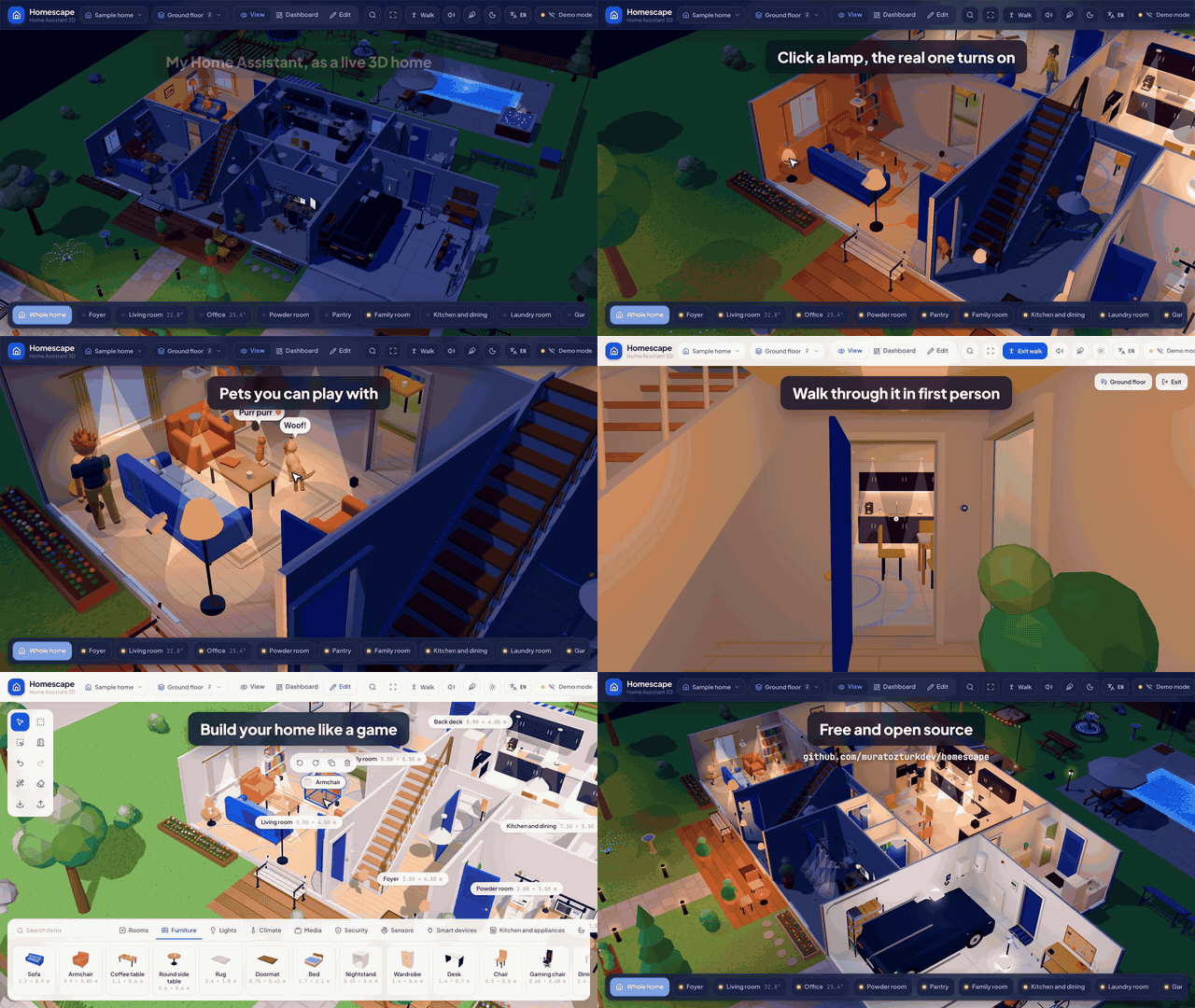
- Open-plan rooms (#2): in edit mode click a wall to select it, then delete it (Delete works too) together with the doors, windows and wall items on it; ⌘Z brings it all back. The room card lists every wall with a wall / open switch and can remove them all, for a room with no walls. Each room keeps its own name, Home Assistant area and stats; lamps light the whole open space, and walk mode, people and pets pass through. Balcony and terrace railings can be removed the same way. Thanks to @cucamacuca and @mingyue5826 for the proposal and the discussion.
- Hide room names in the 3D view: the tag button in the tool column, on phones in the three-dot menu.
- The sample home's names follow the language.
- The top bar fits small phones: under 640 px fullscreen moves into the three-dot menu.
Upgrade note
Plans are now saved in format 6. Homescape 0.1.0 never writes over them: it stops syncing until it is updated, so update every copy of Homescape that uses the same Home Assistant user.
Install
Home Assistant OS or Supervised (app): go to Settings > Apps > Install app, open the top-right menu, choose Repositories and add https://github.com/muratozturkdev/homescape. Install Homescape, start it and turn on Show in sidebar. If it is already installed, update it from Settings > Apps. The app always installs the newest release.
Container or Core: download homescape-0.2.0-www.zip below, unzip it into /config/www/homescape/ and add a Webpage dashboard for /local/homescape/index.html.
Both ways are described in docs/home-assistant.md.
homescape-0.2.0-www.zip SHA-256: 8be061d793be69308c4acd78a2ded7a0bc28a4b2643ccbc4df214526e18c2e72
License
GPL-3.0-or-later. The libraries, fonts and sounds keep their own licenses (THIRD_PARTY_NOTICES.md).
Contributors

Assets 3
Homescape 0.1.0
The first release of Homescape: your Home Assistant home as a live, interactive 3D dollhouse in the browser.
Highlights
- Live 3D home: lights glow in their rooms, the TV plays, doors and windows open with their sensors, people and pets move through the house, and day and night follow the sun.
- Control everything: quick actions on hover or tap, a detailed card per device, search (⌘K) and a Dashboard you can arrange: reorder and hide cards, rooms and devices, pin favorites.
- Build your plan in 3D: the first plan comes from your areas and entities; draw rooms, add floors and roofs, place more than 150 kinds of furniture and devices and bind them to entities.
- Walk through it in first person, with stairs between floors and doors that open.
- Weather and sound: rain, snow, storms and fog from your weather entity; spatial sound for appliances, rain and the street.
- 14 languages, following your device or Home Assistant language.
- Your plan is safe: stored in Home Assistant under your user and included in your backups. Homescape never overwrites data it cannot read and keeps copies you can restore from Plan history.
Install
Home Assistant OS or Supervised (app): go to Settings > Apps > Install app, open the top-right menu, choose Repositories and add https://github.com/muratozturkdev/homescape. Install Homescape, start it and turn on Show in sidebar. The first install builds the app, which takes a few minutes.
Container or Core: download homescape-0.1.0-www.zip below, unzip it into /config/www/homescape/ and add a Webpage dashboard for /local/homescape/index.html.
Both ways are described in docs/home-assistant.md.
homescape-0.1.0-www.zip SHA-256: dc66098f090ea9390f240123cf1a027375608c729c350665ca8ef23c5150089a
License
GPL-3.0-or-later. The libraries, fonts and sounds keep their own licenses (THIRD_PARTY_NOTICES.md).