Repository navigation
Releases
NeoDesk 3.6.0-rc.5

This is the fifth release candidate of 3.6.0. It adds saved sign-in for Windows lock screens, and Connect now uses the device password an organisation's address book stores. The installers come from each release and are fetched from neode.sk, the console's default port is 3375, and neodesk is the command line on every kind of install. A computer whose key the server refuses now really shows offline. It goes with the NeoDesk client 1.5.0-rc.7.
An install of 3.6.0-rc.4 needs one manual step to update, because its update command looks for the installer where it no longer is. See Updating from 3.6.0-rc.4.
What's new
Saved sign-in for Windows lock screens
A device can keep the account name and password of a Windows account: Saved sign-in in the device's menu and on its Actions tab. When a session in the browser viewer opens on the computer's lock or sign-in screen, the viewer signs in with them. It does that by itself when Sign in automatically when a session opens on the lock screen is on (off by default), and otherwise offers Sign in. It tries once per session. If Windows refuses the password, sign in by hand.
The password is stored encrypted on the server and never shown again: you can replace or clear it. It works on Windows computers where NeoDesk runs as a service, in the browser viewer, over a session encrypted end to end with the computer. Two new permissions, Use saved sign-in and Manage saved sign-in, belong to super admins only until you give them to another role. Every save, change, use and refusal is in the audit log. API tokens, and with them the command line and MCP, can save, change and clear the details (neodesk devices signin-set and the other devices signin commands), but can never use or read them.
What works with which client:
- With the client 1.5.0-rc.7 and older, the browser viewer types the details: Ctrl+Alt+Del, then the password (and the account name when the screen asks for it) and Enter. The password reaches the browser for about two seconds. These clients don't report their lock screen, so the viewer signs in by itself only while nobody is signed in on the computer, for example after a restart. When someone is signed in, it shows Sign in and asks first, because on an open desktop the password would be typed into whatever has the focus.
- With a client after 1.5.0-rc.7, which is not released yet, the server seals the details for that computer's NeoDesk, which opens them and types at its own lock screen: the password never reaches the browser. That client reports its lock screen, so saved sign-in acts only on the lock or sign-in screen and never on an open desktop. Once a computer's NeoDesk has reported this way, the server hands out no readable details for it any more, also when an older client is installed on it again.
The details are sealed with a key file of the server, which the console's full backup doesn't hold; see the key file below. The Saved sign-in page has the details.
Connect uses the address book's device password
When an organisation's address book stores a device password for a computer, Connect in the browser viewer now signs in with it instead of asking for it. The server answers the computer's password question itself, so the browser never gets the password. This also works for a contact in the shared address book whose computer isn't assigned to the organisation. If the computer refuses the stored password, the viewer says so and asks for the password, once.
The console, the command line and MCP no longer show that password: neodesk devices connect-password says only whether one is stored. Desktop clients still get it with the shared address book.
These passwords are now sealed with the same key file as saved sign-in. The server moves them to it at its start, so a copy of the database or a backup alone no longer opens them.
Revoking an API token ends what it made
Revoking an API token now also ends what the token made: guest links, device tokens, quick support sessions with their codes, invites, pairing codes, guest desktop links and organization invitations that weren't used yet. The same happens when a token expires or is deleted. The revoke dialog and the token list name what ended.
Computers that joined through the token's invites or pairing codes, or that were approved with it, stay. The revoke dialog lists them so you can check them on the Devices page. Only computers let in from this release on are listed.
neodesk is the command line on every install
- Linux:
neodeskis a copy of the server binary in /usr/local/bin that every user on the server can run; it needs an API token to do anything. The installer's manager is nowsudo neodesk-setup.sudo neodesk --updateand the installer's other options still work and go toneodesk-setup, and a baresudo neodeskon a terminal still opens the menu. - Windows:
neodeskis on the machine's Path, asC:\NeoDesk\bin\neodesk.exe. - Docker:
neodeskin the container, as before.
On a Linux computer that also has the desktop client, neodesk hands the client's own options (--join, --service, --password, --connect and the others) to the client, /usr/bin/neodesk, and so does a join or support link given on its own. --config and --version stay the command line's, and --update, --uninstall and --relay the installer's.
When the console has updated itself, its update screen shows Update the command line too with sudo neodesk-setup --update, and neodesk says on stderr when it is older than the server.
Every command now names the permission its route needs, which neodesk describe lists, every option has a help text, and times without a time zone in tables say UTC. neodesk mcp asks you itself before a tool deletes, ends, runs or changes who may do what, when your MCP client can ask (MCP elicitation). There are now 536 commands in 59 groups.
Installers from each release
The installers and compose files moved into the repository's install/ folder, and every release now carries them: install.sh, neodesk.sh, neodesk.ps1, neodesk-docker.sh and the three compose files. The release's SHA256SUMS lists them, and the new SHA256SUMS.sig signs that list with the release key. The install commands fetch them from neode.sk, which leads to the newest release, and the scripts update themselves from the release they install, never from the repository's main branch. neodesk.sh and neodesk.ps1 check the signature of their new copy; install.sh and the Docker manager check the SHA-256 of what they fetch against the release's list.
The console's default port is 3375
The console's plain HTTP port is now 3375 instead of 5000; HTTPS stays on 5443. New installs use it. Which existing installs move is under Updating from 3.6.0-rc.4.
Renamed paths
- Linux: the installer's backups go to /opt/neodesk-backups. The first run of the new installer as root moves the backups from /opt/rustdesk-backups.
- Docker: the data volume is mounted at /opt/neodesk/data in the container instead of /opt/rustdesk. The update rewrites /opt/rustdesk in .env, in a compose file you changed and in docker-compose.override.yml, and keeps the old files in its backup. A compose file of your own that still mounts the volume at /opt/rustdesk keeps working, and the container's log says to change it to /opt/neodesk/data. Backups now hold the folders neodesk and console, and backups of 3.6.0-rc.4 and older restore as before.
Security fixes
- Accounts that see only some devices can no longer widen their access through the API port 21121. They change no access list, make no group from tags, put no device they can't see into a group, and see only the groups open to them. Access rules on device groups made from tags now reach the devices with the tag.
- A permanently deleted device leaves nothing behind: its key, key requests, stored passwords, grants, groups, folders and settings go with it, so a new install under the same ID inherits none of it.
- A read-only API token sees the enrollment token of an agent template only by its first eight characters.
A refused computer shows offline
A computer whose key the server refuses showed Online in the console and in neodesk devices list (a known issue of 3.6.0-rc.4). It now shows offline, also after the server restarts. Its heartbeats mark nothing online and its system information isn't stored until Approve new key lets it back in.
Smaller changes
- Links that open a device in an app now use
neodesk://and open the NeoDesk client. Open in RustDesk stays as a second choice, and phones keep the RustDesk app. - The invite page tells people on Windows that the exe's permission prompt names Windows Command Processor by Microsoft Windows, and that this is the NeoDesk setup. Only the MSI's prompt names NeoDesk's publisher.
- Starting a browser session no longer logs a failed request (409) for the quick support password.
- The Windows install script for Intune from the console uses the client API port 21121 when the server has no public API address. It used 21114.
- The command line's sign-in error names 3.6.0-rc.4, the release that brought API tokens, instead of a version that doesn't exist.
- Help in the console,
neodesk --helpand the installers' closing summary point to the [NeoDesk Disc...
NeoDesk 3.6.1 (development build 2cff5dc)
NeoDesk 3.6.0-rc.4
This is the fourth release candidate of 3.6.0. It adds the neodesk command line with API tokens for scripts and AI agents, and a setup guide for the first admin of a new install. A computer whose key changed no longer passes as online while every session to it fails. It goes with the NeoDesk client 1.5.0-rc.6.
What's new
Command line and API tokens
Admins make API tokens for scripts under API tokens in the account menu. A token acts as the account that made it, with only the permissions picked for it, read only or read and write, for at most a year and, if you want, only from some addresses. It never gets the server's secrets or more than its account may do, and a revoked token stops working at once.
The neodesk command line uses such a token for everything the console's API does: 532 commands in 59 groups, all made from one table. neodesk describe prints every command with its arguments and permission as JSON or Markdown. neodesk mcp serves the commands as MCP tools for an AI agent, read only unless you add --allow-writes. Commands that run something on a device or the server need --allow-exec as well, and answers that hold secrets need --allow-secrets.
In the Docker image the command is neodesk. On Linux hosts /usr/local/sbin/neodesk is the installer's manager, so there the command line is neodesk-server cli.
neodesk login --url https://<console-address>
neodesk devices list
neodesk describe --format markdown
Put your console's address in place of <console-address>. neodesk login asks for the token and saves it with the address for the next commands.
Setup guide for a new install
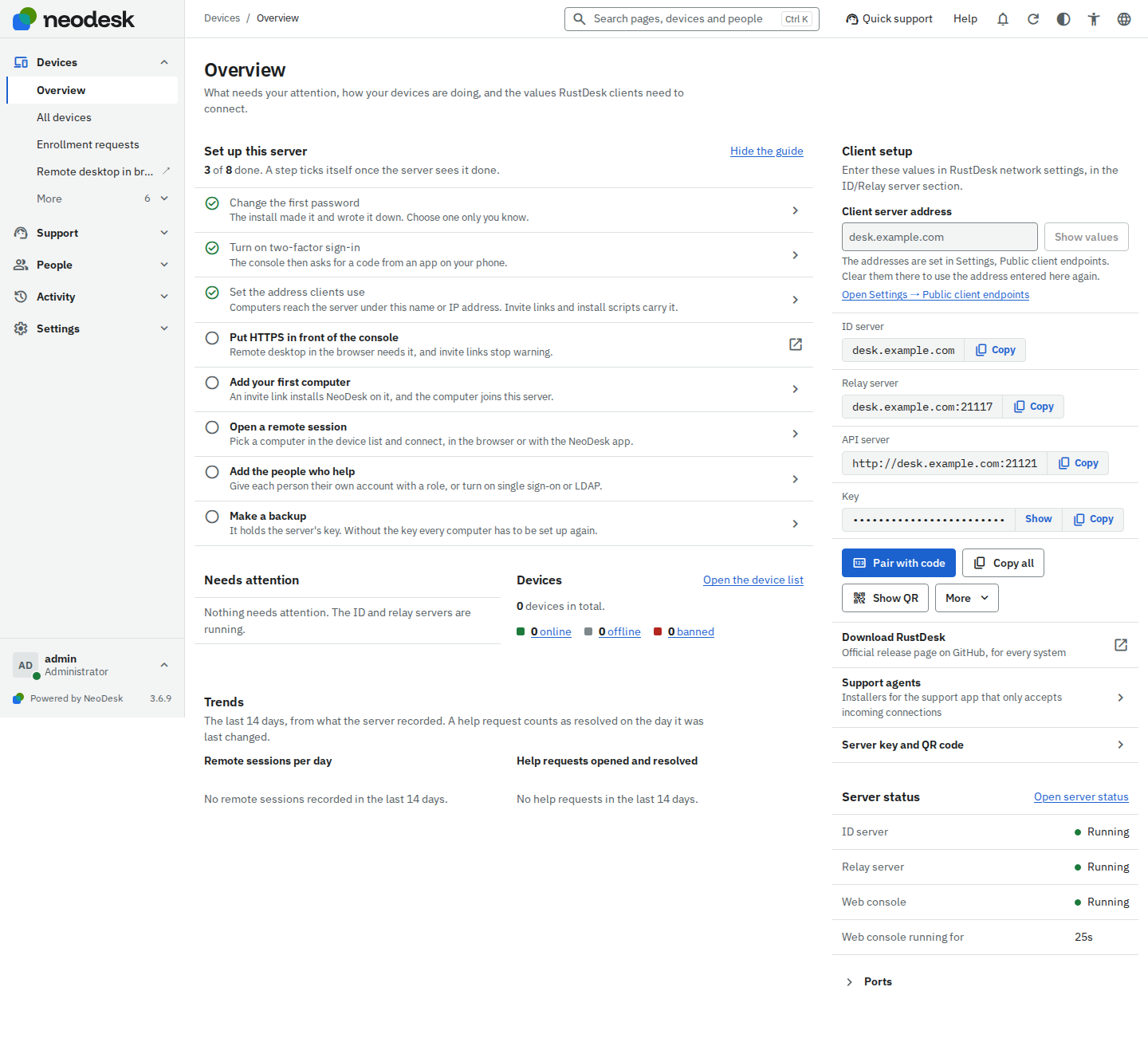
A new install opens with a setup guide on the overview, for the first admin. Its eight steps are: change the first password, turn on two-factor sign-in, set the address clients use, put HTTPS in front of the console, add your first computer, open a remote session, add the people who help, and make a backup. Each step leads to its place in the console and back, and the server ticks a step by itself once it sees it done. You can hide the guide, and Help and Settings bring it back. The backup step shows only to super admins, who may make a full backup. On the command line, neodesk setup-guide status lists the steps.
A computer keeps its connection after a restart
A Windows computer that joined with an invite could lose its key at the next restart. The server kept the old key and showed the computer online, but every session to it ended with "could not be secured". The server now asks a computer it knows for its key each time it registers. A changed key is refused, and with the client 1.5.0-rc.6 the computer's Home and tray say that the server refuses its key. Approve new key shows on its device page once its invite runs on the computer again, and the same invite works after the key is approved.
The client half, which keeps the key over a restart, is in the client 1.5.0-rc.6.
Smaller changes
- Leaving the settings while a save runs waits for the save instead of asking whether to discard what it saves.
- Leaving a page while part of it still loads no longer raises a page error, and a part that failed to load, such as the device panel, loads again the next time you open it.
- Help no longer lists sponsors and supporters, and CHANGELOG.md starts at 3.6.0-rc.2, the first release as NeoDesk.
- Tests that failed now and then, for chat sockets, the relay, mDNS and billing, are stable.
Upgrade notes
Update by running the installer again, as Updating describes. There is still no migration from 3.6.0-rc.1 or older: install NeoDesk fresh.
- Console sessions carry over: nobody has to sign in again.
- A computer whose key changed since it joined is refused after the update. It still shows Online in the list (see the known issues), but no session to it starts. To let it back in, run its invite on it again: its device page then offers Approve new key. Approve the key and run the same invite once more. Computers that joined with a client build from CI before 1.5.0-rc.6 lose their key at a restart, so expect this for them.
- The setup guide opens by itself only on a new install. On an install that is in use, Help and Settings show it.
- Quick support choices and the client half of the key fix need the client 1.5.0-rc.6. The client 1.5.0-rc.5 was never published.
GET /api/console/supportersis gone, with the supporters list in Help. Settings, Appearance no longer offers the theme preset of a former sponsor; a console that applied it keeps its look until you apply another one.- The core script for MeshCentral agents is served at
/neocore.js./meshcore.jsstill answers. - Custom CSS in Settings, Appearance that styles the accessibility helpers or the attestation badge by class name needs the new class names, which start with
nd-.
Install
With Docker, the first line installs this release. The second also serves the console over HTTPS at your domain, which has to point at the server, with ports 80 and 443 open:
curl -fsSL https://raw.githubusercontent.com/neodeskapp/neodesk/main/install.sh | sudo bash -s -- --version 3.6.0-rc.4
curl -fsSL https://raw.githubusercontent.com/neodeskapp/neodesk/main/install.sh | sudo bash -s -- --version 3.6.0-rc.4 --domain <domain> --letsencrypt-email <email-address>
The image is ghcr.io/neodeskapp/neodesk:3.6.0-rc.4. The Linux and Windows pages have the commands without Docker.
Known issues
- A computer whose key the server refuses still shows Online in the console and in
neodesk devices list. Sessions to it are refused, and its client's Home and tray say that the server refuses its key. - Guest links, device tokens and support passwords that an API token made stay valid after the token is revoked.
neodesk mcpdoesn't ask you itself before a tool deletes or ends something. It makes the agent confirm first and leaves asking you to the agent and its MCP client, so give an agent a token with only the permissions it needs.- A few commands of the command line answer 404, because the console doesn't serve their route.
- Some command line tables show times without a time zone.
- Settings, Backup still shows a Server admin the buttons for full backups, which then refuse with 403.
- On SQLite, a backup archive holds the database file twice.
- The console's links that open a device in an app use
rustdesk://. They start stock RustDesk, and on a computer with only the NeoDesk client they open it on Windows and nothing on Linux and macOS. - HTTPS with Let's Encrypt hasn't been run against Let's Encrypt itself yet, not even its staging server. Whether Traefik replaces a staging certificate when you switch to a real one isn't known, and
--no-traefikalso removes aTRUST_PROXYyou had set for a proxy of your own. - Clients that use the console's address as their API server are signed out after the session duration even while they are in use: Extend session on activity and Maximum session lifetime don't apply to them.
- Some permissions only work together with another one, and the Permissions page doesn't say so. Delete devices, Ban, Change device ID and Change connection mode need Edit devices, and Create and Delete users need Edit users, for example.
- Access rules don't reach devices in device groups that are made from tags.
- Relay servers: the assignment rules are saved but not used; every device uses the default relay.
- USB and drive access and Fleet tasks can't save yet, as the banners on both pages say.
- Each browser session start logs a failed request for the quick support password (409), although the session works.
- A slow single sign-on provider ends in "OIDC authentication failed" or a bare page that says "OIDC callback proxy failed".
All changes since v3.6.0-rc.3
- chore: release 3.6.0-rc.4 (d7f76d8)
- docs: write the release notes of 3.6.0-rc.4 (241e306)
- chore: bump version to 3.6.4 [version-bump] (83d15d8)
- test: record the mail message vectors with NeoDesk's names (202ce61)
- test: record the QR code vectors with NeoDesk's names (215a912)
- refactor: drop the name parameters the old recordings needed in discovery, mail and the updater (11b58bf)
- refactor: remove the upstream name mapping now that the recordings use NeoDesk's names (f2dee56)
- fix: leave the old project's issue number out of the service unit's port change message (cb9d69e)
- test: record the update manifest signature vectors with NeoDesk's names (1e4e3ca)
- test: record the mail service's SMTP sessions with NeoDesk's names (e763f89)
- test: record the LAN discovery and mDNS answers with NeoDesk's names (1d0d2af)
- test: record the support client generator's vectors and routes with NeoDesk's names (fd629b7)
- test: record the branding vectors and store scenario with NeoDesk's names (6f982df)
- test: record...
NeoDesk 3.6.0-rc.3
This is the third release candidate of 3.6.0. It closes the permission holes that the review of rc.2 found, serves the console over HTTPS on Docker with a certificate from Let's Encrypt, and makes the settings that did nothing on Docker save. It goes with the NeoDesk client 1.5.0-rc.6.
What's new
HTTPS on Docker
--domain and --email put a small Traefik container in front of the console. It gets a certificate from Let's Encrypt and renews it by itself, and the console's own port then answers on the host only. --letsencrypt-staging uses Let's Encrypt's staging server for a test run, and --no-traefik takes it out again. See HTTPS with Let's Encrypt.
Security
No account can give itself more than it has any more:
- An API key, the console's own included, no longer creates, changes or deletes accounts, roles, API keys or second factors.
- No account gives a role or a key more permissions than it holds itself, and no account widens its own device or panel access.
- Deleting a user group keeps its panel limits on its members.
- The NeoDesk agent's terminal and files have their own permissions, Terminal on NeoDesk agents and Files on NeoDesk agents, instead of coming with Edit devices. The client feature switches cover the agent's tools as well.
- Only super admins download, restore or schedule full backups, and the files with password hashes in a backup archive are readable by their owner only.
- Client API tokens keep the saved session duration after a restart.
- Settings, Advanced refuses a session secret the console can't start with, keeps release keys, the client build command and secrets out of the files it writes, and shows the audit log read-only. A broken session secret no longer stops the server.
- The blocklist that Settings, Advanced saves is loaded at the server's start. On Docker it was never loaded before.
- CORS answers only the desktop client's webview and never with cookies, and a Bearer header no longer switches the CSRF check off for a request that the console's cookies authenticate.
- Access rules for users, user groups and device groups apply to their devices, and devices get only their own data loss prevention policies.
Reinstalled computers
A computer that was reinstalled or reset keeps its ID but comes back with a new key. The server still refuses it, but now keeps the new key as a request: the device list shows the computer offline, and its device page offers Approve new key. Once approved, the computer rejoins with the same invite. This needs the client 1.5.0-rc.5.
Quick support gives only what the person allowed
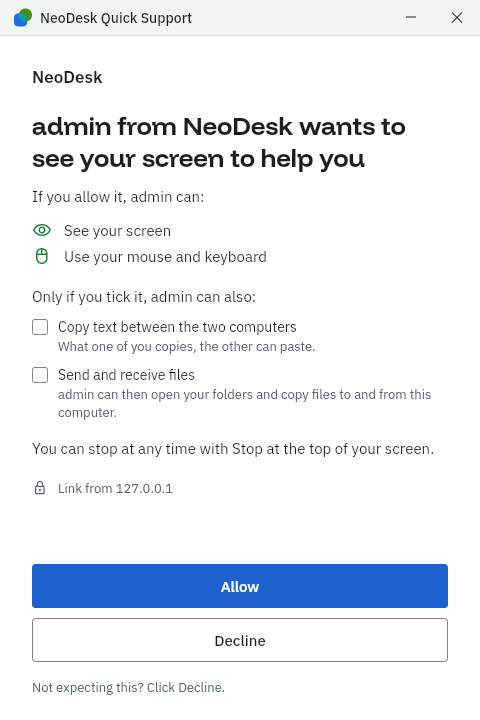
A quick support session gets the screen, the mouse and the keyboard. Copying text and sending files are choices in the support app, off until the person ticks them, and the server holds the session to them.
Settings that now save on Docker
- Connection strategy and the time settings save. The server keeps them in its database and applies them at once, and the page shows what the server runs instead of defaults.
- Pairing codes redeem instead of answering 401.
- RDP and VNC targets reconnect after the container restarts.
- Settings, Updates shows commands that fetch the new version.
The browser viewer over plain HTTP
Over plain HTTP the browser viewer showed a black screen. It now ends the session with a message that it needs HTTPS.
Directory sign-in
The console waits up to 30 seconds for a slow directory and says when it took too long. A directory account signs in to the account the directory names instead of making a second one under the typed name. LDAP groups are searched as the service account, the role map can name a group by its Group name attribute, and the connection timeout covers LDAPS and StartTLS. LDAP and single sign-on settings that can't work are refused with the reason at the field.
Restore one part
A restore brings back only the parts you choose: Server device database leaves the console accounts alone, and Console data leaves the devices. It says when a part brought back nothing.
Several monitors in the browser viewer
The browser viewer shows every display of a device: as the device arranges them, in a grid, or each in a window of its own. Clicks go to the display under the pointer, and the session info shows each display's frame rate and bitrate. The windows of a session's displays close when the session ends.
Smaller fixes
- Phones and keyboards: the top bar, long buttons, status lines and device names stay on the screen, search has Cancel on touch screens, and the remote screen says that F8 leaves it.
- Languages: audit actions and details, hardening checks and the refusals of passwords, two-factor codes, Email and Appearance are in the console's language.
- Appearance: the console background, the web remote client background and the text font reach the pages, a saved look shows at the next page load, and Google fonts are downloaded to the server.
- Installers: a switched-off ufw or firewalld stays as it is, and an invite's Linux install script moves a computer from client 1.5.0-rc.4 to a later build.
Upgrade notes
Update by running the installer again, as Updating describes. There is still no migration from 3.6.0-rc.1 or older: install NeoDesk fresh.
- Console sessions carry over: nobody has to sign in again.
- Permissions that changed:
- Remote operator no longer opens the terminal and the files of NeoDesk agents. Give a role Terminal on NeoDesk agents or Files on NeoDesk agents where it needs them; Global admin and the super admins have them.
- Server admin no longer sees the whole console API key and can't download, restore or schedule full backups.
- The IoT gateway and its devices need View CDAP devices, which Server admin doesn't have.
- Scripts that create or change accounts, roles or API keys with an API key on port 21121 need a signed-in account now.
- On Docker, Connection strategy and the time settings live in the server's database once you save them in the console, and count over
.envfrom then on. - Fields that the server's environment sets can't be changed in the console: the public addresses with
PUBLIC_ENDPOINTS_ENV_OVERRIDE=Y, the enrollment mode withENROLLMENT_MODE_ENV_OVERRIDE=Y, and the release keys, the client build command and the secrets in.env. Change them on the host. - Settings, Appearance no longer has Enable glass surfaces with tint, Surface blur, Glass opacity and Application description. They changed nothing.
- The device ticket routes are
/api/tickets/nd. - Computers that ran the client 1.5.0-rc.4 get a new ID once when they update to 1.5.0-rc.5, and show up as new devices.
Install
With Docker, the first line installs this release. The second also serves the console over HTTPS at your domain, which has to point at the server, with ports 80 and 443 open:
curl -fsSL https://raw.githubusercontent.com/neodeskapp/neodesk/main/install.sh | sudo bash -s -- --version 3.6.0-rc.3
curl -fsSL https://raw.githubusercontent.com/neodeskapp/neodesk/main/install.sh | sudo bash -s -- --version 3.6.0-rc.3 --domain <domain> --letsencrypt-email <email-address>
The image is ghcr.io/neodeskapp/neodesk:3.6.0-rc.3. The Linux and Windows pages have the commands without Docker.
Known issues
- The console's links that open a device in an app use
rustdesk://. They start stock RustDesk, and on a computer with only the NeoDesk client they open it on Windows and nothing on Linux and macOS. - HTTPS with Let's Encrypt hasn't been run against Let's Encrypt itself yet, not even its staging server. Whether Traefik replaces a staging certificate when you switch to a real one isn't known, and
--no-traefikalso removes aTRUST_PROXYyou had set for a proxy of your own. - Clients that use the console's address as their API server are signed out after the session duration even while they are in use: Extend session on activity and Maximum session lifetime don't apply to them.
- Some permissions only work together with another one, and the Permissions page doesn't say so. Delete devices, Ban, Change device ID and Change connection mode need Edit devices, and Create and Delete users need Edit users, for example.
- Access rules don't reach devices in device groups that are made from tags.
- Relay servers: the assignment rules are saved but not used; every device uses the default relay.
- USB and drive access and Fleet tasks can't save yet, as the banners on both pages say.
- Each browser session start logs a failed request for the quick support password (409), although the session works.
- A slow single sign-on provider ends in "OIDC authentication failed" or a bare page that says "OIDC callback proxy failed".
All changes since v3.6.0-rc.2
- chore: release 3.6.0-rc.3 (023908a)
- docs: write the release notes of ...
NeoDesk 3.6.0-rc.2
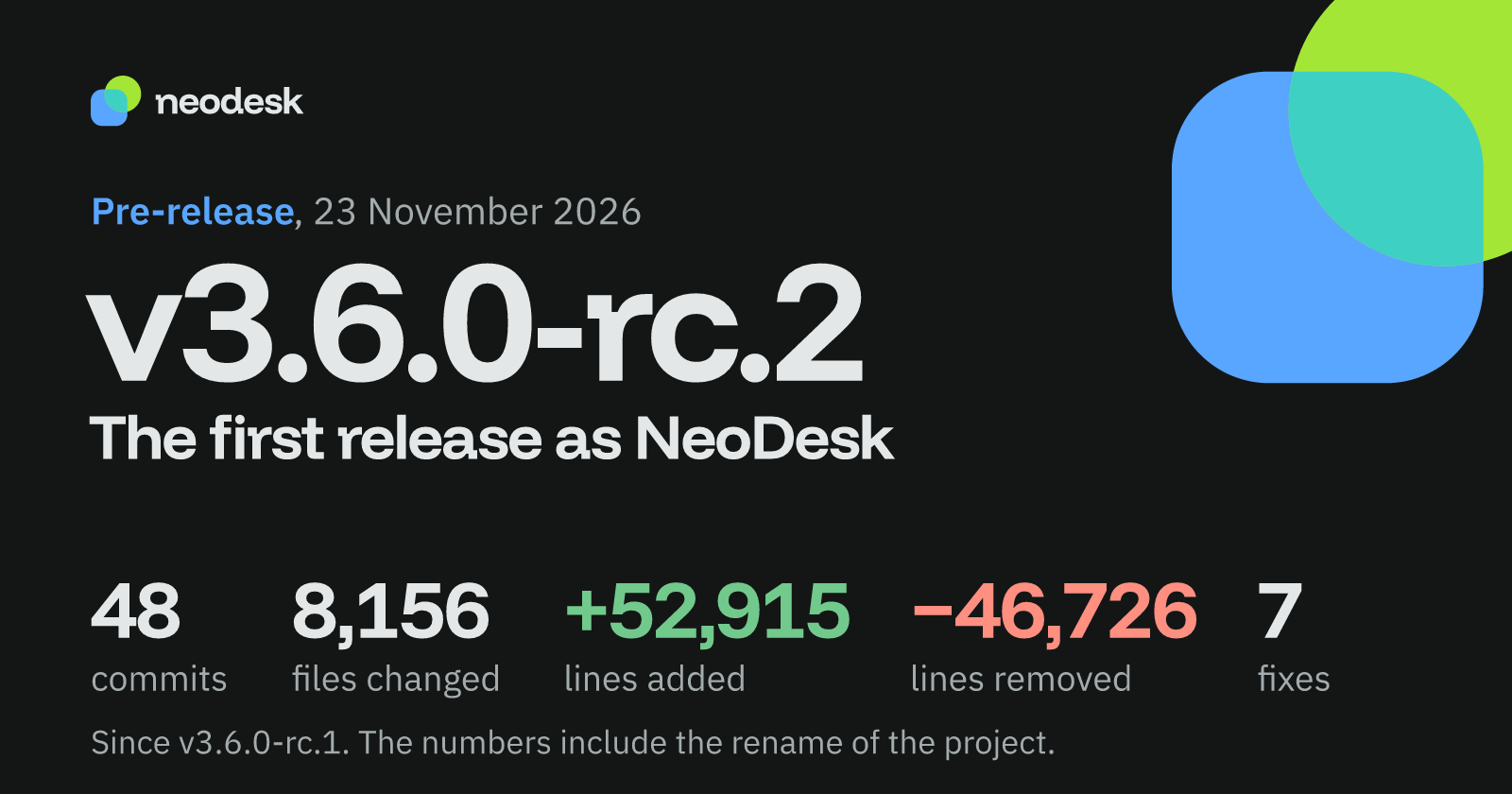
This is the second release candidate of 3.6.0, and the first one as NeoDesk. NeoDesk is a self-hosted remote desktop server for RustDesk clients, with the web console in the same Go binary. It started as a fork of BetterDesk by UNITRONIX and is now developed on its own.
What's new
The project is NeoDesk now
The repository is neodeskapp/neodesk, the client is neodeskapp/neodesk-client, and the documentation is on neode.sk. The console, the installers, the services, the Docker image and the device API all carry the new name.
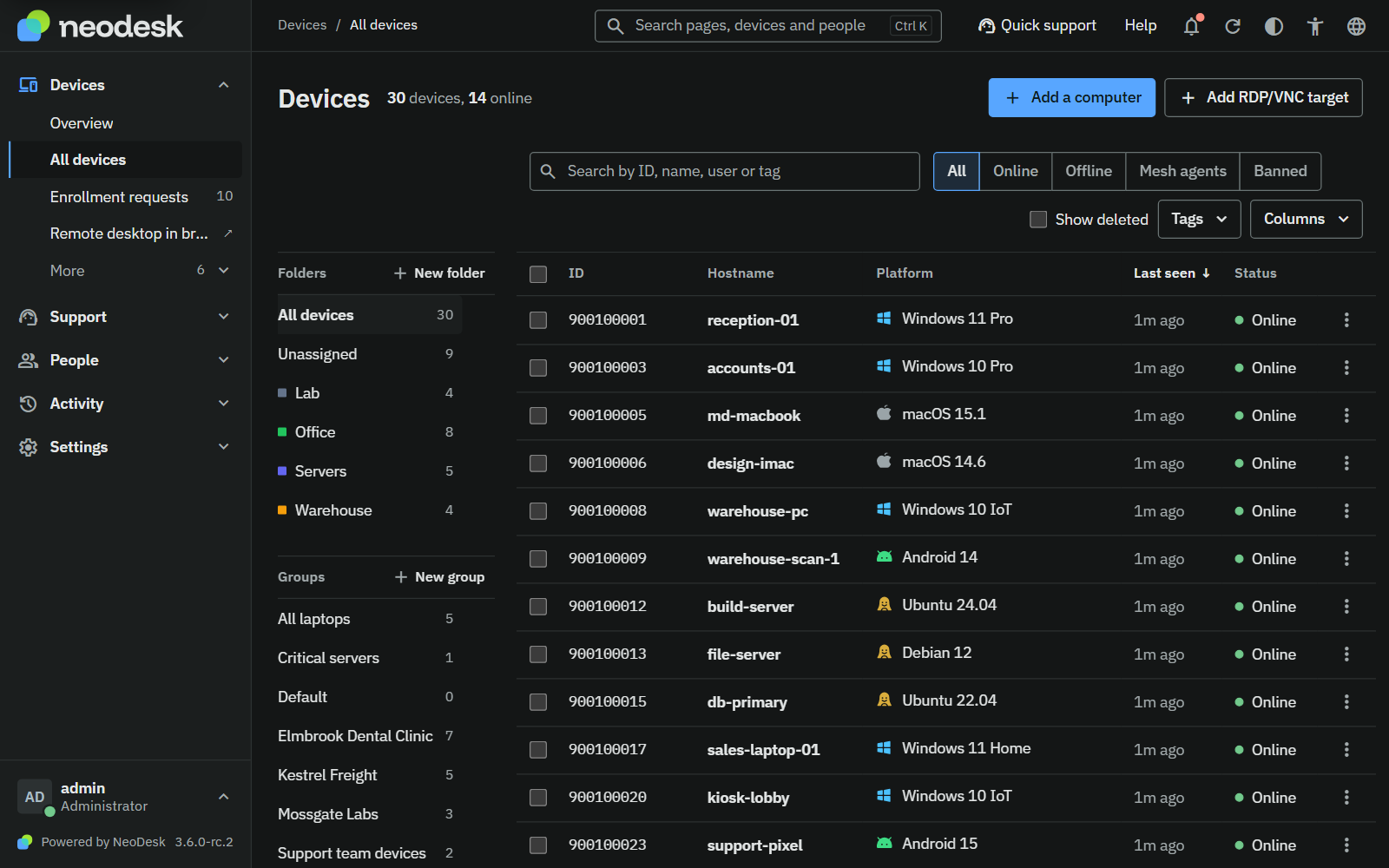
The installers show the NeoDesk logo
neodesk.sh, neodesk-docker.sh and neodesk.ps1 start with the full logo, with the installer's name and version under the wordmark.
Add a computer
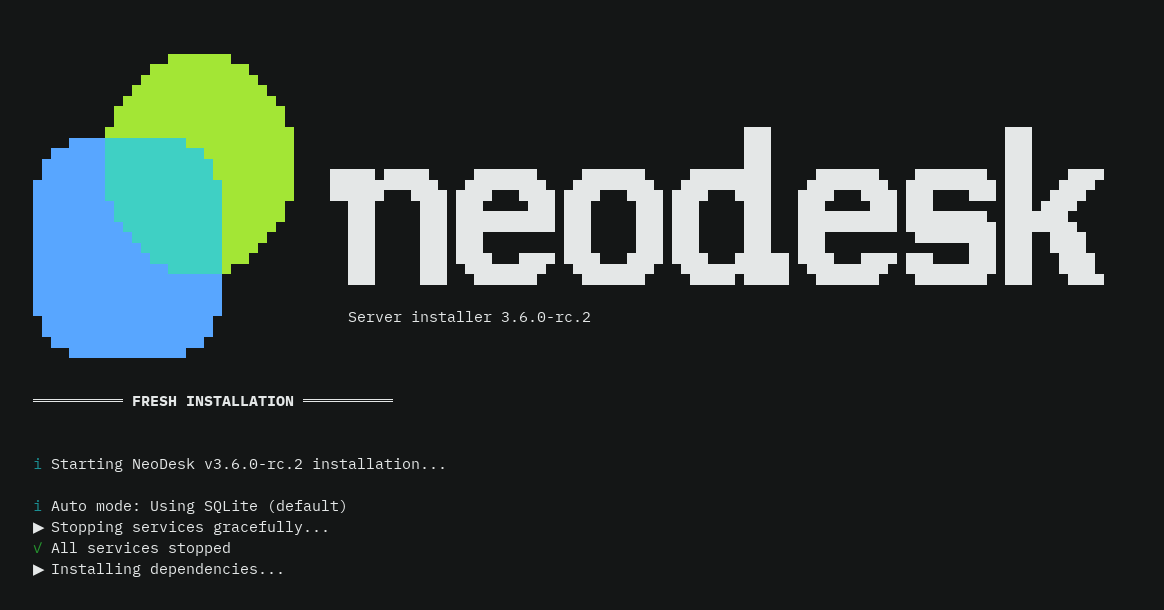
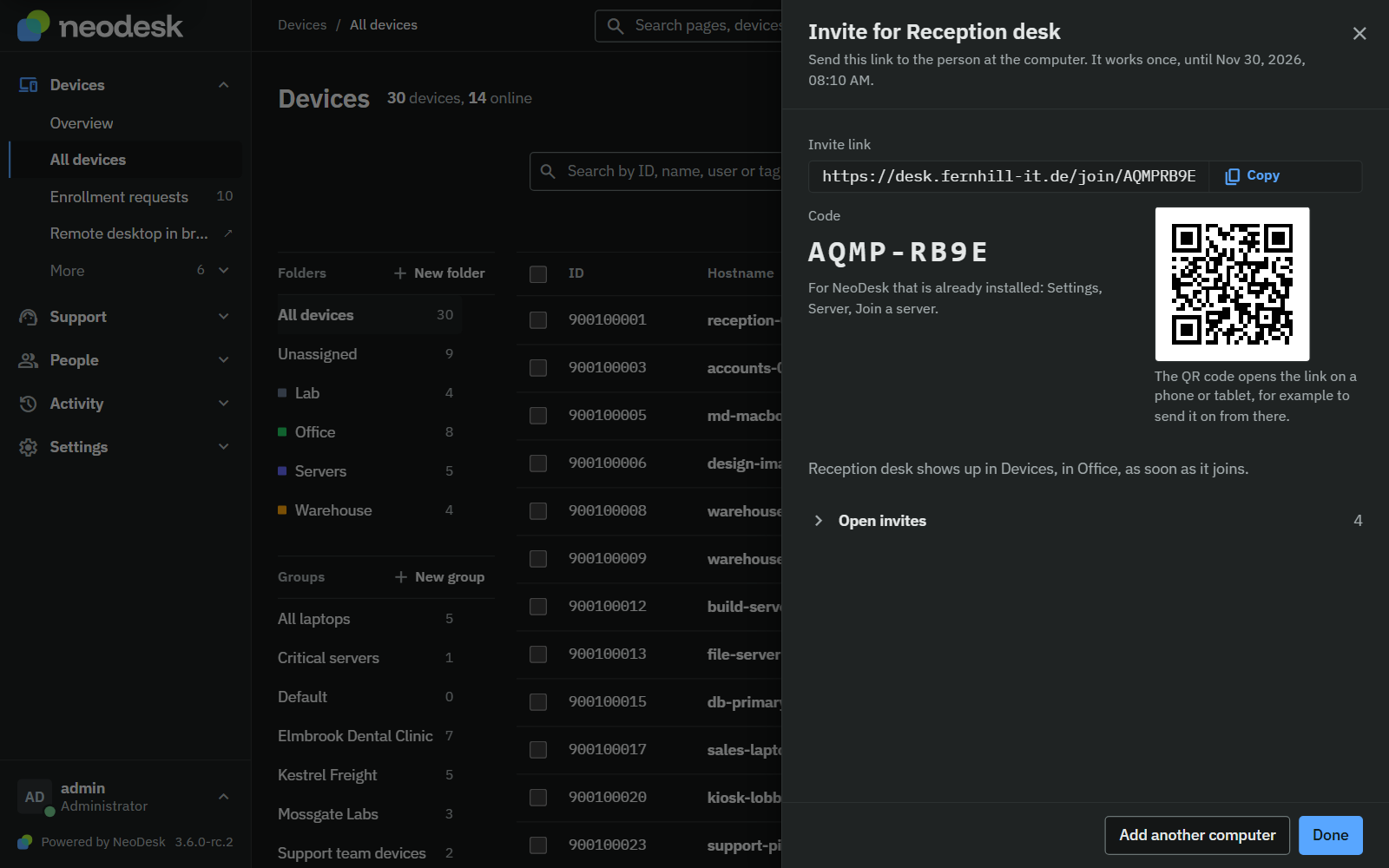
New in 3.6.0. An invite link or code from the console sets up a computer with nothing typed: a Windows setup program named for the invite, a Linux command, or a link that opens NeoDesk on macOS. The computer shows up under Devices, already approved, in the folder you picked. See Add a computer.
Quick support
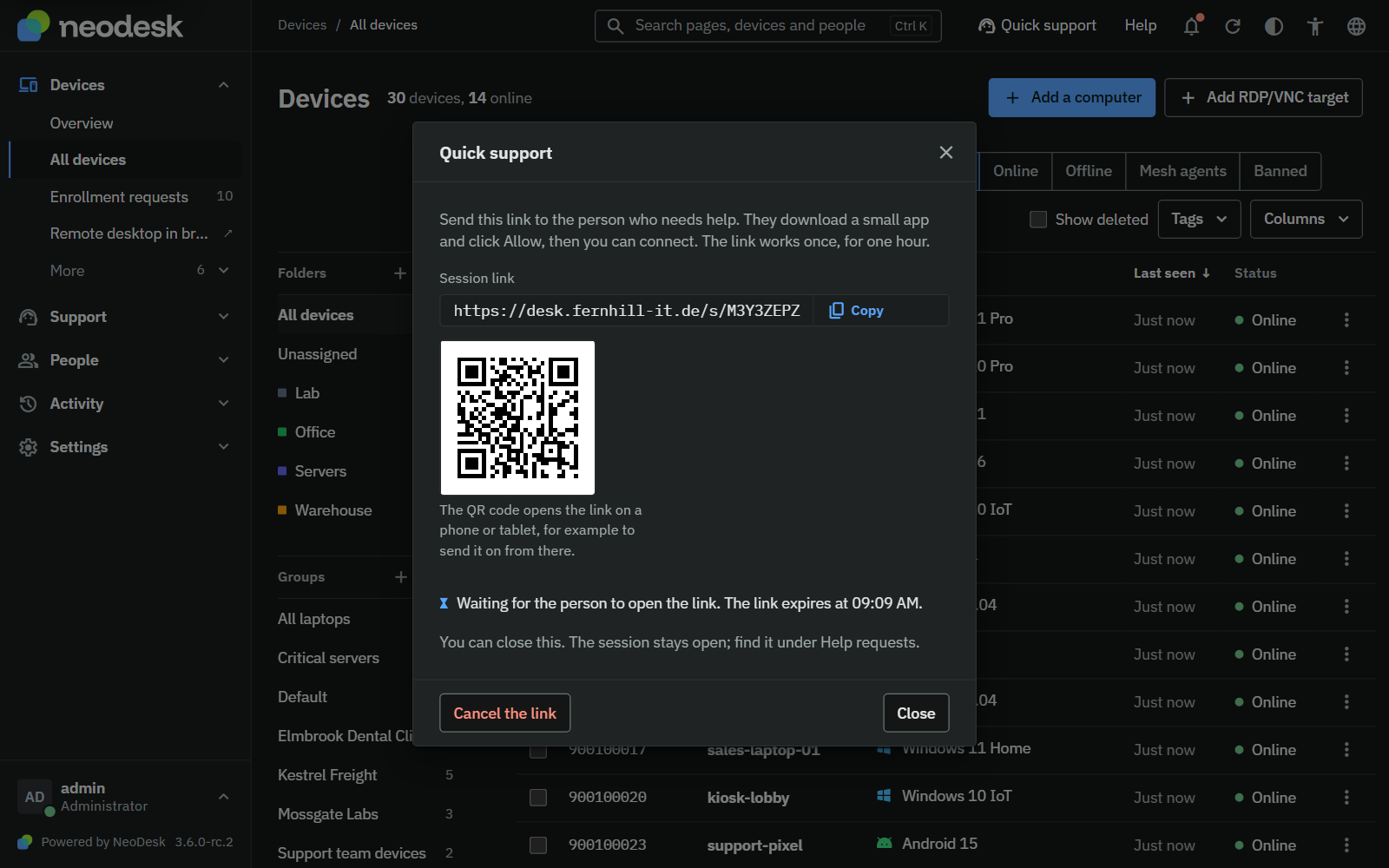
New in 3.6.0. A link for one session that works once, for one hour. The person downloads a small support app and clicks Allow, and you connect without an ID or a password. See Quick support.
Fixes since rc.1
- A socket upgrade with a session cookie and no Origin header got past the console's origin check, which still looked for the old cookie name.
- Support clients are built from the client repository's main branch and checked against its signing key.
Upgrade notes
This is the first NeoDesk release. There is no migration from 3.6.0-rc.1 or older: the installers don't take over their services, folders, volumes or settings. Install NeoDesk fresh with the steps for Linux, Docker or Windows.
- Agents and clients from before the rename can't register with or connect to a NeoDesk server, and an older install can't update itself to NeoDesk.
- Everyone signs in to the console again. Theme and sidebar choices start over, and new two-factor set-ups show NeoDesk as the issuer.
- The names that changed:
- Installers:
neodesk.sh,neodesk.ps1andneodesk-docker.sh. - Linux: the service
neodesk-server, the system userneodesk, the folder/opt/neodeskand the binary/usr/local/bin/neodesk-server. - Windows: the service
NeoDeskServerand the foldersC:\NeoDeskandC:\NeoDeskConsole. - Docker: the image
ghcr.io/neodeskapp/neodesk, the containerneodesk, the volumesneodesk-data,neodesk-console-dataandneodesk-postgres-data, andneodesk-show-admin-credentials. - Environment variables start with
NEODESK_andND_. - Device API:
/api/nd/*, the sockets/ws/nd-signal,/ws/nd-relayand/ws/nd-mgmt, and theX-ND-*headers. The old names are gone, so scripts and integrations that call the API need the new ones. - LAN discovery answers
neodesk-discoverprobes, and mDNS announces_neodesk._tcp.
- Installers:
Install
On Linux:
curl -fsSL https://raw.githubusercontent.com/neodeskapp/neodesk/main/neodesk.sh | sudo bashWhile there is no stable release, the script installs the newest pre-release, this one. The Docker image is ghcr.io/neodeskapp/neodesk:3.6.0-rc.2; the Docker and Windows pages have their commands.
All changes since v3.6.0-rc.1
- chore: release 3.6.0-rc.2 (1d316ab)
- chore: bump version to 3.6.3 [version-bump] (3404635)
- fix: check support releases against the fork's signing key [L294] (2c5df19)
- fix: build support clients from the client fork's main branch [L290] (fc21103)
- fix: start the installer's title under the foot of the n, one line lower (de10f82)
- fix: put the installer's title under the wordmark, beside the mark (96dcf32)
- feat: draw the installers' logo larger, with the wordmark in a pixel font (c96e3d1)
- feat: show the full NeoDesk logo at the top of the installers (eb4b4ae)
- feat: show the NeoDesk logo (01652e8)
- feat: rename the project to NeoDesk (ac92cad)
- refactor: move files to their NeoDesk names (3b499b7)
- test: mask the product version only where it is a whole number [L289] (56d4458)
- chore: bump version to 3.6.2 [version-bump] (62ecdc6)
- ci: stop running the checks for the fix test branch (81be9af)
- chore: bump version to 3.6.1 [version-bump] (1eda7e9)
- fix: install from the renamed neodeskapp organization [L287] (cf7dc80)
- ci: let the e2e instance check for updates with the job's token, not the runner address's rate limit [L286] (e9978a9)
- test: leave free what a chat agent gets before the console closes its oversize frame [L285] (93285f8)
- ci: give the test instances no client release, as the Add a computer goldens expect [L284] (56ffe0b)
- test: accept audit entries without an account in the audit list case with an object limit [L281] (955a602)
- test: open a lasting billing package, not the one the admin run deletes meanwhile [L283] (6ab84db)
- test: expect read-only server files and no terminal in the server management checks [L282] (e58822e)
- test: let the audit list case with an object limit take whatever entries the groups before it wrote [L281] (d6bab66)
- ci: run the console, Go server and web app checks for the fix test branch (50f018d)
- test: expect the backup schedule without the network share login [L276] (d95319a)
- fix: go to #user-groups once the list is in, keep a new report's buttons clear of the top bar and ask for stored passwords only with org.manage_devices [L274] (5dd035d)
- test: expect the no-access page on chat and network tools without their permissions and no ticket comment box without device.edit [L277] (c2b07f6)
- test: expect read-only policies and no remote commands for server admins, as their permissions decide [L275] (8078532)
- test: expect the no-access page on the IoT pages for roles without cdap.view [L273] (e05da7a)
- test: let dialogs finish fading in before the axe checks measure colours [L280] (15a4873)
- test: count only the goroutine check test's own goroutines, so others ending meanwhile do not fail it [L272] (f1b5038)
- test: ask for the server resources uncompressed in the contract matrix, whose size follows the machine [L270] (0df3443)
- fix: check out SVG files with LF line ends so the favicon has the same bytes on every system [L269] (da223f5)
- ci: keep the Playwright browsers cached when e2e tests fail (71fec68)
- ci: run the sharded checks only for main and pull requests (d29bf53)
- ci: deal the race shards by the times of a run in the final layout (b0c5156)
- ci: run each race package or part as its own go test, longest first, one per CPU (f2ffdb6)
- ci: run about one race test binary per CPU in each shard and deal 7 SQLite and 9 PostgreSQL shards (4392c77)
- ci: run the web app's checks in four jobs (77ba7cb)
- ci: run the contract cases in order beside ws-remote and the e2e tests in six shards (f467a68)
- ci: cut long race tests by their subtests and give the PostgreSQL shards the local database name (11ef457)
- ci: run the web app's checks and unit test shards side by side (4a21c4d)
- ci: check the contract suite and the e2e tests against a test instance (27cb297)
- ci: run the race tests on SQLite and PostgreSQL in shards dealt by measured time (3d2d628)
Full Changelog: v3.6.0-rc.1...v3.6.0-rc.2