Repository navigation
Northshell 1.6.0 — disk speed, who loads the server, and a full HTTP client

See who is loading a server's disks, CPU and network, and work with APIs in a full HTTP client.
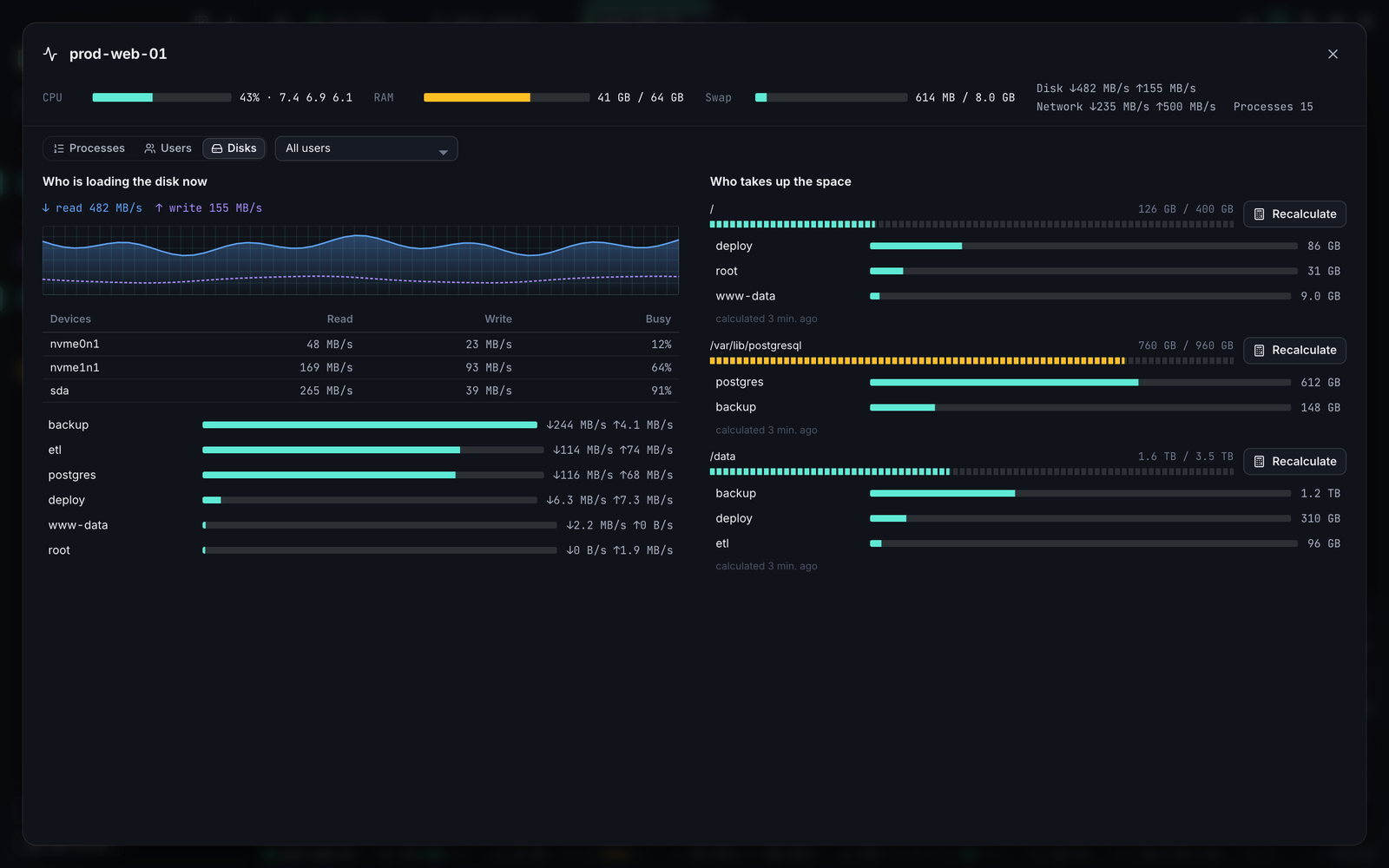
Monitor: who is loading the server
- Disk speed: a new Disk I/O card with read and write speed and a graph, for the whole host and for each device. It updates with the rest of the monitor (every 3 seconds by default).
- Top users: rank users by CPU, RAM, disk or network right in the panel. Pick a user to see their share on every card and their processes.
- Enlarge (⤢) for an htop-like view: every process with sorting by any column, search, a process tree and the full command line, plus a table of users.
- Disks page: who is reading and writing now, and who takes up the space on each volume. Space per user walks the files, so it runs when you press the button, at the lowest CPU and disk priority.
What you can see depends on the server:
- On Linux, reads and writes of other users' processes are visible to root only, so connect as root to see everyone.
- Traffic per user counts TCP connections only.
- macOS has no per-process disk counters, so only its total speed shows.
The per-user numbers are new. If they look wrong on your server, please open an issue.
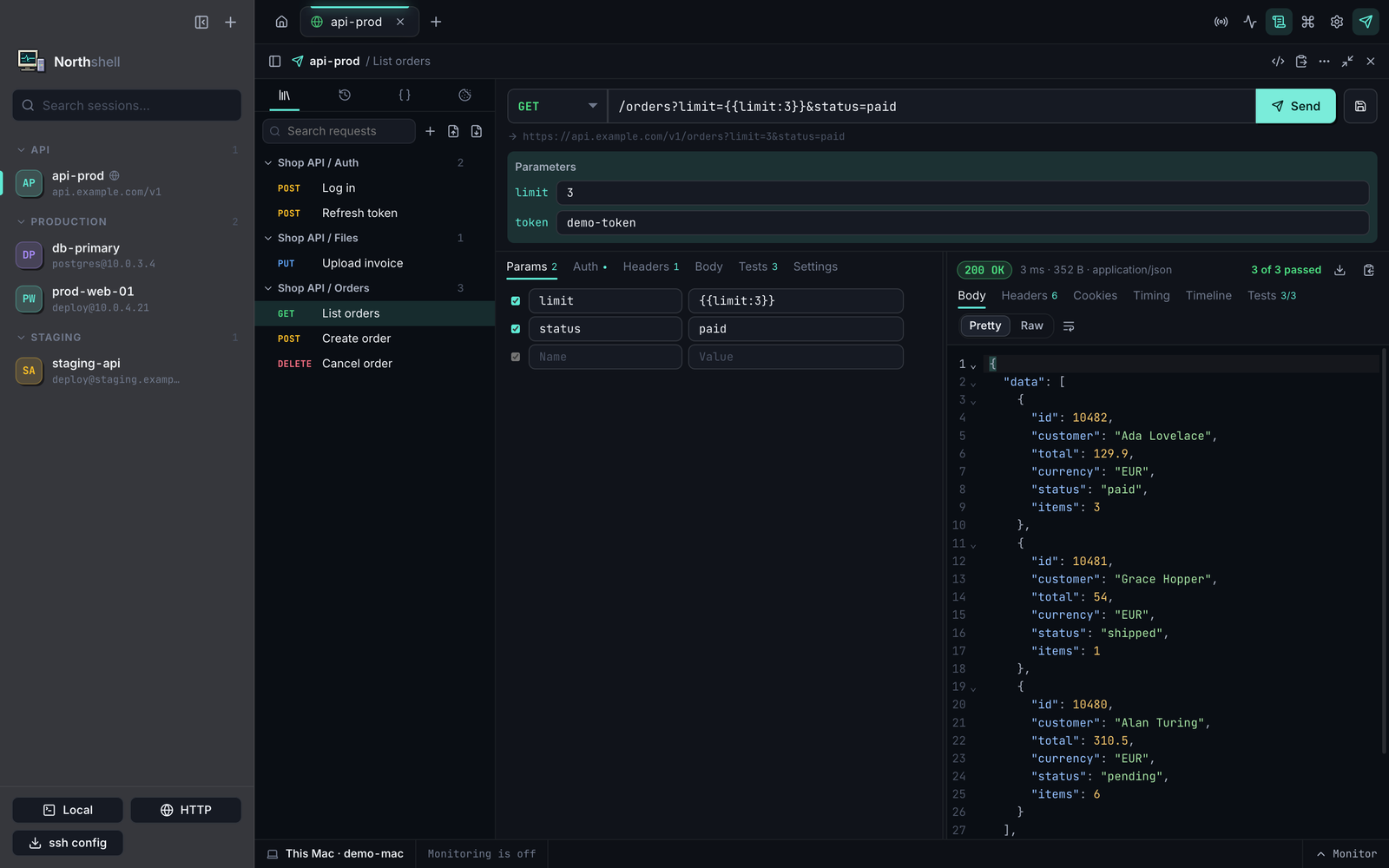
HTTP client, like Postman and Insomnia
- Workspace: fills the window, and one button puts the terminal back beside it.
- Collections: folders of saved requests (
⌘S), with history and variables kept between launches. Import Postman v2 and Insomnia collections, export to Postman. - Requests: Bearer, Basic and API key auth; JSON, XML, text, form, multipart, file and GraphQL bodies; on/off switches for parameters and headers.
- Responses: folding and search (
⌘F), HTML and image preview, cookies, a time breakdown, curl's log with credentials masked, and saving the whole response to a file. - Checks and runs: check the status, time, size, a header or a JSON path, and copy a value from a response into a variable, such as a token after login. Run a whole folder in order and get a report.
- Code: generate a request for curl, fetch, Python requests or HTTPie.
There are no JavaScript scripts, OAuth 2 sign-in, WebSocket, gRPC, mock servers or cloud sync.
Terminal
⌘Aselects the command you are typing, and pressing it again selects all output.⌫deletes the selection and typing replaces it, and the same works for a part selected with the mouse.Ctrl+Agoes to the line start again.
Changes to how things work
$TOKENstays on the environment's own host: a request to another host that uses it now shows an error instead of being sent, so an imported collection cannot carry your token away.- The HTTP workspace covers the terminal by default. Your choice is remembered.
- Plain-text storage: collections, variables and cookies are readable only by your user but aren't encrypted. Keep secrets in
$TOKEN, because a token typed into a form is saved as typed.
Install
Download Northshell-1.6.0-arm64.dmg below (macOS 13+, Apple Silicon), open it and drag Northshell into Applications, replacing the old version — sessions and settings are kept. On first launch allow the app in System Settings → Privacy & Security → Open Anyway, or run xattr -dr com.apple.quarantine /Applications/Northshell.app.
SHA-256: 429173f02e651a04ad376aa9034a6385a04080e01365596ac1bf5c7d9e0a6d2c