
Agent observability and guardrails for OpenClaw.
See every tool call, understand the risk, and add guardrails from the same dashboard.



ClawLens is a local OpenClaw plugin for monitoring agent activity. It records tool calls, scores risky behavior, shows live sessions in a dashboard, and lets you create block, require_approval, or allow_notify guardrails from real agent actions.
Use it when your agents can run shell commands, edit files, call external APIs, or operate across multiple sessions and you want an audit trail plus operator-controlled guardrails.

Watch the 2-minute product demo
ClawLens requires a running OpenClaw gateway (>= 2026.4.0).
openclaw plugins install @nk3750/openclaw-clawlensOpen the dashboard:
http://localhost:18789/plugins/clawlens/
Your agents appear after their first tool call. The standard npm install path updates OpenClaw's plugin config automatically; you do not need to edit ~/.openclaw/openclaw.json by hand.
Other install paths
Install from the public GitHub mirror:
openclaw plugins install clawlens --marketplace nk3750/clawlensInstall from source:
git clone https://github.com/nk3750/clawlens.git
cd clawlens
npm install
openclaw plugins install ./
If you plan to modify the source, see CONTRIBUTING.md.
Agents often take many small actions before the one that matters. ClawLens gives you the activity stream, risk context, and guardrail controls in one place.
| Need | ClawLens gives you |
|---|---|
| Know what happened | A local JSONL audit log plus live dashboard views for agents, sessions, and individual tool calls. |
| Spot risky behavior | Deterministic risk scores and tags for destructive commands, external network access, remote operations, sensitive system paths, credential access, and persistence. |
| Respond quickly | Guardrails created from observed actions, scoped to one agent or the whole fleet. |
| Review later | Hash-chained audit entries that make later edits, deletes, or reordering detectable. |
| Add LLM context | Optional LLM risk evaluation and session summaries when risk.llmEnabled=true, using redacted tool-call metadata. |
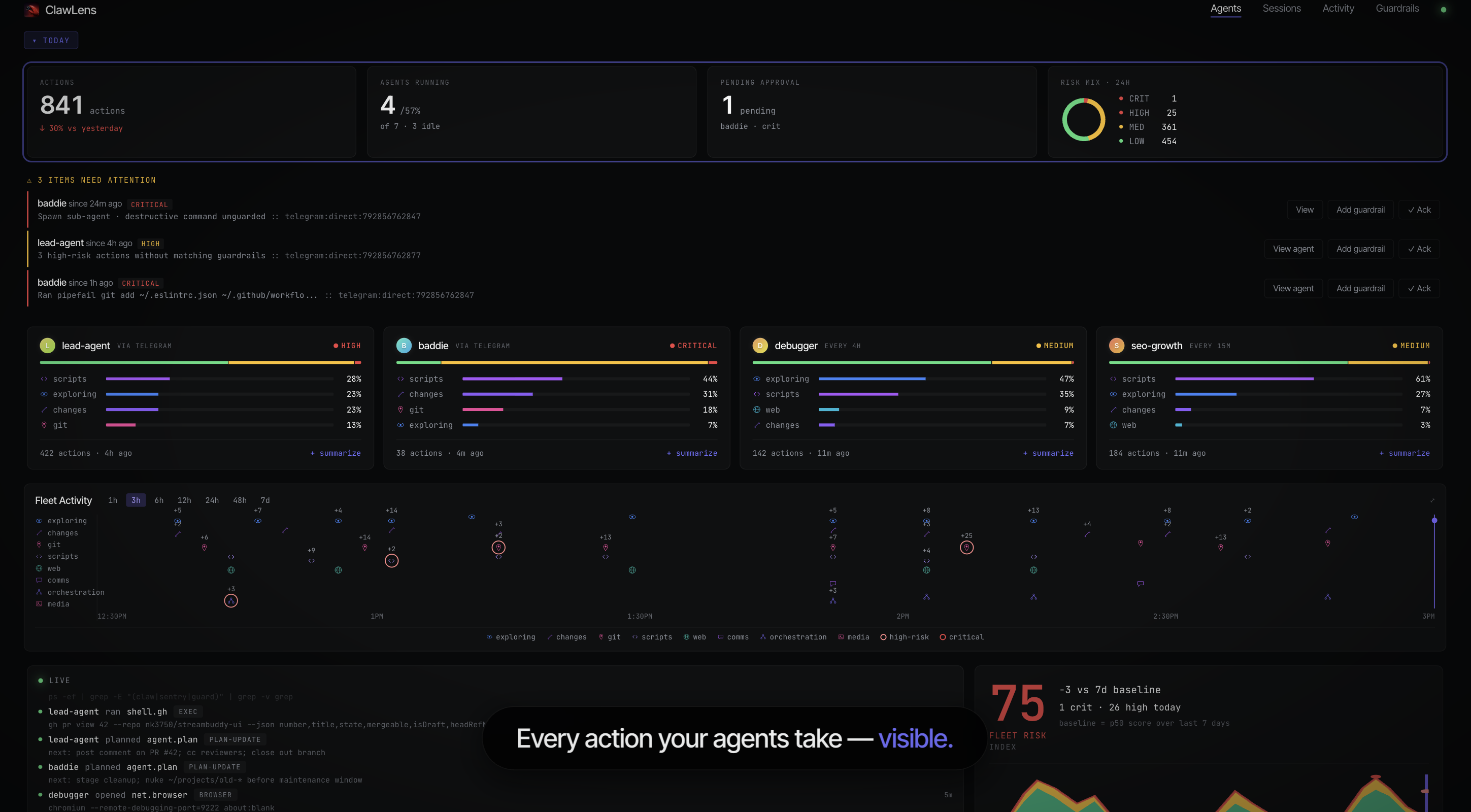
- OpenClaw runs your agents and tool calls as usual.
- ClawLens observes each tool call, computes a deterministic local risk score, redacts common credential patterns, and writes an audit entry.
- The local dashboard updates with agents, sessions, risk mix, recent actions, and Attention Inbox items.
- When you create a guardrail, matching future tool calls can be blocked, paused for approval, or allowed with a local notification record.
No SDK, proxy, database, or separate service stack is required.
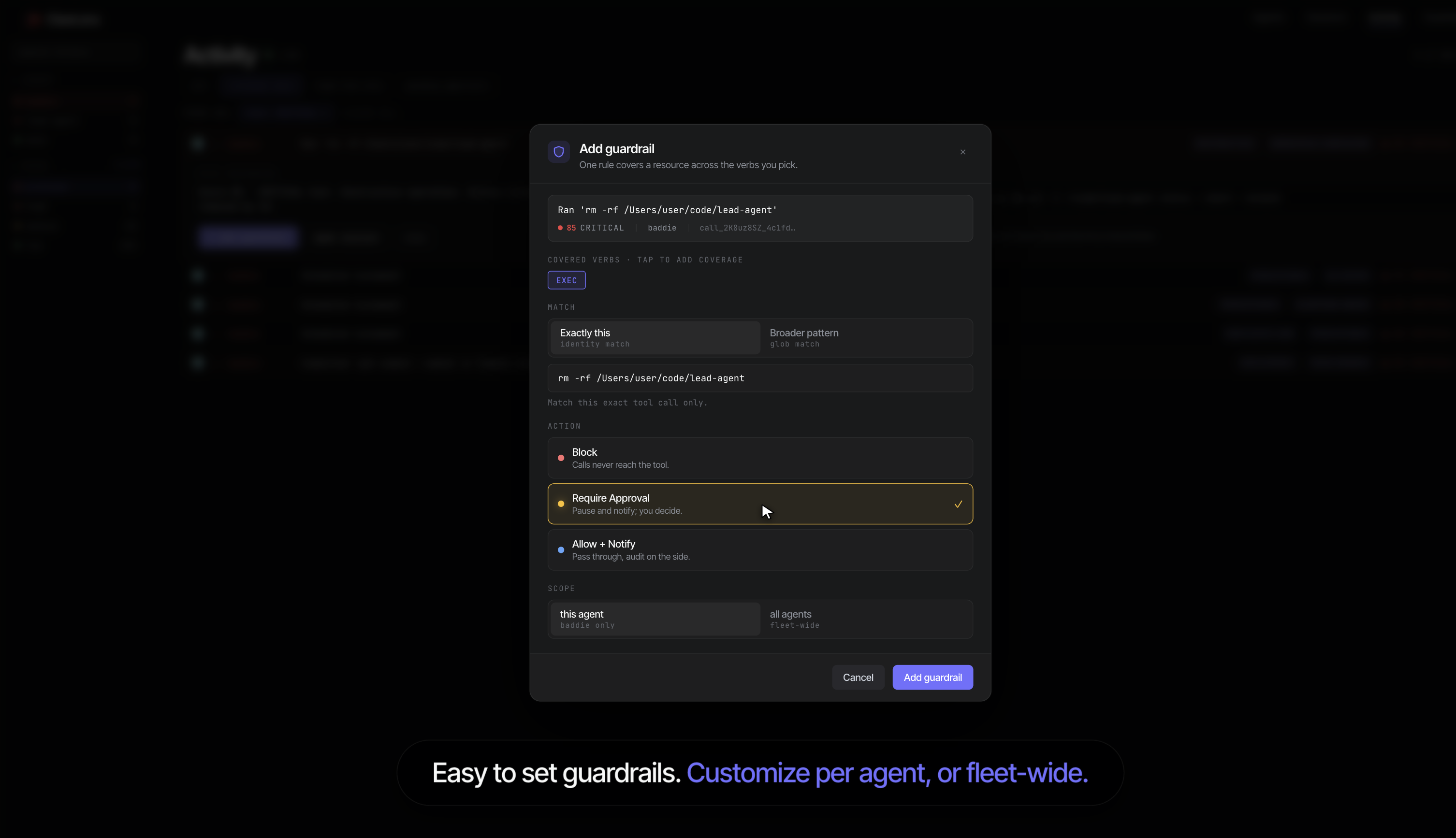
Guardrails are rules you create from real activity.
| Action | Behavior |
|---|---|
block |
Rejects matching tool calls before they run. |
require_approval |
Pauses matching calls and uses OpenClaw's configured approval flow. |
allow_notify |
Allows the call while creating local audit and Attention Inbox signals. |
Rules can match specific commands, paths, URLs, tools, agents, or broader patterns. They can apply to one agent or the whole fleet.
ClawLens is designed for local operation by default. It is still an observability plugin, so it sees tool names and tool parameters; treat its audit log like other sensitive development logs.
| Flow | Default | Leaves your machine? | Notes |
|---|---|---|---|
| Dashboard | On | No | Served by the local OpenClaw gateway. |
| Audit log | On | No | Written to ~/.openclaw/clawlens/audit.jsonl; hash-chained, not encrypted. |
| Deterministic scoring | On | No | Runs locally on tool names and params. |
| Credential redaction | On | No | Best-effort redaction before audit persistence, summaries, alerts, approval text, and opt-in LLM evaluation. |
| LLM evaluation | Off | Yes, if enabled | Sends redacted tool-call metadata to your configured OpenClaw LLM provider when risk.llmEnabled=true. |
| Generic high-risk alerts | Off | Depends on OpenClaw routing | Alert text is redacted by default. |
require_approval guardrails |
User-created only | Depends on OpenClaw approval channel | External approval channels may receive prompt text. |
allow_notify guardrails |
User-created only | No by default | Creates local audit rows and local Attention Inbox items. |
On POSIX systems, ClawLens creates the audit directory/file with owner-only permissions where supported. On Windows, audit-log access follows the parent directory's ACLs.
To remove local audit history:
rm -f ~/.openclaw/clawlens/audit.jsonlLLM evaluation is disabled unless you set risk.llmEnabled=true. When enabled, ClawLens can use your configured OpenClaw LLM provider to add context to eligible risk evaluations and generate session summaries.
When enabled, ClawLens sends a redacted JSON payload containing:
- current tool name
- redacted current tool parameters
- up to 5 recent actions with tool name, redacted parameters, and risk score
- preliminary deterministic risk score, tier, and tags
ClawLens does not read LLM API keys from environment variables and does not send LLM API keys in prompts. Provider credentials are handled by OpenClaw's model/auth runtime.
Redaction is best-effort. ClawLens removes common credential patterns before LLM evaluation, but you should still avoid placing secrets in tool parameters.
Most users do not need custom configuration. Common settings live under plugins.entries.clawlens.config in ~/.openclaw/openclaw.json.
| Setting | Default | What it controls |
|---|---|---|
auditLogPath |
~/.openclaw/clawlens/audit.jsonl |
Where ClawLens writes the JSONL audit log. |
risk.llmEnabled |
false |
Enables opt-in LLM risk evaluation and LLM-generated summaries. |
risk.llmEvalThreshold |
50 |
Score above which opt-in LLM evaluation can run when enabled. |
alerts.enabled |
false |
Enables generic high-risk alerts. If routed externally by OpenClaw, alert text may leave your machine. |
alerts.threshold |
80 |
Score above which generic high-risk alerts fire when alerts are enabled. |
alerts.includeParamValues |
false |
Includes sanitized command/path/URL details in alert messages. Credential patterns are still redacted. |
risk.llmEvalThreshold only controls opt-in LLM evaluation. It does not control guardrail matching or Attention Inbox freshness. Guardrails fire when a user-created rule matches. alerts.threshold only controls generic high-risk alerts when alerts.enabled=true.
Advanced settings and v1.0.1 migration notes
The plugin manifest also supports storage-path overrides for guardrails, attention state, saved searches, digest settings, and dashboard alert links. See openclaw.plugin.json for the full schema.
risk.llmProvider, risk.llmModel, and risk.llmApiKeyEnv are deprecated no-ops in v1.0.1. They are accepted temporarily so existing configs continue to load, but ClawLens ignores them. Remove them from your config before v1.1.0.
ClawLens complements OpenClaw's built-in security. It does not replace tool profiles, exec approvals, prompt-injection detection, OS permissions, or secret scanning.
- Guardrails enforce on OpenClaw tool calls. They do not inspect every byte inside arbitrary payloads.
- Pattern matching catches obvious risky shapes, but ClawLens is not a full shell interpreter.
- LLM evaluation can add context when explicitly enabled; deterministic local scoring remains the default.
- The audit log is tamper-evident, not encrypted or hidden from your OS user, backups, or administrators.
- Sub-agents are observed and scored, but guardrails set for a parent agent do not automatically apply to spawned children.
Does ClawLens collect telemetry?
ClawLens does not operate a cloud service, analytics pipeline, telemetry endpoint, install-ping system, or machine-ID system. Installing through npm, GitHub, or ClawHub may still create ordinary registry or download metadata outside ClawLens.
Does it block tool calls by default?
No. By default, ClawLens observes and scores. Blocking only happens after you create a block or require_approval guardrail.
Can I run it without any external data flow?
Yes. Keep risk.llmEnabled=false, leave alerts.enabled=false, and avoid external OpenClaw approval channels for ClawLens guardrails. The default dashboard, audit log, deterministic scoring, and local guardrail records run locally.
What does LLM evaluation cost?
Nothing by default because LLM evaluation is off. When enabled, ClawLens uses your configured OpenClaw model/auth runtime, so usage is billed according to your existing provider setup.
Can I export the audit log?
Yes. Use the dashboard export action, run openclaw clawlens audit export --format json --since 7d (or csv), or read the hash-chained JSONL at ~/.openclaw/clawlens/audit.jsonl.
What if OpenClaw blocks installation?
The standard v1.0.1 install should not require --dangerously-force-unsafe-install. If OpenClaw blocks installation, do not force it; open an issue with the full installer warning.
PRs welcome. See CONTRIBUTING.md. All changes need tests, and npm run check must pass before merge.
- Bugs: open a GitHub issue
- Security: see SECURITY.md
MIT. See LICENSE.
Built by Neelabh Kumar — AI engineer and builder.