Repository navigation
Keys and Security

On Nostr there's no "Forgot password?" button. Your account is a pair of keys, and you hold them. That's the whole point: no company can lock you out. It also means nobody can let you back in. Two minutes on this page is the best investment you'll make.
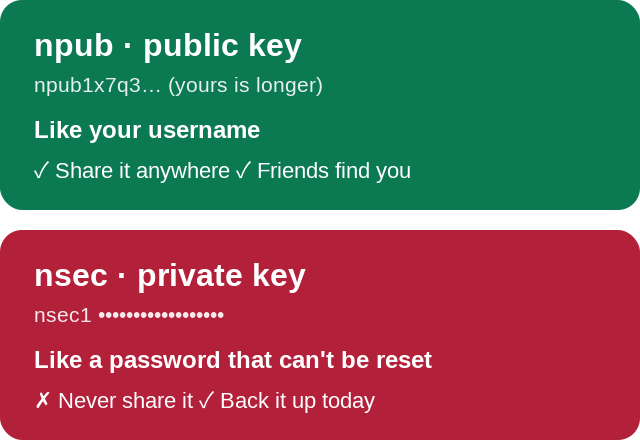
Do this the day you create your account.
-
Find your nsec. In most apps it's in Settings → Keys (or Account / Backup). It starts with
nsec1. - Save it in a password manager in an entry called "Nostr", together with your npub.
- Make a paper copy and keep it where you'd keep your passport.
Extra protection: if your app offers an encrypted backup (starts with ncryptsec1…), save it as well. It's your key locked with a password you choose, so a stolen copy is useless without that password. Keep the password somewhere separate, never on the same paper. Primal and Damus can't log in with an ncryptsec yet, so keep your plain nsec backup too.
Tip
Test your backup without logging out. Open a second app (for example jumble.social or primal.net in a browser) and log in with your backup. If your profile appears, you're safe.
Caution
If you pasted your nsec into an app, logging out deletes it from that device. Never log out, uninstall the app or reset your phone until your backup is saved and tested. (Logins through a signer aren't affected.)
Every time you paste your nsec into an app, that app holds your whole identity. A signer fixes this. Your key lives in one trusted place, and other apps ask it for permission, as in "Allow Primal to post this note?" If one of those apps is ever hacked, your key isn't in it.
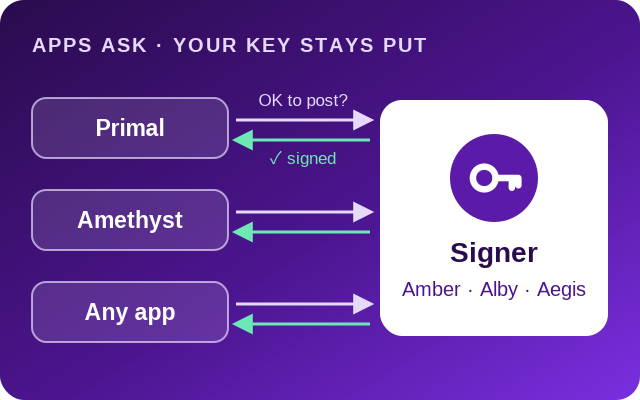
🤖 Android: Amber. Holds your key. Amethyst, Primal and many other apps have a Log in with Amber button. Free, open source and very actively developed. Get it from Zapstore or GitHub.
🌐 Computer: a browser extension. Alby (Chrome, Firefox and others; it also connects a wallet for zaps), nos2x (Chrome) or nos2x-fox (Firefox). On any Nostr website, click Log in with extension.
🍎 iPhone: Aegis (beta, via TestFlight). An Android version is on its GitHub page too. iPhone apps can't talk to each other directly, so iPhone signers work as a bunker: the app connects with a bunker://… or nostrconnect://… link or QR code. Fewer apps support this on iPhone so far.
🧑💻 Power users: run your own remote signer from the command line with nak bunker.
Starting from scratch? nstart.me creates your key, saves an encrypted backup, and can optionally set up a bunker login.
I lost my nsec
Check everywhere first: your password manager, phone notes, screenshots, emails to yourself, and the settings of every app or device that's still logged in. Any logged-in app can show you the key.
If it's truly gone, the account can't be recovered. Create a new one, follow your friends again, and tell people it's your new account. Your old posts stay up, and you can no longer delete them.
My nsec leaked, or I pasted it somewhere sketchy
A Nostr key can't be changed, so move fast:
- Make a new account, ideally with a signer this time.
- Protect your money. In your wallet, revoke every Nostr Wallet Connect connection. Move funds out of any wallet that you log into with your Nostr key. Wallets with their own recovery phrase aren't affected.
- From the old account, post a note pointing to the new npub. Do it before the attacker does, because followers trust the first post they see.
- Update your npub everywhere you've listed it: website, bio, other social media.
- Move your readable handle (NIP-05) and Lightning address to the new account.
Someone is pretending to be me, or a famous person
Anyone can copy a name and photo. Check the npub or the readable handle (name@domain), never just the display name. Report and mute the impersonator. Many apps can hide accounts outside your web of trust (people your follows follow). Turn this on in settings if it isn't already.
- "Support" DMs asking for your nsec, or for a "verification" key. Nostr has no support desk, and no real app will ever ask.
- Websites asking you to paste your nsec to "claim an airdrop", "get verified" or "recover your account".
- "You've been zapped! Claim your sats here" links.
- Giveaways and "double your sats" offers. Always fake.
- Strangers who quickly ask to move to Telegram or WhatsApp. That's a classic setup for investment and romance scams.
- Lookalike accounts replying to popular posts with links. Check the npub.
The rule: never give your nsec to a person, or to a website someone sent you. Type it only into an app you installed yourself, or a well-known Nostr site you typed in yourself (like the ones in this guide). Better still, use a signer.
- Posts, replies, likes, reposts and zaps: everyone can see them, permanently. Treat every note like a postcard.
- Your profile and follow list: public.
- Deleting a post: sends a request. Most apps and relays honour it, but copies can survive.
- Private messages in modern apps (the NIP-17 standard): the content and the sender are hidden, so outsiders can't tell who is talking to whom. The relay that stores it can still see who it's for and roughly when. Older apps can't always read these messages. See the FAQ.
- Older-style DMs (NIP-04): content is encrypted, but anyone can see who messaged whom, and when. Prefer apps that use NIP-17 for anything sensitive.
- Your IP address: visible to the relays you connect to, like any website. Use a VPN or Tor if that matters to you.
← Getting Started · Next: Apps →