Repository navigation
Mini Whiteboard V1.2 — Windows release + macOS preview

Mini Whiteboard V1.2
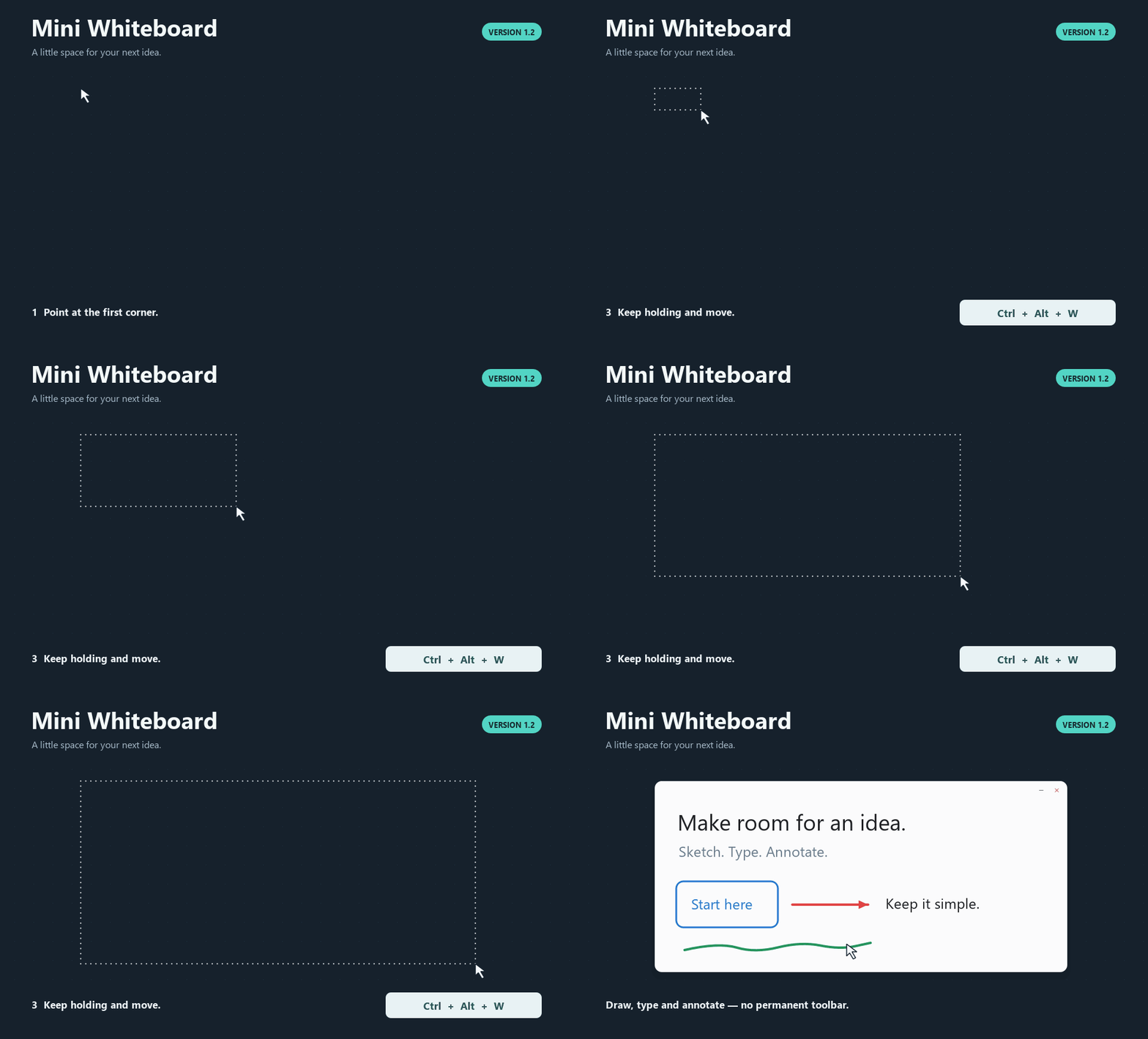
Verified Windows release with a Mac preview. Hold a shortcut, move the pointer,
and release to place a whiteboard or capture a screenshot region.
Downloads and launch
- Windows 10/11, x64:
WinMiniWhiteboardV1.2.zip. Extract it, open the
Mini Whiteboard folder, and run Mini Whiteboard.exe. Keep_internalwith it. - macOS 14+, PREVIEW:
MacMiniWhiteboardV1.2-Preview.zip. Extract on a Mac,
move Mini Whiteboard.app to Applications and open it. Interactive Mac acceptance
remains NOT RUN. The preview is ad-hoc signed and has not been notarized.
Both downloads include Python and Qt. Launch opens only a tray/menu-bar icon.
Windows is unsigned. If a trusted Mac download is blocked, use Apple's documented
Open Anyway process.
What changed
- Windows Ctrl+Alt+W/S: point at the first corner, hold, move, then release
W/S or any required modifier. W makes a board; S captures a locked screenshot
board with Draw active. No initial board, second press, click/drag or minimum hold. - Mac: Control+Option+W/S, or the existing Command+Option+Shift+W/S preset,
uses the same gesture. All four directions and negative desktop coordinates work. - Repeated activations and competing shortcuts cannot confirm/restart a hold.
Escape/menu cancellation and invalid selections clear the preview. Remaining
held S/W cannot switch the newly focused board's tool. Minimum board size stays
160 x 100 logical units; screenshots below 4 x 4 desktop units cancel. - Text wraps naturally to a stored local width, with character fallback for URLs.
Soft wraps leave plain text unchanged; Enter inserts a real newline. Editing,
committed rendering and reopening match. Moves/transforms/window resizing keep
the stored width. Tall text retains its content and follows the caret while editing. - Wrapped text hit testing avoids a Mac Qt stall from expanding every glyph's
tolerance outline. Shaped glyph outlines still provide painted/erasure geometry. - Mac CI uses a free macos-15 runner. Deployment target, Info.plist and runtime
minimum stay 14.0. No paid runner, spending or permission-policy changes. - F1/help, menus, current guides and the app-rendered placement GIF teach the new workflow.
Held-key defect investigation
The preserved V1.1 executable and source reproduced a board plus a renewed outline
under a hold with repeated key-down injections. MOD_NOREPEAT was already present;
the application accepted extra activation events as two-press confirmation/restart
and retained undersized anchors. V1.2 adds explicit hold/release latching and shared
ownership, and never restarts an invalid selection. A permanently unrecoverable
outline was not reproduced in the controlled diagnostic; later valid input recovered.
Actual verification
Release source: 08b3893.
- Windows 11 build 26200, Python 3.12.14 x64: 191 discovered, 189 passed,
2 Mac-only skips; final build gate 5.648 s. - 112 Windows native checks, 45 external-focus real input checks,
25 packaged executable checks, plus 3 native Windows wrapped-editor tests. - Windows ZIP: 174 files, all CRCs and file SHA-256 values match the verified
distribution; 17 verified dependency notice files; executable metadata 1.2. - Hosted Windows checks:
191 discovered, 189 passed, 2 skips in 5.358 s; Python 3.12.10, Windows Server 2025. - Mac CI:
191 passed in 9.471 s, repeated before packaging in 8.825 s. Actual runner:
macOS 15.7.9 arm64, Universal2 Python 3.13.15, Qt/PySide6 6.11.2,
PyInstaller 6.22.3, PyObjC 12.2.2. - Mac Universal2 bundle: 769 checks, signatures/linkage/symlinks/notices;
limited Cocoa startup 8 s, exit 0; 375 ZIP entries,dittoextraction and
full file/mode/symlink revalidation; 15 verified dependency notice files. - Both Actions artifact digests matched; the Mac-created inner ZIP was transferred
unchanged. It was never extracted/recompressed as an app on Windows. - Existing performance workloads, screenshot display cache invariants, workflow
lint, source compilation, dependency consistency and documentation links checked.
NOT RUN: interactive Mac shortcuts/releases/Escape, focus/menu/Spaces/TCC,
real Retina/multi-monitor behaviour; macOS 14 or Intel execution; physical mixed-DPI,
Windows 10/clean-machine deployment, hand-operated IME/context menus and extended use.
Universal2 structural validation does not establish execution on Intel or macOS 14.
SHA-256
| Package | Bytes | SHA-256 |
|---|---|---|
| WinMiniWhiteboardV1.2.zip | 37,781,414 | ced6df9c1fce90fa62bf24f7b0b1b1e1f079ddd61da1ae3082755ced97fc65d8 |
| MacMiniWhiteboardV1.2-Preview.zip | 56,424,554 | 35a0937ddf393b3d8c25305a4cca3258ba292cacb7cd0381d00be9881ffd2d40 |
SHA256SUMS.txt also covers the separate dependency-notice ZIP and the exact
Qt/PySide/PyObjC source archives attached below. Both app packages contain the
licenses and notice-hash manifests. Mini Whiteboard's own source is MIT licensed.
V1.1 and its assets remain intact. Placement demo