Repository navigation
Releases
Mini Whiteboard V1.3.6 — early tester release

An early tester prerelease, using the unchanged V1.3.6 review-02 packages.
V1.3.4 HotkeyPatch
remains the default stable release.
Downloads
- Recommended Windows download: MiniWhiteboard-1.3.6-Setup.exe
- Windows portable: WinMiniWhiteboardV1.3.6.zip
- Mac Universal2 Preview: MacMiniWhiteboardV1.3.6-Preview.zip — macOS 14+, arm64/x86_64 bundle; interactive Mac acceptance is NOT RUN.
- SHA256SUMS.txt
Python and Qt are included. Windows is unsigned. Mac is ad-hoc signed and not
notarized. Publisher warnings and managed-device policies may affect installation;
this release does not establish acceptance by school policies or Smart App Control.
Floating tools and updates
Enable tray/menu bar → Settings → Show floating tools. The compact toolbar is
optional, starts off and follows the active board. Tap to choose a tool; hold or
right-click for options; drag the dotted grip to move it. Placement adjusts above,
below or inside the board. The review-02 controls include outlined colour swatches
and compact semibold option headings.
On Windows, hold Ctrl+Win+Shift+W, move to the opposite corner and release to
create a board; use Ctrl+Win+Shift+Q for a screenshot. Existing saved shortcuts
remain unchanged. Settings → Hotkeys → Reset Defaults → Apply selects the defaults.
Close Mini Whiteboard before updating. Running Setup replaces the registered
installed copy in its existing directory. Portable users must close the old
copy and replace its complete application folder manually. Setup does not remove
separate portable folders or old downloaded ZIPs. On Mac, quit and replace
Mini Whiteboard.app in Applications. The complete HotkeyPatch-to-V1.3.6 client
upgrade/rollback/reinstall/uninstall sequence remains incompletely tested.
Drawing previews avoid rebuilding and retaining each growing stroke path.
A matched synthetic 1,920-point White-board workload reduced p95 paint work from
12.50 ms to 0.72 ms, while release-and-paint cost rose from 6.07 ms to 12.49 ms.
These are processing measurements on unchanged review-01 drawing code, not new
review-02 measurements, physical pen latency or a display-FPS guarantee.
Verification and known limitations
- Review-02 automated suites: 355 Windows tests passed, 2 Mac-only skips;
356 Mac tests passed, 1 Windows-only skip. Package inventories, ZIP CRCs,
source matching and dependency notices passed (18 Windows / 16 Mac notices). - Windows client results use a hosted Windows 11 ARM64 VM with x64 emulation,
Hyper-V graphics and Test Mode. Completed checks include genuine Edge download,
Explorer extraction withZoneId=3, fresh wizard installation, Shell launch,
873 default and 337 custom shortcut assertions, 47 editing checks, and 17 toolbar
checks on each of two backgrounds. These do not establish complete client acceptance. - Glass remains grey on the tested client, including the matched V1.3.4
HotkeyPatch comparison. Its cause is unresolved. Appearance → White provides
the verified opaque appearance. Source-only forced fallback was readable;
the frozen executable did not select it automatically. - One editable-clipboard case remains unresolved: 22/23 pending-creation and
8/8 pointer-motion cases passed. All 28 saved exported PNGs matched expected
pixels, but one following capture did not yield its editable MIME payload. - Client tray/settings/exit, HotkeyPatch upgrade/rollback/reinstall/uninstall
and Protection History UI acceptance remain incomplete. Several bounded
follow-ups stalled without final runtime artifacts; their cause is not established. - Completed protected periods retained active Defender, including real-time,
behaviour, downloaded-file and cloud protection. A separate editing VM recorded
Trojan:Win32/Gracing.Iagainst a temporaryprovjobdprocess/file. Attribution
is unresolved: it is not established as a Mini Whiteboard detection or harmless.
Its recorded application payload hashes were unchanged. No protection was
weakened and no quarantined file was restored. - NOT RUN: native Windows 11 x64/Windows 10 client acceptance, real pen,
physical mixed-DPI/multiple-monitor and hardware-latency checks, Smart App Control
On and school-managed policy acceptance; interactive Mac, macOS 14 and Intel execution. - Actual Windows sign-in is NOT RUN (not tested) under the existing waiver.
Startup registration and controlled launches were tested separately.
Microsoft review
For the exact Windows EXE identified below, Microsoft's completed written analyst
response reported no positive scanner or telemetry indicators and closed the
case without further action. This written response supplies the Microsoft review
for this early tester release.
Submission 1804af5a-568e-4420-bcaa-ea1161006797 still displayed Completed for
the case and Pending for the file-level final determination when rechecked on
8 November 2026. Cloud and client current-detection fields said No malware
detected (definition 1.463.174.0), while protection icons/tooltips contradicted
those fields. No definitive “Not malware” classification is claimed for V1.3.6.
The earlier V1.3.4 determination applies only to its own submitted hash. The cause
of the originally reported quarantine remains unresolved.
Source and checksums
Frozen package source:
b4b9d276efb484512978449d216bfa4a253ef2d9.
Later release commits change diagnostics and documentation; application/build
source remains identical. The Windows installer and portable ZIP contain the same
EXE, SHA-256 39ff0141dc7ddd27c8f6da668bf5ceea1dedc4474f7e24ab3affb93ef5d33f16.
| File | SHA-256 |
|---|---|
| MiniWhiteboard-1.3.6-Setup.exe | 0a504f7f76a878c4de548365abdfdbcdd4e07a8045d79c355393490affd0fef9 |
| WinMiniWhiteboardV1.3.6.zip | f7340c841f7913b90c649693891cf76712ed6e2405e9b75cca28e51e2b4e11ef |
| MacMiniWhiteboardV1.3.6-Preview.zip | b3a72be38dd78ec8ef39e454f65bf65492f182729965baca3f13196381e55f8e |
Detailed verification and measurement scope,
development and rebuild instructions,
and dependency sources and notices
remain available with the source. Windows and Mac packages include the required dependency notices.
Mini Whiteboard V1.3.4 — Windows release + Mac Universal2 Preview
V1.3.4 hotkey patch — 29 October 2026
Windows defaults are now Ctrl+Win+Shift+W for a whiteboard and Ctrl+Win+Shift+Q for capture. Hold → move → release is unchanged. The app version remains 1.3.4.
- Windows installer — recommended hotkey patch
- Windows portable ZIP — hotkey patch
- Mac Universal2 Preview — unchanged, macOS 14+
Saved custom shortcuts are preserved. To adopt the new defaults, choose Settings → Hotkeys → Reset Defaults → Apply. Close the app before running the patched installer; it replaces the installed copy even though the version number stays the same.
Automated suite: 321 discovered; Windows 319 passed with two Mac-only skips; Mac all 321 passed. Hosted Windows CI tested the new defaults, compatibility and custom chords in its build of the same application source. Published Windows files retain the original V1.3.4 bundled runtime. Local desktop testing of the published patch: NOT RUN, as requested. Actual Windows sign-in remains NOT RUN (not tested) under the existing waiver. Other documented platform limits remain; Windows is unsigned and Mac is ad-hoc signed, not notarized.
Patch source · Patch checksums · Patch verification.
Original V1.3.4 notes and downloads
Downloads
| Download | Platform |
|---|---|
| Windows installer — recommended | Windows 10/11 x64; run Setup to replace an installed copy |
| Windows portable ZIP | Windows 10/11 x64; extract and keep the whole folder |
| Mac Universal2 Preview ZIP | macOS 14+; arm64 and x86_64 bundle; interactive acceptance NOT RUN |
Windows is unsigned. Mac is ad-hoc signed and not notarized.
Checksums, dependency notices and corresponding source archives are attached below. Verification receipt.
Changes and verification
Published 29 October 2026.
Windows installer recommended; portable ZIP also available. Mac remains
Universal2 Preview, macOS 14+.
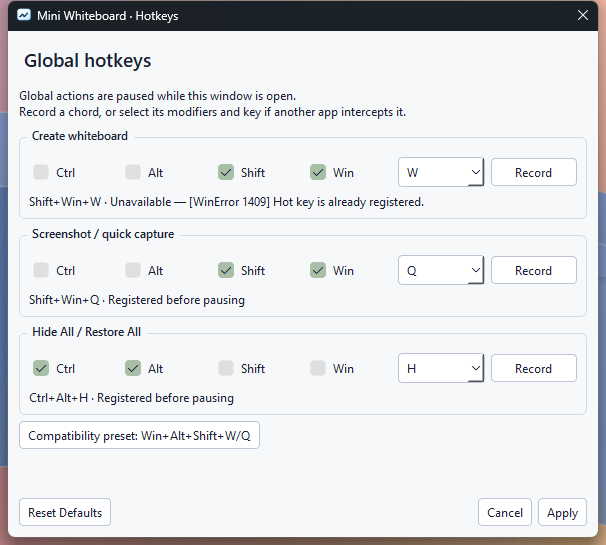
- Windows defaults are Shift+Win+W for a blank board and Shift+Win+Q for
capture. Hold, move the pointer, then release the trigger or any required modifier.
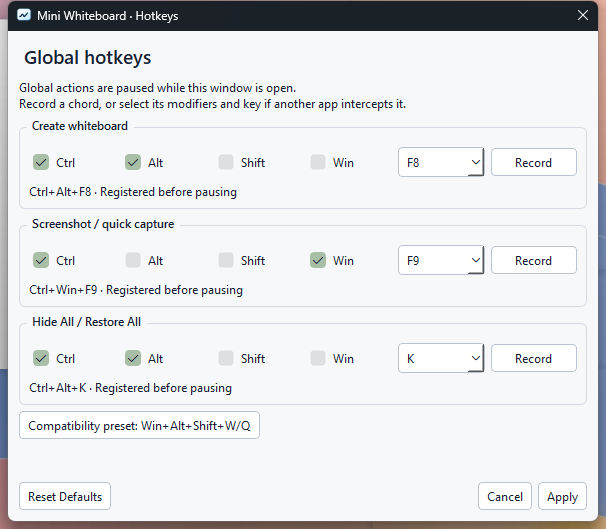
The existing Hide All choice and Mac defaults/alternate preset are retained. - Settings → Hotkeys records or manually selects independent create, capture
and Hide All chords. Apply validates and registers before saving; failed changes
restore working bindings and identify the failure. Cancel preserves the previous
configuration. Reset Defaults edits the fields until Apply is chosen.
Global actions pause while the dialog is open. An explicit Windows compatibility
preset offers the released Win+Alt+Shift+W/Q pair. - Conflicts leave other actions working and provide access to Settings. Menus,
help and status follow the configured chords. Windows-reserved Ctrl+Esc and
Ctrl+Shift+Esc are not overridden; unavailable cancellation chords are reported,
with tray-menu cancellation available. - Running the newer Windows installer replaces the existing installation under
the same identity. Setup verifies a staged replacement and backs up replaced
files before copying. Obsolete files are removed only when validated ownership
and original hashes match. Preferences, custom hotkeys, startup choices and
unrelated files survive. Setup/uninstall still require the app to be closed. - For portable updates, close the old copy and replace its whole application
folder. On Mac, quit and replace the app in Applications. The README downloads,
demo and settings screenshots now show the current release.
Verification
All three application packages use source
7c12b7f.
Windows CI
and Mac CI
passed. Later documentation, demo generation and diagnostic-label changes do not
alter the verified application packages.
| Check | Actual result |
|---|---|
| Complete automated suite | 321 discovered. Local Windows and Windows CI: 319 passed, two Mac-only skips. Mac: all 321 passed twice |
| Default Windows shortcuts | Shift+Win+W returned native registration error 1409 locally and in Windows CI. Positive default-W creation is NOT RUN (not tested). Shift+Win+Q capture passed; 171 final-executable default-profile checks cover the available action and conflict reporting |
| Custom shortcuts and recovery | Real Settings recording/manual selection applied Ctrl+Alt+F8 creation, Ctrl+Win+F9 capture and Ctrl+Alt+K Hide/Restore. Blank-board creation after the default conflict, capture and repeated-key-safe Hide/Restore passed. The separate custom creation matrix passed 337 checks locally and in CI |
| Compatibility and gesture cleanup | 572 source and 873 final-executable checks passed locally and in CI. Left/right modifiers, modifier-release order, repeats, Escape, rapid consecutive gestures and zero-area cancellation passed. External text/menu state remained unchanged; no unexpected foreground activation or stuck previews/keys |
| Selection, text and appearance | 41 pointer, 24 textbox, 15 appearance, 49 material and 177 surface checks passed. Final executable: 36 general plus 99 per White/Glass theme, including wrapping/completion, undo/redo, controls, clean screenshot/clipboard pixels and corner click-through |
| Lifecycle and installation | 111 general checks and 63 for each saved Hide All choice passed. Installer: 46 checks covering a real V1.3.3 upgrade, repeated setup, running-app refusal, pre-copy failure, mid-copy rollback and a launch of the restored old runtime. Obsolete owned files were removed; modified/unrelated files, hotkeys and startup-disable state survived. Portable: nine checks passed |
| Package integrity | Windows: 201 runtime files including the payload manifest, 162 frozen modules and 18 notice files. Mac: Universal2, macOS 14 minimum, 825 bundle checks before and after extraction, 16 notice files, 404 ZIP entries and eight-second Cocoa startup. Metadata, CRCs, file hashes, dependency notices and OCR absence passed |
| Supporting checks | Dependency consistency, compilation, workflow lint and local documentation references passed. The Mac ZIP is transferred unchanged; SHA-256 values and the verification receipt accompany the release |
The general native check separately records unavailable default-W registration.
The default is retained as requested; no automatic compatibility fallback or OS
shortcut takeover occurs. Current Windows checks used build 26200 x64 and one
1920 × 1080 display at 100% physical scaling. Unchanged rendering/selection code
retains prior 125–200% application-scale and performance evidence; these are not
physical mixed-DPI checks.
Installer acceptance used silent setup and the production startup service.
Unchanged wizard/startup-menu coverage is retained from V1.3.2. Temporary
preferences, links and startup registrations were restored. Packaged tray-menu
access used the real Qt notification callback, not a physical taskbar-icon click.
Capture-service failure was injected in the source check only; the released
executable contains no test-only capture-failure switch.
Final hotkey settings and conflict recovery
Acceptance limits
Automatic launch during actual Windows sign-in: NOT RUN (not tested).
Startup registration, controlled command launches, external-disable preservation
and manual/login overlap were tested. The existing release-gate waiver remains.
Other NOT RUN checks: positive Shift+Win+W creation where registration is
blocked; interactive Mac appearance, menu-bar/global shortcuts, capture permissions,
login registration/approval and real login; macOS 14 and Intel execution; Spaces,
Mission Control, Stage Manager and physical Retina/multi-monitor acceptance.
Windows clean-machine execution with Python uninstalled, Windows 10,
quarantined-download/SmartScreen acceptance, physical negative-coordinate and
mixed-DPI transitions, actual OS high-contrast/reduced-transparency transitions,
extended IME/RTL and long-session ergonomics remain untested.
Windows is unsigned. Mac is ad-hoc signed and not notarized. CI bundle validation
and limited startup do not establish interactive Mac acceptance.
Mini Whiteboard V1.3.3 — Windows release + Mac Universal2 Preview
Downloads
| Download | Platform |
|---|---|
| Windows installer — recommended | Windows 10/11 x64; per-user setup |
| Windows portable ZIP | Windows 10/11 x64; extract and keep the whole folder |
| Mac Universal2 Preview ZIP | macOS 14+; arm64 and x86_64 bundle; interactive acceptance NOT RUN |
Windows is unsigned. Mac is ad-hoc signed and not notarized.
Checksums, verification results, dependency notices and corresponding source archives are attached below.
Verification files: use the final verification receipt and final checksums. The first receipt had an incorrect top-level version label. The corrected receipt supersedes it; application downloads, hashes and test results are unchanged. Earlier uploaded files are retained.
Changes and verification
Published 29 October 2026.
Windows installer recommended; portable ZIP also available. Mac remains
Universal2 Preview, macOS 14+.
- Windows creation shortcuts are Win+Alt+Shift+W for a blank board and
Win+Alt+Shift+Q for screenshot capture. Hold, move the pointer, then release.
Either left or right Win/Alt/Shift works. Mac shortcuts and the saved Windows
Hide All choice are unchanged. Shortcut conflicts remain visible in the tray
with a retry action; working shortcuts stay registered. - Window controls have 20 × 20 logical-pixel surfaces and separate 24 × 24 hit
targets. Screenshot content reaches the rounded boundary without a white header
or exposed backing. Cached local samples provide frost behind the controls. - Transient feedback is smaller, wraps within small boards, remains click-through
and respects reduced motion/transparency and high contrast. - Visible content takes priority during selection. Text line spans replace the
invisible full-width textbox hit area. Clicking or dragging another object
inside the current selection frame selects and moves the intended object.
Editor dismissal still consumes its outside click.
Verification
All three application packages use source
486e18e.
Windows CI
and Mac CI
passed. Later documentation changes do not alter the verified packages.
| Check | Actual result |
|---|---|
| Complete automated suite | 302 discovered. Local Windows and Windows CI: 300 passed, two Mac-only skips. Mac: all 302 passed twice |
| Native Windows shortcuts | 572 source checks and 873 final-executable checks passed locally and in Windows CI. Both W and Q created boards through real key input; local Game Bar remained running |
| Packaged gestures | 70 creations across left/right modifiers, every required key released first, four drag directions, held repeats and rapid consecutive releases. Escape and zero-area cancellation passed; no unexpected foreground activation, external text/menu change or stuck keys/previews |
| Selection, text and appearance | 41 pointer, 24 textbox, 15 appearance, 49 material and 177 surface checks passed. Packaged checks: 36 general plus 99 per White/Glass theme, including adjacent notes, prior selection frames, undo/redo, controls, feedback and clean clipboard pixels |
| Lifecycle and startup | 111 general checks and 63 checks for each Hide All choice passed. Installer: 33 checks, including Unicode installation, V1.3.2 upgrade, preferences, external startup disable, open-board protection and uninstall. Portable: nine checks, including launch with Python absent from PATH and controlled login overlap |
| Package integrity | Windows: 200 runtime files, 160 frozen modules, 18 notices. Mac: Universal2, macOS 14 minimum, 825 bundle checks before and after extraction, 16 notices, 404 ZIP entries and eight-second Cocoa startup. Metadata, archive CRCs, file hashes and OCR absence passed |
| Supporting checks | Dependency consistency, compilation, workflow lint and local documentation references passed. Actual native W/Q preview captures and package hashes are retained with verification evidence |
Capture-service failure was injected in the source native Q check; cleanup and
recovery through the next native gesture passed. The shipped app has no test-only
failure switch. Negative-coordinate geometry has automated coverage; physical
negative-coordinate monitors were unavailable.
Windows checks used build 26200 x64 and one 1920 × 1080 display at 100% physical
scaling. Unchanged rendering/selection code retains the previous candidate's
125–200% application-scale and performance evidence. These are not physical
mixed-DPI checks. Current installer checks used silent setup and the production
startup service; unchanged wizard/menu coverage is retained from V1.3.2.
Temporary settings, shortcuts and startup values were restored. Packaged tray
restore used the real Qt notification callback, not a physical taskbar-icon click.
Acceptance limits
Automatic launch during actual Windows sign-in: NOT RUN (not tested).
Startup registration, controlled command launches, external-disable preservation
and manual/login overlap were tested. They do not establish automatic launch at
sign-in; the existing release-gate waiver remains in effect.
Other NOT RUN checks: interactive Mac appearance, menu-bar/global shortcuts,
capture permissions, login registration/approval and real login; macOS 14 and
Intel execution; Spaces, Mission Control, Stage Manager and physical Retina/
multi-monitor acceptance. Windows clean-machine execution with Python uninstalled,
Windows 10, quarantined-download/SmartScreen acceptance, physical negative-coordinate
and mixed-DPI transitions, actual OS high-contrast/reduced-transparency transitions,
extended IME/RTL and long-session ergonomics remain untested.
Windows is unsigned. Mac is ad-hoc signed and not notarized. Mac CI startup and
bundle validation do not establish interactive acceptance under that signature.
Mini Whiteboard V1.3.2 — Windows release + Mac Universal2 Preview
Downloads
| Download | Platform |
|---|---|
| Windows installer — recommended | Windows 10/11 x64; per-user setup |
| Windows portable ZIP | Windows 10/11 x64; extract and keep the whole folder |
| Mac Universal2 Preview ZIP | macOS 14+; arm64 and x86_64 bundle; interactive acceptance NOT RUN |
Windows is unsigned. Mac is ad-hoc signed and not notarized.
Checksums, verification results, dependency notices and corresponding source archives are attached below.
Changes and verification
Published 22 October 2026.
Stable Windows release with a recommended installer and a clearly labelled
Mac Universal2 Preview download.
- Adds a recommended per-user Windows installer with a Start menu shortcut,
optional desktop shortcut and normal uninstall. The complete portable ZIP is
also available. Setup and uninstall refuse to proceed while the app is running. - Adds a glass whiteboard and pen icon throughout setup, shortcuts, the executable,
Mac bundle and About. Tray/menu-bar symbols use a simpler matching silhouette;
Windows follows system appearance and Mac uses a native template image. - Adds Open at login, off by default, to the tray/menu-bar menu. Explicit choices
use Windows per-user Run registration or macOS SMAppService. The menu reflects
registration, external disables, approval requirements and errors.
Turn off Open at login removes the app's registration when startup is
disabled externally or OS approval is pending. - Manual launches and controlled launches of the registered startup command stay
quiet. Windows updates retain preferences
and startup choice; uninstall removes the registration belonging to that copy. - Smooths rounded board edges, aligns themed window controls and adds glass
previews to both hold → move → release placement modes. Boundary artwork,
captures and temporary text editors follow the same antialiased clip.
Verification
All three released application packages use source
04d9627.
Windows CI
and Mac CI
passed for that revision. Subsequent documentation changes do not alter the packages.
| Check | Actual result |
|---|---|
| Full automated suite | 280 discovered. Local Windows and Windows CI: 278 passed plus two Mac-only skips. Mac: all 280 passed twice |
| Windows native | 111 general, 59 hotkey/focus, 24 textbox, 15 appearance and 49 material/state/motion checks passed |
| Installer | 50 checks passed: fresh non-elevated Unicode installation, all 200 runtime-file hashes, 18 notices, Start/optional desktop shortcuts, repeat/upgrade, preferences, startup choices, open-board protection and uninstall cleanup |
| Startup wording | The real packaged menu showed Turn off Open at login, the ordinary checkbox, OS status and settings action. The renamed action removed the owned command and externally disabled approval record. Isolated tests cover Mac pending approval and registration errors |
| Portable ZIP | Nine checks passed after extraction into a permanent Unicode path: CRC/file hashes, quiet launch with Python absent from PATH, default-off/explicit registration/removal, and manual/login duplicate launches preserving the external foreground |
| Final executable | 36 package checks and 38 supplementary native checks per theme passed; text completion/wrapping, undo/redo, Hide/Restore, placement and original screenshot pixels passed |
| Edges and input | 177 native assertions passed at each of five application scales, including delivery through transparent corners to a separate process and all four screenshot directions |
| Retained text | Three font/layout/glyph/clipboard fixtures, including 24,000 wrapped Unicode characters, matched the previous approved candidate exactly |
| Windows archive | 200 runtime files, 159 frozen modules; all CRC/file SHA-256 values and 18 notice hashes verified; consistent 1.3.2/1.3.2.0 metadata |
| Mac archive | Universal2, macOS 14 minimum, macos-15 CI; 825 bundle checks before and after extraction, 16 notices, 404 ZIP entries, eight-second Cocoa startup and normal exit passed |
| Other checks | Dependency consistency, compilation, workflow lint, local documentation references and OCR absence checks passed |
Windows checks used build 26200 x64 and one 1920 × 1080 display at 100% physical
scaling. Fractional runs changed application DPR only. The native H checks used
the saved Ctrl+Alt+Shift+H alternative because Ctrl+Alt+H is occupied on this PC.
Enabled-motion checks injected a policy in the test process. Installer and
portable tests restored their controlled registry values, shortcuts and preferences.
The upgrade fixture wrapped the preserved V1.3.1 portable bundle in a test installer.
Acceptance limits
Windows automatic launch during actual sign-in: NOT RUN (not tested).
Startup registration, external-disable handling, removal, persistence, controlled
launches of the registered command and manual/login instance overlap were tested.
Those checks do not establish automatic launch during a real Windows sign-in.
Other NOT RUN checks: interactive Mac appearance, menu-bar icon, global
shortcuts, capture permissions, login registration/approval or real login; macOS
14 and Intel execution; Spaces, Mission Control, Stage Manager and physical
Retina/multi-monitor acceptance. Windows clean-machine execution without Python,
Windows 10, downloaded/quarantined installation, physical mixed-DPI transitions
and extended IME/RTL or long-session ergonomics are also untested.
Windows is unsigned. Mac is ad-hoc signed and not notarized; CI startup and
bundle validation do not establish interactive acceptance under that signature.
Mini Whiteboard V1.3.1 — Windows release + Mac preview
Downloads
Stable Windows release with a Mac preview download.
- Windows 10/11 x64: extract the ZIP, then run Mini Whiteboard.exe inside the Mini Whiteboard folder. Keep the entire folder together. Python is included.
- Mac preview, macOS 14+: extract on a Mac and move Mini Whiteboard.app to Applications. The Universal2 bundle contains Apple Silicon and Intel slices. Interactive Mac acceptance, macOS 14 execution and Intel execution are NOT RUN; architecture validation and automated startup do not establish those results.
Windows is unsigned. The Mac preview is ad-hoc signed and not notarized. For a trusted Mac download blocked by Gatekeeper, follow Apple's Open Anyway instructions.
Changes
- Refined optional Glass with a continuous rounded native backdrop, one light-catching rim, clearer typography and roomier temporary menus. Windows material now updates correctly when the desktop background changes while a popup opens. White remains the default appearance.
- Reworked F1 help into two columns where space permits, with a scrolling layout on smaller desktops and the chosen Hide All shortcut shown.
- Added a restrained 140 ms edge highlight for Glass creation, restore and temporary surfaces. Reduced motion suppresses it; repeated native notifications cannot replay it. Artwork keeps its geometry, colours and opacity.
- Removed OCR / Extract Text, its engine, language data and exclusive dependencies.
- Added a saved Windows Hide All shortcut choice: Ctrl+Alt+H or Ctrl+Alt+Shift+H. A conflict preserves the placement and screenshot shortcuts. Hide All restore preserves the foreground application.
- Fixed focus when a textbox opens immediately after placement. Outside textbox clicks finish editing and deselect without starting another tool action. Text metrics, clipboard, masks, history and hold → move → release placement remain covered by regressions.
Glass uses native frost and static shading. It is a Liquid Glass-inspired approximation without optical refraction. Unsupported effects, reduced transparency and high contrast use solid fallbacks. Mac system menus keep their native appearance.
Verification
Both runtime archives are the exact approved review files, built from 8d0f10a69e9a239a12fdbf80bf561cc8690b8773. The release tag adds documentation changes only.
- Windows CI: 242 tests passed, two Mac-only skips. Native Windows 11 checks covered placement/lifecycle, shortcuts/focus, editing, rounded geometry, material updates and packaged operation.
- Mac CI: all 244 tests passed twice on macOS 15.7.9 Apple Silicon. Universal2/linkage/signature/symlink/metadata checks passed before and after Mac-created archive extraction; eight-second Cocoa startup and normal exit passed.
- Both packages passed notice, CRC and SHA-256 checks and contain no removed OCR payload. The Mac ZIP was transferred unchanged from the Mac builder.
- Detailed release verification and performance results and the testing guide record actual results and limits.
Checks not run: interactive Mac appearance, shortcuts, focus, Screen Recording permissions/capture, Spaces and Retina/multi-monitor behaviour; macOS 14 and Intel execution; Windows 10, clean-machine/security acceptance, physical mixed-DPI displays and extended manual IME/RTL/handle usability. Mac animation/performance was not measured. Enabled Windows motion was checked with a test-process policy injection while the OS motion setting remained disabled.
Checksums and sources
- Windows ZIP SHA-256:
9cbebd8f864430637e659c47a76227c988ef9d3c75fb6e5e285dc7d55c466b60 - Mac preview ZIP SHA-256:
caefb39d524e3102685209fcdf7c016ffaa4f35e28c5d74fa48c2972df33c392
SHA256SUMS.txt covers all attached runtime, notice and dependency-source files. Each app includes its dependency notices and source/rebuild guide; a separate notice archive and the five retained exact dependency-source archives are attached here. Mini Whiteboard's own code/assets use MIT. See third-party notices and rebuilding/replacing dependencies. Historical releases and assets remain available.
Mini Whiteboard V1.3 — Windows release + macOS preview
Mini Whiteboard V1.3
Windows release · macOS preview. Extract the Windows ZIP and keep its runtime folder together. On Mac, extract the preview and move Mini Whiteboard.app to Applications.
Changes
- An outside click now finishes and deselects any textbox. That click cannot create another editor or start a tool; use a separate next click. Blank drafts preserve redo/history; clearing existing text is one undoable deletion.
- Saved Appearance → White / Glass. White stays the default. Windows 11 build 22621+ uses DWM Acrylic behind opaque artwork; macOS uses NSVisualEffectView. Windows 10, unavailable effects, reduced transparency and high contrast use a readable solid fallback.
- Brief 140 ms top-edge emphasis and feedback fades respect reduced motion. Hide All is immediate; there is no idle animation or desktop-capture loop.
- Extract Text… from an existing image or locked screenshot. Review/correct, then explicitly Copy or Insert as Text. English OCR is offline: bundled Tesseract 5.5.3 on Windows, system Vision on Mac. Original pixels, masks and locks are preserved. Insertion is one undo action; recognition alone changes neither document nor clipboard.
- Ctrl+Alt+H on Windows / Control+Option+H on Mac toggles Hide All / Restore All. Restore returns only the recorded visible batch without taking foreground focus. Previously minimized boards remain hidden. Mac's alternate preset includes Command+Option+Shift+H; normal Command+H remains unchanged.
- OCR is bounded to one worker process plus one queued request, 20 seconds per job, 16 million source pixels / 32 MiB PNG input and 100,000 output characters. Display transforms are rectified to original pixels; masks/creation clips, transparency and dark backgrounds are handled before recognition. Hiding, closing, cancelling or changing the source invalidates results.
Verification
- Windows: 236 automated tests discovered; 234 passed, two Mac-only symlink skips. Native checks cover W/S, text dismissal, windows/tools, real Glass and focus. The final executable passed 35 packaged checks and exact clean/dark/transparent OCR with restricted PATH, an invalid external data directory, Unicode/space paths and a Python socket audit guard.
- The machine already has Ctrl+Alt+H registered by another application (error 1409). The real conflict path retains W/S. Native H dispatch, repeat suppression and nonactivating restore passed using a temporary Ctrl+Alt+Shift+H test binding. The shipped binding remains Ctrl+Alt+H.
- Actual Windows captures confirmed background-dependent native frost and opaque exact ink. Thirty theme/hide cycles and six repeated OCR jobs returned to unchanged GDI/user counts; OCR completion left history and clipboard unchanged.
- Baseline V1.2.1 → V1.3, same Windows setup: median startup to tray 275.6 → 282.9 ms (five samples); working set 53.2 → 56.8 MiB. Both recorded 0 CPU seconds during separate 60-second idle samples. In 28 annotation fixtures (blank, 1080p, 1440p and 4K), median of event medians was 1.303 → 1.252 ms; worst p95 4.586 → 2.974 ms. No screenshot-source decode/repaint calls occurred during annotation, and each screenshot cache built once. These are processing timings, not display FPS.
- A 24,400-character wrapped-text hit path retained bounded work (median 0.046 ms). A 24.9 MB noisy 4K OCR input remained cancellable; the maximum measured GUI heartbeat gap was 77.7 ms.
- macOS 15.7.9 arm64 CI: full tests, imports, Universal2 bundle/linkage/signature/symlink/notices checks, limited startup, exact source/frozen Vision OCR, ditto creation/extraction and revalidation. Minimum deployment remains macOS 14.0.
Limits and checks not run
The Windows app is unsigned; the Mac preview is ad-hoc signed, not notarized. OCR can misread handwriting, small text or complex layouts; review results. Only English is guaranteed. Documents are session-only.
NOT RUN: interactive Mac Glass, shortcuts/focus, Screen Recording permission prompts, Spaces, Retina/physical multi-monitor acceptance; execution on macOS 14 or Intel hardware; Windows 10, clean-machine disconnected deployment and physical mixed-DPI testing. Restricted-path/socket-guard diagnostics are separate from a clean offline machine.
Both ZIPs include required notices. Separate dependency notices, corresponding OCR sources/build recipes, exact Qt/PySide/PyObjC sources and SHA256SUMS accompany this release. Earlier releases and repository visibility are preserved.
Release source: 60e8f1534aef4870d3694482cc9f4d6032d1ed59.
Mini Whiteboard V1.2.1 — Windows release + macOS preview
Mini Whiteboard V1.2.1
Windows bug-fix release with a clearly labelled macOS 14+ preview.
What changed
- Blank textbox dismissal: an outside press previously finished the editor
and then reached the active Text tool, creating another blank editor. Empty
and whitespace-only drafts now dismiss without starting a canvas action,
adding history or clearing redo. A separate next click immediately creates text. - Clearing existing text removes it in one undoable operation, restoring its exact
content, width, transforms, masks, colour and stacking on undo. - Old editor callbacks cannot close a replacement session. Single/double-click
dismissal follows one input owner. Meaningful Text-mode continuation still
commits and starts/edits the next textbox with one click, including a panned view;
that press cannot activate an old transform handle. - Editor context menus remain usable while embedded in the transformed view.
Closing their menu with an outside click restores editor focus. Palette dismissal
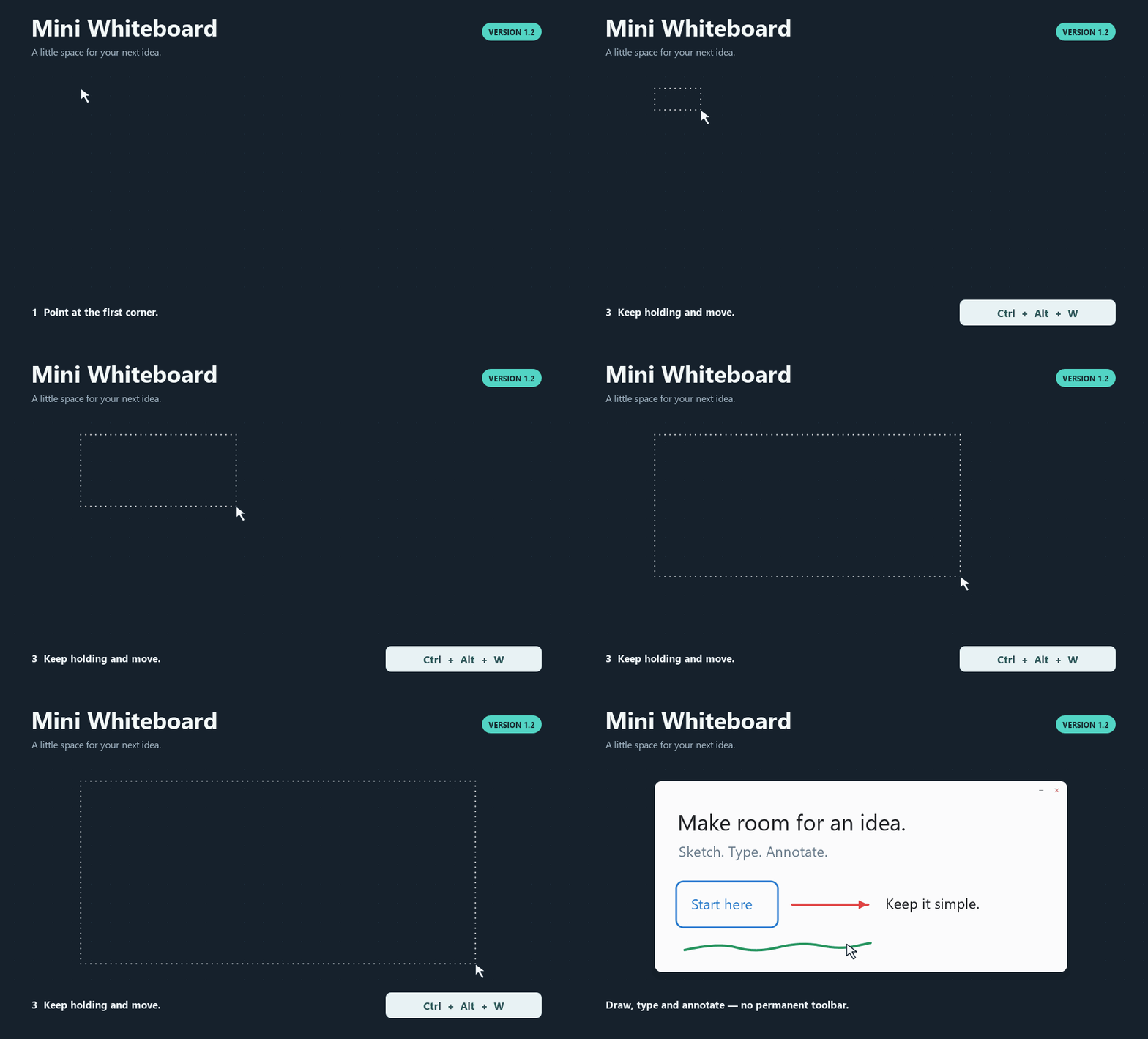
no longer replays a click into text creation or another canvas tool. - Escape detection resets for a fresh global hold after idle. V1.2 hold → move →
release creation, repeat protection, wrapped text and screenshot caching remain. - Documentation is consolidated into usage, contribution, release, testing and
dependency/source guides.
Downloads
| Package | Installation |
|---|---|
| WinMiniWhiteboardV1.2.1.zip | Windows 10/11 x64: extract, open Mini Whiteboard, run Mini Whiteboard.exe. Keep the entire folder, including _internal. |
| MacMiniWhiteboardV1.2.1-Preview.zip | macOS 14+ preview: extract on a Mac, move Mini Whiteboard.app to Applications and open it. |
Python and Qt are included. Launch opens a tray/menu-bar icon. Hold Ctrl+Alt+W
on Windows or Control+Option+W on Mac, move the pointer and release to place a
board. Use S for a screenshot board. Press F1 for tools and shortcuts.
Windows is unsigned; the Mac preview is ad-hoc signed and not notarized.
For a trusted blocked Mac download, use Apple's Open Anyway instructions.
Verification
Release source: e1d976c5c2ea389fe6b339f15d88442bd34815fe.
| Check | Actual result |
|---|---|
| Windows 11 build 26200, Python 3.12.14 x64 | 213 discovered: 211 passed, two Mac-only skips; build gate 6.343 s |
| Windows native GUI/controller regressions | 111 checks passed; one 1920×1080 display at 100% |
| External-focus W/S hold/release | 49 native-input checks passed, including creation from an editor and cancellation with a popup |
| Native textbox audit | 18 checks passed; reported loop reproduced before the fix; whitespace, rapid cycles, menus/focus, palette and deletion/undo checked |
| Other application clicks | Eight supplementary native assertions passed with an owned separate process; blank/nonempty edits finish and the clicked button acts once |
| Final Windows executable | 34 packaged checks passed, including native blank dismissal, next-click typing, deletion/undo/redo and palette dismissal |
| Windows ZIP/notices | 174 files; every CRC and file SHA-256 matches the verified build; 17 notice hashes verified; strings 1.2.1, numeric/manifest 1.2.1.0 |
| Hosted Windows CI | 213 discovered, 211 passed, two skips in 6.771 s; Windows Server 2025, Python 3.12.10 x64 |
| Mac CI | All 213 passed in 13.697 s; repeated before build in 8.579 s |
| Mac actual builder | macOS 15.7.9 arm64; Universal2 Python 3.13.15; Qt/PySide6 6.11.2, PyInstaller 6.22.3, PyObjC 12.2.2 |
| Mac bundle and startup | Universal2, 769 checks; eight-second Cocoa startup, normal termination, exit 0; minimum target/runtime/plist 14.0 |
| Mac archive/notices | 375 entries, ditto extraction plus full file/mode/symlink and bundle revalidation; 15 notice hashes verified |
| Mac transfer | Both Actions artifact digests verified; inner Mac-created ZIP transferred unchanged through Windows |
| Other checks | 28 screenshot performance cases; screenshot cases retained one cache build and zero source paint/decode/geometry work; workflow lint, compilation, dependencies and documentation/source-archive links passed |
The focused automated audit covers blank/whitespace drafts, existing deletion,
press/move/release, rapid/double clicks, stale callbacks, menus, other targets,
panned/transformed editing, lifecycle and history. Scripted checks use owned
windows/processes. They do not establish a full hand-operated acceptance pass.
NOT RUN: interactive Mac global shortcuts/Escape, focus/menu/Spaces,
Screen Recording permission/capture and Retina/multi-monitor acceptance;
execution on macOS 14 or Intel; physical mixed-DPI Windows arrangements,
Windows 10/clean-machine deployment, hand-operated IME/RTL/emoji and prolonged use.
Universal2 validation does not prove Intel execution. Mac remains a preview.
SHA-256
| Package | Bytes | SHA-256 |
|---|---|---|
| WinMiniWhiteboardV1.2.1.zip | 37,783,789 | 7e876fe8786596fe9d95072ce2111bb88a4f96330e9750541ac4316ebbce5f55 |
| MacMiniWhiteboardV1.2.1-Preview.zip | 56,427,689 | 54b8fe6f2db52bfc1938679fbdc26539a454888f7963d5d43d165c63ab9bc1cb |
SHA256SUMS.txt
also covers the separate dependency-notice ZIP and the five exact Qt/PySide/PyObjC
source archives. Both apps include original license texts, version/hash manifests
and source/rebuild information.
The app's own source/assets are MIT licensed; dependencies retain their terms.
Testing and troubleshooting
· Placement demo
V1.1 and V1.2 releases and assets remain intact. Repository visibility is unchanged.
Mini Whiteboard V1.2 — Windows release + macOS preview
Mini Whiteboard V1.2
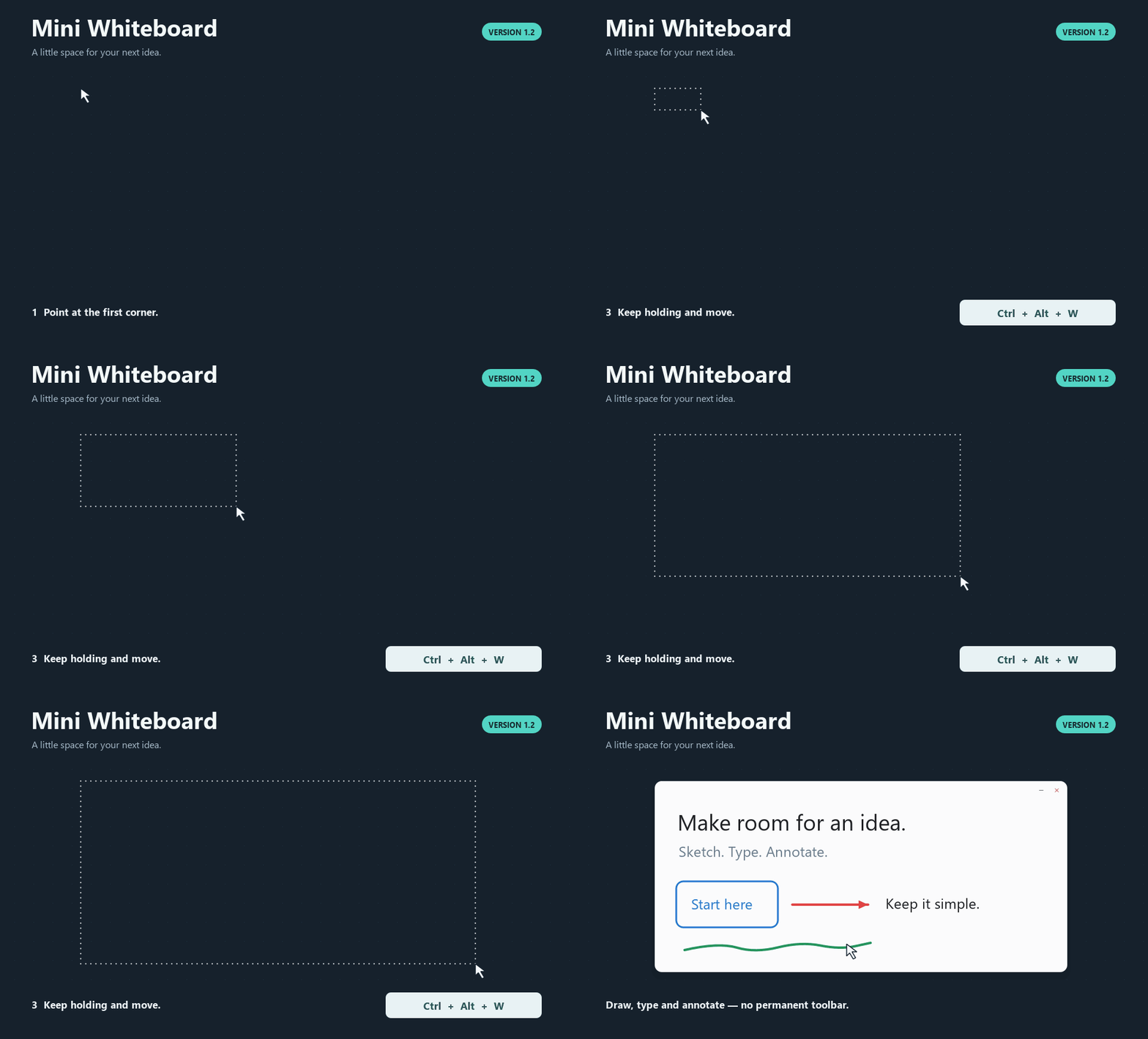
Verified Windows release with a Mac preview. Hold a shortcut, move the pointer,
and release to place a whiteboard or capture a screenshot region.
Downloads and launch
- Windows 10/11, x64:
WinMiniWhiteboardV1.2.zip. Extract it, open the
Mini Whiteboard folder, and run Mini Whiteboard.exe. Keep_internalwith it. - macOS 14+, PREVIEW:
MacMiniWhiteboardV1.2-Preview.zip. Extract on a Mac,
move Mini Whiteboard.app to Applications and open it. Interactive Mac acceptance
remains NOT RUN. The preview is ad-hoc signed and has not been notarized.
Both downloads include Python and Qt. Launch opens only a tray/menu-bar icon.
Windows is unsigned. If a trusted Mac download is blocked, use Apple's documented
Open Anyway process.
What changed
- Windows Ctrl+Alt+W/S: point at the first corner, hold, move, then release
W/S or any required modifier. W makes a board; S captures a locked screenshot
board with Draw active. No initial board, second press, click/drag or minimum hold. - Mac: Control+Option+W/S, or the existing Command+Option+Shift+W/S preset,
uses the same gesture. All four directions and negative desktop coordinates work. - Repeated activations and competing shortcuts cannot confirm/restart a hold.
Escape/menu cancellation and invalid selections clear the preview. Remaining
held S/W cannot switch the newly focused board's tool. Minimum board size stays
160 x 100 logical units; screenshots below 4 x 4 desktop units cancel. - Text wraps naturally to a stored local width, with character fallback for URLs.
Soft wraps leave plain text unchanged; Enter inserts a real newline. Editing,
committed rendering and reopening match. Moves/transforms/window resizing keep
the stored width. Tall text retains its content and follows the caret while editing. - Wrapped text hit testing avoids a Mac Qt stall from expanding every glyph's
tolerance outline. Shaped glyph outlines still provide painted/erasure geometry. - Mac CI uses a free macos-15 runner. Deployment target, Info.plist and runtime
minimum stay 14.0. No paid runner, spending or permission-policy changes. - F1/help, menus, current guides and the app-rendered placement GIF teach the new workflow.
Held-key defect investigation
The preserved V1.1 executable and source reproduced a board plus a renewed outline
under a hold with repeated key-down injections. MOD_NOREPEAT was already present;
the application accepted extra activation events as two-press confirmation/restart
and retained undersized anchors. V1.2 adds explicit hold/release latching and shared
ownership, and never restarts an invalid selection. A permanently unrecoverable
outline was not reproduced in the controlled diagnostic; later valid input recovered.
Actual verification
Release source: 08b3893.
- Windows 11 build 26200, Python 3.12.14 x64: 191 discovered, 189 passed,
2 Mac-only skips; final build gate 5.648 s. - 112 Windows native checks, 45 external-focus real input checks,
25 packaged executable checks, plus 3 native Windows wrapped-editor tests. - Windows ZIP: 174 files, all CRCs and file SHA-256 values match the verified
distribution; 17 verified dependency notice files; executable metadata 1.2. - Hosted Windows checks:
191 discovered, 189 passed, 2 skips in 5.358 s; Python 3.12.10, Windows Server 2025. - Mac CI:
191 passed in 9.471 s, repeated before packaging in 8.825 s. Actual runner:
macOS 15.7.9 arm64, Universal2 Python 3.13.15, Qt/PySide6 6.11.2,
PyInstaller 6.22.3, PyObjC 12.2.2. - Mac Universal2 bundle: 769 checks, signatures/linkage/symlinks/notices;
limited Cocoa startup 8 s, exit 0; 375 ZIP entries,dittoextraction and
full file/mode/symlink revalidation; 15 verified dependency notice files. - Both Actions artifact digests matched; the Mac-created inner ZIP was transferred
unchanged. It was never extracted/recompressed as an app on Windows. - Existing performance workloads, screenshot display cache invariants, workflow
lint, source compilation, dependency consistency and documentation links checked.
NOT RUN: interactive Mac shortcuts/releases/Escape, focus/menu/Spaces/TCC,
real Retina/multi-monitor behaviour; macOS 14 or Intel execution; physical mixed-DPI,
Windows 10/clean-machine deployment, hand-operated IME/context menus and extended use.
Universal2 structural validation does not establish execution on Intel or macOS 14.
SHA-256
| Package | Bytes | SHA-256 |
|---|---|---|
| WinMiniWhiteboardV1.2.zip | 37,781,414 | ced6df9c1fce90fa62bf24f7b0b1b1e1f079ddd61da1ae3082755ced97fc65d8 |
| MacMiniWhiteboardV1.2-Preview.zip | 56,424,554 | 35a0937ddf393b3d8c25305a4cca3258ba292cacb7cd0381d00be9881ffd2d40 |
SHA256SUMS.txt also covers the separate dependency-notice ZIP and the exact
Qt/PySide/PyObjC source archives attached below. Both app packages contain the
licenses and notice-hash manifests. Mini Whiteboard's own source is MIT licensed.
V1.1 and its assets remain intact. Placement demo
Mini Whiteboard V1.1 — Windows release + macOS preview
Mini Whiteboard V1.1
Stable Windows release with a Mac preview. Place a small whiteboard anywhere
with two presses, then draw, type or annotate a screenshot.
Downloads
| Download | Platform | Status |
|---|---|---|
| WinMiniWhiteboardV1.1.zip | Windows 10/11, 64-bit | Stable Windows release |
| MacMiniWhiteboardV1.1-Preview.zip | macOS 14+ | Mac preview; interactive acceptance outstanding |
Both packages include Python and the libraries they need. Launching the app
shows a tray/menu-bar icon; it opens no board until you place one.
Windows: extract the ZIP, open the Mini Whiteboard folder and run
Mini Whiteboard.exe. Keep the executable and _internal folder together.
The Windows package is unsigned.
Mac preview: extract the ZIP on macOS and move Mini Whiteboard.app to
Applications. The app is ad-hoc signed. If macOS blocks a trusted copy, follow
Apple's Open Anyway instructions.
Screen capture may request Screen Recording permission.
Two presses to place a board
- Point at one corner and press Ctrl+Alt+W on Windows or
Control+Option+W on Mac. Release the keys. - Move to the opposite corner; the dotted outline shows the proposed board.
- Press the same shortcut again to create it. Escape cancels placement.
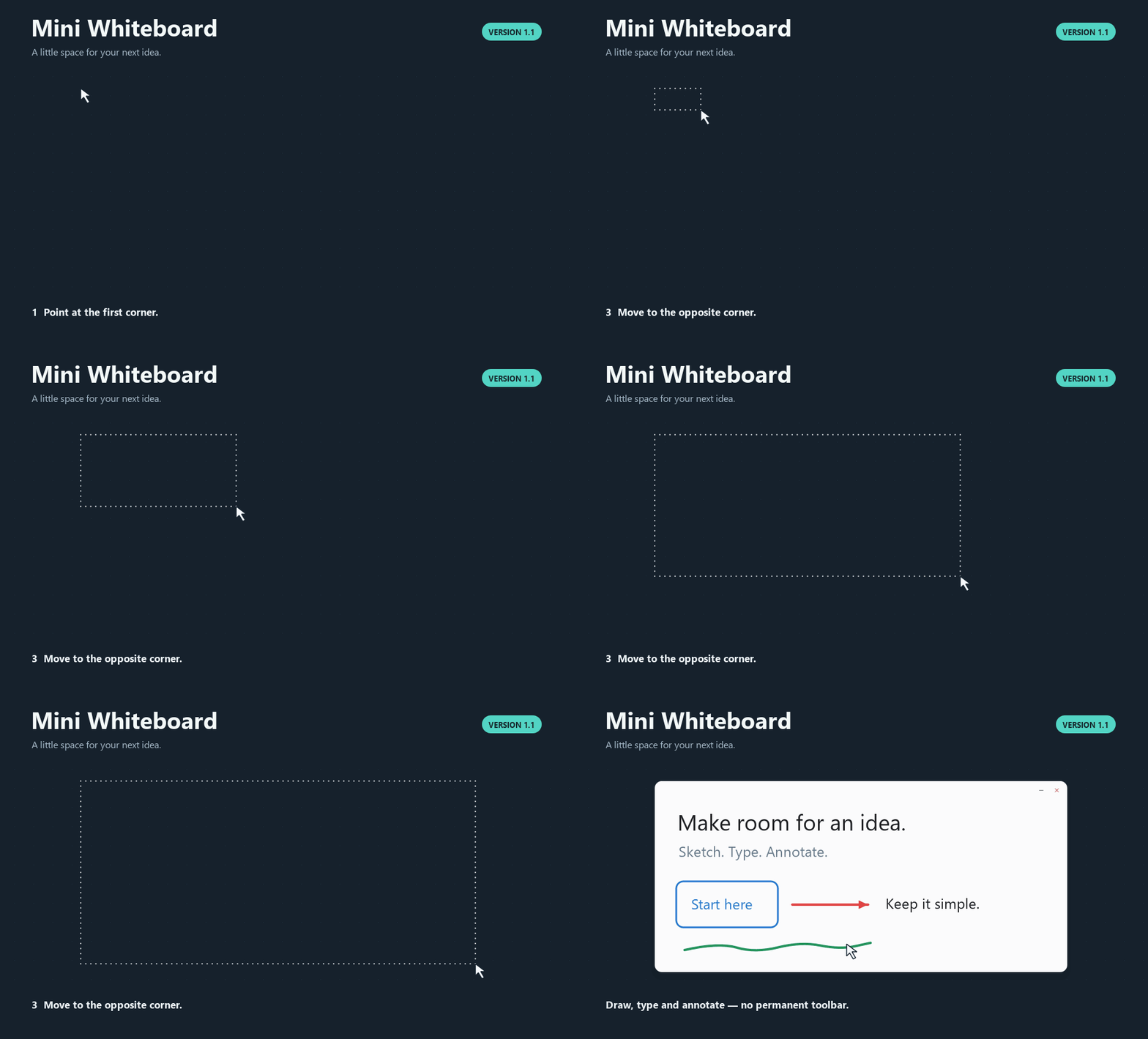
The demo uses the actual app controller and renderer on a controlled desktop.
Included in V1.1
- Freehand drawing, seven shapes, multiline text and a temporary colour palette.
- Multiple selection with shared movement, scaling and rotation.
- Circular partial erasing and whole-stroke erasing.
- Smart Guides, optional Grid Snap, object locking and front/back ordering.
- Editable copy/cut/paste/duplicate, image paste and local image drops.
- A global screenshot shortcut: Ctrl+Alt+S on Windows or
Control+Option+S on Mac, then drag a region to annotate. - Independent boards and undo/redo. Text editors keep typing and editor undo
separate from tool shortcuts.
Press F1 in a board for all shortcuts. Boards last for the current session;
only preferences are saved. The application has no account, service or telemetry.
Verification
| Check | Actual result |
|---|---|
| Windows automated suite | 160 tests passed; 2 Mac-only tests skipped (162 discovered) |
| Windows native GUI regressions | 110 checks passed |
| Real Windows keyboard/mouse workflow | 31 checks passed |
| Packaged Windows executable | 17 checks passed |
| Windows ZIP | 174 files; CRC and every file SHA-256 verified |
| Windows dependency notices | 17 files; all hashes verified |
| Mac automated suite | 162 tests passed |
| Mac bundle | Universal2; 769 checks passed |
| Mac packaged startup | 8-second check passed; normal exit |
| Mac ZIP and dependency notices | ditto extraction/metadata verified; 15 notice hashes verified |
Windows CI
and Mac build/verification
passed for the release source. The Mac runner was macOS 14.8.9 on arm64 with
Python 3.13.15; checking both architectures does not establish Intel execution.
Windows download SHA-256:
99c5d6e8e7737dd0ef7c2d701004b30b69f66ff428c41524243a06e81c83ae69.
Mac preview SHA-256:
6e624db8d1214ae9229e600ecc1bf0b1cc605fab3fcfb867a39015cc4e28ec92.
Interactive Mac hotkeys, external focus, menus, permissions, capture, Spaces and
physical display checks remain NOT RUN. Intel execution remains NOT RUN.
Physical mixed-DPI Windows arrangements and clean-machine deployment also remain
NOT RUN. See the Mac checklist
and complete test report.
Checksums and dependency sources
SHA256SUMS.txt accompanies the downloadable packages and dependency source
archives. The packages contain license texts, exact dependency versions and
notice hashes. The Qt/PySide 6.11.2 source archives attached to this release are
for developers rebuilding or replacing those libraries; they are not required
to run the app. The Mac bridge's PyObjC core source archive is included too.
See the dependency source guide.
Mini Whiteboard's own code and assets are MIT licensed. Dependencies retain
their original licenses. Feedback and bug reports
are welcome; include your operating system and steps to reproduce a problem.