Repository navigation

V1.3.4 hotkey patch — 29 October 2026
Windows defaults are now Ctrl+Win+Shift+W for a whiteboard and Ctrl+Win+Shift+Q for capture. Hold → move → release is unchanged. The app version remains 1.3.4.
- Windows installer — recommended hotkey patch
- Windows portable ZIP — hotkey patch
- Mac Universal2 Preview — unchanged, macOS 14+
Saved custom shortcuts are preserved. To adopt the new defaults, choose Settings → Hotkeys → Reset Defaults → Apply. Close the app before running the patched installer; it replaces the installed copy even though the version number stays the same.
Automated suite: 321 discovered; Windows 319 passed with two Mac-only skips; Mac all 321 passed. Hosted Windows CI tested the new defaults, compatibility and custom chords in its build of the same application source. Published Windows files retain the original V1.3.4 bundled runtime. Local desktop testing of the published patch: NOT RUN, as requested. Actual Windows sign-in remains NOT RUN (not tested) under the existing waiver. Other documented platform limits remain; Windows is unsigned and Mac is ad-hoc signed, not notarized.
Patch source · Patch checksums · Patch verification.
Original V1.3.4 notes and downloads
Downloads
| Download | Platform |
|---|---|
| Windows installer — recommended | Windows 10/11 x64; run Setup to replace an installed copy |
| Windows portable ZIP | Windows 10/11 x64; extract and keep the whole folder |
| Mac Universal2 Preview ZIP | macOS 14+; arm64 and x86_64 bundle; interactive acceptance NOT RUN |
Windows is unsigned. Mac is ad-hoc signed and not notarized.
Checksums, dependency notices and corresponding source archives are attached below. Verification receipt.
Changes and verification
Published 29 October 2026.
Windows installer recommended; portable ZIP also available. Mac remains
Universal2 Preview, macOS 14+.
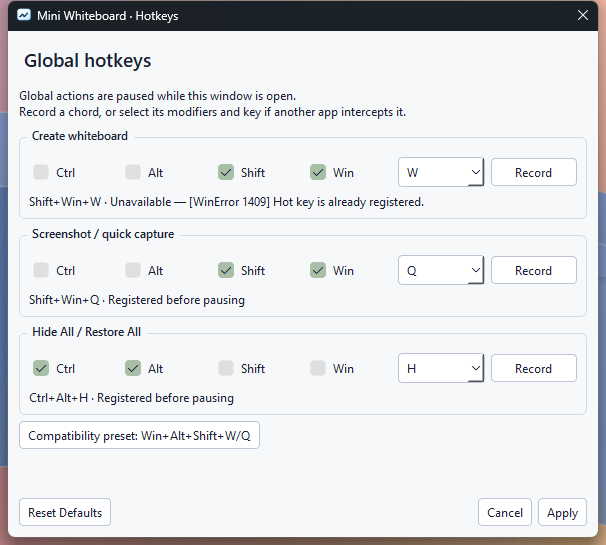
- Windows defaults are Shift+Win+W for a blank board and Shift+Win+Q for
capture. Hold, move the pointer, then release the trigger or any required modifier.
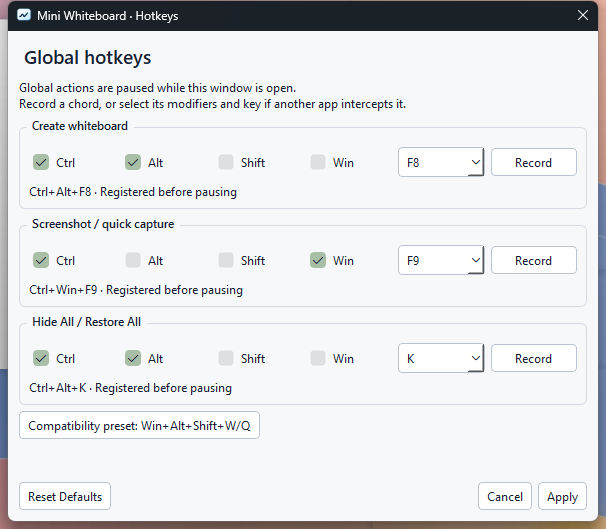
The existing Hide All choice and Mac defaults/alternate preset are retained. - Settings → Hotkeys records or manually selects independent create, capture
and Hide All chords. Apply validates and registers before saving; failed changes
restore working bindings and identify the failure. Cancel preserves the previous
configuration. Reset Defaults edits the fields until Apply is chosen.
Global actions pause while the dialog is open. An explicit Windows compatibility
preset offers the released Win+Alt+Shift+W/Q pair. - Conflicts leave other actions working and provide access to Settings. Menus,
help and status follow the configured chords. Windows-reserved Ctrl+Esc and
Ctrl+Shift+Esc are not overridden; unavailable cancellation chords are reported,
with tray-menu cancellation available. - Running the newer Windows installer replaces the existing installation under
the same identity. Setup verifies a staged replacement and backs up replaced
files before copying. Obsolete files are removed only when validated ownership
and original hashes match. Preferences, custom hotkeys, startup choices and
unrelated files survive. Setup/uninstall still require the app to be closed. - For portable updates, close the old copy and replace its whole application
folder. On Mac, quit and replace the app in Applications. The README downloads,
demo and settings screenshots now show the current release.
Verification
All three application packages use source
7c12b7f.
Windows CI
and Mac CI
passed. Later documentation, demo generation and diagnostic-label changes do not
alter the verified application packages.
| Check | Actual result |
|---|---|
| Complete automated suite | 321 discovered. Local Windows and Windows CI: 319 passed, two Mac-only skips. Mac: all 321 passed twice |
| Default Windows shortcuts | Shift+Win+W returned native registration error 1409 locally and in Windows CI. Positive default-W creation is NOT RUN (not tested). Shift+Win+Q capture passed; 171 final-executable default-profile checks cover the available action and conflict reporting |
| Custom shortcuts and recovery | Real Settings recording/manual selection applied Ctrl+Alt+F8 creation, Ctrl+Win+F9 capture and Ctrl+Alt+K Hide/Restore. Blank-board creation after the default conflict, capture and repeated-key-safe Hide/Restore passed. The separate custom creation matrix passed 337 checks locally and in CI |
| Compatibility and gesture cleanup | 572 source and 873 final-executable checks passed locally and in CI. Left/right modifiers, modifier-release order, repeats, Escape, rapid consecutive gestures and zero-area cancellation passed. External text/menu state remained unchanged; no unexpected foreground activation or stuck previews/keys |
| Selection, text and appearance | 41 pointer, 24 textbox, 15 appearance, 49 material and 177 surface checks passed. Final executable: 36 general plus 99 per White/Glass theme, including wrapping/completion, undo/redo, controls, clean screenshot/clipboard pixels and corner click-through |
| Lifecycle and installation | 111 general checks and 63 for each saved Hide All choice passed. Installer: 46 checks covering a real V1.3.3 upgrade, repeated setup, running-app refusal, pre-copy failure, mid-copy rollback and a launch of the restored old runtime. Obsolete owned files were removed; modified/unrelated files, hotkeys and startup-disable state survived. Portable: nine checks passed |
| Package integrity | Windows: 201 runtime files including the payload manifest, 162 frozen modules and 18 notice files. Mac: Universal2, macOS 14 minimum, 825 bundle checks before and after extraction, 16 notice files, 404 ZIP entries and eight-second Cocoa startup. Metadata, CRCs, file hashes, dependency notices and OCR absence passed |
| Supporting checks | Dependency consistency, compilation, workflow lint and local documentation references passed. The Mac ZIP is transferred unchanged; SHA-256 values and the verification receipt accompany the release |
The general native check separately records unavailable default-W registration.
The default is retained as requested; no automatic compatibility fallback or OS
shortcut takeover occurs. Current Windows checks used build 26200 x64 and one
1920 × 1080 display at 100% physical scaling. Unchanged rendering/selection code
retains prior 125–200% application-scale and performance evidence; these are not
physical mixed-DPI checks.
Installer acceptance used silent setup and the production startup service.
Unchanged wizard/startup-menu coverage is retained from V1.3.2. Temporary
preferences, links and startup registrations were restored. Packaged tray-menu
access used the real Qt notification callback, not a physical taskbar-icon click.
Capture-service failure was injected in the source check only; the released
executable contains no test-only capture-failure switch.
Final hotkey settings and conflict recovery
Acceptance limits
Automatic launch during actual Windows sign-in: NOT RUN (not tested).
Startup registration, controlled command launches, external-disable preservation
and manual/login overlap were tested. The existing release-gate waiver remains.
Other NOT RUN checks: positive Shift+Win+W creation where registration is
blocked; interactive Mac appearance, menu-bar/global shortcuts, capture permissions,
login registration/approval and real login; macOS 14 and Intel execution; Spaces,
Mission Control, Stage Manager and physical Retina/multi-monitor acceptance.
Windows clean-machine execution with Python uninstalled, Windows 10,
quarantined-download/SmartScreen acceptance, physical negative-coordinate and
mixed-DPI transitions, actual OS high-contrast/reduced-transparency transitions,
extended IME/RTL and long-session ergonomics remain untested.
Windows is unsigned. Mac is ad-hoc signed and not notarized. CI bundle validation
and limited startup do not establish interactive Mac acceptance.