Repository navigation
Releases
NetSpeck 1.0.3 — Windows 11 public preview

NetSpeck 1.0.3 — Windows 11 public preview
Fixed excessive memory growth during long-running taskbar monitoring. Native cached UI Automation snapshots replace the legacy managed proxy factory; COM references are released explicitly on a dedicated background thread.
On the tested Windows 11 26H2 26300.9974 x64 system:
- 2,000 accelerated taskbar scans: retained private memory growth dropped from 30.75 MiB to 0.80–1.58 MiB.
- 10,000 graph redraws: 0.32–0.39 MiB retained growth, with no increase in handles.
- A six-minute live run with the graph enabled remained around 47–48 MiB working set.
- Offline, menu/settings, layout and rendering regression checks pass. A multi-day run of the new version has not yet been completed.
Download NetSpeck-v1.0.3-win-x64.zip, close the previous copy, replace its files and run NetSpeck.exe. Preferences are retained. The EXE is unsigned. Vertical placement remains experimental; Windows 10 is unsupported.
По-русски
Исправлен чрезмерный рост памяти при длительной работе. Заменён способ опроса панели задач; служебные ресурсы Windows теперь освобождаются явно в отдельном фоновом потоке.
На проверенной Windows 11 26H2 26300.9974 x64:
- После 2000 ускоренных опросов рост удерживаемой памяти снизился с 30,75 до 0,80–1,58 МиБ.
- После 10 000 перерисовок графика — 0,32–0,39 МиБ, без роста числа дескрипторов.
- За шесть минут обычной работы с включённым графиком занятая физическая память оставалась около 47–48 МиБ.
- Пройдены проверки расчётов, меню, настроек, размещения и отрисовки. Многосуточный прогон новой версии пока не завершён.
Скачай NetSpeck-v1.0.3-win-x64.zip, закрой предыдущую копию, замени файлы и запусти NetSpeck.exe. Настройки сохранятся. EXE без цифровой подписи. Вертикальное размещение пока экспериментальное; Windows 10 не поддерживается.
NetSpeck 1.0.2 — Windows 11 public preview
NetSpeck 1.0.2 — Windows 11 public preview
Fixes the indicator disappearing when Explorer temporarily withdraws its taskbar accessibility tree during a popup menu. The app keeps the last verified position while the menu is open and rechecks placement after it closes. Confirmed occupied space, taskbar geometry changes and size changes still invalidate the previous position.
The original right-click scenario was verified on Windows 11 26H2 26300.9974 x64.
Validation: 73 offline checks, 133 behavior checks and 128 rendering cases. Vertical taskbar placement remains experimental; other Windows 11 builds are unverified. Windows 10 is unsupported. The EXE is unsigned.
Download NetSpeck-v1.0.2-win-x64.zip, extract it and run NetSpeck.exe. Close the previous copy before replacing its EXE. Your preferences are retained. The background graph can be completely disabled in the menu or settings.
По-русски
Исправлено исчезновение индикатора, когда Explorer временно перестаёт предоставлять элементы панели задач при открытии всплывающего меню. Приложение сохраняет последнее проверенное положение на время меню и заново проверяет его после закрытия. Если место действительно занято, изменилась геометрия панели или её размер, старое положение не используется.
Проверки: 73 автономные, 133 проверки поведения и 128 вариантов отрисовки. Вертикальное размещение пока экспериментальное; другие сборки Windows 11 не проверены. Windows 10 не поддерживается. EXE без цифровой подписи.
Скачайте NetSpeck-v1.0.2-win-x64.zip, распакуйте и запустите NetSpeck.exe. Перед заменой EXE закройте предыдущую копию. Настройки сохраняются. Фоновый график можно полностью отключить в меню или настройках.
NetSpeck 1.0.1 — Windows 11 public preview
NetSpeck 1.0.1 — Windows 11 public preview
- Fixed taskbar free-space calculation: popup menus no longer push the indicator sideways.
- Added an experimental vertical taskbar layout. Values and units stack to fit a narrow panel; enable Resize panel height and drag the top edge. Horizontal width is saved separately.
- Added regression checks for menu geometry, both resize directions and multiple DPI settings.
Verified on Windows 11 26H2 26300.9974 x64 with the standard horizontal taskbar. Vertical layout has passed geometry, rendering and native-window tests; actual vertical Explorer integration is not yet verified. Other Windows 11 builds are unverified; Windows 10 is unsupported. The EXE is unsigned.
Download NetSpeck-v1.0.1-win-x64.zip, extract it and run NetSpeck.exe. Close the previous copy before replacing the EXE. The background graph can be completely disabled in the context menu or settings.
По-русски
- Исправлен расчёт свободного места: всплывающие меню больше не должны сдвигать индикатор в сторону.
- Добавлен экспериментальный вид для вертикальной панели задач. Числа и единицы расположены друг под другом. Для изменения высоты включите Изменять высоту и потяните верхний край. Ширина горизонтального индикатора сохраняется отдельно.
- Добавлены проверки геометрии меню, обоих направлений изменения размера и разных масштабов Windows.
Проверено на Windows 11 26H2 26300.9974 x64 со стандартной горизонтальной панелью задач. Для вертикального вида проверены геометрия, отрисовка и нативные окна; встраивание в реальную вертикальную панель Explorer пока не проверено. Другие сборки Windows 11 не проверены; Windows 10 не поддерживается. EXE без цифровой подписи.
Скачайте NetSpeck-v1.0.1-win-x64.zip, распакуйте и запустите NetSpeck.exe. Перед заменой EXE закройте предыдущую копию. Фоновый график можно полностью отключить через контекстное меню или настройки.
NetSpeck 1.0.0 — Windows 11 public preview
Live download & upload speed in your Windows 11 taskbar.
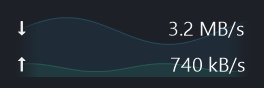
App-rendered preview · sample traffic
🚀 Get started
- Download NetSpeck-v1.0.0-win-x64.zip from the assets below.
- Extract it and run NetSpeck.exe. No installation or administrator rights are required.
- Right-click the indicator or its tray icon to customize it.
The attached .sha256 file contains the ZIP checksum. GitHub's automatic Source code archives are for building the app yourself.
✨ Highlights
- 🎚️ Independent smoothing: number averaging and graph smoothing have separate controls.
- 📈 A graph you can tune: history, frame rate, colors, opacity, scale, line width, fill and a 10% fade at each end.
- 🔤 Your own look: drag the left edge to adjust width, choose fonts and import your own fonts or ICO/PNG icons. Flows and Speedometer icons are included.
- ⚙️ Settings & startup: explanatory tooltips for menus and settings, plus optional startup at sign-in.
Tip
The graph can be completely disabled from the right-click menu or Settings → Graph. Download/upload numbers remain visible.
🖼️ Real screenshots
With the background graph
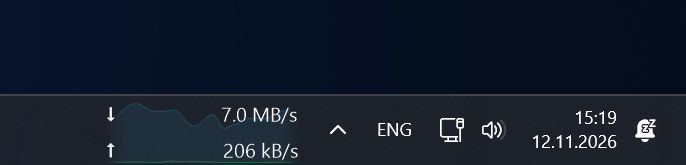
Numbers only

🪟 Preview compatibility
Verified on Windows 11 26H2 26300.9974 x64, with the standard primary horizontal taskbar. Other Windows 11 builds are unverified; Windows 10 is unsupported. Taskbar integration is unofficial and Windows updates may affect it. The EXE is unsigned.
See known issues and the full README.
🧪 Verification
Development checks passed: 66 offline checks · 112 behavior checks · 80 render cases. These results do not replace testing on your Windows build.
🌐 По-русски
Скачайте NetSpeck-v1.0.0-win-x64.zip, распакуйте и запустите NetSpeck.exe. Установка и права администратора не нужны.
Фоновый график можно полностью отключить через ПКМ по индикатору или «Настройки → График», оставив только числа загрузки и отдачи. Усреднение чисел и сглаживание графика настраиваются отдельно; доступны свои шрифты, иконки и изменение ширины перетаскиванием.
Это предварительный выпуск для Windows 11: проверена сборка 26H2 26300.9974 x64. Подробнее о настройках, запуске и совместимости — в русском README.
📄 License
MIT · Copyright © 2026 nt-bro.