Repository navigation
NetSpeck 1.0.0 — Windows 11 public preview
Pre-release
Live download & upload speed in your Windows 11 taskbar.
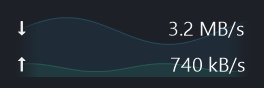
App-rendered preview · sample traffic
🚀 Get started
- Download NetSpeck-v1.0.0-win-x64.zip from the assets below.
- Extract it and run NetSpeck.exe. No installation or administrator rights are required.
- Right-click the indicator or its tray icon to customize it.
The attached .sha256 file contains the ZIP checksum. GitHub's automatic Source code archives are for building the app yourself.
✨ Highlights
- 🎚️ Independent smoothing: number averaging and graph smoothing have separate controls.
- 📈 A graph you can tune: history, frame rate, colors, opacity, scale, line width, fill and a 10% fade at each end.
- 🔤 Your own look: drag the left edge to adjust width, choose fonts and import your own fonts or ICO/PNG icons. Flows and Speedometer icons are included.
- ⚙️ Settings & startup: explanatory tooltips for menus and settings, plus optional startup at sign-in.
Tip
The graph can be completely disabled from the right-click menu or Settings → Graph. Download/upload numbers remain visible.
🖼️ Real screenshots
With the background graph
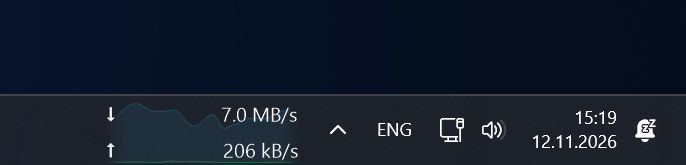
Numbers only

🪟 Preview compatibility
Verified on Windows 11 26H2 26300.9974 x64, with the standard primary horizontal taskbar. Other Windows 11 builds are unverified; Windows 10 is unsupported. Taskbar integration is unofficial and Windows updates may affect it. The EXE is unsigned.
See known issues and the full README.
🧪 Verification
Development checks passed: 66 offline checks · 112 behavior checks · 80 render cases. These results do not replace testing on your Windows build.
🌐 По-русски
Скачайте NetSpeck-v1.0.0-win-x64.zip, распакуйте и запустите NetSpeck.exe. Установка и права администратора не нужны.
Фоновый график можно полностью отключить через ПКМ по индикатору или «Настройки → График», оставив только числа загрузки и отдачи. Усреднение чисел и сглаживание графика настраиваются отдельно; доступны свои шрифты, иконки и изменение ширины перетаскиванием.
Это предварительный выпуск для Windows 11: проверена сборка 26H2 26300.9974 x64. Подробнее о настройках, запуске и совместимости — в русском README.
📄 License
MIT · Copyright © 2026 nt-bro.