Repository navigation
Fleet v0.2.0 — Usage at a glance

download installer · download portable zip
windows 11 · x64 · python included
Python is bundled. Local quota providers require their clients installed and signed in; keep Claude Code on PATH for login renewal. API providers require their matching keys.
current setup guide · provider requirements
The v0.2.0 portable ZIP includes an older README with outdated setup copy and links to omitted documents. Use the online guides above; the download files and checksums are unchanged.
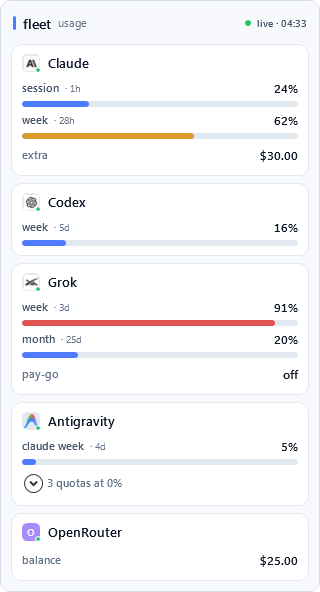
Fleet 0.2.0 is a complete visual refresh focused on making every quota readable at a glance—from the tiny Windows tray slot to the full flyout.
Highlights
- A polished Windows 11 flyout with spacious provider cards, full-width meters, clearer reset times, and a calm blue/amber/coral pressure scale.
- Full-bleed provider tray tiles with a four-pixel usage meter that remains legible at Windows' 16-pixel notification size.
- Collapsible zero-use quota windows keep unused limits available without cluttering the main view.
- Balance-only providers stay out of the tray cycle; OpenRouter prefers account credit balance with a management key and falls back to regular-key budget and spend.
- Cleaner Codex rows, distinct Antigravity quota labels, and reduced Grok authentication pressure through short-lived, visibly cached readings.
- API keys added with
setxcan now be discovered with Refresh now, without restarting Fleet. - Provider artwork and its third-party notice are included in both portable and installed builds.
Download
- Installer:
Fleet-Setup-0.2.0.exe— per-user installation with no administrator prompt. - Portable:
Fleet-0.2.0-portable.zip— extract anywhere and runFleet.exe.
To upgrade an installed copy, run the new installer over the existing installation. For a portable copy, quit Fleet before replacing the previous files.
Warning
Fleet binaries are currently unsigned. Windows SmartScreen may show a reputation warning on first launch. Only run files downloaded directly from this GitHub release page.
SHA-256
bc8cc0515a05c25a37bb51d8c65ce912947a12282d21a2bdb4ecf14de2f16bf5  Fleet-Setup-0.2.0.exe
a3f2f6ea047a5af379e8ab20d2babac4c47546fafe9e38ec10c3b0a71e0857ca  Fleet-0.2.0-portable.zip
Full changes: v0.1.1...v0.2.0