Repository navigation
Releases
fleet 0.4.1 — dashboard inside the tray popup

Dashboard now switches pages inside the existing Fleet tray popup. Back returns to usage. The separate desktop window from 0.4.0 has been removed.
- Back, Refresh and Settings remain visible while the detailed page scrolls.
- Charts, the summary and token tables fit the popup's existing width and native style.
- Data updates preserve the current page and scroll position; navigation starts at the top.
- Full reported limits, local usage history, model/project breakdowns and coverage notes remain available.
- Old dashboard launch requests are ignored rather than reopening the popup later.
The dashboard still uses the tray's normalized local data. It adds no separate collector, credentials or telemetry. API-price estimates remain separate from subscription limits, actual API spending and promotional credits.
Validation: 310 offline tests passed. The native panel built with zero warnings or errors. The isolated interaction check verified one window, the same popup handle/root, Dashboard/Back navigation, scroll preservation, refresh, tray message/file requests, stale requests and numeric layout. Offscreen checks do not activate windows, capture the desktop or watch the cursor. Sonnet 5.5 reviewed the correction and GitHub presentation with no blockers.
Use the installer or extract the portable ZIP and run Fleet.exe, keeping _internal beside it. Settings, sign-ins and usage history are retained. Binaries are unsigned. Verified hashes are attached in SHA256SUMS.txt.
9c06e3e8da8f026cc89b2eabc2121b5eea61ea3b4e47f0d5f34b71738af182e8  Fleet-0.4.1-portable.zip
ca1bd2be33d4a973cc2d81339b1eafbbc52d99301c4318588c5d3fddf5a397d7  Fleet-Setup-0.4.1.exe
fleet 0.4.0 — desktop usage dashboard
superseded by v0.4.1: Dashboard now stays inside the existing tray popup.
The Dashboard button opens a larger Fleet window that stays open while you work. You can also open it from the tray menu.
- Review all reported provider limits, reset times, balances and API account spending.
- See local Claude Code/Codex activity over 24 hours and 14 days, token/cache breakdowns, and up to 20 models and projects from the last 7 days.
- Resize between one and two columns. Refresh and Settings remain at the top; live updates preserve your scroll position.
- Keep cached readings, unavailable accounts and incomplete local log coverage visible.
The dashboard uses Fleet's native Windows theme and the tray's local data model. It adds no separate network collector or telemetry. Local API-price estimates are separate from subscription limits, actual API spending, and promotional credits.
Downloads: use the installer, or extract the portable ZIP and run Fleet.exe. Keep _internal beside it. Existing settings, sign-ins and local usage history are retained. Binaries are unsigned.
Validation: 310 offline tests passed, the native panel built without warnings or errors, and isolated native interaction checks covered opening, resizing, refresh, theme changes and close/reopen. The published assets were checked against SHA256SUMS.txt before release.
SHA-256
8c9397552bc8a055a158292fe24b0d75a3ccae93e42ea7f526ccf069d1e2dd32  Fleet-0.4.0-portable.zip
b3b6180d30d7ae7ea8c829691f22cce1cb101e15ff5b9b28c2b6646b91aeb142  Fleet-Setup-0.4.0.exe
fleet 0.3.0 — native usage dashboard and claude api accounts
fleet 0.3.0 brings the native usage dashboard and Claude API account setup into the public release.
what's new
- native Windows 11 flyout with slim quota meters, acrylic, provider details, reset times and clear cached readings.
- API-price estimates from local Claude Code and Codex logs: today, 7/30 days, activity, burn rate and cache share. these are estimates, not subscription charges.
- Claude API setup using Windows Credential Manager. regular keys get a free connection check; organization billing credentials show today's and calendar-month spending in UTC.
- correct decimal-cent aggregation, pagination, real zero-spend readings, failure pacing, and cache handling across key changes or UTC dates.
- tray styles, alerts, provider visibility, client-managed sign-in renewal, and Antigravity's own quota groups.
- complete portable packages with the native panel and setup guides; authenticated local loopback usage integration for T3 Code.
included Max/Team credits
the remaining promotional-credit balance and expiry are available in Claude Console. Open billing links there, even without saving a key. credits renew on your billing date; calendar-month spending is not the remaining credit allowance. see the provider guide.
install or upgrade
- installer: run
Fleet-Setup-0.3.0.exe. installation is per-user. start at sign-in is enabled by default and can be unchecked. - portable: quit Fleet, extract the complete
Fleet-0.3.0-portable.zip, then runFleet.exe. keep_internalandFleetPanel.exebeside it. - binaries remain unsigned, so Windows SmartScreen may show a reputation warning.
verification
301 offline tests pass. the release assets are built by GitHub Actions from the tag, with native build and secret checks. native light/dark input checks and an isolated Credential Manager interop round trip passed locally. no live Anthropic account was used for validation.
download SHA256SUMS.txt beside the assets to verify their SHA-256 hashes.
Fleet v0.2.0 — Usage at a glance

download installer · download portable zip
windows 11 · x64 · python included
Python is bundled. Local quota providers require their clients installed and signed in; keep Claude Code on PATH for login renewal. API providers require their matching keys.
current setup guide · provider requirements
The v0.2.0 portable ZIP includes an older README with outdated setup copy and links to omitted documents. Use the online guides above; the download files and checksums are unchanged.
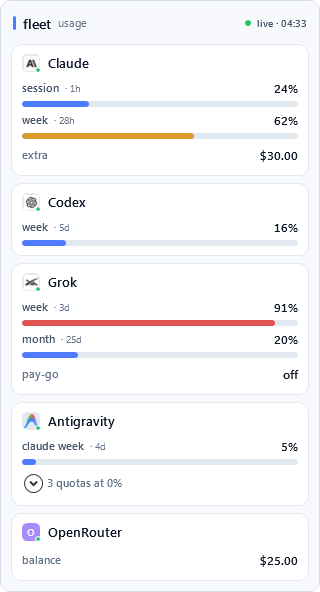
Fleet 0.2.0 is a complete visual refresh focused on making every quota readable at a glance—from the tiny Windows tray slot to the full flyout.
Highlights
- A polished Windows 11 flyout with spacious provider cards, full-width meters, clearer reset times, and a calm blue/amber/coral pressure scale.
- Full-bleed provider tray tiles with a four-pixel usage meter that remains legible at Windows' 16-pixel notification size.
- Collapsible zero-use quota windows keep unused limits available without cluttering the main view.
- Balance-only providers stay out of the tray cycle; OpenRouter prefers account credit balance with a management key and falls back to regular-key budget and spend.
- Cleaner Codex rows, distinct Antigravity quota labels, and reduced Grok authentication pressure through short-lived, visibly cached readings.
- API keys added with
setxcan now be discovered with Refresh now, without restarting Fleet. - Provider artwork and its third-party notice are included in both portable and installed builds.
Download
- Installer:
Fleet-Setup-0.2.0.exe— per-user installation with no administrator prompt. - Portable:
Fleet-0.2.0-portable.zip— extract anywhere and runFleet.exe.
To upgrade an installed copy, run the new installer over the existing installation. For a portable copy, quit Fleet before replacing the previous files.
Warning
Fleet binaries are currently unsigned. Windows SmartScreen may show a reputation warning on first launch. Only run files downloaded directly from this GitHub release page.
SHA-256
bc8cc0515a05c25a37bb51d8c65ce912947a12282d21a2bdb4ecf14de2f16bf5  Fleet-Setup-0.2.0.exe
a3f2f6ea047a5af379e8ab20d2babac4c47546fafe9e38ec10c3b0a71e0857ca  Fleet-0.2.0-portable.zip
Full changes: v0.1.1...v0.2.0