#The key to use this package for Chrome Browser Extensions
Using AWS RUM documentation to set-up this package - there's only one item in the required set up that's going to prevent RUM from working with Browser Extensions, this is the domain name requirement.
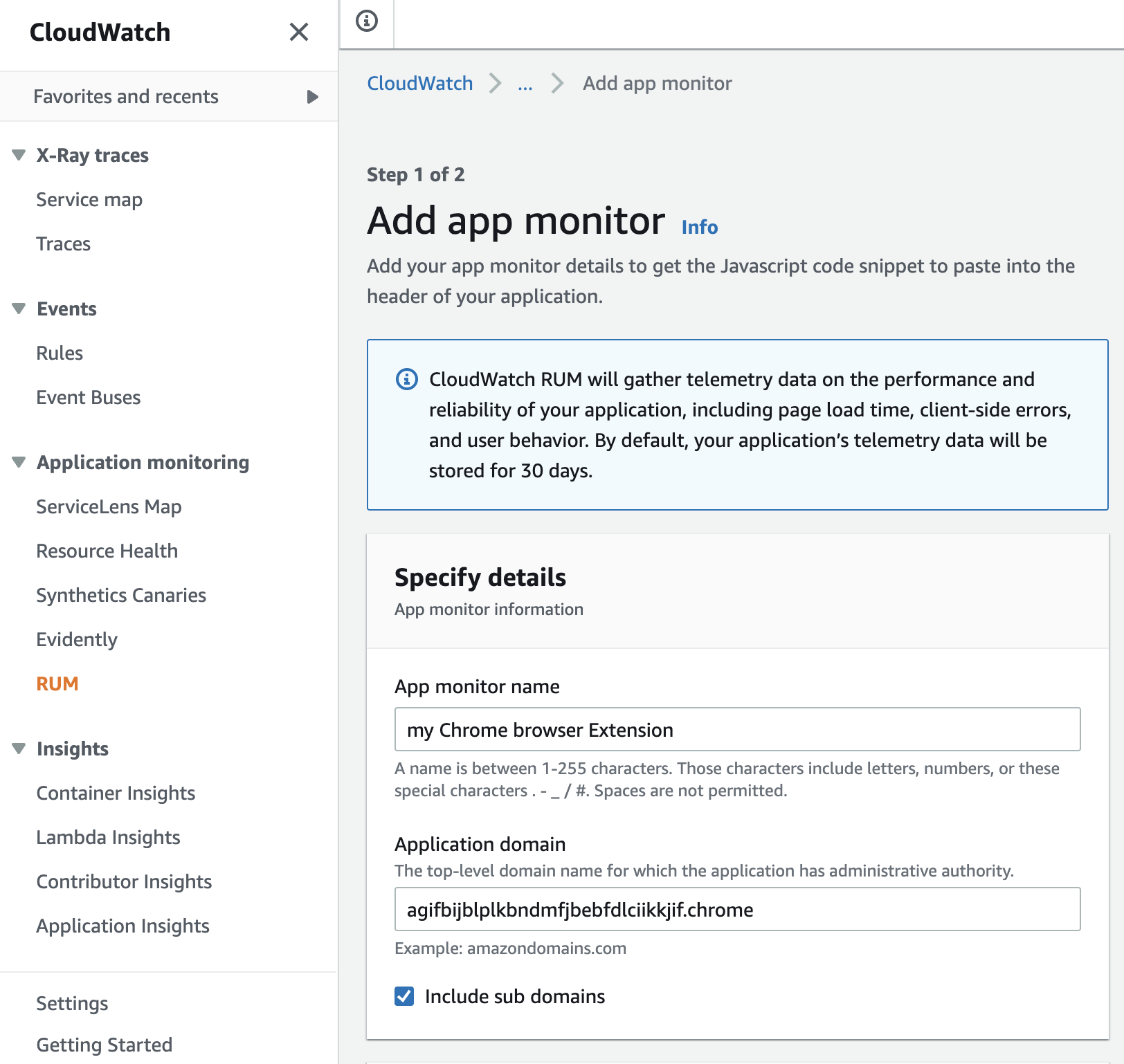
"Application Domain" requirement in Step 2:
- add your Chrome Extension Production ID followed by
.chrome:
Example:
CHROME_EXTENSION_PRODUCTION_ID=agifbijblplkbndmfjbebfdlciikkjif
In the Application Domain field found on AWS RUM configuration site - type:
agifbijblplkbndmfjbebfdlciikkjif.chrome
I have only tested this package with a Chrome Extension but the .chrome doesn’t mean you need to necessarily be building in a Chrome Extension, this is just what I named the domain, looking back, I should have used something more agnostic like .browserextension
This is the CloudWatch RUM web client source code repository. It hosts a JavaScript library which performs real user monitoring (RUM) telemetry on web applications. Data collected by the RUM web client includes page load timing, JavaScript errors and HTTP requests.
See Installing as a JavaScript Module.
See Installing as an Embedded Script.
- Configuring the web client
- Executing commands
- Using the web client with Angular
- Using the web client with React
- Troubleshooting
Use the following community resources for getting help with the SDK. We use the GitHub issues for tracking bugs and feature requests.
- View the CloudWatch RUM documentation.
- Ask a question in the Amazon CloudWatch forum
- Open a support ticket with AWS Support.
- If you think you may have found a bug, open an issue.
If you encounter a bug with the CloudWatch RUM web client, we want to hear about it. Before opening a new issue, search the existing issues to see if others are also experiencing the issue. Include the version of the CloudWatch RUM web client, Node.js runtime, and other dependencies if applicable. In addition, include the repro case when appropriate.
The GitHub issues are intended for bug reports and feature requests. For help and questions about using the CloudWatch RUM web client, use the resources listed in the Getting Help section. Keeping the list of open issues lean helps us respond in a timely manner.
We support and accept PRs from the community.
See CONTRIBUTING
The CloudWatch RUM web client is developed and built using Node.js version 16 or higher.
To build the CloudWatch RUM web client, run the release process:
npm install
npm run release
The release process creates (1) a web bundle and a debug map for distribution via CDN, and (2) JavaScript modules and TypeScript declaration files for distribution via NPM.
The CDN files are:
./build/assets/cwr.js
./build/assets/cwr.map.js
The NPM files are:
./dist/es/index.js
./dist/es/index.d.ts
./dist/cjs/index.js
./dist/cjs/index.d.ts
To perform exploratory testing, run the Webpack DevServer:
npm install
npm run server
In a browser, navigate to http://localhost:9000.
To run (Jest) unit tests:
npm run test
To run (TestCafe) browser integration tests:
npm run integ:headless
npm run integ:browser
To run (TestCafe) integration tests for a specific browser:
npm run integ -- (browserName)
# for example
npm run integ -- chrome:headless
npm run integ -- chrome
Some features perform monkey patching which is incompatible with TestCafe. In these cases, run Nightwatch as a separate browser integration test target:
npm run integ:local:nightwatch
The CloudWatch RUM web client uses pre-commit tasks to lint and format its source code. Before submitting code, check that all linter and formatter warnings have been resolved.
Attempt to automatically repair linter warnings:
npm run lint:fix
Format code:
npm run prettier:fix
See CONTRIBUTING for more information.
This project is licensed under the Apache-2.0 License.