Repository navigation


|
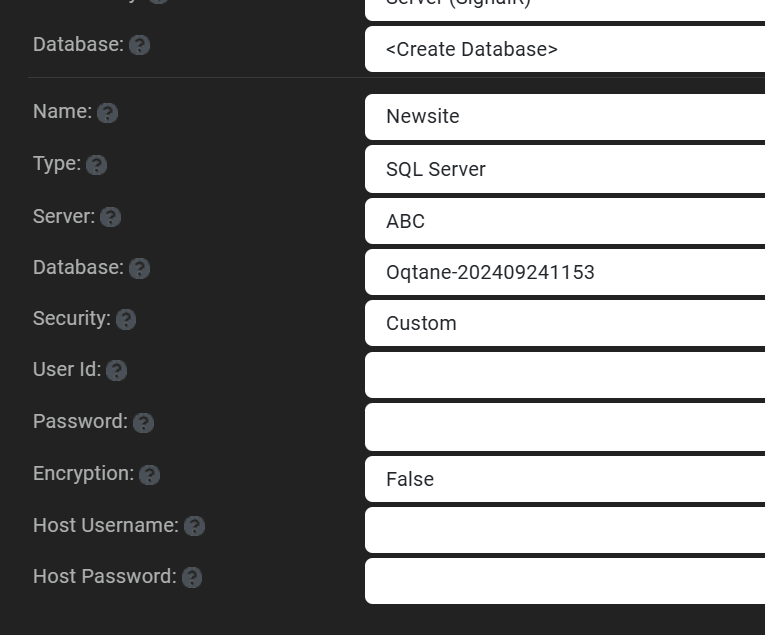
I have a testsite, lets call it oqtane.test.com release 5.2.3 I fill in this The new database is created but I cant access the new site. It is Blank no log. |
Replies: 7 comments 45 replies

|
This sounds like it may be an issue worth reporting. |

|
Process making two databases. First databas was created when I installed first time. Second database was made when I submitted the form above and got the error. |

|
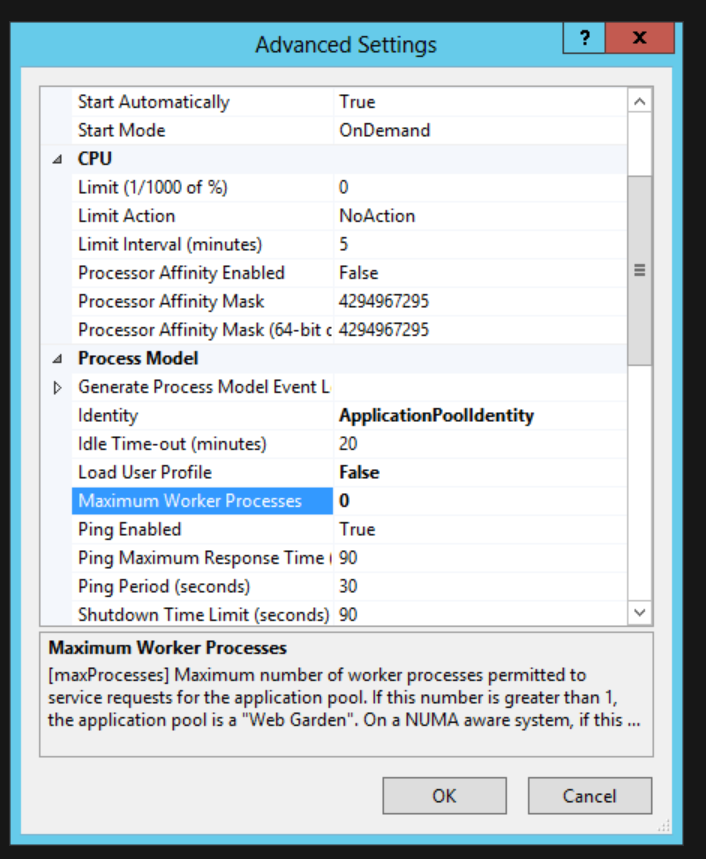
@JanOlsmar thank you for this information. To verify the app pool worker process has only 1 if I am not mistaken. I will verify soon as I get a moment to log into dev station to see if I can reproduce this issue.
I believe you can and should set this to 1. |
|
Max 1 worker processes is my setting in the pool |
|
great thank you. I will see what I can find out. @sbwalker is in Florida, which declared a state of emergency today. I hope the best for everyone dealing with that situation. I will do my best to support until then. On the flip side other developers contributing will be awake later in the evening that may also help provide a solution. |
|
I'm in no rush, just doing a little testing to see how it worked. Hope for the best regarding Idalia. |

|
@JanOlsmar it looks like this specific scenario (ie. creating a new site in a multi-tenant environment using an isolated database) may have been affected by the recent enhancements in 5.2.2 to support SecurityStamp: Oqtane.Repository.UserRoleRepository.UpdateSecurityStamp(Int32 userId) in C:\Source\Projects\oqtane.framework\Oqtane.Server\Repository\UserRoleRepository.cs:line 168 This method relies on the .NET Identity library - which appears to be throwing the DbContext exception. Perhaps the .NET Identity library is not using DbContextFactory (which is the recommended approach in Blazor). This will require more investigation. |

|
@thabaum yes |
|
@JanOlsmar I just tested this locally and I was not able to reproduce the error you encountered. One difference is that I was using LocalDB rather than a full SQL Server instance. However it would be helpful to understand if you encountered the error when running in Visual Studio - or on an IIS instance. |
|
@JanOlsmar I also updated the issue with how to reproduce so @sbwalker can do this from his laptop if needed. |
|
thanks again for reporting, I will dig into code as I can as he gave us some clues to work on with latest updates to the DB Context Factory, however I cannot verify this until I work deeper in the framework source and push tests to the example production site I have for testing things like this. |
|
This helps get the ball rolling a little faster, thanks again for reporting and please let us know if you find anything more out that may help. |
|
@JanOlsmar thanks again for additional support. one last question, sorry to ask as I have not tested via MS SQL Server but did get the error in LocalDB sub-site creation. You mentioned the database is created, is it verified a blank database in MS SQL Server Management Studio second database is created, but it is empty? Not just included Oqtane appsettings.json file but actually a database was created? I may have time later to review this more, but I don't want to have to do this if it is unnecessary since you say you already have been through that process trying to create a second site with a second database created using MS SQL Server (not LocalDB) |
|
@JanOlsmar disregard question as I believe once issue #4667 is resolved so with this issue, thanks for reporting! |
|
@thabaum the issue related to Installation on IIS #4667 has been resolved... however the issue of creating an additional Site with a separate Database(Tenant) which @JanOlsmar reported in this Discussion thread is unrelated, and still appears to be an issue (ie. I can reproduce it). I cannot reproduce this issue when running in Visual Studio (on IIS Express) so it is very confusing. |
|
this way you can rule out "permissions" as an issue. |
|
|
@thabaum #4676 fixes this issue (logged as #4675). Basically the problem was that when creating a new database it dynamically adds a new connection string to appsettings.json - however the call to the AddOrUpdateSetting() method was not setting the "reload" parameter to true. As a result, when it tried to create the DbContext it could not retrieve the connection string (because it was using an older cached version of IConfiguration). What I don't understand is why this did not throw an exception in Visual Studio. Perhaps when debugging it automatically reloads appsettings.json changes. |
|
@sbwalker gotcha, glad you found the issue. This makes sense and I believe VS probably is working as you described which maybe related to hot reload? Maybe running without hot reload would create this error? |
|
The permission issue if using integrated security permissions and should have all permissions needed. So that would rule that out. |
|
I have done a couple of test of my original error IIS and Sql Server. I never use LocalDB on IIS. |
|
@JanOlsmar are you saying that you got the latest code from the Dev branch (with the latest fix), compiled it, deployed it to an IIS instance, and you are still experiencing the problem? |
|
No was not aware there was a fix for this issue. Still on 5.2.3. |
|
I posted this above but it probably got lost in all the other posts "#4676 fixes this issue (logged as #4675). Basically the problem was that when creating a new database it dynamically adds a new connection string to appsettings.json - however the call to the AddOrUpdateSetting() method was not setting the "reload" parameter to true. As a result, when it tried to create the DbContext it could not retrieve the connection string (because it was using an older cached version of IConfiguration). What I don't understand is why this did not throw an exception in Visual Studio. Perhaps when debugging it automatically reloads appsettings.json changes." |
|
No problem :) Works fine with Dev branch. |
|
I am happy this problem is resolved. Thank you for reporting it! |

|
FYI, the same also happens when trying to deploy in Azure (Web App + SQL Server)
This is with the Install zip from version 5.2.3, so it's not possible to deploy that version in Azure. An urgent 5.2.4 release (that contains the mentioned fix) is required. |
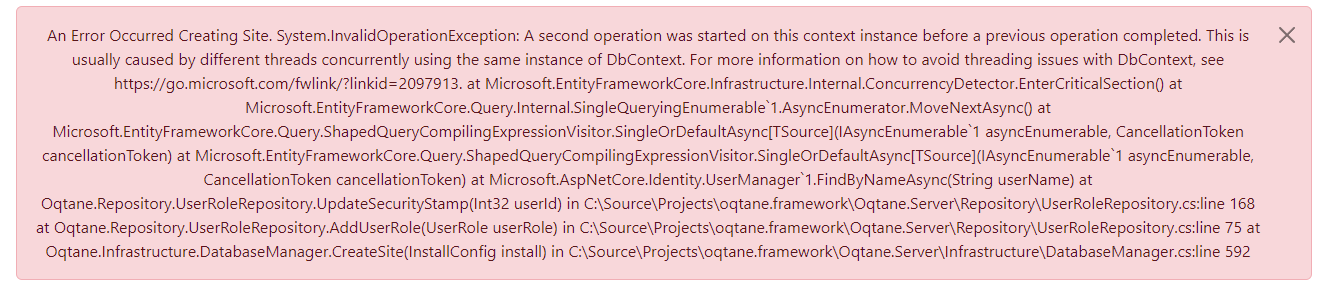


@JanOlsmar it looks like this specific scenario (ie. creating a new site in a multi-tenant environment using an isolated database) may have been affected by the recent enhancements in 5.2.2 to support SecurityStamp:
Oqtane.Repository.UserRoleRepository.UpdateSecurityStamp(Int32 userId) in C:\Source\Projects\oqtane.framework\Oqtane.Server\Repository\UserRoleRepository.cs:line 168
This method relies on the .NET Identity library - which appears to be throwing the DbContext exception. Perhaps the .NET Identity library is not using DbContextFactory (which is the recommended approach in Blazor). This will require more investigation.