Tools used for .csv file task automation
I am designing tools to speed up some tasks involving .csv file format.
A] Tool_1: ApplyFormulasToGroupOfFiles_SameName_v0.1
- Information:
- If you want to manually extract data from multiple .csv files with the same name, it will take a lot of time.
- "ApplyFormulasToGroupOfFiles_SameName_v0.1" is a utility I developed to address this issue.
- The current version of this tool is 0.1.
- .csv is the accepted input file type.
- The generated output file is an.xlsx.
- How to use this tool?:
- Simply download the.exe file from the repository (you will receive an unsafe warning from Explorer; choose to keep downloading).
- After downloading the.exe file, follow the "EXECUTION ACTION" section's instructions.

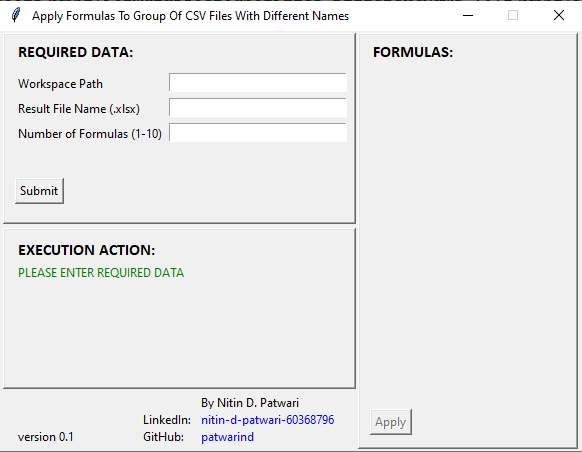
B] Tool_2: ApplyFormulasToGroupOfFiles_DifferentName_v0.1
- Information:
- If you want to manually extract data from multiple .csv files with the different names, it will take a lot of time.
- "ApplyFormulasToGroupOfFiles_DifferentName_v0.1" is a utility I developed to address this issue.
- The current version of this tool is 0.1.
- .csv is the accepted input file type.
- The generated output file is an.xlsx.
- How to use this tool?:
- Simply download the.exe file from the repository (you will receive an unsafe warning from Explorer; choose to keep downloading).
- After downloading the.exe file, follow the "EXECUTION ACTION" section's instructions.
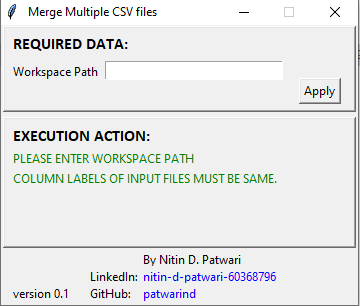
C] Tool_3: MergeMultipleCSVFiles_v0.1
- Information:
- If there are multiple .csv files with the same column labels, then the "MergeMultipleCSVFiles_v0.1" tool can be used to merge those files to a single .csv file "merged_files.csv".
- The current version of this tool is 0.1.
- .csv is the accepted input file type and output is also generated in same file format.
- How to use this tool?:
- Simply download the.exe file from the repository (you will receive an unsafe warning from Explorer; choose to keep downloading).
- After downloading the.exe file, follow the "EXECUTION ACTION" section's instructions.