db4
In this lesson we will build a nicer view of our blog entries, rather than the "dump" output which is ugly.
First, let's create a new HTML template (our first one for the blog!). Inside the templates/ subfolder, create a file called browse.html:
<html>
  <head>
    <title>Browse entries</title>
  </head>
<body>
  <h1>Browse entries</h1>
  {% if entries %}
  <ul>
    {% for entry in entries %}
      <li>
        Title: {{ entry.title }}<br>
        Date: {{ entry['date'] }}<br>
        Content: {{ entry["content"] }}<br>
    {% endfor %}
  </ul>
  {% else %}
  This blog is empty.
  {% endif %}
  </ul>
</body>
</html>
To be clear, our directory structure now looks like
blog/
+-- blog.py
+-- schema.sql
+-- populate.sql
+-- blog.db (this is probably here, but technically doesn't exist until we run schema.sql)
+-- templates/
    +-- browse.html
Let's also add a new route to our blog.py code:
@app.route("/browse")
def browse():
    db = get_db()
    rows = db.execute('select id, date, title, content from entries order by date')
return render_template('browse.html', entries=rows)The Flask route for /browse isn't all that different than /dump. In some sense, it's actually simpler. We connect
to the database, execute the query, and send the rows to render_template. The only new thing is we've never seen render_template called with a keyword argument other than a simple integer or string. But remember rows is actually an iterator over SQL rows. So how does the template handle this? Let's flip to the HTML template and see.
In the HTML template, notice the main logic is one big if statement. if entries asks if the variable entries has any rows in it. If it does, the upper part of the if block runs, and if not, the lower block runs. Notice that the lower block just prints out a message saying the blog is empty, which makes sense. So let's examine the upper block.
The upper block makes an unordered list with <ul>, then starts a for loop. Notice how the for loop in the HTML template looks almost exactly like the for loop in the dump route. The only difference is we use a variable called entries rather than a variable called r.
Inside the for loop, we mingle HTML code with variable insertions using double curly braces. The entry variable is a dictionary, and you can do lookups either with entry.attribute or entry["attribute"]. Pick your favorite and stick to it.
Modify the HTML template so that the blog entries look like the formatting below:
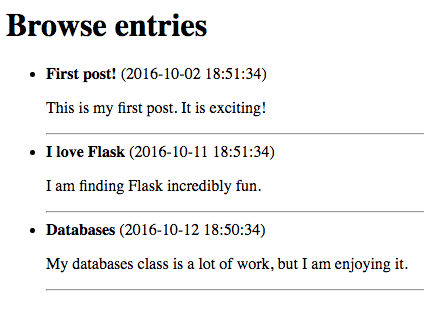 Specifically, make the titles bold, put the date in parentheses, put the content below with a blank line in between, and separate the entries with a horizontal rule (
<hr>).