Repository navigation
Releases
FrameKeep 3.1.1

FrameKeep 3.1.1: Recordings fix
A quick fix for 3.1.0. If you're on 3.1.0, please update.
Fixed
- Opening Recordings closed FrameKeep with "Unhandled exception in script". The page now opens normally, and new tests open it and resize it the way the app does.
- Recordings now stop when FrameKeep stops. If FrameKeep closed unexpectedly, 3.1.0 left its screen recorder running in the background, one more after every restart, and Windows showed "Failed to remove temporary directory". Now Windows ends them together with FrameKeep: in testing, a recorder was gone 157 ms after FrameKeep was force-closed (before: still running). Files are saved every 5 seconds, so a crash costs at most the last few seconds.
- The Recordings grid follows the window size again, adding or removing columns as you resize.
Changed
- The player uses puretech-player 0.1.1, which keeps its clock on the frame you stepped to.
If 3.1.0 crashed on you: a recorder may still be running in the background. Restarting your PC stops it, or end any ffmpeg.exe in Task Manager. Your recordings are not affected.
Download
Get FrameKeep.exe below. It's one portable file with everything inside: no Python, no installer. Your settings carry over.
Full notes: CHANGELOG · Full Changelog: v3.1.0...v3.1.1
FrameKeep 3.1.0
FrameKeep 3.1: your screen and your cameras, in tiny files
The biggest FrameKeep update yet. FrameKeep now records your webcams and network cameras next to your screen, has its own player, can record desktop audio, and the app itself got much lighter. Every number below was measured, and the full tables are in docs/perf.
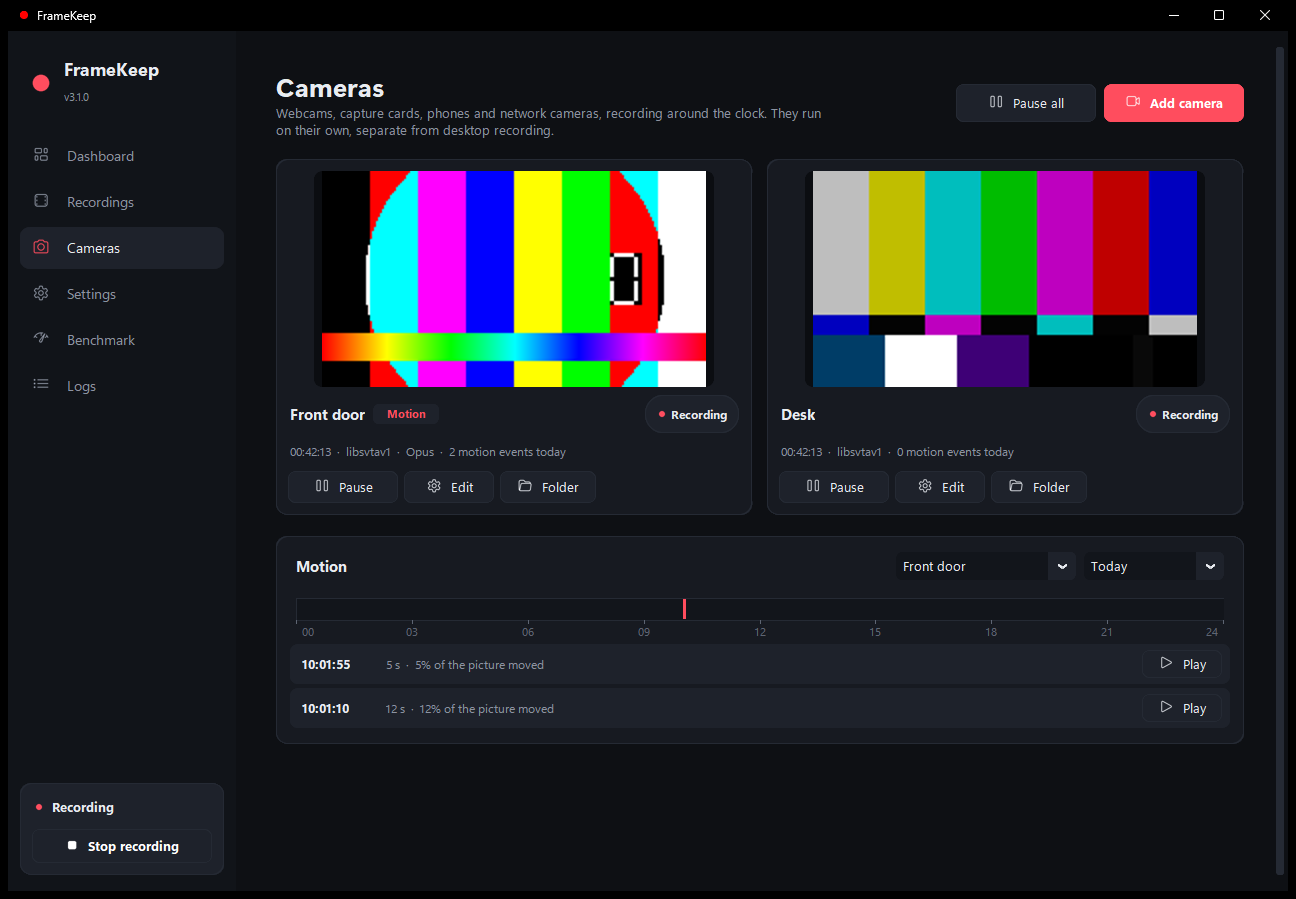
Cameras
Turn webcams, capture cards, phones (Iriun, DroidCam) and network cameras (RTSP or HTTP) into a recording station inside FrameKeep.
- Records around the clock with no gap between files, and marks motion on a timeline you can jump straight to.
- Optional per camera: sound, date and time in the picture, motion notifications, "save space when nothing moves".
- Runs separately from screen recording. Pause your own webcam for a call from the tray, a hotkey, or automatically while apps like Zoom are open.
- 86 MB per hour for a 720p webcam in AV1 (still scene), 2 to 3% of the PC's CPU. At the same quality AV1 was 2.8x smaller than H.265 and 10x smaller than H.264.
- Network cameras can keep their own stream for almost no CPU (0.05%), or be made smaller.
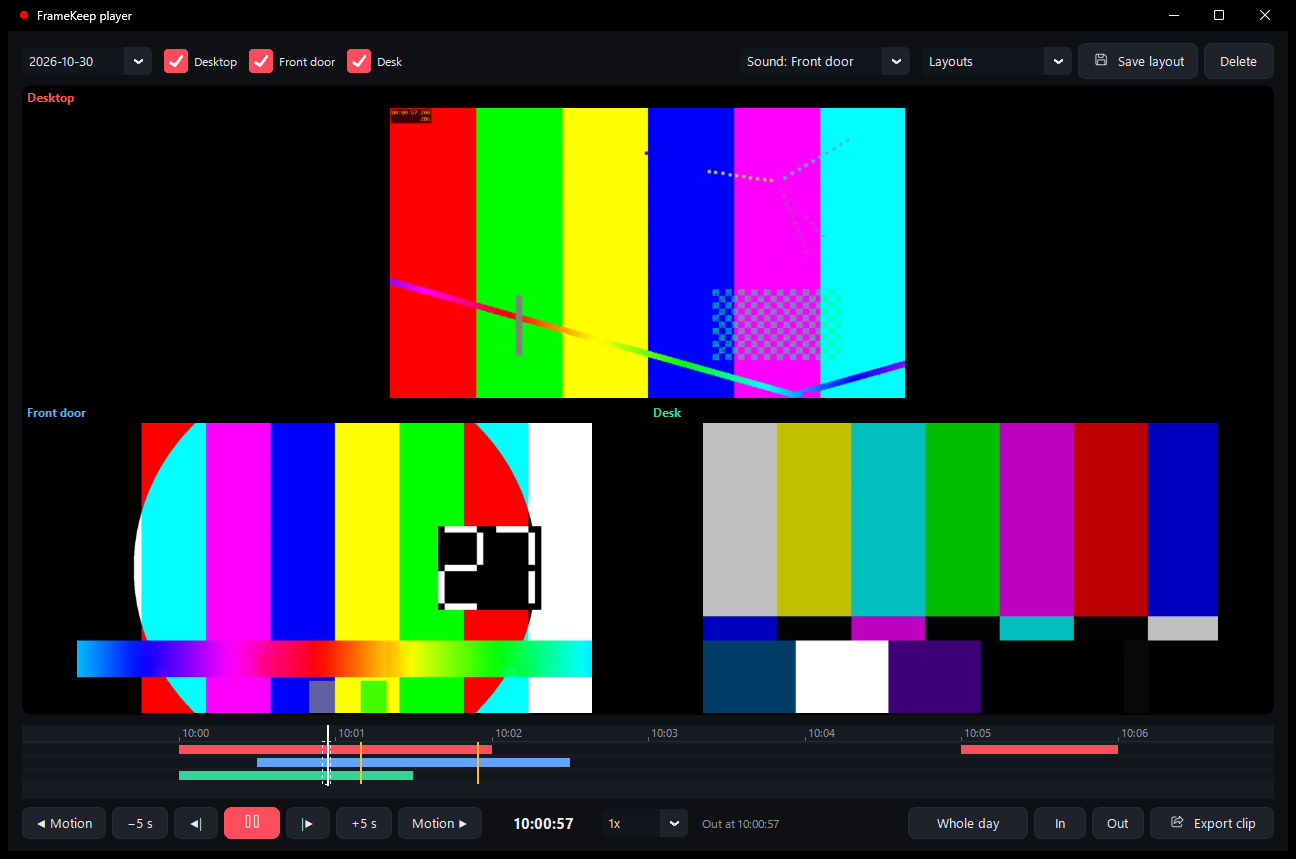
The FrameKeep player
Play now opens FrameKeep's own player instead of ffplay.
- A whole day plays as one timeline across files, in every format FrameKeep records, H.266 included.
- Up to four sources side by side (desktop and cameras) in sync, with saved layouts and the sound from the one you pick.
- Time bar with a lane per source and motion marks, 0.25x to 16x, frame stepping, next/previous motion.
- Lossless clip export: set In and Out and save a full-quality copy in a moment.
- Against ffplay on 8 test files: less or equal CPU on all 8 (H.266 at 1080p: 52% of a core instead of 108%), less memory on 7, faster seeks on 6. Built on puretech-player.
Desktop audio (optional, off by default)
- Records what your PC plays into the same file: Opus (smallest) or AAC (plays everywhere). Silence costs about 1 kbps.
- Follows headphone and speaker switches, and can leave apps out (for example Discord).
- Adds about 21 MB of memory and 0.1% of the PC's CPU.
Lighter and smarter
- A native tray (puretech-tray): the icon shows motion and problems, notifications have buttons (Play on a motion alert), and the menu follows dark mode. FrameKeep uses 16% less memory in the tray with it.
- Compared with 3.0: the app commits 21 MB instead of 520 MB in the tray, wakes up 3 times a second instead of 90, and encoders use up to 24% less memory.
- Disk space: a warning once recordings pass 100 GB (you choose), and optional cleanup of old camera footage. Desktop recordings are never deleted.
- H.266 (Ultra) recordings now play back with correct timing.
Download
Get FrameKeep.exe below. It's one portable file with everything inside, FFmpeg included: no Python, no installer.
Upgrading from 3.0: your settings carry over. The Player setting becomes "FrameKeep player". The first time FrameKeep shows a notification it adds a Start menu shortcut for your account, because Windows only shows notifications with buttons for apps that have one.
Good to know: H.265 on cameras can fall behind on busy scenes, so cameras default to AV1. On a 2-core PC, three cameras watching constant movement fall behind; use fewer or a lower frame rate.
Full notes: CHANGELOG · README · Full Changelog: v3.0.0...v3.1.0
FFmpeg for FrameKeep (ffmpeg-9.0.2-fk3)

Minimal FFmpeg built by tools/build_ffmpeg.sh for FrameKeep.exe. See BUILDINFO.txt in the zip. fk3 adds tools/patches/vvenc-vfr-timestamps.patch, which fixes broken timestamps in H.266 (VVenC) recordings with variable frame rate. SHA-256: 3126b4762825bbc044f4b320fd171f22054ee8fb83933b563b547419d0bc4412
v3.0.0
Full Changelog: v2.1.0-stable...v3.0.0
Full Changelog: v2.1.0-stable...v3.0.0
FFmpeg for FrameKeep (ffmpeg-9.0.2-fk4)
Minimal FFmpeg built by tools/build_ffmpeg.sh for FrameKeep.exe. See BUILDINFO.txt in the zip.
FFmpeg for FrameKeep (ffmpeg-9.0.2-fk2)
Minimal FFmpeg 9.0.2 built by tools/build_ffmpeg.sh for FrameKeep.exe (adds the WebM muxer). See BUILDINFO.txt in the zip. sha256 5acef9360061a6b0f11bc318d85c362617f4cfde39292679aa5f4ee1510f8e53
v2.1.0-stable
v2.1.0 Changelog
- New program icon to match tray icon!
- Removed ~47% of lines of the script. Removed code was script bloat, or optimization choices.
- Clarified README.md customization documentation
- Improved recording status messages to better distinguish between user-initiated stops and automatic hour-limit completions
- Hot-swap configuration feature: Press Ctrl+R in the console to refresh configuration settings without restarting the application
- Added Extra ADUS results
Future Plans
- FrameKeep only records the primary monitor, I hope to add configuration settings that let you choose all, or certain monitors.
- H.265 and AV1 are in the plans, and will NOT be replacing the defaults, they will be optional bonuses to users that can computationally afford it.
framekeeposv2.0.0-stable
FrameKeep - (C) 2025 Tanner Lucier
Licensed under GPLv3 - see LICENSE file for details
v2.0.0 Changelog
- Fixed FrameKeep not being able to sometimes find openh264-1.8.0-win64.dll on startup
- Added ffmpeg.exe to handle automatic but safe .mkv → .mp4 conversions (you can download your own ffmpeg build, using a different build could cause script instability), this does add ~100MB to the final build. You can delete the .exe and/or turn this off in the configuration file if you wish.
- Added CRF (Constant Rate Factor) so .mkv → .mp4 conversions are not only safe, but will also save storage space. You can turn CRF off in the configuration .json file, you can also edit the CRF value in the config file, the default is 23 to maintain quality while getting smaller files. CRF is automatically ignored if .mkv → .mp4 conversions are turned off.
- Added the "chunk_minutes" option to the configuration file, this allows you to change how long you want each file to record for. The default has been left at 60 minutes
- Important actions added to the console. Also added color coding, and timestamps.
- Added folders for third-party software to clean the repo up.
- Fixed build version to match Semantic Versioning standards (hopefully), also started saving releases for older versions. FrameKeepOS, FFmpeg, and Cisco's Open H.264 licensing has been added to the repo.
- Adjusted H.264 ADUS to new averages done with personal testing (users are more than welcome to post their own results, they will be taken into account with ADUS numbers).
Future Plans
- FrameKeep only records the primary monitor, I hope to add configuration settings that let you choose all, or certain monitors.
- Plan on implementing a "frame-break" system that automatically detects when the same frame is being displayed (for say, 5 or 10 frames), and saves space by not saving that frame repeatedly. While CRF and H.264 are good at this on their own, a correct system could save even more storage space.
- H.265 and AV1 are in the plans, and will NOT be replacing the defaults, they will be optional bonuses to users that can computationally afford it.
framekeepopen-source v1.1.0-stable
v1.1 Changelog
- Switched from MJPG as the default recording codec, to H.264. MJPG is a fallback if for some reason H.264 doesn't work. This cuts recording file sizes by ~75%, with no loss in recording quality, while also using ~23% less RAM. You can also now customize which codec you want to record in, in the FrameKeep config.json file.
- Updated MJPG Average Disk Usage Statistics (ADUS) after more testing. Also added H.264 ADUS
Future Plans:
- Plan on adding H.265 (HEVC) and AV1 (AOMedia Video 1) for even more savings on storage, without losing any quality.