

pyOMA is an open-source toolbox for Operational Modal Analysis (OMA) developed by Simon Marwitz, Volkmar Zabel et al. at the Institute of Structural Mechanics (ISM) of the Bauhaus-Universität Weimar. Operational Modal Analysis is a methodogy for the identification of structural modal properties from ambient (output-only) vibration measurements. It is written in python 3.xx.
- Documentation: https://py-oma.readthedocs.io
- Source Code: https://github.com/pyOMA-dev/pyOMA
- Citing in your work: https://doi.org/10.5281/zenodo.14936576
In a broader sense OMA consists of a series of processes:
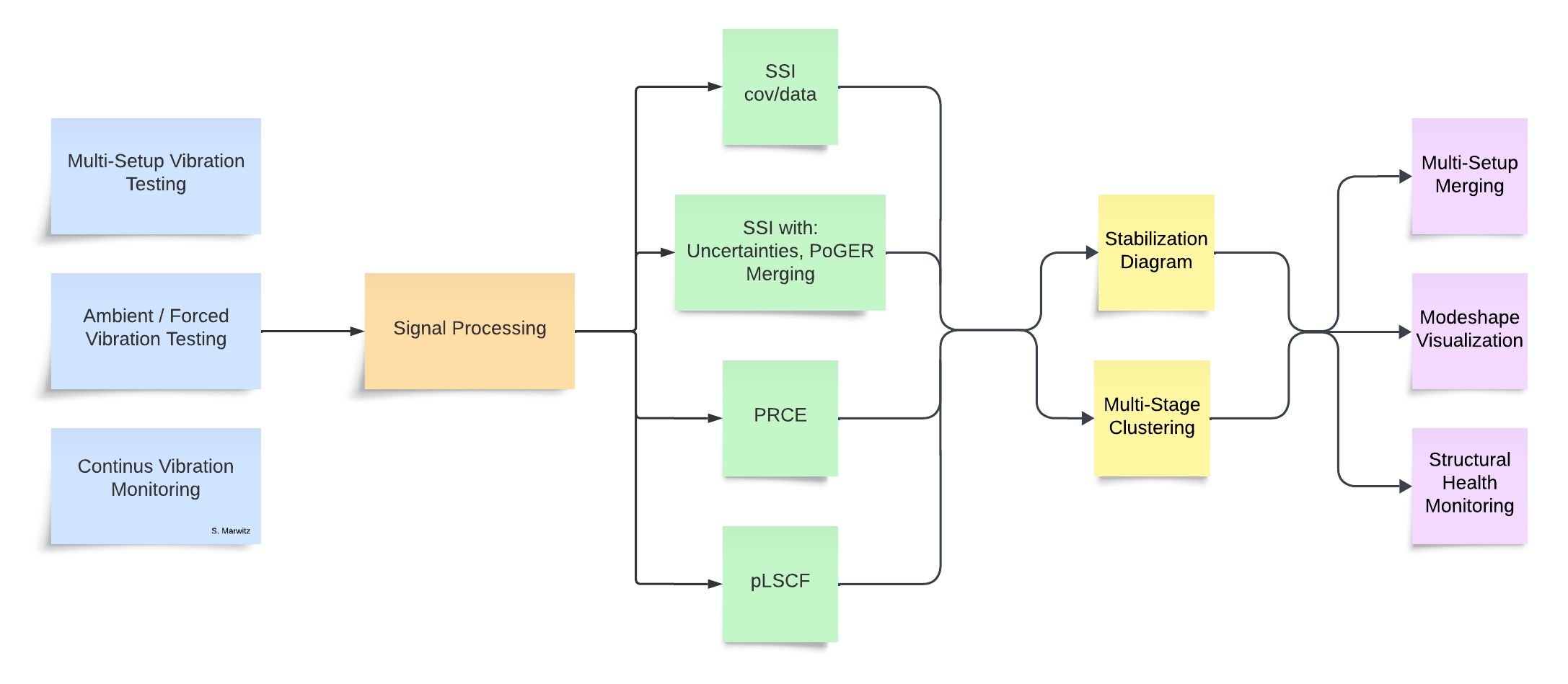
| Ambient Vibration Testing | Acquiring vibration signals (acceleration, velocity, ...) from mechanical structures under ambient excitation (wind, traffic, microtremors, ...) |
| Signal Processing | Filters, Windows, Decimation, Spectral Estimation, Correlation Function Estimation |
| System Identification | Various time-domain and frequency-domain methods for identifiying mathematical models from acquired vibration signals. |
| Modal Analysis | Estimation of modal parameters (frequencies, damping ratios, mode shapes) from identified systems. Manually, using stabilization diagrams or automatically using multi-stage clustering methods. |
| Post Processing | E.g. plotting of mode shapes, merging of multiple result datasets (setups), statistical analyses, SHM |
The toolbox is currently used on a daily basis to analyze the continuously acquired vibration measurements of a structural health monitoring system (since 2015). Further uses include various academic and commercial measreument campaigns on civil engineering structures including bridges, towers/masts, widespanned floors, etc.
| [Ref1] | Simon Marwitz et al. “An Experimental Evaluation of Two Potential Improvements for 3D Laser Vibrometer Based Operational Modal Analysis”. In: Experimental Mechanics 57.8 (July 2017), pp. 1311–1325. |
| [Ref2] | Simon Marwitz et al. “Modalanalyse von Monitoringdaten eines Sendeturms”. In: Bautechnik 95.4 (Mar. 2018), pp. 288–295. |
| [Ref3] | Simon Marwitz et al. “Operational Modal Analysis with a 3D Laser Vibrometer without External Reference”. In: Rotating Machinery, Hybrid Test Methods, Vibro-Acoustics & Laser Vibrometry. Ed. by James De Clerck et al. Vol. 8. Proceedings of the 34th IMAC, A Conference and Exposition on Structural Dynamics 2016. Society of Experimental Mechanics. Springer International Publishing, Jan. 25, 2016, pp. 75–85. |
| [Ref4] | Simon Marwitz et al. “Automatisierte Modalanalyse und Langzeitmonitoring eines rotationssymmetrischen Turmtragwerks”. In: Berichte der Fachtagung Baustatik-Baupraxis 13. Ed. by Günther Meschke et al. Vol. 13. Baustatik Baupraxis e. V.. Ruhr-Universität Bochum: Lehrstuhl für Statik und Dynamik der Ruhr-Universität Bochum, Mar. 2017, pp. 165–172. |
| [Ref5] | Simon Marwitz et al. “Cross-Evaluation of two Measures for the Assessment of Estimated State-Space Systems in Operational Modal Analysis”. In: Proceedings of the 7th International Operational Modal Analysis Conference. Shaker Verlag GmbH, Germany, May 11, 2017, pp. 253–256. |
| [Ref6] | Simon Marwitz et al. “Betrachtung von Unsicherheiten in der Modalanalyse mit der Stochastic Subspace Identification am Beispiel eines seilabgespannten Masts”. In: Tagungsband der 15. D-A-CH Tagung Erdbebeningenieurwesen und Baudynamik. Sept. 21, 2017. |
| [Ref7] | Simon Marwitz et al. “Modale Identifikation aus Langzeit-Dehnungsmessungen an einem Sendeturm”. In: Tagunsgband der VDI Baudynamik Tagung. Apr. 17, 2018. |
| [Ref8] | Simon Marwitz et al. “Relations between the quality of identified modal parameters and measured data obtained by structural monitoring”. In: Conference Proceedings of ISMA2018 - USD2018. Sept. 17, 2018. |
| [Ref9] | Zabel, V. et al. "Bestimmung von modalen Parametern seilabgespannter Rohrmasten". In: Berichte der Fachtagung Baustatik-Baupraxis, Institut für Baustatik und Baudynamik. 2020. |
| [Ref10] | Marwitz, S. et al. " Cross-Validation in Stochastic Subspace Identification". In: Proceedings of the IOMAC 2025. 2025. |
- python https://www.python.org/ or https://www.anaconda.com/download
- matplotlib http://matplotlib.org/
- numpy http://www.numpy.org/
- scipy https://scipy.org/
Optional libraries:
- ipywidgets https://github.com/jupyter-widgets/ipywidgets
- ipympl https://matplotlib.org/ipympl/
- JupyterLab https://jupyter.org/
$ git clone https://github.com/pyOMA-dev/pyOMA.git /dir/to/pyOMA/
$ pip install -r /dir/to/pyOMA/requirements.txt
- Setup a project directory
/dir/to/project/containing measurement and result files- Copy the script
scripts/single_setup_analysis.ipynbto your project directory. An example JuPyter notebook can be found on the left.- Startup JupyterLab or JupyterNotebook and open the script
/dir/to/project/single_setup_analysis.ipynb- Modify the paths in the second cell and run the script
- In case of errors check that:
- input files are formatted correctly
- arguments are of the right type and order
- search the internet for similar errors
- Open an issue at https://github.com/pyOMA-dev/pyOMA/issues
pyOMA
├── pyOMA
│   ├── core
│   │  ├── PreProcessingTools.py
│   │  ├── ModalBase.py
│   │  ├── PLSCF.py
│   │  ├── PRCE.py
│   │  ├── SSICovRef.py
│   │  ├── SSIData.py
│   │  ├── VarSSIRef.py
│   │  ├── StabilDiagram.py
│   │  ├── PlotMSH.py
│   │  ├── PostProcessingTools.py
│   │  └── ...
│   ├── GUI
│   │  ├── PlotMSHGUI.py
│   │  ├── StabilGUI.py
│   │  ├── Helpers.py
│   │  └── ...
Additionally some further files are provided with it:
├── doc
├── input_files
├── scripts
├── tests
│   ├── basic_tests.py
│   └── files
│       └── ...
├── LICENSE
├── README.rst
├── requirements.txt
└── setup.py
Current development is focused on the core package which contains all the algorithms.
The input_files packages provides templates for input files for automated and structured analysis of a dataset consisting of multiple measurements.
The scripts package contains templates for certain recurring tasks, as well as commonly used functions, derived from the core and GUI packages.
The tests package contains common use cases and files, which could be run to test if any changes in the modules result in breaking existing functionality.
The documentation is generated from the git repository by Sphinx automatically and available on https://py-oma.readthedocs.io/
For beginners:
- Fork the project on GitHub and start development
- Open a Pull Request to get your changes merged into the project
- Ensure the documentation can be built: Navigate to the doc folder in a CLI and run
make clean && make htmlto mitigate any errors from wrongly formatted documentation syntax.