Project developed with Spring Boot, Spring Data JPA, Hibernate, Mockito, JUnit 5 and H2 Database. The DTO (Data Transfer Objects) and MVC standards were used. I'll leave my POSTMAN collections in the repository for consumption by the project endpoints.
Some features developed:
-
Creation of a user CRUD Rest API;
-
Automated tests with 100% project code coverage;
-
Validations with Spring Validation;
-
Using Lombok and ModelMapper to eliminate boilerplate code
-
Implementation of test and development profiles;
-
Custom exception handling









git clone https://github.com/RamonBecker/SpringJUNITAPI.git

git clone https://github.com/RamonBecker/SpringJUNITAPI.git
or install github https://desktop.github.com/
To test the end points you will need to install POSTMAN or Insomnia. I recommend installing POSTMAN. I'll leave the collections on the DRIVE to facilitate testing.
Download and import collections into your POSTMAN:
https://drive.google.com/file/d/1cxAaM5MhwwDUdmilla_Fh3jb6JKufJq6/view?usp=sharing
To test the project you will need to clone the repository on your machine. You can choose both tools: postman or insomnia.
To download postman go to the following link: https://www.postman.com/downloads/
To download insomnia rentre from the following link: https://insomnia.rest/download
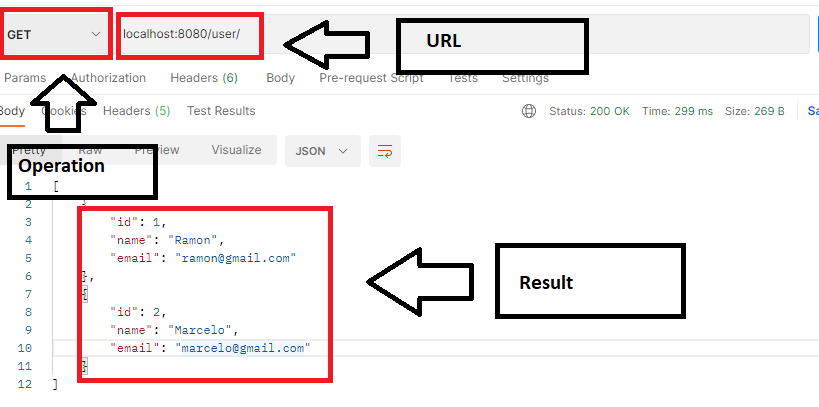
Remembering that you must choose the operating system corresponding to your machine. After you have made your registration in these tools, run them and you must type the following in the address:
localhost:8080/user/
according to the image below, to perform, for example, the GET operation, to search for all users in the database.
The following HTPP methods were implemented: PUT, DELETE, GET and POST.
The example was performed using Postman.
If you want to modify the user to access the database, modify the application.properties file. Change the following:
spring.datasource.username=user
spring.datasource.password=password
Access in browser
http://localhost:8080/h2-console
If the JDBC URL is not configured, replace it with:
jdbc:h2:mem:testdb

- Java
- JPA
- Hibernate
- Spring Boot
- H2 Database
- Design Pattern MVC
- Design Pattern DTO
- Lombok
- Mockito
- JUnit 5
- CRUD User
- Automated tests for the Rest API
By Ramon Becker 👋🏽 Get in touch!


