Click the image below to watch the introduction video.
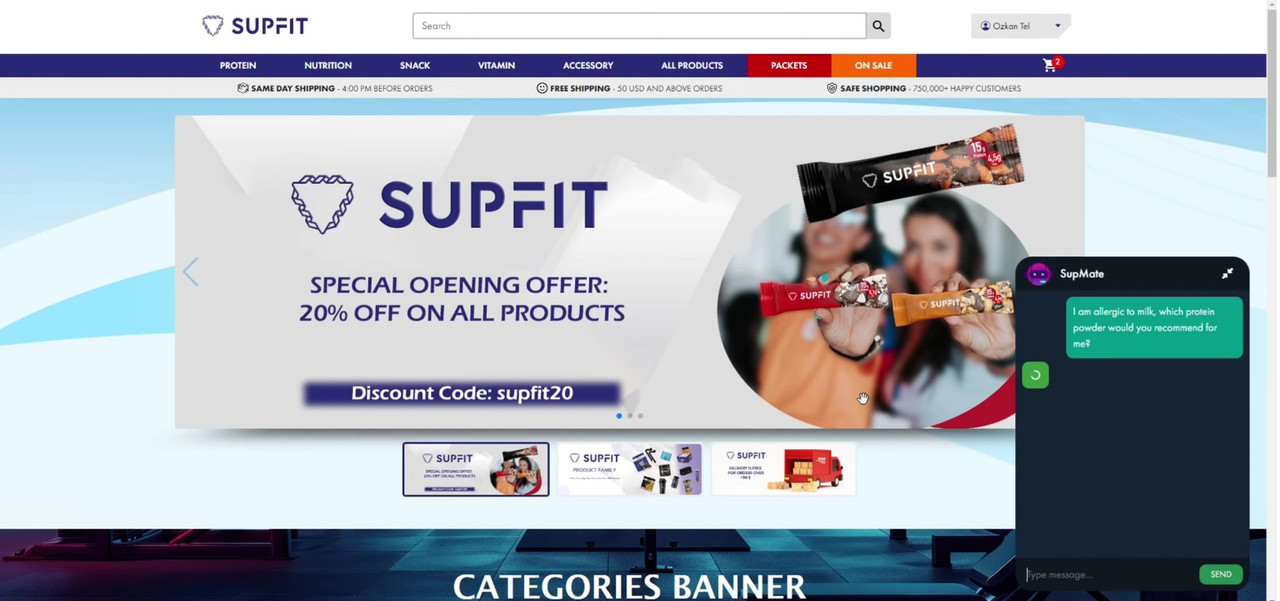
SupFit is a full-stack e-commerce platform that integrates an AI chatbot to enhance user experience. The platform features secure authentication, scheduled restocks, and optimized performance through caching mechanisms. SupFit is built with modern web development technologies, ensuring scalability, security, and responsiveness across devices.
Users can find answers to frequently asked questions (FAQs) and ask any remaining questions to the site’s integrated chatbot (SupMate). Users can search for products using the search bar, add favorite products to their favorites, and view the most purchased products on the site. They can also choose how many minutes before their session times out. To place an order, they need to register and add at least one address. After placing an order, users can track their order and see their previous reviews. They can view product details such as nutrition facts, weight, usage descriptions, reviews, ratings, and stock levels. They can add products to their cart and use discount codes. If the cart total exceeds $50, they get free shipping. The site is responsive, so it works well on all devices without issues.
- Backend:
- Spring Boot
- Spring AI
- Spring Security
- JPA (Hibernate)
- MySQL/SQL
- Redis
- Frontend:
- React.js (with Vite)
- Redux Toolkit Query
- TypeScript
- Bootstrap / Material UI
- AI Integration:
- Ollama LLAMA3 (used rag technique & pinecone vector database)
- Security:
- JSON Web Token (JWT)
- Other:
- EMailJS (for email service integration)
- External API for Turkish city/district data
- BlurHash (Placeholder images)
- AI Chatbot Integration: Improve customer interaction with an AI-powered chatbot for friendly and fast support.
- Scheduled Job for Restocking: Automates product restocks at predefined intervals default is every midnight.
- Caching for Optimized Performance: Redis caching for faster retrieval of user information and product data.
- Fully Responsive Design: Provides a fully user friendly shopping experience across all devices.
- Secure Authentication: User login and registration secured with JSON Web Tokens (JWT).
- Email Notifications: Integrated with EMailJS for sending transactional emails for the purpose of forgotten password service.
- External API Integration: Uses an external API for dynamic city and related district data within Turkey.
- BlurHash: While products are loading, BlurHash images are shown as placeholders. BlurHash string is automatically generating at product service when product is created.
git clone https://github.com/yourusername/supfit.git
cd supfit
Navigate to the backend folder and run:
mvn clean install
mvn spring-boot:run
Navigate to the frontend folder and run:
npm install
npm run dev
- Start both the backend and frontend servers.
- Access the app via http://localhost:3000.
- Register an account, browse products, chat with the AI bot, and enjoy the seamless e-commerce experience.
- Before starting, you should add some mock data for the products.
- You can use the JSON format below to create products after starting the project at http://localhost:8080/products using the POST method.
{ "name": "productName", "title": "productTitle", "imageUrl": "productImageCDNurl", "flavourIds": [intValue, intValue, ...], // flavor ids come from flavor table "ingredients": ["ing1", "ing2", ...], "price": bigIntPrice, "weight": intWeightAsGrams, "servingAmount": intValue, "quantity": intValue, "description": "productDesc", "usageDescription": "productUsageDesc", "nutritionFacts": { "Energy": doubleValue, "Protein": doubleValue, "Carbohydrates":doubleValue, "Fat": doubleValue, "Sodium": doubleValue, "Potassium": doubleValue, "Calcium": doubleValue, "Iron": doubleValue }, "categoryId": intValue from category table } // JSON format below for creating accessory products { "name": "...", "title": "...", "imageUrl": "...", "flavourIds": [], // set empty "ingredients": [], // set empty "price": ..., "weight": ..., "servingAmount": ..., "quantity": ..., "description": "...", "usageDescription": "...", "nutritionFacts": {}, // set empty "categoryId": 5 } - For database configuration, create a database named 'supplement', then run the following scripts:
INSERT INTO `supplement`.`category` (`category_image`, `name`) VALUES ('yourCategoryImageUrl', 'protein');
INSERT INTO `supplement`.`category` (`category_image`, `name`) VALUES ('yourCategoryImageUrl', 'nutrition');
INSERT INTO `supplement`.`category` (`category_image`, `name`) VALUES ('yourCategoryImageUrl', 'snack');
INSERT INTO `supplement`.`category` (`category_image`, `name`) VALUES ('yourCategoryImageUrl', 'vitamin');
INSERT INTO `supplement`.`category` (`category_image`, `name`) VALUES ('yourCategoryImageUrl', 'accessory');
INSERT INTO `supplement`.`category` (`category_image`, `name`) VALUES ('yourCategoryImageUrl', 'all');
INSERT INTO `supplement`.`category` (`category_image`, `name`) VALUES ('yourCategoryImageUrl', 'packets');
INSERT INTO `supplement`.`category` (`category_image`, `name`) VALUES ('yourCategoryImageUrl', 'onsale');
INSERT INTO `supplement`.`flavour` (`color`, `name`) VALUES ('#b2b2b2', 'unflavored');
INSERT INTO `supplement`.`flavour` (`color`, `name`) VALUES ('#D61F33', 'watermelon');
INSERT INTO `supplement`.`flavour` (`color`, `name`) VALUES ('#F2D00F', 'lemonade');
INSERT INTO `supplement`.`flavour` (`color`, `name`) VALUES ('#E6BC79', 'biscuit');
INSERT INTO `supplement`.`flavour` (`color`, `name`) VALUES ('#B64300', 'caramel');
INSERT INTO `supplement`.`flavour` (`color`, `name`) VALUES ('#56321D', 'chocolate');
INSERT INTO `supplement`.`flavour` (`color`, `name`) VALUES ('#F1D018', 'banana');
INSERT INTO `supplement`.`flavour` (`color`, `name`) VALUES ('#BA9051', 'coconut');
INSERT INTO `supplement`.`flavour` (`color`, `name`) VALUES ('#CC1E5F', 'raspberry');
INSERT INTO `supplement`.`flavour` (`color`, `name`) VALUES ('#D61F33', 'strawberry');
INSERT INTO `supplement`.`flavour` (`color`, `name`) VALUES ('#E96F44', 'peach');
INSERT INTO `supplement`.`flavour` (`color`, `name`) VALUES ('#78B747', 'apple');
INSERT INTO `supplement`.`coupon` (`code`, `discount`) VALUES ('50OFF', '50');
INSERT INTO `supplement`.`coupon` (`code`, `discount`) VALUES ('requiet2k', '20');
INSERT INTO `supplement`.`coupon` (`code`, `discount`) VALUES ('supmate', '75');
INSERT INTO `supplement`.`coupon` (`code`, `discount`) VALUES ('20OFF', '20');
INSERT INTO `supplement`.`coupon` (`code`, `discount`) VALUES ('supfit', '40');
-- To enable caching in this project, you should use Redis. I was using Redis from Docker with the following script:
docker run --name supredis -p 6379:6379 --restart always -d redis
**If you don't want to use this command, just ensure that your Redis instance is running on port 6379. Otherwise, go to the application.properties file and change the spring.data.redis.port.