

A Flutter widget for building a vertical column of widgets and text, where
the text wraps around floated widgets — similar to the CSS float and
clear properties.
Try the live demo: https://ronjb.github.io/float_column
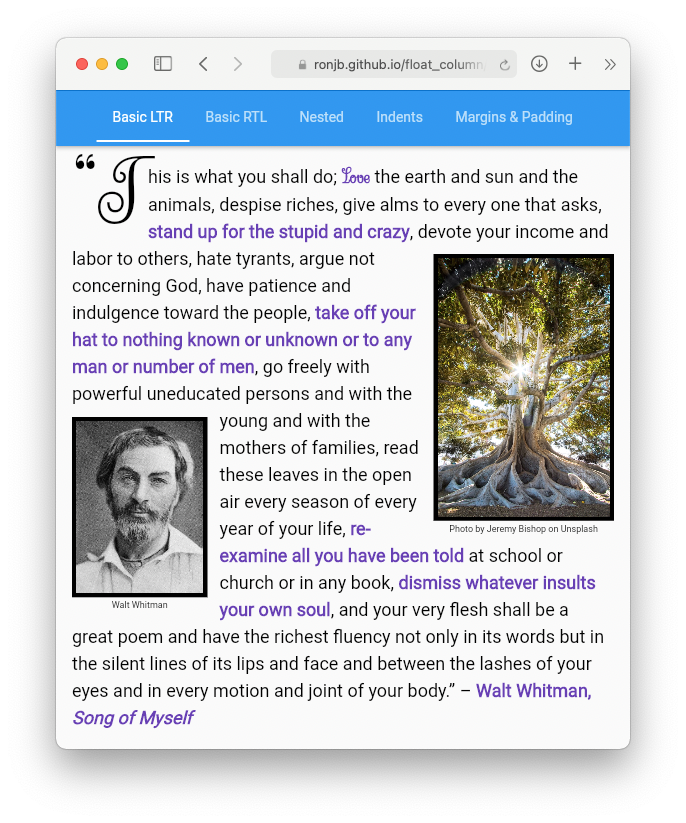
- Float widgets to the left or right (or
start/endfor automatic right-to-left support), with paragraph text wrapping around them. - Float widgets inline from within text using
WidgetSpan— the float anchors to its position in the text. - Clear floats (like CSS
clear), with optional minimum spacing. - Margins, padding, and a first-line indent (or hanging indent) on paragraphs.
- Constrain a float's width to a percentage of the column's width.
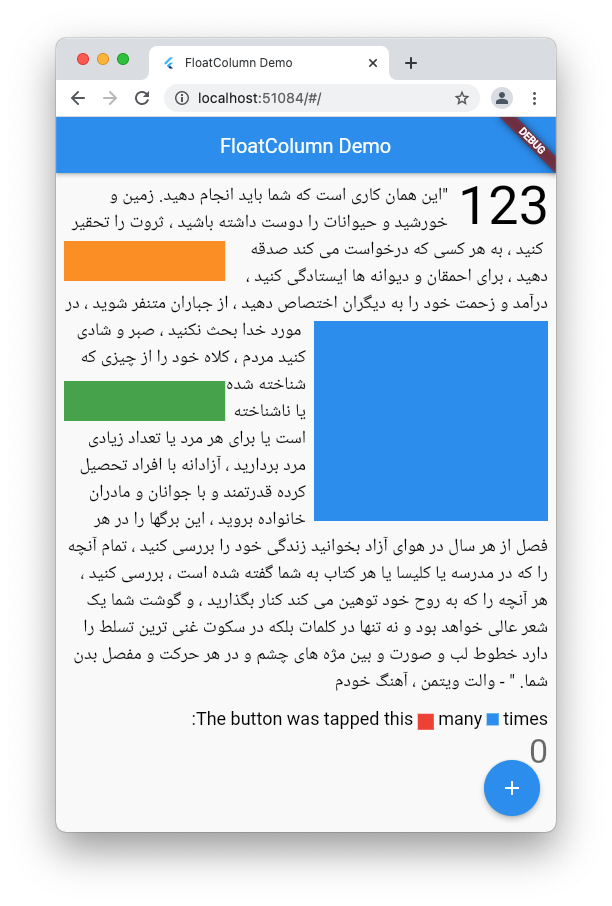
- Full right-to-left text direction support.
- Works with Flutter text selection.
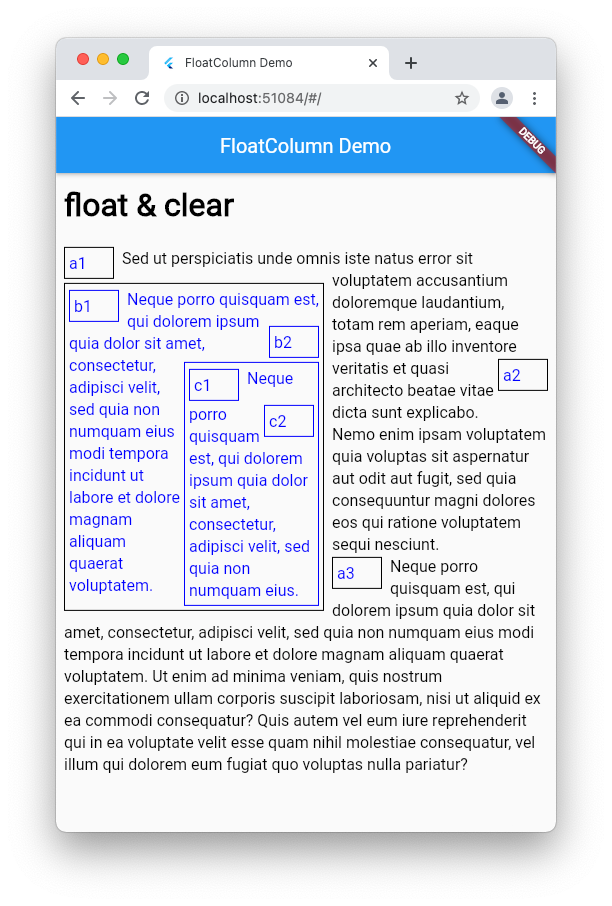
FloatColumnwidgets can themselves be floated and nested.
Add the dependency to your app's pubspec.yaml file:
dependencies:
  float_column: ^4.1.0
And import it:
import 'package:float_column/float_column.dart';FloatColumn accepts a list of children that can be Widget, Text,
RichText, TextSpan, or WrappableText objects. Wrap any widget that
should float in a Floatable:
FloatColumn(
  children: [
    const Floatable(
      float: FCFloat.start,
      padding: EdgeInsetsDirectional.only(end: 8),
      child: FlutterLogo(size: 100),
    ),
    const Floatable(
      float: FCFloat.end,
      clear: FCClear.both,
      clearMinSpacing: 20,
      padding: EdgeInsetsDirectional.only(start: 8),
      child: FlutterLogo(size: 100),
    ),
    WrappableText(
      text: const TextSpan(
        text: 'This text will wrap around the floated widgets, '
            'flowing to the right of the first logo, then below it, '
            'then to the left of the second logo…',
      ),
    ),
  ],
),
Plain Text and TextSpan children work too — they're treated like
WrappableText automatically:
FloatColumn(
  children: [
    const Floatable(float: FCFloat.start, child: FlutterLogo(size: 80)),
    const Text('Text children wrap around floated siblings too.'),
  ],
),Widgets can also be floated from within the text itself by wrapping them
in a Floatable inside a WidgetSpan. The float is anchored to the line
of text containing the WidgetSpan, and the text wraps around it from
there — handy for figures, pull quotes, or margin notes that should stay
with their place in the text:
FloatColumn(
  children: [
    WrappableText(
      text: const TextSpan(
        children: [
          TextSpan(text: 'The image below is floated at the point in the '
              'text where it appears'),
          WidgetSpan(
            child: Floatable(
              float: FCFloat.start,
              clear: FCClear.start,
              padding: EdgeInsetsDirectional.only(end: 8),
              maxWidthPercentage: 0.33,
              child: Image(image: AssetImage('assets/fig1.png')),
            ),
          ),
          TextSpan(text: ', and the rest of the paragraph continues to '
              'wrap around it…'),
        ],
      ),
    ),
  ],
),A classic use case — float the first letter of a paragraph:
FloatColumn(
  children: [
    WrappableText(
      text: const TextSpan(
        children: [
          WidgetSpan(
            child: Floatable(
              float: FCFloat.start,
              padding: EdgeInsetsDirectional.only(end: 8),
              child: Text('T', style: TextStyle(fontSize: 64, height: 1)),
            ),
          ),
          TextSpan(text: 'he rest of the paragraph wraps around the '
              'oversized first letter, like a drop cap in a book or '
              'magazine…'),
        ],
      ),
    ),
  ],
),
See the example app
for a more polished DropCap widget with font-size-aware measurements.
Like CSS clear, a child can be pushed below previously floated siblings
with the clear property, using FCClear.left, FCClear.right,
FCClear.start, FCClear.end, or FCClear.both. Floated widgets also
support clearMinSpacing, the minimum vertical space between the cleared
widget and the float above it:
FloatColumn(
  children: [
    const Floatable(float: FCFloat.start, child: FlutterLogo(size: 100)),
    const Floatable(
      float: FCFloat.start,
      clear: FCClear.start, // Placed below the first logo,
      clearMinSpacing: 16,  // with at least 16 pixels of spacing.
      child: FlutterLogo(size: 100),
    ),
    WrappableText(
      text: const TextSpan(text: 'This text wraps around both logos…'),
      clear: FCClear.none, // The default — no clearing.
    ),
  ],
),WrappableText and Floatable both support margin and padding.
Margins can overlap adjacent content, similar to CSS margin behavior —
vertical margins collapse between non-floated siblings, and a floated
child's margin box is what sibling content wraps around. Padding never
overlaps siblings.
WrappableText also supports a first-line indent — use a positive value
for a normal indent or a negative value for a hanging indent:
WrappableText(
  text: const TextSpan(text: 'A paragraph with an indented first line…'),
  indent: 32,
  margin: const EdgeInsetsDirectional.only(start: 16),
  padding: const EdgeInsets.symmetric(vertical: 8),
),FloatColumn respects the ambient Directionality (or an explicit
textDirection), and FCFloat.start/FCFloat.end and
FCClear.start/FCClear.end resolve automatically:
FloatColumn widgets can be floated and nested:
| Property | Description |
|---|---|
float |
Which side to float to: none (default), left, right, start, or end. |
clear |
Place this child below floated siblings: none (default), left, right, start, end, or both. |
clearMinSpacing |
Minimum vertical spacing below the cleared sibling. |
margin |
Space around the child that can overlap adjacent content. |
padding |
Space around the child that never overlaps siblings. |
maxWidthPercentage |
Maximum width as a fraction of the column's width (defaults to 1.0). |
| Property | Description |
|---|---|
text |
The TextSpan to display. |
clear |
Place this paragraph below floated siblings. |
indent |
First-line indent; negative for a hanging indent. |
margin, padding |
Space around the paragraph. |
textAlign, textDirection, overflow, textScaler, maxLines, locale, strutStyle, textHeightBehavior |
Standard text layout properties, like those on Text. |
- API documentation
- Example app — also running live at ronjb.github.io/float_column
- Found a bug or have a feature request? Please file an issue at the GitHub issue tracker.
- Licensed under the MIT License.