Repository navigation
Releases
Releases · rty813/nexterm
v0.1.9

修复 / Fixes
- 修复 SSH 和 WSL 自动加载 Shell 集成时,登录后提示
syntax error near unexpected token $'{\r'的问题。原因是集成脚本在 Windows 上构建时被转成了 CRLF 换行,bash 无法解析;现在发送到远端前会去掉\r,仓库也强制这些脚本使用 LF。如果之前用右键“安装 Shell 集成”装过,升级后再安装一次即可覆盖。
Fixedsyntax error near unexpected token $'{\r'after logging in over SSH or WSL with shell integration loading automatically. The integration scripts were built with CRLF line endings on Windows, which bash can't parse;\ris now stripped before they are sent, and the repository keeps these scripts LF. If you installed it before with the pane menu's "Install shell integration", install it again after upgrading to replace the old copy. - 修复 WebGL 渲染下,大量不同字符快速刷新后终端停止更新的问题。字形缓存写满纹理上限后,渲染器每一帧都会报错(
reading 'version'),窗格不再刷新;现在会清空并重建字形缓存。这里回补了 xterm.js 上游的修复。
Fixed terminals that stopped updating under the WebGL renderer after many different characters scrolled by. Once the glyph cache reached the texture limit, every frame failed (reading 'version') and the pane froze; the cache is now cleared and rebuilt instead. This backports the upstream xterm.js fix. - 启动时窗口直接以你的主题显示:浅色主题不再先闪一下深色,窗口背景也会沿用上次的主题颜色。设置读取失败时同样会应用默认主题。
The window now opens in your theme: a light theme no longer flashes dark first, and the window background uses last run's theme color. The default theme is applied even if the settings can't be read.
Full Changelog: v0.1.8...v0.1.9
v0.1.8
修复 / Fixes
- 修复 WebGL 渲染下字形偶尔出现异色碎片、混入其他字笔画的问题(大量不同汉字快速刷新时较容易出现,例如在 BBS 里翻页),以前要最大化再还原窗口或更换字体才能恢复。原因是字形缓存页合并后,渲染器仍读取旧纹理或旧位置;这里回补了 xterm.js 上游的修复。
Fixed glyphs under the WebGL renderer occasionally showing off-color fragments or strokes from other characters (most likely when many different CJK characters scroll by, such as paging through a BBS), which used to need a maximize/restore or a font change to clear. After the glyph cache merged its pages, the renderer could keep reading the old texture or old positions; this backports the upstream xterm.js fix. - 设置里的数字框(字号、回滚行数、SFTP 并发数等)现在可以全部删除后重新输入。以前每按一次键就会被立即修正,例如删光字号会跳回默认值,无法直接改成 20。输入完成离开输入框时,超出范围的值会被限制到范围内,留空则恢复原值。
Number fields in Settings (font size, scrollback, SFTP concurrency and others) can now be cleared and retyped. Each keystroke used to be corrected immediately, so clearing the font size snapped it back and you couldn't just type 20. When you leave the field, an out-of-range value is clamped and an empty one restores the previous value. - 点击标题栏的最大化 / 还原按钮后,键盘焦点留在终端里。
The terminal keeps keyboard focus after you maximize or restore the window from the title bar. - 断线重连时完整重置终端并保留原有输出:全屏程序、鼠标上报、输入模式、滚动区域等不再残留给新的 shell。手机和分享页同样看到重置后的画面,光标样式恢复为设置里的值。
Reconnecting now fully resets the terminal while keeping its output, so a full-screen program, mouse reporting, input modes or a scroll region no longer carry over to the new shell. Phones and share viewers see the reset screen too, and the cursor style returns to your setting.
Full Changelog: v0.1.7...v0.1.8
v0.1.7
新功能 / What's new
插件商店 / Plugin store
- 在「设置 → 插件 → 商店」粘贴商店地址即可添加,浏览和安装其中的插件;从商店安装同样要先确认权限。商店是任何 HTTPS 服务器都能托管的一组签名静态文件,首次添加时记住它的公钥,之后的目录和插件包都要用这把公钥验证,不能回滚到旧目录。
Add a store under Settings → Plugins → Store by pasting its address, then browse and install its plugins; installs still go through the permission review. A store is a set of signed static files that any HTTPS server can host. Its public key is remembered when you first add it, and every later index and package must verify with that key and cannot roll back to an older index. - 主窗口启动后会检查更新,有更新时显示提示条。「全部更新」直接安装不需要新权限的更新,需要新权限的留给你逐个确认。插件只接受来自原商店的更新和撤销。
The main window checks for updates after it starts and shows a notice when there are any. Update All installs updates that ask for no new permissions and holds the others for you to review. A plugin only takes updates and revocations from the store it came from. - 已安装的插件(包、启停、隐藏的入口、插件配置)和商店列表现在随配置同步,属于新的「插件」类别。旧版本的数据在首次启动时自动迁移。
Installed plugins (packages, enabled state, hidden entries, configuration) and your store list now sync with your settings under a new Plugins category. Existing data is migrated on first start. - 发布自己的商店见插件商店指南。
To publish your own store, see the plugin store guide (Chinese).
插件弹窗大小 / Plugin dialog size
- 内容弹窗默认从 600×420 放大到 760×560。标题栏新增最大化按钮,也可以拖动右下角调整大小;拖出来的大小按插件和视图记在本机,双击右下角恢复默认。
Content dialogs now open at 760×560 instead of 600×420. A new title bar button maximizes the dialog, and you can drag its bottom-right corner to resize it; the size is remembered per plugin view on this computer, and double-clicking the corner resets it. - 插件开发者可以在清单里给
dialog/settings视图声明初始size,也可以在页面里调用nexterm.views.resize(),见插件开发指南。
Plugin authors can declare an initialsizefordialog/settingsviews in the manifest, or callnexterm.views.resize()from the page; see the plugin guide (Chinese).
按窗格的文本高亮 / Per-pane text highlights
- 文本高亮规则改为属于各个窗格,只给这个窗格的输出上色,标签页移到其他窗口时一起带走。「管理文本高亮」打开当前窗格的高亮设置;设置窗口里原来的全局高亮页已移除,旧的全局规则不再保留。
Text highlight rules now belong to each pane, color only that pane's output, and move with the tab to another window. Manage Text Highlights opens the rules for the current pane. The global highlight page in Settings is gone, and the old global rules are not kept.
最近的快速连接 / Recent quick connects
- 会话栏「最近」里的快速连接地址新增「保存为会话」(用地址预填新建会话)和「从历史中移除」,在行上的按钮和右键菜单里都有。
Quick connect addresses under Recent in the session sidebar now have Save as session (opens a new session prefilled from the address) and Remove from history, on the row's buttons and in its context menu.
改进 / Improvements
- 支持只提供旧算法的 SSH 服务器(如 H3C 防火墙等老设备):在安全的默认算法之后追加
ecdh-sha2-nistp*、SHA-1 Diffie-Hellman、CBC 加密和hmac-sha1,不再报 “No common Kex algorithm”。新服务器仍然协商安全算法。
Connects to SSH servers that only offer legacy algorithms (older devices such as H3C firewalls):ecdh-sha2-nistp*, SHA-1 Diffie-Hellman, CBC ciphers andhmac-sha1are offered after the safe defaults, so the handshake no longer fails with "No common Kex algorithm". Modern servers still negotiate the safe ones. - 在会话栏点击插件提供的会话时,如果 SSH 主机就是插件已获授权的 HTTPS 地址的主机,不再弹出插件连接确认。插件自己发起的连接和其他主机仍然需要确认。
Clicking a plugin-provided session in the session sidebar no longer asks for confirmation when its SSH host matches an HTTPS origin the plugin is already allowed to reach. Connections the plugin opens on its own, and other hosts, still ask.
Full Changelog: v0.1.6...v0.1.7
v0.1.6
新功能 / What's new
插件(实验版)/ Plugins (experimental)
- 在「设置 → 插件」安装本地
.nexterm-plugin插件包:读取和校验后先显示插件身份和请求的权限,确认后才安装;同 ID 的新包替换旧版本时重新确认。插件可以启停、重新加载、排序、卸载,也可以隐藏单个入口。
Install local.nexterm-pluginpackages from Settings → Plugins. After reading and validating the package, the installer shows the plugin's identity and requested permissions before anything is installed; a package with the same ID replaces the old version after you approve again. Plugins can be enabled, disabled, reloaded, reordered and uninstalled, and single entries can be hidden. - 插件可以添加命令和快捷键(也出现在命令面板)、标题栏状态项、工具栏按钮、侧栏 / 底部面板 / 标签页视图、内容和设置弹窗、终端右键菜单,以及会话栏里的动态会话列表。网络请求、Windows 凭据管理器和临时 SSH 会话都要在清单里声明,并由你确认。
Plugins can contribute commands and shortcuts (also in the command palette), title bar status items, toolbar buttons, sidebar, panel and tab views, content and settings dialogs, terminal context menu items, and dynamic session lists in the session sidebar. Network access, Windows Credential Manager and temporary SSH sessions must be declared in the manifest and are confirmed by you. - 从 Hello 计数器模板 开始开发,见插件开发指南。只安装信任的插件:权限检查不是针对恶意代码的审计沙箱。
Start from the Hello counter template; see the plugin guide (Chinese). Install only plugins you trust: the permission checks are not an audited sandbox for hostile code.
常用目录 / Folder bookmarks
- 文件浏览器中点地址栏的星标或按
Ctrl+D收藏当前目录,可以只用于这台服务器,也可以所有服务器共用(如~/.ssh、/var/log)。书签栏里单击打开,Alt+单击同时让终端cd过去,右键重命名或移除,拖动排序;地址栏输入时会提示书签和最近访问的目录。书签随设置同步,最近访问只留在本机。
In the file browser, click the star in the address bar or pressCtrl+Dto bookmark the current folder, for this server only or for every server (e.g.~/.ssh,/var/log). Click a bookmark to open it,Alt-click to alsocdthe terminal there, right-click to rename or remove, drag to reorder; the address bar suggests bookmarks and recent folders as you type. Bookmarks sync with your settings; recent folders stay on this computer.
标签页会话设置 / Session settings for an open tab
- 右键标签页或终端,选择「会话设置与保存…」,不断开连接就能修改当前标签页的名称、分组和终端设置,或者保存到会话列表(快速连接保存为新会话,已保存的会话则更新原配置)。
Right-click a tab or the terminal and choose Session settings and save… to change this tab's name, group and terminal settings without disconnecting, or save them to the session list (a quick connect becomes a new session; a saved session updates its profile).
ZMODEM 接收重名文件 / ZMODEM filename conflicts
- 远端执行
sz时,传输卡片显示保存位置(默认下载文件夹),可以更改或直接接收。本地已有同名文件时,可以另存为新文件名、明确覆盖或取消,不会再自动生成name (1)之类的文件;传输中断或取消时原文件不受影响。
When the host runssz, the transfer card shows where files will be saved (Downloads by default); change the folder or accept. If a file with the same name exists, save it under another name, explicitly overwrite it, or cancel, instead of getting an automaticname (1)copy; an aborted or cancelled transfer leaves existing files untouched.
代理与导入 / Proxies and import
- SSH 会话支持 OpenSSH 风格的 ProxyCommand(
%h/%p/%r);动态转发(-D)除 SOCKS5 外也支持 SOCKS4 / 4a。
SSH sessions support an OpenSSH-style ProxyCommand (%h/%p/%r); dynamic forwarding (-D) also serves SOCKS4 / 4a besides SOCKS5. - 可以从 Xshell(
Sessions目录、.xsh文件或导出的.xts包)和 MobaXterm(MobaXterm.ini或.mxtsessions)导入会话,文件夹变成分组;不导入保存的密码。
Import sessions from Xshell (theSessionsfolder,.xshfiles or exported.xtsarchives) and MobaXterm (MobaXterm.inior.mxtsessions); folders become groups. Saved passwords are not imported.
服务器资源 / Server resources
- Linux 服务器的 SSH 会话可以打开「服务器资源」面板,查看 CPU、内存和交换分区、负载、各网卡速率、磁盘和运行时间,使用会话已有的连接,不需要再次登录。
For SSH sessions on Linux servers, the Server Resources panel shows CPU, memory and swap, load, per-interface network rates, disks and uptime over the session's existing connection, with no extra login.
改进 / Improvements
- 语法高亮在画面绘制前就上色,BBS 翻页等整屏重绘不再先闪一下默认颜色。
Syntax highlighting is applied before the screen is drawn, so full-screen redraws (such as BBS pages) no longer flash in the default color first. - 设置窗口改为左侧分区列表,可用方向键切换。
The Settings window lists its sections in a sidebar you can move through with the arrow keys.
Full Changelog: v0.1.5...v0.1.6
v0.1.5
新功能 / What's new
终端字体 / Terminal font
- 「设置 → 常规」列出本机已安装的字体(默认只列等宽字体),选中的字体放在字体栈最前面并保留后备字体;字体栈仍可手动编辑,下方有实时预览。
Settings → General lists the fonts installed on this computer (monospaced only by default). The chosen font goes first in the font stack and the fallbacks stay; the stack is still editable by hand, with a live preview.
配置存储位置 / Configuration location
- 和 WindTerm 的 profiles 目录一样,可以把配置放在程序目录(便携模式,
<exe>/data)、用户的应用数据目录(默认)或任意文件夹。首次运行时询问,也可以设为每次启动都询问;保存的文件夹不可用时退回用户目录并说明原因。切换时可以把当前配置复制过去,然后重启应用。
Like WindTerm's profiles directory, the configuration can live in the program folder (portable,<exe>/data), the user's app data folder (default) or a folder you choose. The first run asks, or every startup if you like; a saved folder that can't be used falls back to the user folder and says why. Switching can copy the current configuration over, then restarts the app.
防空闲断开 / Anti-idle
- 会话超过设定秒数没有输入时自动发送一段内容(默认
\0,支持\n、\xHH等转义),防止服务器因无操作注销(TMOUT、autologout、exec-timeout),SSH 保活包管不到这种情况。由后端计时,窗口最小化时照常工作;全屏程序(vim、top 等)、命令运行中和文件传输时不发送。适用于所有协议,在会话设置的「更多」里开启。
After a set number of seconds without input, a session sends a string (\0by default; escapes such as\nand\xHHwork) so servers that log out inactive users (TMOUT,autologout,exec-timeout) keep you in, which SSH keep-alives can't do. The timer runs in the backend, so it works while the window is minimized, and it holds off during full-screen programs (vim, top …), running commands and file transfers. Works with every protocol; turn it on under More in the session settings.
歧义宽度字符 / Ambiguous-width characters
● ─ │ ■ ★等字符在 GBK、Big5 等字符集里占两列,水木等 BBS 按两列排版,以前会导致整行错位、残留旧字。会话的「高级 → 终端」新增宽度选项:自动 / 单宽 / 双宽,自动在 CJK 字符集下按双宽显示。回滚历史、远程访问和会话分享的页面使用同样的宽度。
Characters such as● ─ │ ■ ★are two columns wide in GBK, Big5 and similar charsets, and BBSes such as newsmth lay them out that way; they used to shift the rest of the line and leave stale text. A per-session option (Advanced → Terminal) picks auto / single / double width, with auto using double width for CJK charsets. The history view, remote access and shared sessions use the same widths.
配置同步 / Config sync
- 远程访问的中继地址和令牌现在会随设置一起同步;远程访问开关、只读选项和配对密钥仍然只留在本机。新同步的电脑会拿到中继配置,但远程访问保持关闭。
The remote access relay address and token now sync with the settings; the on/off switch, read-only option and pairing key stay on each computer. A newly synced computer gets the relay with remote access still off.
Full Changelog: v0.1.4...v0.1.5
v0.1.4
新功能 / What's new
触发器 / Triggers
- 仿 WindTerm 的触发器:识别终端输出中的特定内容,悬停显示提示,单击(默认 Ctrl + 单击)执行动作。屏幕上的匹配都带下划线:可点击的是实线,只有提示的是虚线。在「设置 → 触发器」中按优先级排列,可以关闭、调整顺序、编辑或新增。
WindTerm-style Triggers recognize patterns in terminal output: hover a match for its tooltip, click it (Ctrl + click by default) to run its action. Matches are underlined, solid when clickable and dotted when tooltip-only. Settings → Triggers lists them in priority order; turn them off, reorder, edit or add your own. - 内置:超链接(http(s)、ftp(s)、sftp、scp、ssh、telnet、file、www.、邮箱和 OSC 8 链接)、十六进制转换、时间戳转换、解压;默认自定义触发器:Python 报错(键入
vim <文件> +<行号>)和计算器。
Built in: Hyperlink (http(s), ftp(s), sftp, scp, ssh, telnet, file, www., email and OSC 8 links), Hexadecimal Converter, Timestamp Converter and Unarchiver. Default custom triggers: Python Error (typesvim <file> +<line>) and Calculator. - 自定义触发器使用带命名分组的正则,提示可以是模板或脚本,动作可以是发送文本或打开链接。捕获的文本键入时会做 shell 转义;脚本在无网络、无应用权限的 Worker 中运行,超过 0.5 秒即终止。
Custom triggers take a regex with named groups, a tooltip template or script, and a send-text / open-link action. Captured text is shell-quoted when typed; scripts run in a Worker with no network or app access and are stopped after 0.5 s.
分享会话 / Session sharing
- 右键标签或窗格 →「分享此会话…」,经已配置的中继生成一个只包含这个终端的链接。每个分享有独立的密钥和房间,访客看不到电脑上的其他内容;默认只读,可把控制权交给一位访客输入并接管终端尺寸,收回控制权后尺寸还给电脑。可设置有效期、是否包含回滚、新访客是否需要批准、是否仅限一位访客。
Right-click a tab or pane → Share This Session… to create a link for just that terminal through your relay. Each share has its own key and room, so viewers see nothing else. Read-only by default; one viewer at a time can be given control to type and take over the terminal size, which returns when control ends. Options: expiry, scrollback, approve new viewers, single-viewer link. - 「手机远程」更名为「远程访问」:任何浏览器都能使用。配置和协议不变,已有的配对继续有效。
"Phone remote" is now Remote access, as it works from any browser. Config and protocol are unchanged, so existing pairings keep working.
检查更新 / Updates
- 工具栏「更多」菜单显示当前版本,并新增「检查更新」(也可在命令面板和快捷键中使用);手动检查总会给出结果。
The toolbar's More menu shows the running version and a Check for Updates item, also in the command palette and shortcut editor. A manual check always answers. - 发现新版本时,提示框里直接显示这次的更新说明(按界面语言显示中文或英文);GitHub API 被限流时也能取到。
The update dialog shows the new release's notes, in the UI language, even when the GitHub API is rate-limited.
Full Changelog: v0.1.3...v0.1.4
v0.1.3
新功能 / What's new
串口与二进制数据 / Serial & binary data
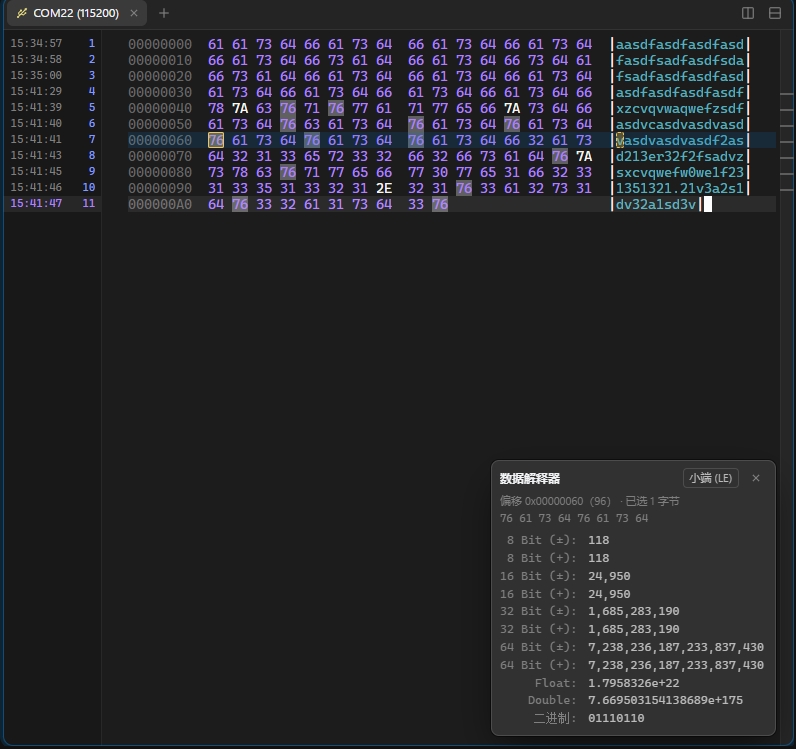
- 串口和 Raw TCP 会话新增「数据类型」:设为「二进制 (Hex)」后,收到的数据按偏移 / 十六进制 / ASCII 三栏显示,窄窗格自动改为每行 8 或 4 字节;输入和发送的数据原样发出,不做字符集转换,也不再误触发 ZMODEM。从 WindTerm 导入时会读取
session.dataType。
Serial and raw TCP sessions get a Data Type. Binary shows received bytes as a hex dump (offset / hex / ASCII), 8 or 4 bytes per row in narrow panes; input goes out as is, with no charset conversion and no ZMODEM detection. WindTerm'ssession.dataTypeis imported. - 数据解释器:二进制窗格右下角常驻一个类似 WinHex 的面板。单击任意字节(十六进制或 ASCII 栏),即从该字节开始解读为 8 / 16 / 32 / 64 位有符号和无符号整数、Float、Double 和二进制位,可切换大端 / 小端;当前字节在两栏中都用框标出,换位置时闪烁;单击数值即可复制。
Data interpreter: a WinHex-style panel in every binary pane. Click a byte (hex or ASCII) to read 8 / 16 / 32 / 64-bit signed and unsigned integers, Float, Double and bits from it, big or little endian. The byte is boxed in both columns and blinks when it moves; click a value to copy it. - 十六进制发送:发送器可切到 Hex 模式,每行一包,支持
48 65 6C、48656C、0x01,0x03、\x1B\x5B、AA-BB:CC等写法,实时显示包数和字节数,并指出无法识别的位置。
Hex Sender: one packet per line in the usual notations, with live packet / byte counts and the bad token pointed out.
窗口 / Windows
- 侧边栏的会话可以直接拖到终端区域打开:拖到窗格边缘即分屏,拖到中间则新开标签。
Drag a session from the sidebar onto the terminals: a pane's edge splits, the middle adds a tab.
检查更新 / Update check
- 启动时检查 GitHub 上的新版本,可打开下载页或跳过该版本;在「设置 → 常规」中可关闭或手动检查。从这个版本起,之后的新版本都会自动提示。
Checks GitHub for a newer release at startup, with Download / Later / Skip this version. Turn it off or check by hand under Settings → General. From this version on, new releases are offered automatically.
已知问题 / Known issue
- 二进制模式下,最后一行未收满时可能不显示右侧 ASCII 栏,收满后正常。
In binary mode, the last, partly filled row of the hex dump may miss its ASCII column until it fills up.
Full Changelog: v0.1.2...v0.1.3
v0.1.2

新功能 / What's new
完整回滚历史 / Full scrollback history
- 窗格输出过的每一行都在后台压缩保存,可以一直往上滚到会话开始;滚动条覆盖全部历史。
Every line a pane prints is kept, compressed in the backend. Scroll back to the start of the session; the scrollbar spans the whole history. - 搜索(
Ctrl+Shift+F)、滚动条标记、「保存到文件」都覆盖全部历史。
Search, scrollbar marks and Save to file cover the whole history. - 内存超过上限后,旧内容加密写入临时文件;可在设置里关闭或调整上限。
Past a memory limit, older blocks are encrypted to temp files. Limits are configurable in Settings. - 远端
clear和菜单「清除回滚」都会清除历史,行号从 1 重新开始。
A remoteclearor Clear Scrollback clears the history and restarts line numbers at 1.
时间与行号栏 / Timestamp & line-number gutter
- 左边时间、右边行号,当前行单独着色;终端里光标所在行和点击的行各有背景色带。
Time on the left, line number on the right, current line highlighted; background bands for the cursor's line and the clicked line. - 鼠标选择不会再选到最后一行输出下面的空行。
Mouse selection stops at the last line of output.
MCP
- 新工具
list_files、upload_file、download_file、transfer_status:AI 可以在 SSH 窗格上浏览目录、上传 / 下载文件和文件夹(SFTP,不支持时用 SCP),传输显示在传输面板里。
New tools to browse an SSH pane's server and upload / download files and folders (SFTP, SCP fallback), shown in the transfer panel. - 新工具
read_history、search_history:读取和搜索窗格的完整历史。
New tools to read and search a pane's full history.
性能 / Performance
修复了完整历史的一处内存浪费,并减少了每行输出触发的前端开销。与 WindTerm 2.7.0 的对比见 README。
Fixed memory waste in the history store and per-line frontend overhead. See the README for the comparison with WindTerm 2.7.0.
Full Changelog: v0.1.1...v0.1.2
Full Changelog: v0.1.1...v0.1.2
v0.1.1
v0.1.0
Full Changelog: https://github.com/rty813/nexterm/commits/v0.1.0