Repository navigation
v0.1.3

新功能 / What's new
串口与二进制数据 / Serial & binary data
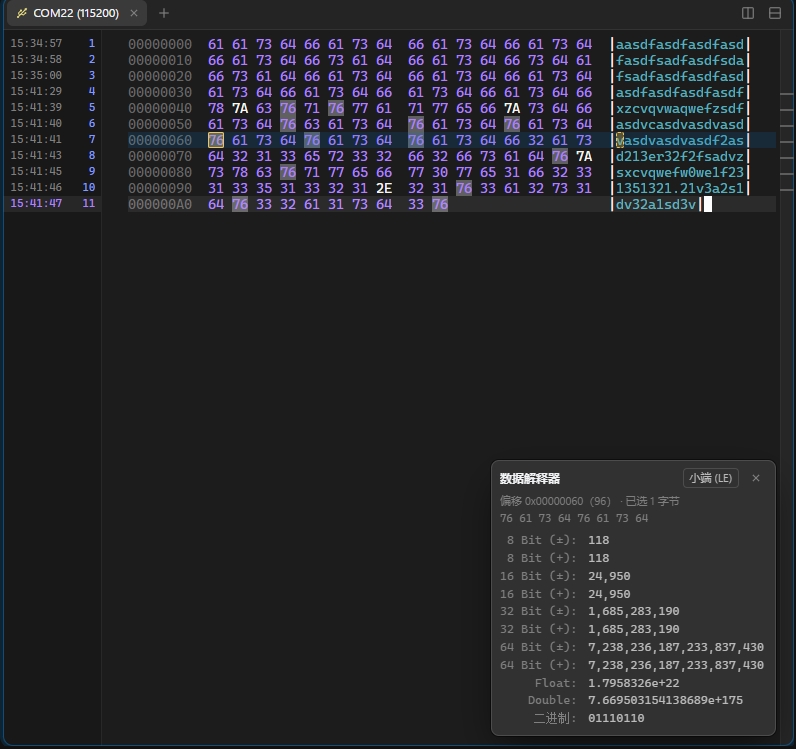
- 串口和 Raw TCP 会话新增「数据类型」:设为「二进制 (Hex)」后,收到的数据按偏移 / 十六进制 / ASCII 三栏显示,窄窗格自动改为每行 8 或 4 字节;输入和发送的数据原样发出,不做字符集转换,也不再误触发 ZMODEM。从 WindTerm 导入时会读取
session.dataType。
Serial and raw TCP sessions get a Data Type. Binary shows received bytes as a hex dump (offset / hex / ASCII), 8 or 4 bytes per row in narrow panes; input goes out as is, with no charset conversion and no ZMODEM detection. WindTerm'ssession.dataTypeis imported. - 数据解释器:二进制窗格右下角常驻一个类似 WinHex 的面板。单击任意字节(十六进制或 ASCII 栏),即从该字节开始解读为 8 / 16 / 32 / 64 位有符号和无符号整数、Float、Double 和二进制位,可切换大端 / 小端;当前字节在两栏中都用框标出,换位置时闪烁;单击数值即可复制。
Data interpreter: a WinHex-style panel in every binary pane. Click a byte (hex or ASCII) to read 8 / 16 / 32 / 64-bit signed and unsigned integers, Float, Double and bits from it, big or little endian. The byte is boxed in both columns and blinks when it moves; click a value to copy it. - 十六进制发送:发送器可切到 Hex 模式,每行一包,支持
48 65 6C、48656C、0x01,0x03、\x1B\x5B、AA-BB:CC等写法,实时显示包数和字节数,并指出无法识别的位置。
Hex Sender: one packet per line in the usual notations, with live packet / byte counts and the bad token pointed out.
窗口 / Windows
- 侧边栏的会话可以直接拖到终端区域打开:拖到窗格边缘即分屏,拖到中间则新开标签。
Drag a session from the sidebar onto the terminals: a pane's edge splits, the middle adds a tab.
检查更新 / Update check
- 启动时检查 GitHub 上的新版本,可打开下载页或跳过该版本;在「设置 → 常规」中可关闭或手动检查。从这个版本起,之后的新版本都会自动提示。
Checks GitHub for a newer release at startup, with Download / Later / Skip this version. Turn it off or check by hand under Settings → General. From this version on, new releases are offered automatically.
已知问题 / Known issue
- 二进制模式下,最后一行未收满时可能不显示右侧 ASCII 栏,收满后正常。
In binary mode, the last, partly filled row of the hex dump may miss its ASCII column until it fills up.
Full Changelog: v0.1.2...v0.1.3