Repository navigation
Terminal
parallax runs Parallax in your terminal, laid out like Claude Code, with the same threads, Spaces, and Projects as the app, live in both. It talks to the plxd on the computer it runs on and starts it if it isn't running. /settings signs in to providers and GitHub, adds API keys, and changes this computer's settings, so it works without the app.
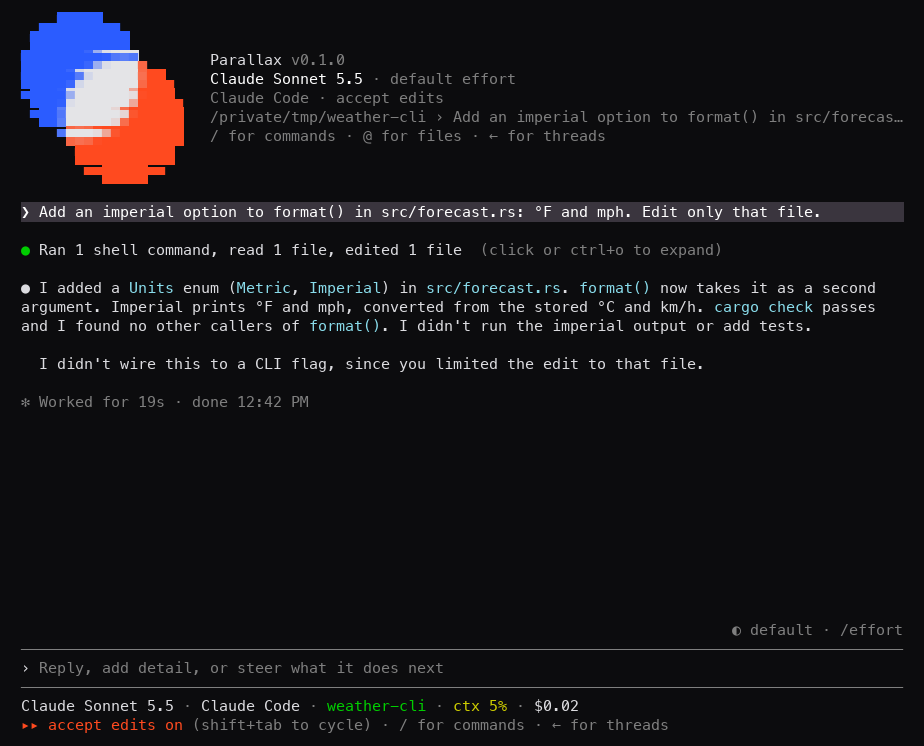
parallax is plxd under another name. Run with no arguments, it opens the terminal UI, the same as plxd tui. With a subcommand it is plxd: parallax service status is plxd service status.
The app installs the command at its first launch on Linux and Windows, and keeps it up to date at each launch after. On macOS it asks first, because linking into /usr/local/bin takes your password. Settings > General > Terminal command installs, reinstalls, or removes it on any OS.
| OS | Command | What it runs |
|---|---|---|
| macOS | /usr/local/bin/parallax |
A link to the plxd inside the app |
| Linux | ~/.local/bin/parallax |
A link to a copy of the app's plxd in ~/.local/share/parallax/app, since an AppImage's files go away when it quits |
| Windows |
parallax.cmd in %LOCALAPPDATA%\Parallax\bin
|
The app's plxd. The folder is added to your user PATH. |
The app leaves alone anything named parallax that it didn't make, and doesn't put the command back after you remove it. The Terminal command row is hidden while the Mac app runs from its disk image. Move the app to /Applications first.
On macOS (Apple silicon) and Linux (x64 and arm64), without the app:
curl -fsSL https://raw.githubusercontent.com/ryan-stoffel/parallax/develop/scripts/install-tui.sh | shThe script downloads the newest nightly's plxd, checks its SHA-256, checks that it runs, puts it in ~/.parallax-plxd, and links ~/.local/bin/parallax to it. It doesn't edit your shell's config files. If ~/.local/bin isn't on your PATH, run ~/.local/bin/parallax, or add the folder to your PATH.
parallaxWhere you run it decides where new threads work:
- In a git checkout, new threads work in that checkout in place, as Claude Code does, not in a worktree of their own. The first message adds the repository to plxd if it isn't there yet.
- Inside a thread's worktree, it opens that thread.
- Anywhere else, new threads start in Chats, and the screen says why.
--data-dir points it at another data folder.
Type / to list them. ↑↓ choose, Enter runs, Tab completes. A command that picks something, such as /model, opens a list when run alone, or picks by name: /model claude-opus-5-5.
| Command | What it does |
|---|---|
/new |
Start a new thread here, or in the repo or Space named. Also /clear. |
/threads |
Open the sidebar of threads by repo and Space. Also /resume, or ← on an empty prompt. |
/provider |
Choose who runs it: Claude, Codex, Cursor, and the rest |
/model |
Choose one of the provider's models |
/effort |
Choose how hard it thinks |
/mode |
Choose what it may do without asking. Also Shift+Tab. |
/stop |
Stop the turn under way. Also Esc. |
/settings |
Sign in to providers and GitHub, add API keys, change settings |
/login |
Open settings at the first provider that isn't signed in |
/help |
Show the keys |
/quit |
Leave. Also /exit, Ctrl-C twice, or Ctrl-D. |
A /provider, /model, /effort, or /mode change goes with your next message.
| Key | What it does |
|---|---|
@ |
Mention a file from the checkout |
| ← on an empty prompt | Open the sidebar. n there starts a thread. |
| Shift+Tab | Cycle the mode: accept edits, auto mode, plan mode, ask first, bypass permissions |
| Esc | Interrupt the turn |
\ or Alt+Enter |
New line |
| ↑↓ | Prompt history |
| Click a tool line | Open that run of tool calls |
| Ctrl+O | Open or close every run of tool calls |
| Mouse wheel, PgUp, PgDn | Scroll |
| Shift+drag | Select text |
When an agent asks for approval, the terminal shows Yes, No, and for some requests Yes, and don't ask again this session. Press 1, 2, or 3, or move with ↑↓ and press Enter. Esc answers No.
/settings opens a screen with these sections:
| Section | What it does |
|---|---|
| Providers | Enter signs in. A provider whose sign-in runs in the terminal gets the terminal until it finishes. Cursor signs in through the browser. Space turns a provider on or off. |
| New threads | The provider new threads run on |
| GitHub | Install the GitHub CLI and sign in with a device code |
| API keys | Add or remove Anthropic, OpenAI, and Cursor keys |
| General | Resume after a usage limit, Continue threads after restarts, Clean up merged worktrees, Parallax Connect, Remote access over HTTPS, Web client, Parallax Relay, and the device name |
A command the app installed runs the app's plxd, so it updates with the app.
A terminal-only install updates when you run its install command again. A plxd that's already running keeps its version until it restarts, and the script says so.
| Message | What to do |
|---|---|
<home>/.local/bin/parallax is already there and isn't this installer's. Move it, then run this again. |
Something else is named parallax, such as the command the app installed. Remove it in Settings > General, or move it. |
The download's SHA-256 doesn't match <file>.sha256. Nothing was installed. |
Run the script again. |
The downloaded plxd doesn't run here. Nothing was installed. |
The downloaded plxd failed its --version check on this computer. File a bug with your OS and architecture. |