Repository navigation
Releases
Tinge 26 v1.0.2

Tinge 26 customizes Home Screen notification badges on iOS 26. Match badge colors to each app icon or choose your own, then fine-tune the text contrast and border with a live preview.
What’s new
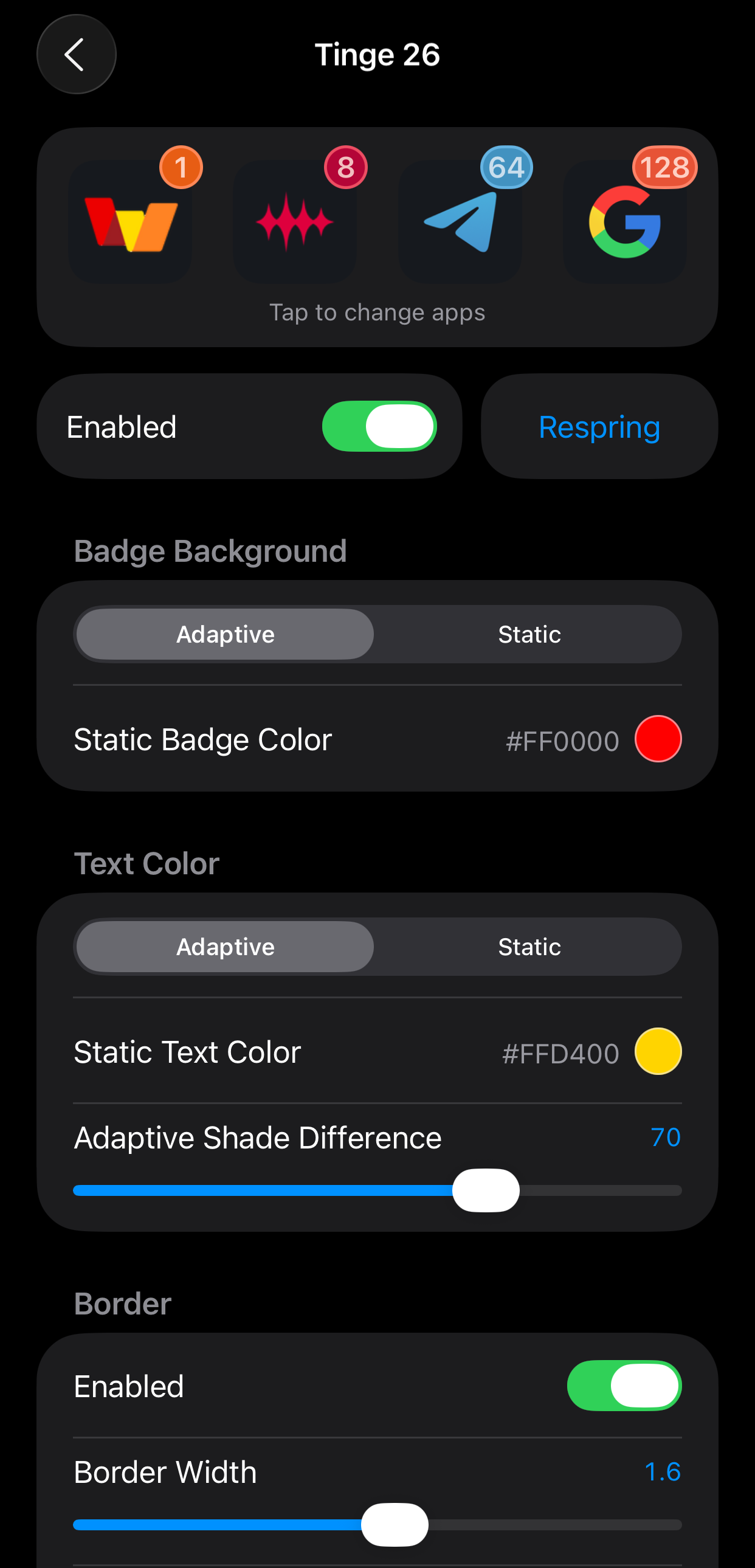
- Added a live preview with four installed apps and badge counts of 1, 8, 64 and 128. Tap an icon to swap the app.
- Added separate Adaptive Shade Difference sliders for badge text and borders. Both range from 0 to 100.
- Improved adaptive borders so they lighten or darken in the same direction as adaptive text.
- Set the border width range to 0–3 points in 0.1-point increments.
- Refined slider haptics so each endpoint gives a single tick per drag.
- Moved Respring beside Enabled and tightened the credits layout.
- Added a new four-badge icon.
Install
- RootHide: Install the
iphoneos-arm64epackage directly, without Patcher. - Standard rootless: Install the
iphoneos-arm64package.
Respring and open Settings → Tinge 26. Changing the main Enabled switch requires a respring.
Original Tinge by P2KDev (@p2kdev). Tinge 26 by sahinkaa.
Contributors

Assets 4
Tinge 26 - 1.0.1
An adaptive badge background responsiveness update for Tinge 26.
What changed
- Reuse cached icon colors when a new badge appears.
- Preserve the same icon's sampled color through badge count changes.
- Retry unavailable icon pixels early with a bounded recovery sequence.
- Keep valid background paint visible while the same icon's appearance refreshes.
- Reject stale callbacks after view reuse or a folder's highest-count app changes.
Static badge backgrounds, text colors, borders, highest-count folder coloring and safe animated badge updates are preserved. No additional runtime hook targets, recurring timers or background services were added.
Compatibility and installation
Tested for several days on iPhone 11 Pro Max running iOS 26.0.1 with Dopamine 3 RootHide, with no problems reported. Other devices, iOS versions and the standard rootless variant have not been confirmed on-device.
- Native RootHide:
com.sahinkaa.tinge26_1.0.1_iphoneos-arm64e.deb. Install directly without RootHide Patcher. - Rootless:
com.sahinkaa.tinge26_1.0.1_iphoneos-arm64.deb.
Upgrade the existing installation and respring once. Saved preferences are preserved. Keep both Tinge and ZZTingeAdaptiveBridge enabled for SpringBoard.
An icon must have usable rendered pixels before its color can be sampled. An unrendered folder member may still require opening its folder once.
Credits and source
Original Tinge by P2KDev (@p2kdev). iOS 26 port and maintenance by sahinkaa. The rendered-icon approach was informed by w1tu's ntfy, whose MIT notice is retained.
The dedicated Tinge26_1.0.1_source.zip includes the port source, build instructions and unchanged prebuilt original compatibility core. Original implementation source was not supplied. Use this archive for the implementation; GitHub's automatic source archives contain the repository documentation. SHA-256 checksums are included.
Contributors
Assets 6
Tinge 26 1.0
Tinge 26 - 1.0
Customize your notification badges with adaptive colors, text colors and borders.
An iOS 26 compatibility port of Tinge 1.2.2 by P2KDev (@p2kdev), ported by sahinkaa.
Features and changes
- Adaptive badge backgrounds take their representative color from the app icon already rendered by SpringBoard, including themed icons.
- Folder badge colors follow the eligible app with the highest badge count inside the folder. SpringBoard's badge numbers are preserved.
- Animated badge updates safely handle badges appearing, increasing, decreasing and disappearing.
- Static backgrounds, adaptive/static text colors, border width, adaptive/static borders and matching the border to the text color are supported.
- A native settings pane with Apple's color picker saves changes atomically and verifies them by reading them back, including static border colors.
- The original settings icon is preserved. Respring is the only action row, with balanced spacing and a tappable GitHub credit beneath it.
- Credits retain P2KDev (@p2kdev), with © 2024-2026, and add the iOS 26 port credit for sahinkaa. Package author: P2KDev • sahinkaa.
- Separate standard rootless and native RootHide packages are provided, both version 1.0, under
com.sahinkaa.tinge26.
Compatibility
Confirmed working only on iPhone 11 Pro Max, iOS 26.0.1, Dopamine 3 RootHide.
The standard rootless build is included, but on-device compatibility for that variant and for other devices, iOS versions or jailbreaks has not been confirmed.
Downloads
| File | Use |
|---|---|
com.sahinkaa.tinge26_1.0_iphoneos-arm64e.deb |
Dopamine RootHide: install directly, without RootHide Patcher. |
com.sahinkaa.tinge26_1.0_iphoneos-arm64.deb |
Standard rootless jailbreaks. |
Tinge26_1.0_source.zip |
Port source, prebuilt core inputs and build instructions. |
SHA256SUMS |
Checksums for the packages and source archive. |
Choose the package matching your jailbreak. Do not convert one variant into the other or install both together.
Installation
- Close Settings and keep a backup of your current preferences.
- Download the package matching your jailbreak and install it with your package manager. RootHide users should use the iphoneos-arm64e file directly, without Patcher.
- If replacing another Tinge installation, allow the package manager to replace it. Keep saved preferences if you want to retain your colors and border settings.
- Respring, then open Settings → Tinge 26.
PreferenceLoader, a Substrate-compatible loader and libcolorpicker are required. The RootHide package also requires rootless-compat for the preserved original core. Both components, Tinge and ZZTingeAdaptiveBridge, must remain enabled for SpringBoard.
Notes and credits
If a folder's highest-badged app has not rendered yet, opening the folder once may be needed before its color becomes available.
Original Tinge: P2KDev (@p2kdev). iOS 26 port: sahinkaa. The rendered-icon sampling approach was informed by w1tu's ntfy; its MIT notice is retained in the port source archive.
The port source archive includes the unchanged original compatibility core as prebuilt binaries. Original implementation source was not supplied, so the archive does not claim to recreate it or assign it a new license.
To uninstall, remove Tinge 26 using your package manager and respring. Normal removal leaves saved preferences in place.