Utility
In this folder we store static class with static functions to keep our code tidy. Functions that have no dependencies will be placed here.
In this class we keep functions required to modify botState data. With every bot, you can store variables that is specific to each user, identified by participant id that is present in either an activity / event object. These variables are persistent throughout different conversations and throughout the bot's life. (bot that lives on the bot framework site)
From the simplecallingbot the only variable that is available to us without extra step would be the event objects. It contains a list variable of participants that consist of details from everybody in the call (including the bot itself), from it we can extract the participant id which is a hash value.
        public static string getUserData(IEnumerable<Participant> p, string field, ref int count)
        {

        public static string setUserData(IEnumerable<Participant> p, string field, ref int count)
        {
            StateClient stateClient = new StateClient(new MicrosoftAppCredentials(microsoftAppId, microsoftAppPassword));
            BotData userData = stateClient.BotState.GetUserDataAsync("skype", p.ElementAt(0).Identity).Result;

            stateClient.BotState.SetUserDataAsync("skype", p.ElementAt(0).Identity, userData);
From the messageController we have access to activity object, so we can just use it to get our parameters required for GetUserDataAsync().
        // overloaded getUserData function that uses activity from IMessage
        public static string getUserData(Activity activity, string field, ref int count)
        {

        // overloaded setUserData function that uses activity from IMessage
        public static string setUserData(Activity activity, string field, ref int count)
        {
            StateClient stateClient = activity.GetStateClient();
            BotData userData = stateClient.BotState.GetUserDataAsync(activity.ChannelId, activity.From.Id).Result;

            stateClient.BotState.SetUserDataAsync(activity.ChannelId, activity.From.Id, userData);
output = userData.GetProperty<string>(field);
return output;While setting the data, a common error that occurs when setting Botstate would be simultaneous access where "HTTP status code 412 Precondition Failed" is returned. This can be handled by using a try/catch loop where if it fails, it will wait 300ms before trying to update the BotState again.
            try
            {
                userData.SetProperty<string>(field, value);
                stateClient.BotState.SetUserDataAsync("skype", p.ElementAt(0).Identity, userData);
            }
            catch (HttpOperationException)
            {
                if (count < limit)
                {
                    count++;
                    Thread.Sleep(300);
                    return setUserData(p, field, value, ref count);
                }
            }
return "1";Functions here assist in creating messages, prompts and playprompts instances. Replying to the caller can occur in 2 different ways, either by synthetic voice or by an audio clip.
The most straight forward method would be the built-in synthesized voice by creating a prompt using string of the sentence to be said and the gender of the voice. And return it as a PlayPrompt action.
            var prompt = new Prompt { Value = text, Voice = VoiceGender.Female };
            return new PlayPrompt { OperationId = Guid.NewGuid().ToString(), Prompts = new List<Prompt> { prompt } };
Similarly, an audio path can be cast into a System.Uri object and used as a parameter in creation of a Prompt.
            System.Uri uri = new System.Uri(audioPath);

            var prompt = new Prompt { FileUri = uri };
            return new PlayPrompt { OperationId = Guid.NewGuid().ToString(), Prompts = new List<Prompt> { prompt } };
Recording is done by the SetRecord function which creates and returns a Record object. Some parameters of Record that requires the most tweaking are MaxSilenceTimeoutInSeconds and InitialSilenceTimeoutInSeconds, they are the deciding factor of how fast the caller should respond, which is critical when catering the bot to different demographic and kinds of conversation.
InitialSilenceTimeoutInSeconds -> Maximum initial silence allowed before the recording is stopped.
MaxSilenceTimeoutInSeconds -> Maximum silence allowed after the speech is detected.
        public static Record SetRecord(string id, PlayPrompt prompt, bool playBeep, int maxSilenceTimeout)
        {
            return new Record()
            {
                MaxSilenceTimeoutInSeconds = maxSilenceTimeout,
                OperationId = id,
                PlayPrompt = prompt,
                MaxDurationInSeconds = 8,
                InitialSilenceTimeoutInSeconds = 3,
                PlayBeep = playBeep,
                RecordingFormat = RecordingFormat.Wav,
                StopTones = new List<char> { '#' }
            };
        }
The HeroCard used in this bot is generated from the GenResponseCard function, after the credentials and a connector is created, we can then create the card itself. Create CardAction and insert it into CardButtons, now the buttons will know how to react when being clicked on.
Here, we are using 2 parameters which are text and Buttons in the HeroCard.
            List<CardAction> cardButtons = new List<CardAction>();
            CardAction plButton1 = new CardAction()
            {
                Value = "call",
                Type = ActionTypes.PostBack,
                Title = "call"
            };
            CardAction plButton2 = new CardAction()
            {
                Value = "record",
                Type = ActionTypes.PostBack,
                Title = "record"
            };

            cardButtons.Add(plButton1);
            cardButtons.Add(plButton2);

            var heroCard = new HeroCard()
            {
                Text = "Choose your destiny!",
                Buttons = cardButtons
            };
Next attach the HeroCard to a IMessageActivity object as an attachment and send it off. Now the caller will receive an alert that a message has been sent from the bot.
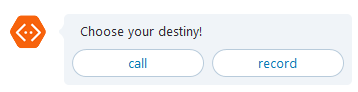
            IMessageActivity newMessage = Activity.CreateMessageActivity();
            newMessage.Type = ActivityTypes.Message;
            newMessage.From = new ChannelAccount(botId, ConfigurationManager.AppSettings["BotId"]);
            newMessage.Conversation = new ConversationAccount(false, recipientId);
            newMessage.Recipient = new ChannelAccount(recipientId);

            newMessage.Attachments = new List<Attachment> {
                heroCard.ToAttachment()
            };

var response = connector.Conversations.SendToConversation((Activity)newMessage);This class trims the silence at the end of the audio clips by analysis the sample amplitude median of the .wav file. To get a more precise detection, the sample rate is divided by 10, so the audio file is sampled as every 0.1 seconds.
sampleRate = wain.SampleRate / 10;The beginning of the recording (detection of the silence end at the begenning) is detected as the aplitude median of the following 3 samples are all more than twice of the aplitude median of the current sample.
      for (int idx = 0; idx < inList.Count - 4; idx++)
      {
                if (inList[idx + 1] > inList[idx] * product && inList[idx + 2] > inList[idx] * product &&
                    inList[idx + 3] > inList[idx] * product)
                {
                    result[0] = idx;
                    break;
                }
       }
The silence at the end is detected as the median amplitude of the following 10 sample are fewer than half of a value. The value is the average of the median amplitude of the previous samples from the recording beginning.
       for (int idx = result[0] + 1; idx < inList.Count - 11; idx++)
       {
                int peakAvg = Convert.ToInt32(inList.Skip(result[0]).Take(idx - result[0]).Average());
                if (inList[idx+1] * product < peakAvg && inList[idx+2] * product < peakAvg &&
                    inList[idx+3] * product < peakAvg && inList[idx+4] * product < peakAvg &&
                    inList[idx+5] * product < peakAvg && inList[idx+6] * product < peakAvg &&
                    inList[idx+7] * product < peakAvg && inList[idx+8] * product < peakAvg &&
                    inList[idx+9] * product < peakAvg && inList[idx+10] * product < peakAvg)
                {
                    result[1] = idx;
                    break;
                }
        }
The end of the silence is extended by 1 second as to ensure no loss of the recording with voice.
        if (result[1] < inList.Count - 11) { result[1] += 10; }
        else { result[1] = inList.Count - 1; };