Barcelona football club inspired watch face for Pebble Time. (Colour, Digital).
Watch face looks similar to Barcelona's crest, with a little fun.
- Barça colours creeps up to indicate the minutes. Hours displayed in numerals.
- A little 'P' in the top right corner indicates it's PM.
- Battery-level indicator:
- white card outline: charging,
- yellow card: not more than 20% charge remaining,
- red card: not more than 10% charge remaining.
- Bluetooth connection indicator:
- Orange Barça ball: connected,
- Grey Barça ball: disconnected.
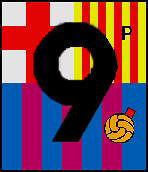 Watch face: PM, bluetooth connected, battery level critical (<= 10%)
Need larger font for hour digits! Unfortunately, Pebble only supports up to font size ~48. Tried size 70 and the lower half of digits are frayed and cut off.
There're several ways around this.
- Use images.
- Use GPaths of the digits.
I chose the latter, hoping to find a way to convert any font anytime for Pebble Time use. These are the steps:
- OTF to TTF. If you're using a non-TTF font file, you'll need to convert it to TTF first (before you're able to use Batik SVG Font Converter).
- Use FontForge to convert say a OTF font file to TTF.
- Open the file in FontForge.
- Choose menu item: 'File> Generate Fonts...'.
- Below the filename textfield, select 'TrueType' from the font type drop-down list.
- Click 'Generate' button and ignore any errors (or fix them 1st if you refer).
- Use FontForge to convert say a OTF font file to TTF.
- TTF to SVG. Use Java-based Batik SVG Font Converter to convert characters from a TTF font file to a SVG image file.
-
Command will be like:
java -jar batik-ttf2svg.jar LemonMilk.ttf -l 48 -h 57 -o ./numbers.svg -testcard
-
The '-testcard' option adds visible letters to the SVG file, so you can open it in a browser and see a preview. Without 'testcard', the file will appear empty in a browser (as the SVG contains only a font definition and no actual visual elements).
-
The font definition will contain lines for the exported numbers like (number '2' below):
- The "d=" portion is a SVG path definition, which can use all sorts of exotic curves (quadratic Bézier, smooth quadratic Bézier, elliptical arcs, etc.) and straight line segments. Refer to this simple introduction page to SVG Paths. To render in Pebble using GPath, the the path needs to be converted to use only straight line segments.
-
- SVG to GPath - preparation and conversion.
- I used Raphaël's (a JavaScript library for vector graphics like SVG) Raphaël.path2curve() method to convert the path to one using only simple 'C curveto'-type curves.
- I also wrote a webpage that uses Raphaël's to manipulate the path and resize it down to better fit to Pebble Time's resolution. The original SVG numbers were somehow humongous.
- Next, use InkScape to flatten all the curve segments to obtain a path with only straight line segments.
- Create a SVG file for each number. E.g. for number '2':
- Create a SVG file for each number. E.g. for number '2':
    * Open SVG file in InkScape.
    * Select object, flip it right-side up if needed.
    * Select menu command: 'Extensions> Modify Path> Flatten Beziers...'. Select a 'flatness' factor of 0.3 (or smaller number for smoother curves; larger numbers are coarser).
        * This must be the last command, otherwise other operations may mess up the path into using non-straight line segments again.
    * Save the SVG file.
* The paths can then be extracted and placed in my [svg2Gpath.js](https://raw.githubusercontent.com/sdneon/Barcelona/master/tools/svg2Gpath.js) script. It is run using [Node.JS](https://nodejs.org/en/) to convert the paths into a [.c or .h file](https://raw.githubusercontent.com/sdneon/Barcelona/master/src/nums.h) containing [GPathInfo](https://developer.pebble.com/docs/c/Graphics/Drawing_Paths/) definitions of the numbers.
    * Command will be like:
        > node svg2Gpath.js > nums.c

    * Note: the script actually didn't take care of multiple paths like in numbers 0 (inner and outer circles), 6, 8 and 9. (Owing to the extra 'M'-move commands in the path). I edited out the unwanted circles/paths as I wanted a hollow style.
- Lastly, the GPathInfo definitions can be included in the Pebble watch face code to draw the huge numbers =)
Thanks to:
- Ariq Sya for his Lemon/Milk font, which I've used to generate larger digits in a hollow style.
- And all the fantastic tools to convert TTF to SVG to GPath.
- v1.0
- Initial release.