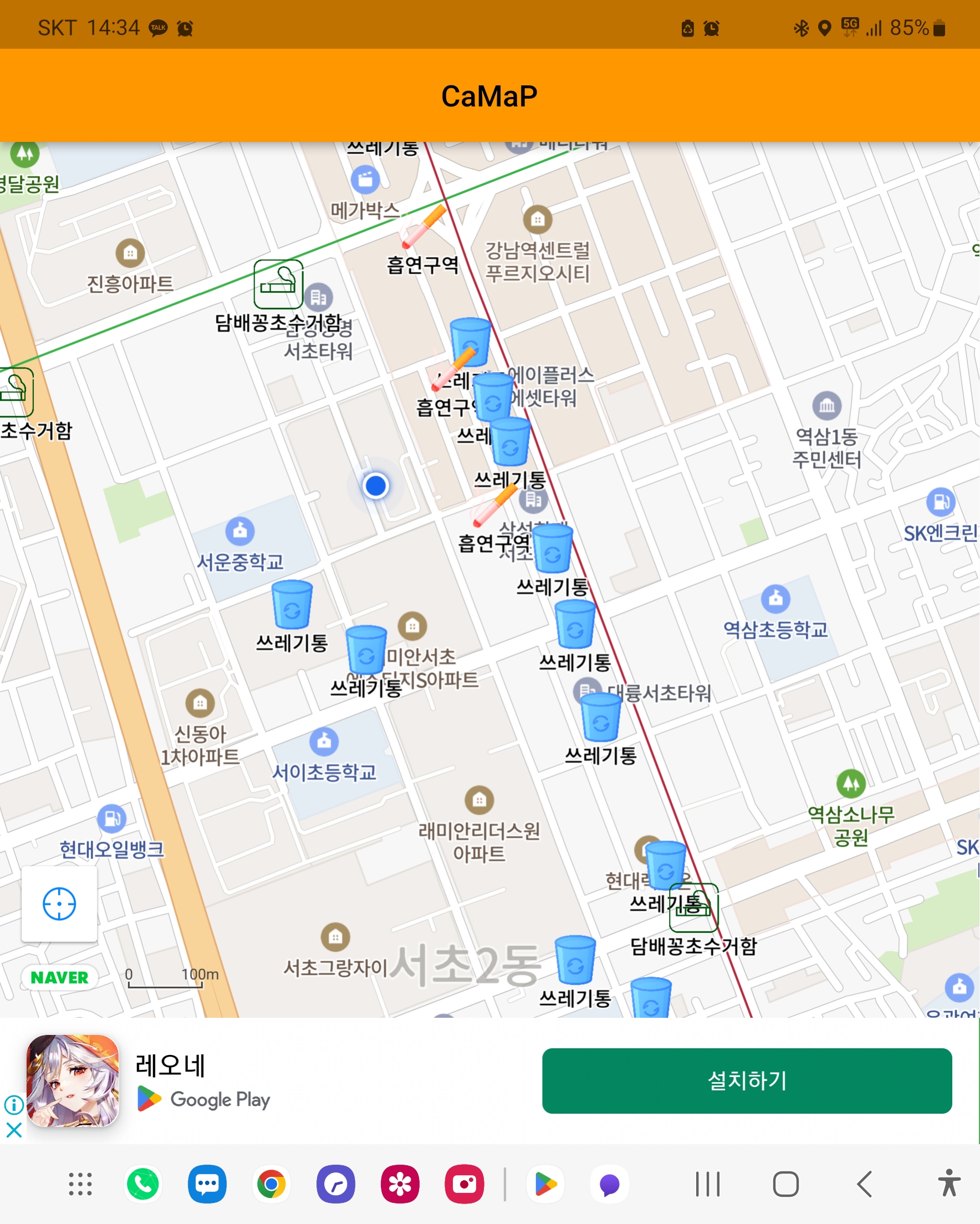
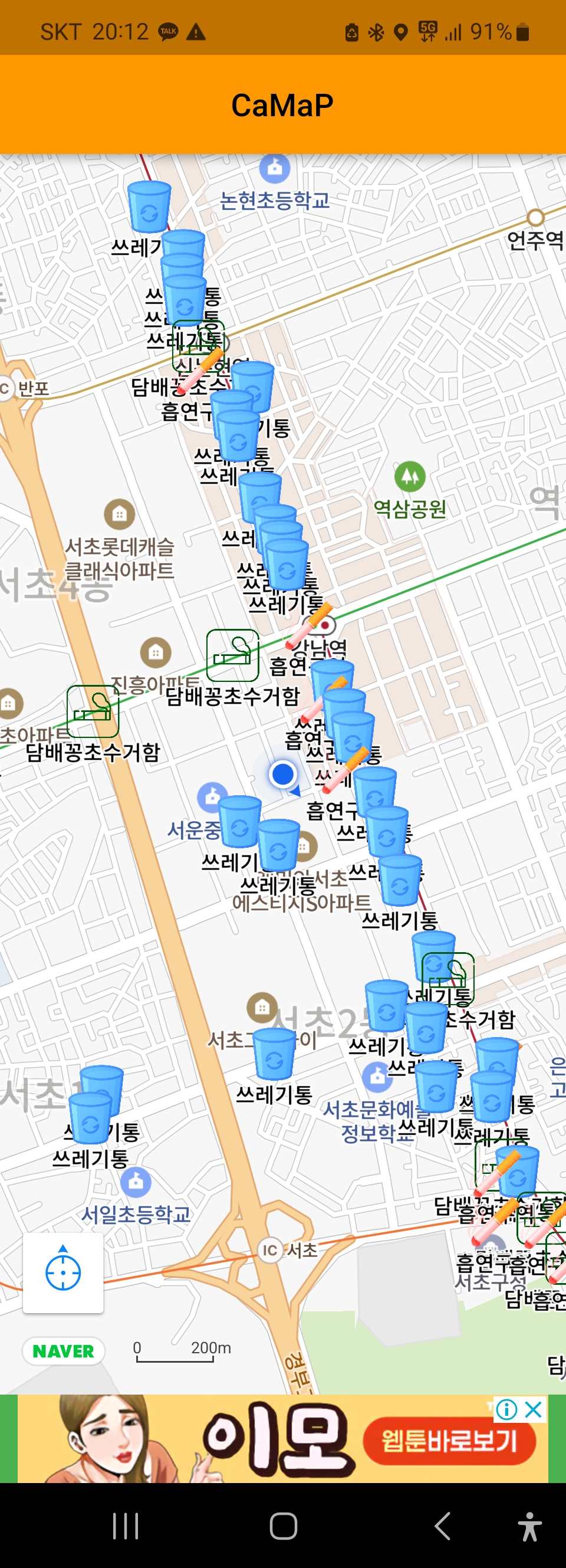
Notion : Flutter Naver Map
This project is about public interest.
This project started to seperate non-smokers from secondhand smoke.
This map displays Near Smoking Zone and Trash Can, thus, non-smokers can avoid certain area
This app is made for koreans, using Naver Map API.
But, I believe you can use it in foreign country, if you get used to using Google Map API instead.
I've got the area informaition from Seoul City hall,
And I published this App via Google Play Store
1. File Structure
2. Develop Environment
3. Getting Packages
4. Setting Configuration
5. Used Concept
6. Usage Example
System Link with your DB(database)
etc packages
Used Concept
.
├── android			    # android config
│   ├── .gradle		            # gradle config
│   │   └── ...etc
│   ├── app
│   │   ├── src
│   │   │   ├── debug		    # debug manifest
│   │   │   ├── main		    # main manifest
│   │   │   │   ├── java
│   │   │   │   ├── kotlin
│   │   │   │   └── res		    # resources
│   │   │   │   │   ├── drawable
│   │   │   │   │   ├── mipmap	    # app icons
│   │   │   │   │   └── values
│   │   │   └── profile		    # profile manifest
│   │   ├── build.gradle	    # app/build.gradle
│   │   └── ...etc
│   ├── gradle
│   │   └── wrapper		    # gradle wrapper
│   ├── build.gradle
│   ├── key.properties		    # key properties
│   ├── local.properties	    # local properties
│   └── ...etc
├── ios				    # ios config
│   ├── Flutter			    # flutter ios config
│   │   └── ...etc
│   ├── Runner
│   │   ├── Assets.xcassets	    # app icons
│   │   ├── Base.lproj
│   │   ├── AppDelegate.swift
│   │   ├── Info.plist		    # ios runner config
│   │   └── ...etc
│   └── ...etc
├── lib                             # main function library
│   ├── components		    # components widget classes
│   ├── custom_class		    # custom location classes
│   ├── services		    # minor services classes
│   ├── view		            # screen view classes
│   ├── firebase_options.dart       # firebase platform options
│   └── main.dart		    # main
├── linux                           # linux cconfig
│   ├── flutter 	            # flutter linux config
│   │   └── ...etc
│   ├── CMakeLists.txt              # cmake config
│   ├── main.cc		            # main linux
│   ├── my_application.cc	    # main config
│   └── my_application.h            # my_application library
├── macos                           # 로그 폴더
│   ├── Flutter		   	    # flutter ios config
│   │   └── ...etc
│   ├── Runner
│   │   ├── Assets.xcassets	    # app icons
│   │   ├── Base.lproj
│   │   ├── AppDelegate.swift
│   │   ├── Info.plist		    # ios runner config
│   │   └── ...etc
│   └── ...etc
├── test                            # Unit, Function, Class, Widget, Total test
├── web		                    # Web config
│   ├── icons
│   ├── favicon.png
│   ├── index.html
│   └── ...etc
├── windows                         # Windows config
│   ├── flutter			    # flutter windows config
│   │   └── ...etc
│   ├── runner			    # runner in windows
│   │   └── ...etc
│   ├── CMakeLists.txt
│   └── ...etc
├── .dart_tool                      #  pub package folder
│   └── ...etc
├── .idea                           # IDE config
│   └── ...etc
├── .vscode                         # VS Code config
│   └── ...etc
├── assets                          # assets for program
│   ├── areas			    # location data in csv
│   └── markers			    # marker image icon in png
├── build                           # build outputs
│   └── ...etc
├── .metadata
├── analysis_options.yaml
├── pubspec.lock
├── pubspec.yaml		    # pub library declare
├── README.md
├── .env                            # development config
├── .flutter-plugins
├── .flutter-plugins-dependencies
├── .gitignore                      # main config
└── camap.iml
For : Android(current), IOS, Windows, Linux(not done)
Used : Google Cloud, Firebase, Naver Cloud, Play Store, Google Admob
You Must Refer My Notion(in Kor) Together for Plugin Packages Description of This Project
For Development OS, I used Windows10.
Then, set your working space for flutter
> cd C:\WorkspaceYou need to set up both Android Studio and Flutter
Checkout My Notion(in Kor) for Installation in Windows
You can also refer to Google flutter documents,
which includes Installation, Lab, and Cookbook.
Create Your Project
> flutter create "Project Name"You can run your project via commands below
> flutter run
> flutter run --release
If null safety error occurs,
> flutter run --no-sound-null-safety
> flutter run --release --no-sound-null-safetyIn debugging mode,
> flutter run --debugIf null safety error occurs,
> flutter run --debug --no-sound-null-safetyTo publish your project, You need to build your project first.
You can build your project through commands below.
You can find your appbundle here : C:\Workspace\build\app\outputs\bundle\release
(Running flutter build defaults to a release build.)
> flutter build appbundle
> flutter build appbundle --release
> flutter build appbundle --debug
If null safety error occurs,
> flutter build appbundle --no-sound-null-safety
> flutter build appbundle --release --no-sound-null-safety
> flutter build appbundle --debug --no-sound-null-safetywill be updated in ver 2.0
In C:\Workspace\pubspec.yaml,
Packages
dependencies:
  flutter:
    sdk: flutter

  cupertino_icons: ^1.0.2
  flutter_config: ^1.0.8					#for dotenv
  naver_map_plugin: ^0.9.6 					#for naver map
    # git: https://github.com/LBSTECH/naver_map_plugin.git	#for latest version of naver map
  csv: ^5.0.0 							#for reading csv
  google_mobile_ads: ^2.3.0 					#for google ad
  geolocator: ^8.2.1

  firebase_core: ^2.4.1					        #for firebase
  firebase_analytics: ^10.1.0					#for firebase analytics
  firebase_crashlytics: ^3.0.9					#for firebase crashlytics
firebase_messaging: ^14.2.1 #for firebase messagingThe following adds the Cupertino Icons font to your application.
Use with the CupertinoIcons class for iOS style icons.
> flutter flutter pub add cupertino_icons This allows you to use .env files.
> flutter flutter pub add flutter_config For this project, You need to setup variables below in your C:\Workspace\.env.
Create .env file in your C:\Workspace, then setup like below.
You must get your ID's from cloud platform first.
YOUR_CLIENT_ID_HERE = "Naver Client ID"
YOUR_APPLICATION_ID_HERE = "Google Admob Application ID"
After setting up your .env, we will use them in C:\Workspace\android\app\src\main\AndroidManifest.xml
...
 <application
        android:label="CaMap"
        android:name="${applicationName}"
        android:icon="@mipmap/camap_icon">
        <meta-data
            android:name="com.naver.maps.map.CLIENT_ID"
            android:value="@string/YOUR_CLIENT_ID_HERE" />
        <meta-data
            android:name="com.google.android.gms.ads.APPLICATION_ID"
            android:value="@string/YOUR_APPLICATION_ID_HERE" />
        <activity
...This allows you to use Naver API via naver_map_plugin.
> flutter flutter pub add naver_map_plugin Because this plugin requires lots of information about naver cloud platform,
I wrote detailed manual about this plugin in My Notion(in Kor).
This allows you to read csv files in flutter.
> flutter flutter pub add csv For this project, You need to setup csv files in your asset folders C:\Workspace\assets\areas.
Move your csv files which contains location coordinate data.
csv file must include information of location name(id), latitude, and longitude.
Below shows you some of examples of csv contents.
1-1,37.50375605,127.0241095
1-2,37.48276664,127.0349496
1-3,37.48124455,127.0361898
...
Below code shows example how I applied in this project
class SmokingAreaData {
  //for smoking area
  static List<List<dynamic>>? csvData;

  //read csv data from assets/areas
  static Future<List<List<dynamic>>> processCsv() async {
    var result = await rootBundle.loadString(
      "assets/areas/Seocho_SmokingArea.csv",
    );
    return const CsvToListConverter().convert(result, eol: "\n");
  }

  //return as list of custom marker, using csv data
  static Future<List<AreaType>> markers() async {
    List<AreaType> areas = [];
    csvData = await processCsv();

    //add in area list using which gives you areatype
    for (List<dynamic> lt in csvData!) {
      areas.add(SmokingArea(aid: lt[0], location: LatLng(lt[1], lt[2])));
    }

    return areas;
  }
}This allows you to use google mobile ad banner in organized form/widget.
> flutter flutter pub add google_mobile_ads I also had to write manual in My Notion(in Kor),
since this plugin also requires lots of information about google cloud platform, firebase, and Admob
This gives you exact coordinates about your location
> flutter flutter pub add geolocator Will be updated in Ver 2.0
Will be updated in Ver 2.0
This gives you exact coordinates about your location
> flutter flutter pub add firebase_core
> flutter flutter pub add firebase_analytics
> flutter flutter pub add firebase_crashlytics
> flutter flutter pub add firebase_messaging Because Firebase configuration requires some of firebase knowledge,
I wrote detailed manual about it in My Notion(in Kor).
I will describe them in three steps; core, analytics, and crashlytics
import 'firebase_options.dart';
import 'package:firebase_core/firebase_core.dart';
...
void main() async {
  WidgetsFlutterBinding.ensureInitialized();

  //firebase core
  await Firebase.initializeApp(
    options: DefaultFirebaseOptions.currentPlatform,
  );
}import 'package:firebase_analytics/firebase_analytics.dart';
...
//in MyApp Stateless Widget
static FirebaseAnalytics analytics = FirebaseAnalytics.instance;
static FirebaseAnalyticsObserver observer =
FirebaseAnalyticsObserver(analytics: analytics);
...
//in MyMapState Stateful Widget
const MyMapState(
{super.key,
required this.title,
required this.analytics,
required this.observer});
final FirebaseAnalytics analytics;
final FirebaseAnalyticsObserver observer;
...
//in MyMapState State
Future<void> firebaseAnalyticsEvent(s) async {
await widget.analytics.logEvent(
name: 'marker_click_event',
parameters: <String, dynamic>{
'string': s,
'int': 100,
},
);
}
...import 'package:firebase_crashlytics/firebase_crashlytics.dart';
...
//in main
//firebase crashlytics
FlutterError.onError = FirebaseCrashlytics.instance.recordFlutterFatalError;
PlatformDispatcher.instance.onError = (error, stack) {
FirebaseCrashlytics.instance.recordError(error, stack, fatal: true);
return true;
};
...import 'package:firebase_crashlytics/firebase_messaging.dart';
...
//in MyApp
///////////firebase messaging///////////
_initFirebaseMessaging(BuildContext context) {
FirebaseMessaging.onMessage.listen((RemoteMessage event) {
print(event.notification!.title);
print(event.notification!.body);
showDialog(
context: context,
builder: (BuildContext context) {
return AlertDialog(
title: const Text("Alert"),
content: Text(event.notification!.body!),
actions: [
TextButton(
child: const Text("Ok"),
onPressed: () {
Navigator.of(context).pop();
},
)
],
);
});
});
FirebaseMessaging.onMessageOpenedApp.listen((RemoteMessage message) {});
}
_getToken() async {
FirebaseMessaging messaging = FirebaseMessaging.instance;
print("messaging.getToken() , ${await messaging.getToken()}");
}
///////////firebase messaging///////////
...
//in MyApp build MaterialApp
initialRoute: '/', //start from map
routes: {
// go to map
'/': (context) => Builder(builder: (context) {
_initFirebaseMessaging(context);
_getToken();
return MyMap(analytics: analytics, observer: observer);
}),
// go to home
'/home': (context) => const HomeScreen(),
'/login': (context) => LoginPage(observer: observer),
},
...라이브러리 설치 -비밀번호 암호화, 토큰 관리
Create your .gitignore file in C:\Workspace, then setup like below.
In C:\Workspace\.gitignore,
.env
assets/
/android/key.properties
/android/app/camap.jks
/android/app/proguard-rules.pro
...       # default .gitignore for flutter
We have already discuss about using dotenv configuration above.
Please note flutter_config
In C:\Workspace\pubspec.yaml,
Assets
flutter:
  uses-material-design: true

  assets:
  - assets/markers/ 	#for marker location in csv
  - assets/areas/ 	  #for marker image icon in png
Then, make assets/markers & assets/areas folder in C:\Workspace.
keystore configuration requires basic knowledge about key signing. Check out My Notion(in Kor)
proguard configuration requires basic knowledge about multidex support.
Check out either My Notion(in Kor) or Google flutter documents.
CRUD구조 같은 거