Repository navigation
Releases
Turnhuddle 0.2.5

Quieter rounds, and no more output-limit errors
Conversations you start from the chat no longer pop up a notification for every turn, and Claude no longer stops with an "output exceeded the configured limit" error when it reads large files.
Improvements
- No progress popup, and no notification sound, while a round started from the chat runs. Stop it from the composer as before.
- Cancelled and failed rounds are shown in the chat only, without an extra popup.
- Rounds started from the Command Palette keep the progress popup and its Cancel button.
Fixes
- Claude stopped with output exceeded the configured limit of 1048576 bytes when it read large files or searched a big codebase: everything it read counted against the limit. The limit now applies to the reply only; a separate 64 MB cap still stops a runaway process.
Install from the Visual Studio Marketplace, or download the VSIX below and use Extensions: Install from VSIX….
Turnhuddle 0.2.4
Feels like Claude Code: bookmarks, history and logos
The chat header now works like Claude Code's: bookmark a conversation, open your history from the clock, start a new chat from the bubble. Replies carry each agent's own logo when the Claude Code and Codex extensions are installed.
Bookmarks and history, one click away
Bookmark the conversation you're in from the header. The clock opens your history, searchable, with bookmarked conversations at the top and each one's age, rounds and outcome; it also offers Continue from a Claude Code or Codex session…. The speech bubble starts a new conversation. Chat is now the first view in the Turnhuddle sidebar, with the Conversations list folded underneath.
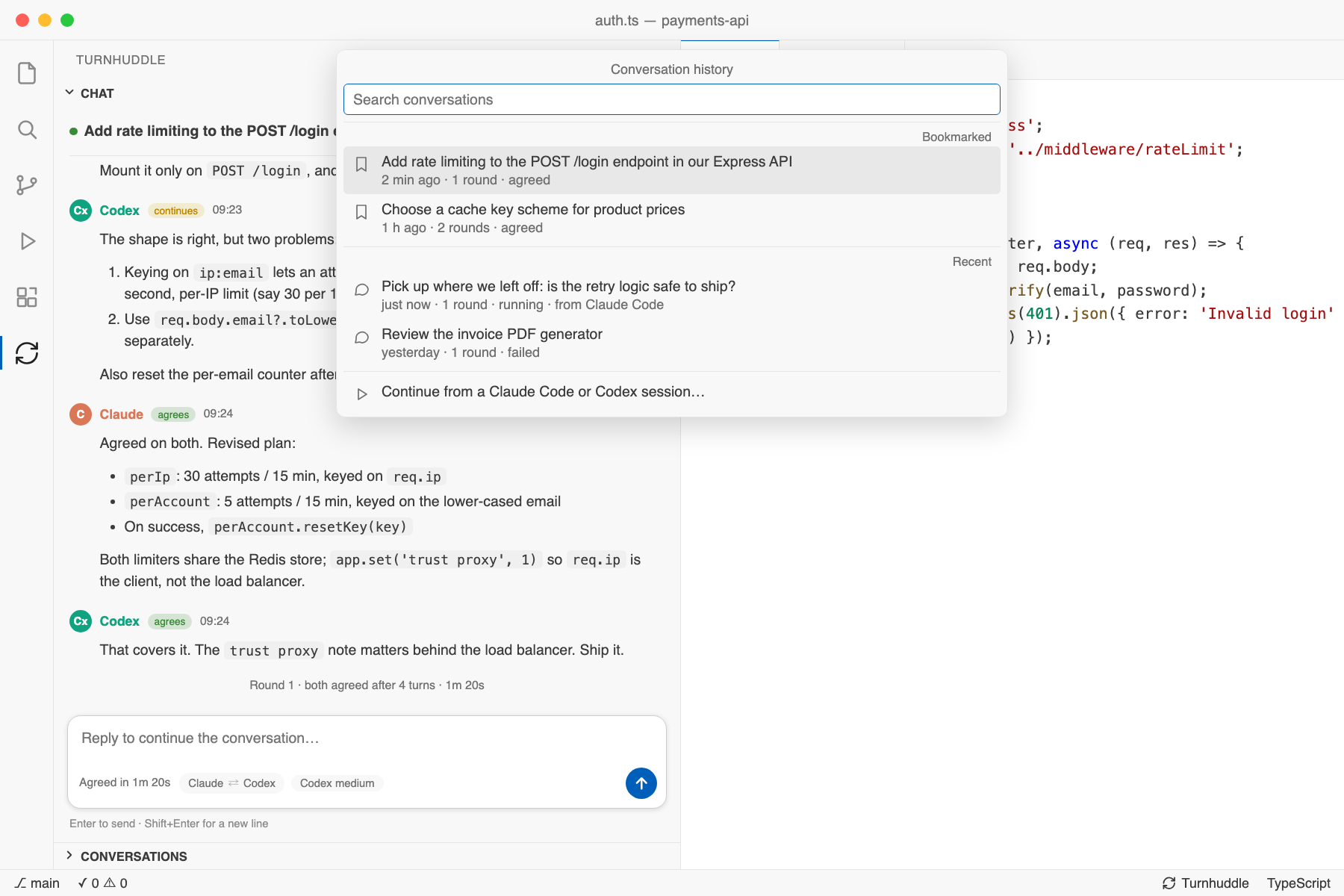
The agents' own logos
Turnhuddle shows the logos that the Claude Code and Codex extensions already ship, read from where those extensions are installed on your machine; it doesn't include them itself. The OpenAI blossom switches between black and white to suit light and dark themes. Without those extensions, or with turnhuddle.vendorLogos off, you see initials as before.
Improvements
- The conversation's state is a small coloured dot before its title; hover it for the name.
- Bookmarked conversations show 🔖 in the Conversations list and stay at its top.
Install from the Visual Studio Marketplace, or download the VSIX below and use Extensions: Install from VSIX….
Turnhuddle 0.2.3
Works with the Claude Code and Codex extensions you already have
You no longer need the Claude Code and Codex command-line tools on your PATH. Turnhuddle now finds them itself, including the copies that come with the Claude Code and Codex VS Code extensions.
No more "Cannot run claude"
If you use Claude Code or Codex through their VS Code extensions, the command-line tools live inside those extensions, not on your PATH, and Turnhuddle failed with Cannot run claude. It now looks on your PATH, in the usual install folders, in your login shell's PATH (for VS Code opened from the Dock), and finally inside the Claude Code and Codex extensions. Turnhuddle: Check CLI Installations shows which copy it found and where. A path you set in turnhuddle.claudePath or turnhuddle.codexPath still wins.
Improvements
- If a CLI can't be found, Turnhuddle says what to install and offers Open Settings and Check Again, instead of starting a conversation that fails.
- The Turnhuddle Output channel notes which CLI copy each session uses.
Install from the Visual Studio Marketplace, or download the VSIX below and use Extensions: Install from VSIX….
Turnhuddle 0.2.2
A session picker that shows what you asked
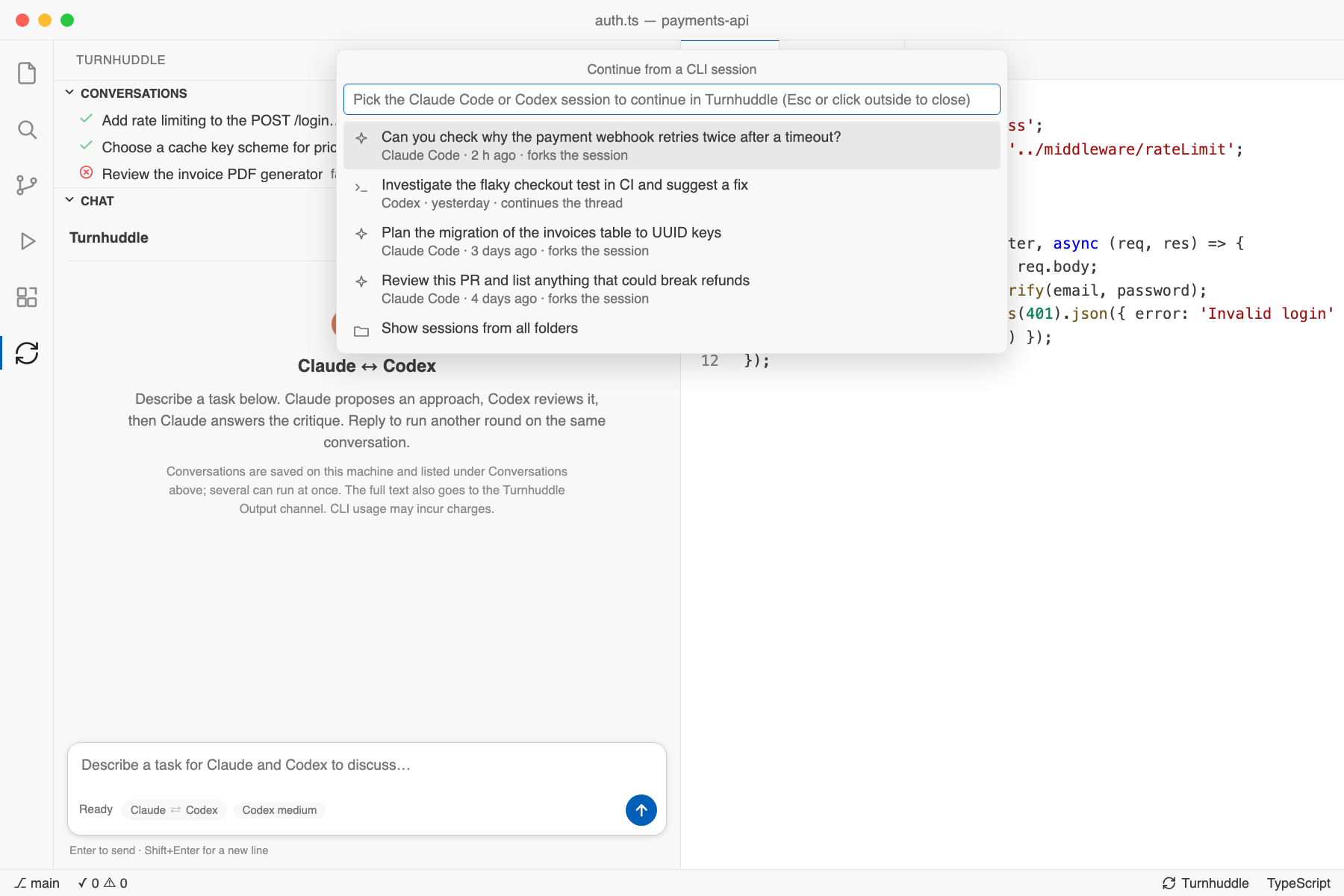
Continuing a Claude Code or Codex session is easier. Each session in the picker is titled with the question you asked, not context the CLIs add behind the scenes, and the picker closes when you click away.
Titles you recognise
Claude Code and Codex quietly record extra context before your first message, such as which file was open in your editor. The picker used to show that. Now it skips it and shows the first thing you typed, without Markdown symbols or stray backslashes. The tool, its age and what happens when you pick it sit on one line underneath, so long titles no longer hide them. Press Esc or click anywhere outside to close the picker.
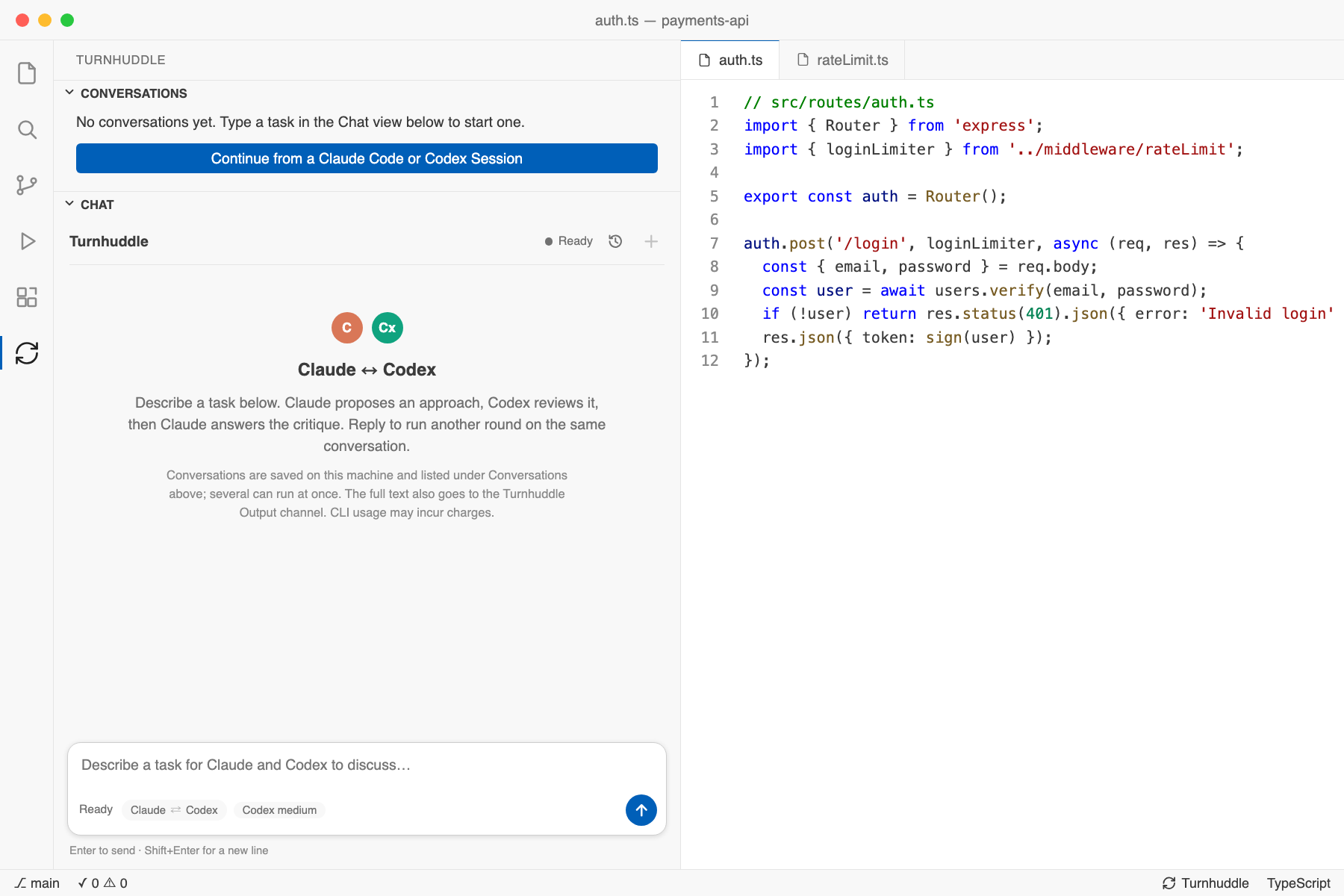
A proper button when there are no conversations yet
The empty Conversations view showed a stray \n in its message. It now reads cleanly, with a Continue from a Claude Code or Codex Session button underneath.
Improvements
- The Marketplace page now has screenshots and a full overview of what Turnhuddle does.
Install from the Visual Studio Marketplace, or download the VSIX below and use Extensions: Install from VSIX….
Turnhuddle 0.2.1
Updates for everyone, and releases that publish themselves
Turnhuddle now checks for new versions itself, so installs from GitHub stay current too. Plus a clearer Activity Bar icon, a fix for the streaming cursor, and every release now published automatically with notes and a downloadable VSIX.
Check for updates
Once a day Turnhuddle asks GitHub for the latest release. If there's a newer one, a notification offers to install it: the VSIX is downloaded, its checksum verified against GitHub's, and installed for you. Run Turnhuddle: Check for Updates any time, or turn the daily check off with turnhuddle.checkForUpdates.
Improvements
- A new Activity Bar icon, two arrows taking turns, that stays legible at small sizes.
- Each release now comes with a GitHub Release that includes the VSIX, for installing without the Marketplace.
- This website, with every release explained.
Fixes
- While Claude streams a list, the typing cursor now sits at the end of the text instead of on a line of its own.
Install from the Visual Studio Marketplace, or download the VSIX below and use Extensions: Install from VSIX….