Repository navigation
Turnhuddle 0.2.4

Feels like Claude Code: bookmarks, history and logos
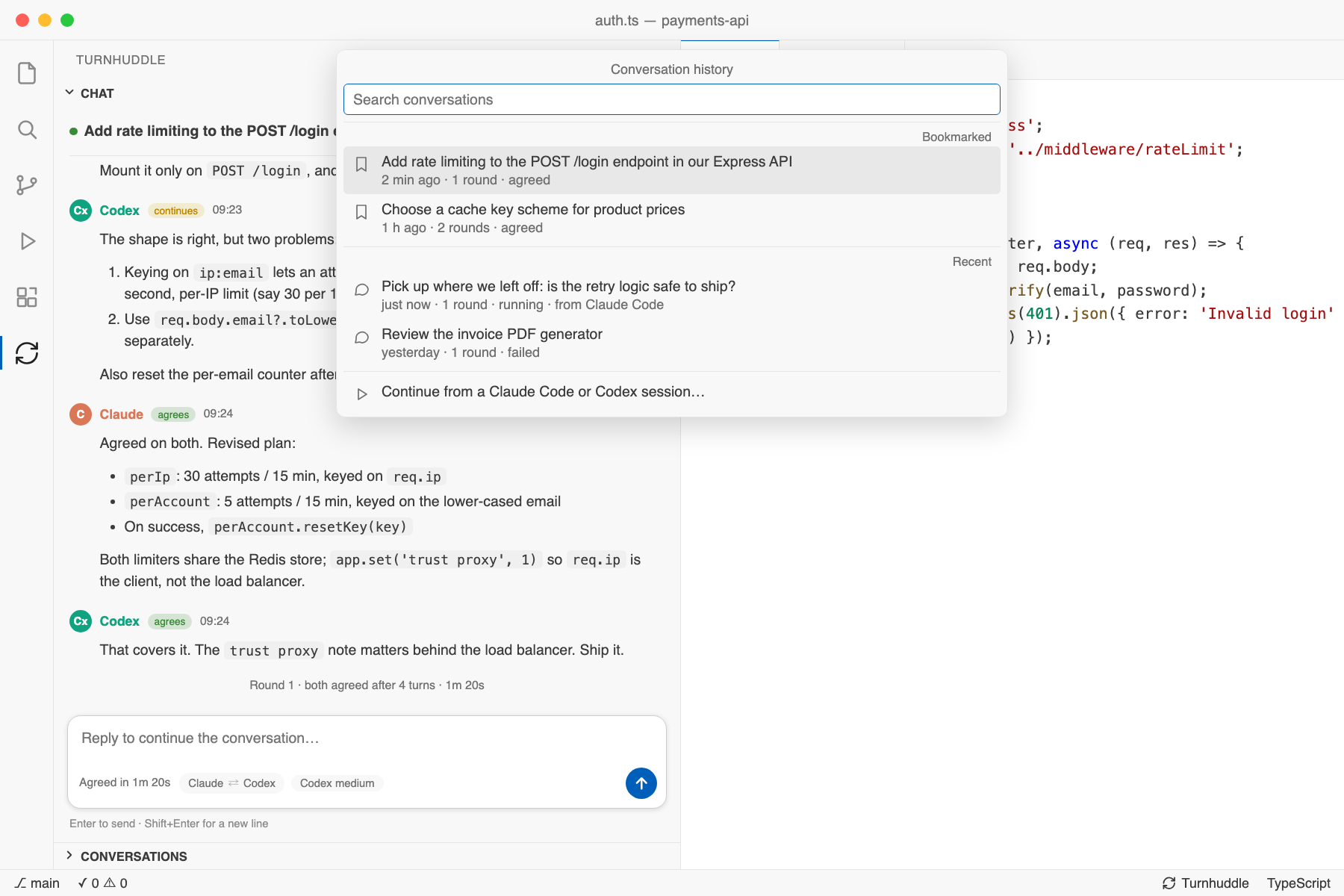
The chat header now works like Claude Code's: bookmark a conversation, open your history from the clock, start a new chat from the bubble. Replies carry each agent's own logo when the Claude Code and Codex extensions are installed.
Bookmarks and history, one click away
Bookmark the conversation you're in from the header. The clock opens your history, searchable, with bookmarked conversations at the top and each one's age, rounds and outcome; it also offers Continue from a Claude Code or Codex session…. The speech bubble starts a new conversation. Chat is now the first view in the Turnhuddle sidebar, with the Conversations list folded underneath.
The agents' own logos
Turnhuddle shows the logos that the Claude Code and Codex extensions already ship, read from where those extensions are installed on your machine; it doesn't include them itself. The OpenAI blossom switches between black and white to suit light and dark themes. Without those extensions, or with turnhuddle.vendorLogos off, you see initials as before.
Improvements
- The conversation's state is a small coloured dot before its title; hover it for the name.
- Bookmarked conversations show 🔖 in the Conversations list and stay at its top.
Install from the Visual Studio Marketplace, or download the VSIX below and use Extensions: Install from VSIX….