Repository navigation


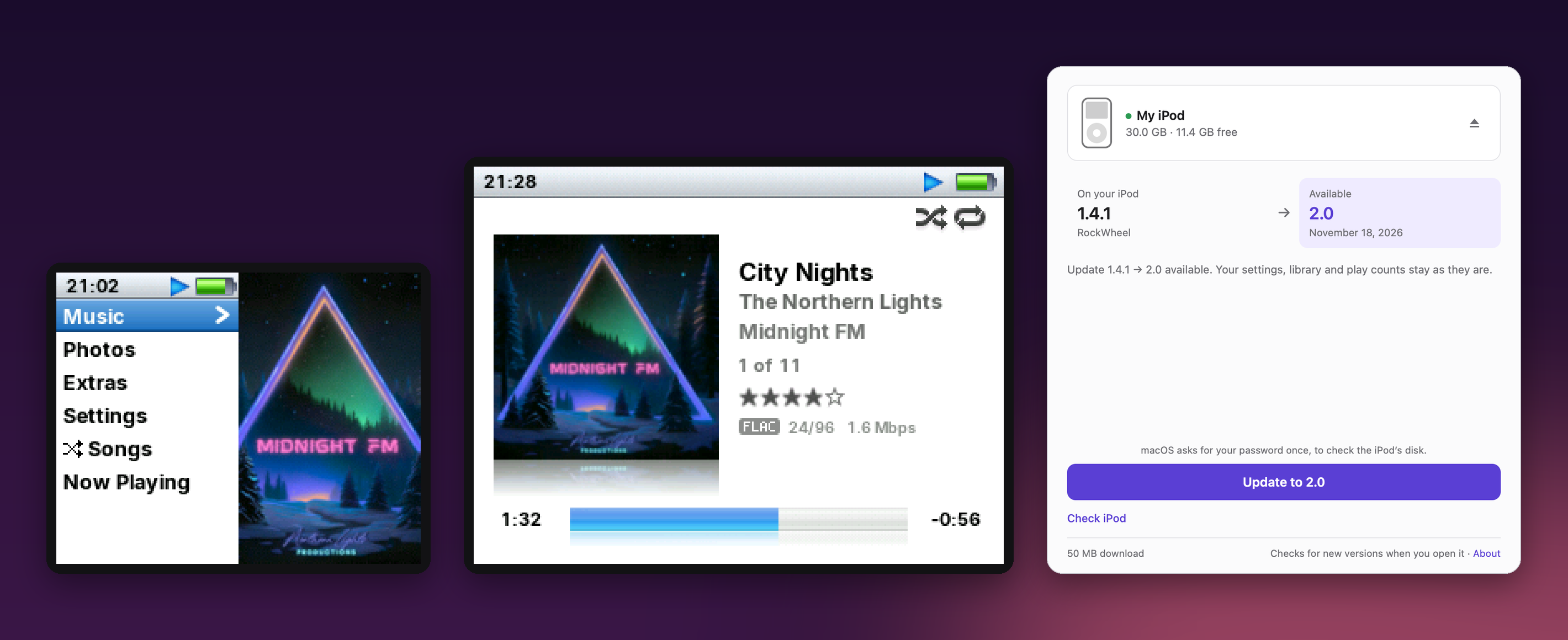
RockWheel 2.0 brings two big things. The new RockWheel app for Mac and Windows installs RockWheel and keeps it up to date, so you no longer need Terminal or PowerShell. And RockWheel now runs on the iPod Photo as well as the iPod Video. The firmware also adds a play queue, Compilations, Last.fm and a new theme called Dieter, and it fixes many problems with power cuts, full disks and damaged files. The README explains each feature in detail.
Tested on one iPod Video (5.5G with 32 MB of RAM, an iFlash card and about 13,000 songs) and one iPod Photo (30 GB, original hard drive), both with macOS 26. On Windows, the app was tested with the iPod Video.
Highlights
- The RockWheel app for Mac and Windows. Connect your iPod and click Install. The app picks the right firmware for your model, checks Apple's software on the iPod, installs the bootloader with a backup on your computer, checks every file it copied and ejects the iPod.
- Updates in one click. The app tells you when a new version is out and updates the iPod. Your settings, play counts and ratings stay.
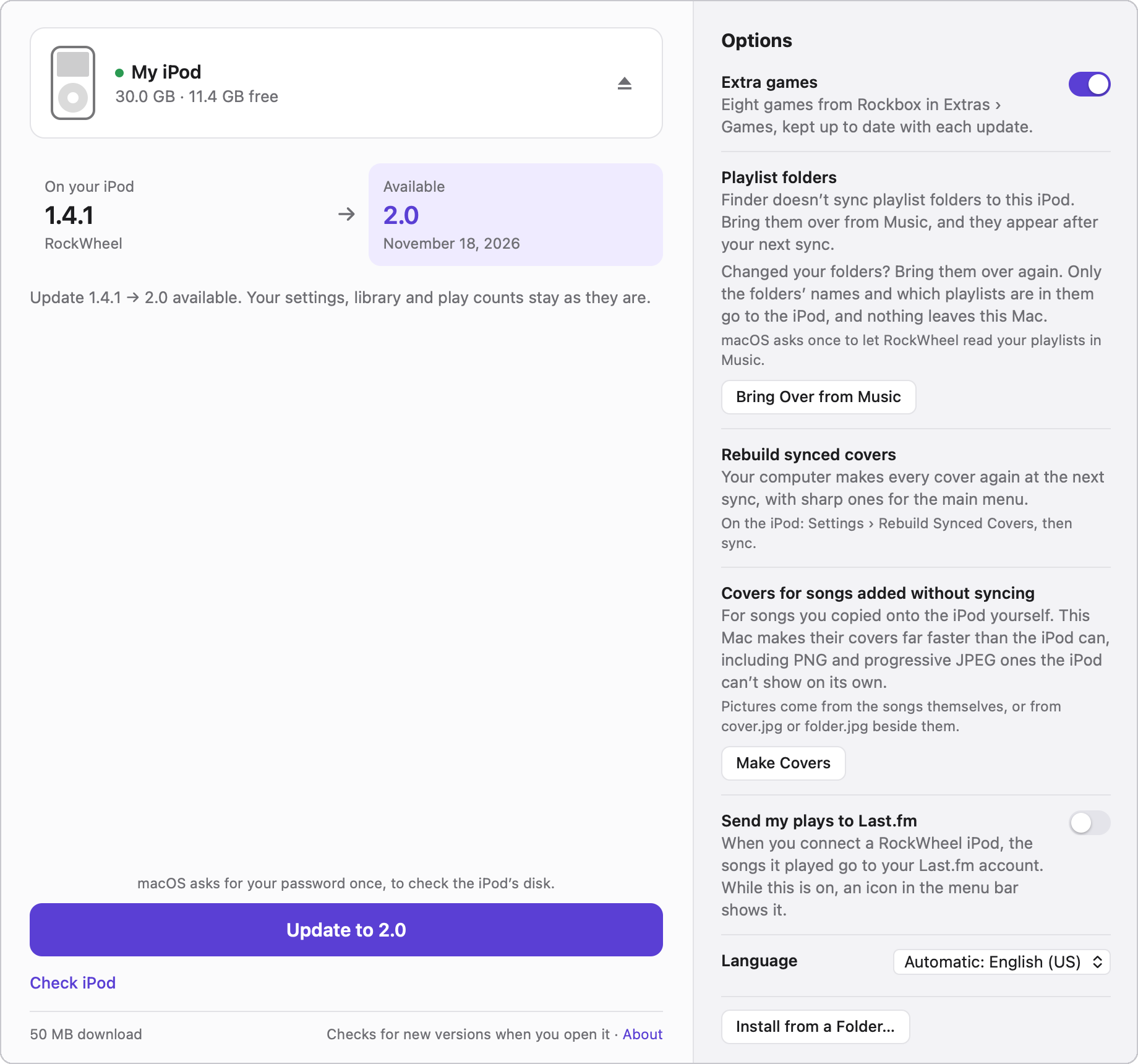
- The app does more than install. On a Mac it converts an iPod formatted for Mac. Its Options add the extra games, bring over your playlist folders, make covers for songs you copied yourself and send your plays to Last.fm. It speaks 46 languages.
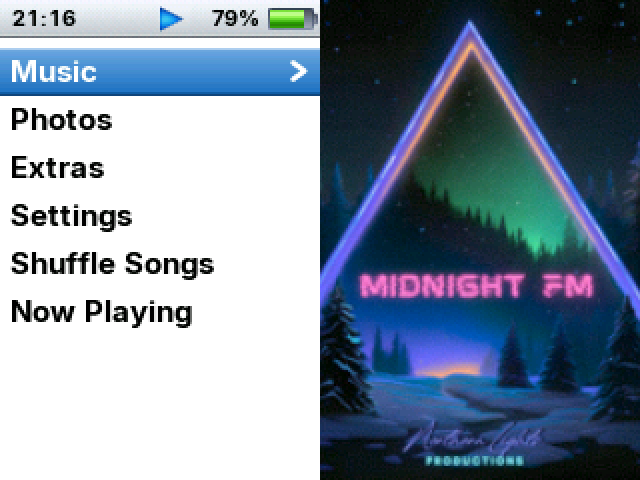
- iPod Photo support (Beta). All four themes fit its smaller screen, it syncs with Finder, and the cover of what's playing appears next to the main menu.
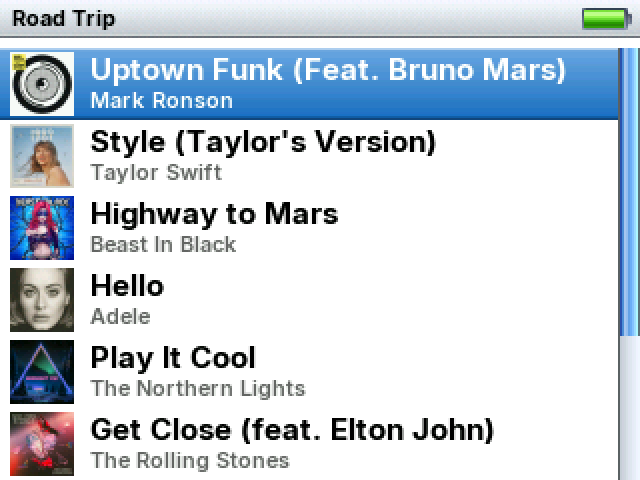
- A play queue. Play Next and Play Last add songs to Up Next. A queued song plays once and then leaves the list.
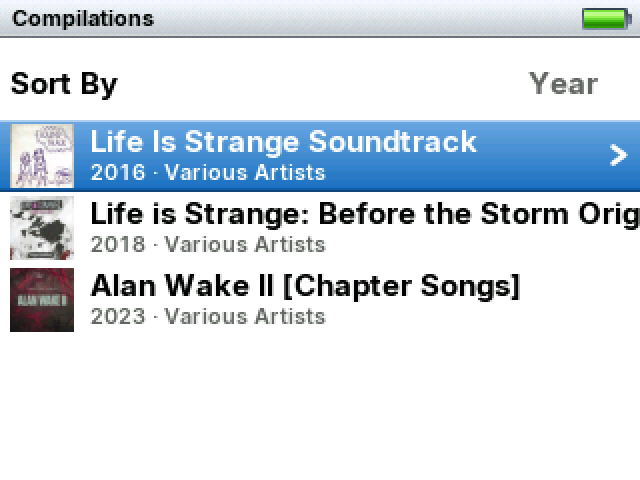
- Compilations are back in Music, as on a stock iPod. Artists who only appear on compilations no longer fill up Artists.
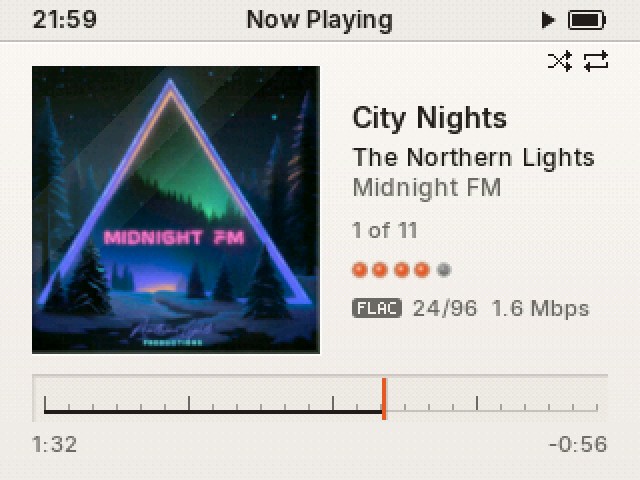
- Dieter is a new theme. It's calm and precise, and Now Playing shows the progress as a tuning scale behind glass.
- Last.fm. The iPod keeps track of what you play, and the app sends it to Last.fm when you connect.
- Changes on your computer reach the iPod. Rename a song or change its artist in Music, and the iPod picks it up at the next sync. Its play count and rating stay.
- Your computer makes the covers for songs you copied onto the iPod yourself, even PNG and progressive JPEG pictures the iPod can't open.
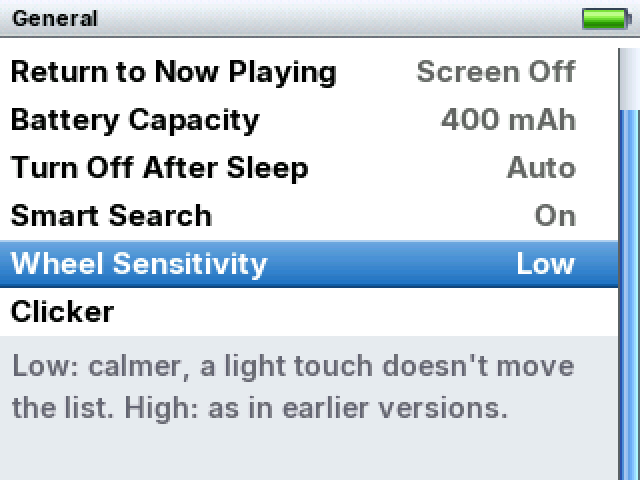
- Battery Percentage and Wheel Sensitivity. The wheel's new default feels like a stock iPod's.
- The iPod sleeps instead of turning off. Hold Play, or leave it paused for 2 minutes, and it goes to sleep. Turn the wheel and you're back where you left off. Asleep, the test iPod Video draws 11.8 mA, about half of what it draws awake with the screen off.
- Almost every format is decoded on the second processor core, so the core that runs the menus no longer decodes music.
- Power cuts and full disks do less harm. Settings, playlists and play counts survive them.
Before you update
- Update with the app, or run the same install command as before. Your settings, play counts, ratings and resume points are kept. The Terminal and PowerShell commands haven't changed, and they now work on both iPods.
- Update the games as well: games from 1.4.1 don't run on 2.0. The app and the scripts do this for you.
- The first start takes longer than usual, but only once. Updating Library checks each song for a compilation mark and prepares covers for the songs Finder gave none, which are mostly songs you copied yourself.
- Last.fm logging is on. The iPod writes the songs you play to
/.scrobbler.log, so they're ready the first time you send them. You can turn it off in Settings › Playback › Last.fm. - The iPod now sleeps instead of turning off, as a stock iPod does. Holding Play puts it to sleep, and so does leaving it paused or stopped for 2 minutes. 1.4.1 turned it off, after 10 minutes when you left it alone. Turn the wheel to wake it. After some hours of sleep it turns itself off, as set in Settings › General › Turn Off After Sleep.
- The wheel moves fewer rows per turn. Wheel Sensitivity starts at Low: 16 rows per turn instead of 24, and a finger resting on the wheel doesn't move the list, just like on a stock iPod classic. If you prefer the wheel from 1.4.1, choose High in Settings › General. Games always use High.
- Play Next and Play Last now add songs to a queue. A queued song plays once and leaves the list. It is no longer added to the list for good.
- Compilations now appears in Music, and artists who only appear on compilations leave Artists. To keep Artists as it was, turn Compilations off in Settings › Music Menu.
- Covers now come only from Updating Library. If you change a song on the iPod itself, it shows the note icon until the next Updating Library. The old setting that switched album art off is gone.
- In Neo, settings show On and Off as words, and lists sit closer to the edges of the screen.
- Battery Capacity is back in Settings › General, just above the new Turn Off After Sleep.
- A first install now needs Apple's latest software on the iPod: 1.3 on the Video and 1.2.1 on the Photo. Updating an iPod that already has RockWheel doesn't.
- If you're coming from 1.3 or earlier, please read Updating to 1.4 too.
What's new
The RockWheel app
- It's for Mac (macOS 11 or later) and Windows (10 or 11). Download it from this release.
- The Windows installer isn't signed yet, so Windows SmartScreen may warn you the first time. Click More info, then Run anyway.
- It finds your iPod and shows its model, its name, the version it has and the latest version.
- It installs or updates RockWheel, reads the files back from the iPod to check them, and ejects the iPod when it's done.
- On a first install it writes the bootloader. It saves a backup on your computer first, and puts the old one back if anything doesn't match.
- On a Mac it can convert an iPod formatted for Mac to FAT32. It asks you to type ERASE before it starts. On Windows, restore such an iPod in iTunes before you install.
- Before a first install it checks Apple's software on the iPod, and tells you how to update it if needed.
- In Options you can add the extra games, bring playlist folders over from Music or iTunes, rebuild synced covers, make covers for songs added without syncing, send your plays to Last.fm, choose the language and install from a folder.
- It speaks 46 languages.
- It has an Eject button. If another program is using the iPod, the app tells you which one.
- Copy Report gives you a report to attach to an issue. It leaves out your serial number, your computer's name and your file paths.
- The Terminal and PowerShell scripts can now install RockWheel on the iPod Photo too, and remove it again.
iPod Photo (Beta)
- RockWheel runs on the iPod Photo and the iPod color. Both are 4th-generation iPods with a color screen.
- Classic, Modern, Neo and Dieter come in light and dark versions laid out for its 220×176 screen.
- It syncs with Finder in RockWheel's own USB mode, with Finder's covers and your photos.
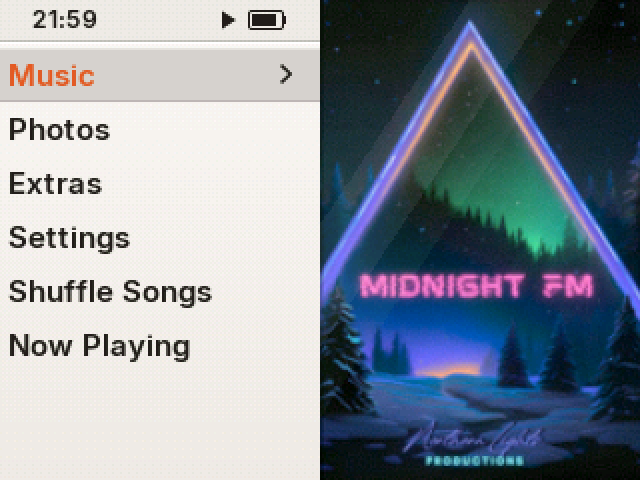
- Next to the main menu you see the cover of what's playing. Next to Photos you see a collage of your photos, and next to Settings you see your disk. You can turn this off in Settings › Appearance › Cover Beside Menu.
- If a menu name in your language is too long to fit next to the cover, the iPod uses a shorter one. Shuffle Songs and Shuffle Albums get a shuffle icon.
- Settings and the Now Playing menu use two-line rows, with each value under its name.
- Now Playing uses more of the screen, so long titles have more room.
- The covers next to the main menu are sharp. Finder writes them at the right size, so the iPod doesn't have to make them. They take about 77 KB per song on the iPod. For songs synced before you installed RockWheel, Updating Library makes these covers instead, and Settings › Rebuild Synced Covers has Finder write them all again at the next sync.
- It sleeps just like the Video, and it turns itself off after the time you set in Turn Off After Sleep.
- It has its own bootloader. The bootloader tries the disk again before it gives up, because the drive sometimes doesn't answer right after disk mode.
- So far it has been tested on one iPod Photo. See Known limitations.
Play Next, Play Last and Up Next
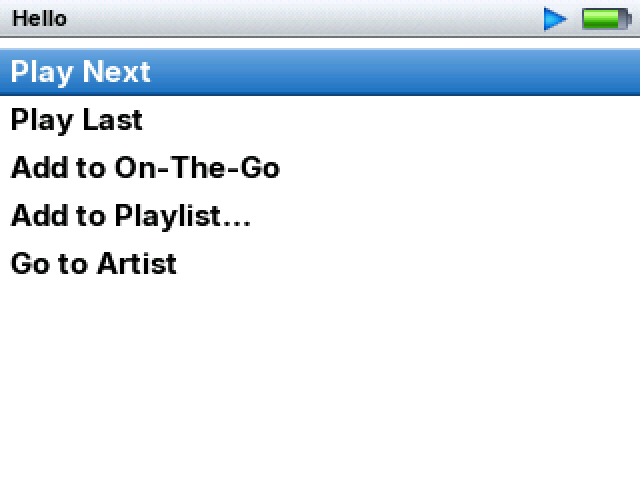
- Play Next and Play Last now come first in the menu of a song, album, artist, playlist, genre or episode, also in Search and Cover Flow.
- Play Next puts your choice at the front of the queue. Play Last puts it at the end.
- A queued song plays once and then leaves the list. Repeat All doesn't repeat it, and saving the list as a playlist doesn't keep it.
- When the queue runs out, playback goes on from the song after the one that was playing when the queue began.
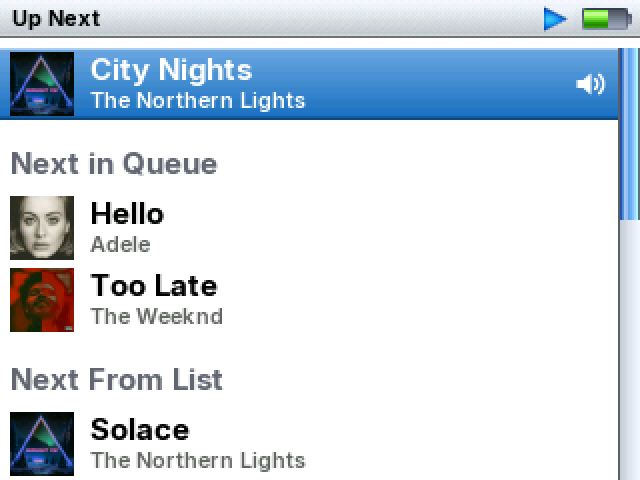
- Up Next shows the queue under "Next in Queue" and the rest of the list under "Next From List".
- To empty the queue, choose Clear Queue in a queued song's menu. The iPod asks before it clears it.
- Up Next is the first item in the Now Playing menu.
- The queue stays after a restart, and turning Shuffle on or off keeps it in order.
- If you queue songs while the music is paused, it stays paused. If you queue them while it's stopped, they wait after the song Resume will play.
Music and library
- Music › Compilations comes right after Albums. It lists the albums marked as compilations, with the same Sort By, years and covers as Albums. Synced songs use iTunes' Compilation setting, and songs you copied use the mark in their tags.
- Artists leaves out artists who only appear on compilations, as a stock iPod does.
- When you change a song's details on your computer, the iPod picks up the change at the next sync, even from tools that only edit the iPod's database. Play counts, ratings and resume points are kept.
- Songs in a playlist, On-The-Go and Up Next show their covers, with the artist under the title.
- Every cover is prepared during Updating Library, also for copied songs without an album tag. Nothing is decoded while you browse or play.
- When a song's picture can't be shown, Now Playing tells you why and how to fix it, and lists show a "?". You can turn this off in Settings › Appearance › Missing Covers Caution.
- The app can make the covers of songs you added without syncing, including pictures the iPod can't read on its own.
- Updating Library's Songs step reuses the sort orders it made last time. After three songs were added on the test iPod, it took 2.54 s instead of 2.83 s.
- Pressing Menu or connecting USB during that step no longer leaves a half-finished Songs list.
Playback
- Almost every format is now decoded on the iPod's second processor core, as MP3 and AAC already were. The core that runs the menus no longer decodes music.
- HE-AAC plays at the right speed. It used to play twice as fast and stop halfway. It plays without its extra high frequencies (SBR), so it sounds a little duller.
- FLAC files with large blocks now play, for example ffmpeg's 88.2–192 kHz files.
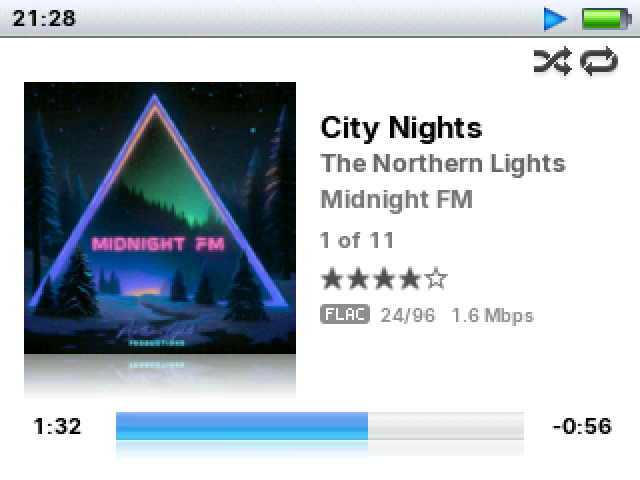
- Now Playing's Format and Bitrate line starts with the format: MP3, AAC, AAC+, ALAC, FLAC, OPUS and so on. Lossless tracks show their bit depth and sample rate, like "24/96", and high bitrates show in Mbps.
- Last.fm logging (Settings › Playback › Last.fm) records the songs you listen to, and it's on by default. Podcasts and audiobooks aren't logged, and neither is anything played while the clock isn't set.
- When the iPod sleeps, the audio chip goes into standby and the processor slows down. Asleep, the test iPod Video draws 11.8 mA. Awake with the screen off, it draws 21.9 mA.
- Settings › General › Turn Off After Sleep can be Auto, 2 h, 6 h, 12 h, 24 h, 2 days or Never. Auto turns the iPod off once sleep has used about 5% of the battery, which takes between 2 and 12 hours.
- On tracks longer than about 4 hours, such as audiobooks in a single file, the progress bar no longer jumps back.
- When you scrub, the bar stays where you put it and no longer jumps back and forth.
Interface
- In every theme, lists end with a whole row at the bottom of the screen, with or without covers.
- Battery Percentage (Settings › Appearance) shows the battery level next to its icon in every status bar. It's off by default.
- Wheel Sensitivity (Settings › General) has three levels: Low, which is the default, Medium and High.
- Pressing a button on the wheel no longer turns it by accident. Menu takes you back to the row you left, and Select opens the row you meant.
- The wheel speeds up in steps every 0.4 seconds, as the stock iPod Photo firmware does.
- Hold Menu a little longer to jump back to where you were before the main menu. A click tells you it worked. Do it again to switch back.
- Messages like "Loading…" now appear in the middle of the screen, also when the cover is next to the main menu.
- A setting's value always shows in full. If the name is too long, it ends in "…" and scrolls while it's selected.
- In Hebrew, Arabic and other right-to-left languages, ratings fill from the right.
- Neo shows On and Off as words, has narrower margins, and highlights the whole row in lists with covers.
- In Neo and Classic, the cover in Now Playing now sits where Modern's does and stays clear of the progress bar.
- When a song has no cover, the note icon in Now Playing has a reflection, just like a cover.
- Cover Flow clicks for every album that passes and no longer skips albums when the screen can't keep up. One turn of the wheel moves 16 albums. You can open the album in the middle as soon as the covers stop. Cover Flow follows your backlight settings and lets the iPod sleep.
- Spanish, Slovenian, Hindi, Greek, Italian and Turkish get shorter names where the full ones didn't fit. "Group by Album Artist" fits again in Hungarian, and long Thai names no longer break in the middle of a word.
- If the iPod crashes, the next start saves a report to
.rockbox/crash.log, and the crash screen asks you to send it.
Dieter
- Dieter is a new theme for both iPods, in light and dark. Choose it in Settings › Appearance › Theme.
- It uses warm whites and light grays with near-black text. In dark mode it takes on the black of the iPod itself.
- The only color comes from the album cover and one small signal color. You can pick Orange, Red, Yellow or Green in Settings › Appearance › Color.
- Now Playing shows the progress as a tuning scale behind glass, with a needle in the signal color. When you change the volume, a knob appears where the cover was.
- The selected row is a flat band with its name in the signal color. On and Off settings are round keys with a lamp.
- The cover next to the main menu sits in a recess. When nothing is playing, the recess shows a speaker grille.
- Ratings are five push keys with lamps. Quick Scroll shows its letter on a round key, and Search types on typewriter keys.
- Dieter has no Cover Colors or Angled Cover, because the cover is its one big splash of color.
Fixes
Power cuts, full disks and damaged files
- Settings, unsent play counts, your playlists and On-The-Go now survive a power cut at any moment. After the restart the iPod finds the whole file, from either before or after the cut, and never a part of it.
- A power cut while a file was being added could hide files in a folder and later stop the iPod with "Dir entry … is not free!". Folders are now written in a safe order, and a folder an earlier cut left that way can grow again without the error.
- A power cut while a file was being removed could leave it behind under a short name like
TRACK0~1.M4A. - If a synced playlist had to move while the disk was full, it was lost until the next sync with free space. Now it's kept, and the iPod shows "Not Enough Space".
- A read error halfway through a playlist was treated as its end. This could shorten the playlist or delete On-The-Go.
- A shuffled list came back unshuffled after a reset, and a song moved twice in Up Next lost its place.
- A damaged iTunesDB could freeze the menus and stop the iPod from connecting for a sync. Damaged iTunesDB, ArtworkDB and Photo Database files are now rejected where they go wrong.
- Scrubbing while a large cover was loading could freeze the iPod.
- In some memory situations, music stopped or restarted over and over.
- After you deleted a copied song, sorting could read the wrong name for it.
- The first fast scroll after music started could show the note icon instead of covers.
- Skipping a song could show the previous song's cover under the new title.
- Opus: scrubbing back near the start jumped about 10 seconds ahead, and Previous on a resumed track went back to the saved place instead of 0:00. Both bugs came from Rockbox.
Fixes from Rockbox
These come from Rockbox itself, and each one is credited in its commit.
- A playlist file cut short by a full disk stopped Resume with "Err: EOF".
- An out-of-range number in a damaged
config.cfgcould switch the iPod off at startup or freeze it. - Cover Flow showed the previous album's title for one frame when turning left.
The look
- Neo: in an artist's albums, a cover without a year stuck out of the selection.
- Modern on the Video: the thin line next to the main menu's photo collage was missing.
- Classic: a name too wide for the USB screen's title was cut off in the middle of a letter.
- A message that was too wide by just its last letter lost that letter.
Known limitations
- The iPod Photo is in Beta. It has been tested on one 30 GB iPod Photo with its original hard drive, synced with Finder on macOS 26. Other capacities, the iPod color, other kinds of screen and iTunes on Windows haven't been tried with it yet. Rebuild Synced Covers, and the covers next to the main menu for songs synced before RockWheel, have been tested on it only in the simulator.
- A few things are still Video-only. When a song's picture can't be shown, the iPod Photo shows the note and a "?" without saying why. Its Turn Off After Sleep on Auto switches it off after about 2 hours of sleep, because its sleep hasn't been measured yet.
- Windows. The app was tested there by updating an iPod Video. A first install, Last.fm sending and making covers haven't been tried on Windows yet. A Mac-formatted iPod has to be restored in iTunes before you install.
- Last.fm from the Mac app works only when the app is in Applications.
- Song details changed by tools that only edit the iPod's database, such as iOpenPod, were tested in the simulator. Changes made with Finder were tested on the iPod.
- HE-AAC plays without SBR, so it sounds a little duller than it should.
- Very demanding files stutter, because they need more than the iPod's processor can give. Examples are 24-bit/96 kHz WavPack in its highest modes, APE at Extra High and some SID tunes.
- The 64 MB iPod Video (60 and 80 GB) hasn't been tested on a device.
Thanks
Thank you to everyone who opened an issue after 1.4.1. The wheel turning under a pressed button, the battery percentage, the queue and Last.fm all came from you. Many fixes come from Rockbox. The ALAC decoder's assembly code comes from PodBox by Anthony Fletcher, and some ideas come from ProkBox5g. Each is credited in its commit.
Files
RockWheel-mac.dmg: the RockWheel app for MacRockWheel-windows-setup.exe: the RockWheel app for Windowsrockbox.zip: firmware for the iPod Videorockbox-ipodcolor.zip: firmware for the iPod Photorockbox-games.zip,rockbox-games-ipodcolor.zip: eight extra games for eachbootloader-ipodvideo.ipod: Rockbox bootloader for the iPod Video, unchanged since 1.2.0bootloader-ipodcolor.ipod: RockWheel's bootloader for the iPod Photoipodpatcher(macOS),ipodpatcher.exe(Windows): used by the scriptsSHA256SUMS,SHA256SUMS-games,SHA256SUMS-windows: checksums of the other files
SHA-256 of the app files:
54e3a2d4d140117cf3372f77580e4ae7dda69590bb85b4702736f67224d4faef  RockWheel-mac.dmg
501cc6f208e390539cf7e88e7a0373cb7ff46702697bff9d53103fc85d33627f  RockWheel-windows-setup.exe