With quick tags extension, multiple lines of tags not handled correctly #1913


Description

Describe the bug
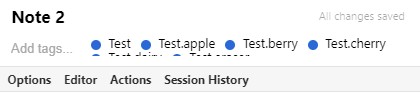
If you enable the "Quick Tags" extension and start entering a handful of tags until the line overflows, the text will wrap to a second line, but the height of the tags field will not increase.
To Reproduce
Steps to reproduce the behavior:
- Ensure "quick tags" extension is activated (and "Folders" if quick tags is reliant on that)
- Make a new note
- Start adding tags to the tag field until the text overflows
- Notice that the tags overflows to a second line, but the height of the tags field does not increase to accommodate the second row of tags
Expected behavior
I expected the height of the tags field to increase so I could see the second row of tags
Screenshots
Note that you can see the top of the second line in the below screenshot
Desktop (please complete the following information):
- OS: Windows 10 v1909
- Standard Notes: v3.4.1
Additional context
I'm using bold editor, and the quick tags and folders extensions.
Metadata
Metadata
Assignees
Labels
No labels