Repository navigation
Oscilloscope
Since 0.6.0 scpi-sim simulates a digital oscilloscope: a generic one and five real models. Test code that captures waveforms can run in CI, and the things that go wrong on a real bench go wrong here too: a clipped signal, a trigger that never fires, a read that times out.
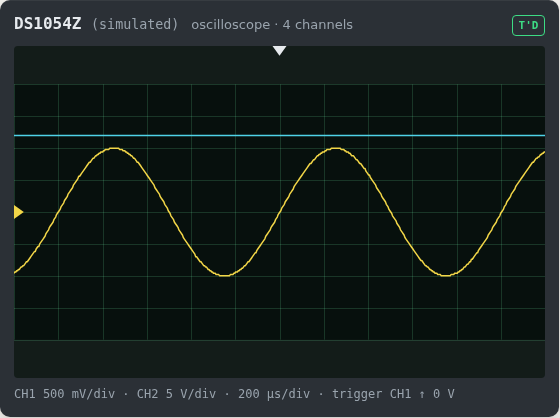
Try it in the Browser demo, or start one:
pip install scpi-sim pyvisa pyvisa-py
scpi-sim serve --signal 1:sine,freq=1k,vpp=2 --profile rigol-ds1054z
--signal CH:SHAPE[,KEY=VALUE...] says what is at an input. Shapes: dc, sine, square, triangle,
sawtooth. Keys: freq, vpp, offset (the middle of the swing), duty, phase (degrees), rise
(seconds). Numbers take n, u, m, k, M, G. Repeat the option for more channels. In a bench file:
instruments:
  scope:
    profile: rigol-ds1054z
    port: 5027
    signals:
      1: {shape: sine, frequency: 1000, vpp: 2}
wiring:
  - scope.ch2 -> rail_12v    # a channel on a supply's net shows its DC voltage
scpi-sim serve scope is the generic instrument, with the command tree of Keysight InfiniiVision scopes.
The five models share nothing on the wire, which is the point of the profiles. Each recipe below follows the manufacturer's programming manual, converts to volts with that manual's formula, and works against the real instrument if only the address changes. Start the profile on port 5025 first. All of them run with:
import pyvisa

rm = pyvisa.ResourceManager("@py")
scope = rm.open_resource("TCPIP0::127.0.0.1::5025::SOCKET", read_termination="\n",
write_termination="\n", timeout=5000)scope.write(":TIM:SCAL 0.0002")
scope.write(":CHAN1:SCAL 0.5")
scope.write(":WAV:SOUR CHAN1")
scope.write(":WAV:MODE NORM")
scope.write(":WAV:FORM BYTE")
fields = scope.query(":WAV:PRE?").split(",")
yinc, yorigin, yref = float(fields[7]), int(fields[8]), int(fields[9])
codes = scope.query_binary_values(":WAV:DATA?", datatype="B")
volts = [(code - yorigin - yref) * yinc for code in codes]
print(len(volts), max(volts), scope.query(":MEAS:ITEM? FREQ,CHAN1"))For the memory instead of the 1200 screen points: :STOP, :WAV:MODE RAW, and set :WAV:STOP. It stays at
1200 until you do, so forgetting it returns 1200 points without an error. At most 250000 points per read in
BYTE; read longer records in batches with :WAV:STAR and :WAV:STOP, as in the guide.
scope.write(":TIM:SCAL 0.0002")
scope.write(":WAV:SOUR CHAN1")
scope.write(":WAV:FORM BYTE")
scope.write(":DIG CHAN1")
fields = scope.query(":WAV:PRE?").split(",")
yinc, yorigin, yref = float(fields[7]), float(fields[8]), int(fields[9])
codes = scope.query_binary_values(":WAV:DATA?", datatype="B")
volts = [(code - yref) * yinc + yorigin for code in codes]
print(len(volts), max(volts), scope.query(":MEAS:FREQ? CHAN1"))
As in the guide, code 0 is reserved for holes in the record, 1 means clipped low, 255 clipped high.
scope.write("HEADER OFF")
scope.write("HOR:SCA 2E-4")
scope.write("DAT:SOU CH1")
scope.write("WFMO:BN_F RI")
scope.write("DAT:WID 1")
ymult = float(scope.query("WFMO:YMU?"))
yoff = float(scope.query("WFMO:YOF?"))
yzero = float(scope.query("WFMO:YZE?"))
codes = scope.query_binary_values("CURV?", datatype="b")
volts = [(code - yoff) * ymult + yzero for code in codes]
scope.write("MEASU:IMM:TYP FREQ")
print(len(volts), max(volts), scope.query("MEASU:IMM:VAL?"))
Without HEADER OFF, the default, answers repeat the command (:CH1:SCALE 1.0000E+00). There is no
SYST:ERR?; errors are events in ALLEV?.
scope.write("TIM:SCAL 2E-4")
scope.write("FORM UINT,8")
yorigin = float(scope.query("CHAN1:DATA:YOR?"))
yinc = float(scope.query("CHAN1:DATA:YINC?"))
codes = scope.query_binary_values("CHAN1:DATA?", datatype="B")
volts = [yorigin + yinc * code for code in codes]
print(len(volts), max(volts), scope.query("MEAS1:RES? FREQ"))
ASCII is the format after *RST. FORM REAL,32 gives volts directly, big endian unless FORM:BORD LSBF.
scope.write("TDIV 200US")
scope.write("C1:VDIV 500mV")
vdiv = float(scope.query("C1:VDIV?").split()[1].rstrip("V"))
ofst = float(scope.query("C1:OFST?").split()[1].rstrip("V"))
scope.write("C1:WF? DAT2")
header = scope.read_bytes(22)  # C1:WF DAT2,#9<nine digits>
codes = scope.read_bytes(int(header[13:22]))
scope.read_bytes(2)  # the two newlines that end the answer
volts = [(c - 256 if c > 127 else c) * (vdiv / 25) - ofst for c in codes]
print(len(volts), max(volts), scope.query("C1:PAVA? FREQ"))
The data can contain 0x0A, so read it by its length: read_raw() with a newline as read termination stops at
the first one, as the guide warns. Answers carry their unit. WFSU SP,4,NP,1000,FP,0 selects a part of the record. There is no SYST:ERR?.
| You do | The scope does | Your test sees |
|---|---|---|
| V/div too small for the signal | the converter clips | a flat top, and a Vpp that is the screen, not the signal |
| timebase too fast for the period | no complete period on screen | no frequency: 9.9E37 (Siglent ****, R&S 9.91E37) |
| timebase far too slow | the sample rate drops, the signal aliases | a frequency that is not there, or none |
| trigger level outside the signal, Auto sweep | runs unsynchronised | waveforms at a random phase, status AUTO
|
| the same, Normal sweep | keeps the old capture | stale data, status WAIT
|
| the same, Single | waits for its trigger |
*OPC? gets no answer, your client times out |
| changes a setting on a stopped scope | keeps the capture and its scale | the old waveform with the old preamble |
| reads raw memory while it runs | Rigol refuses, Keysight gives the measurement record | an error, or fewer points than asked for |
| reads a channel that is off | no data | an error (Tektronix: no answer and events 2244, 420) |
Measurements are computed from the samples, so a clipped or aliased capture gives wrong numbers, as on the instrument.
Besides the usual ones (see Fault injection recipes):
| Fault | Effect |
|---|---|
no_trigger |
the trigger never fires, whatever the signal does |
signal channel=1 shape=sine frequency=1000 vpp=2 offset=0 duty=0.5 phase=0
|
replaces what is at a channel's input until the faults are cleared: change the signal in the middle of a test, or take it away |
offset value=0.5
|
added to every sample |
noise sigma=0.1
|
volts rms at all inputs |
from scpi_sim import Signal, get_profile

scope = get_profile("rigol-ds1054z")(noise=0, seed=1, signals={1: Signal("sine", 1000, 2.0)})
scope.process(":TIM:SCAL 0.0002;:CHAN1:SCAL 0.5")
scope.inject("signal", channel=1, shape="dc", vpp=0)   # the probe falls off
assert float(scope.process(":MEAS:ITEM? FREQ,CHAN1")) == 9.9e37
scope.clear_faults()
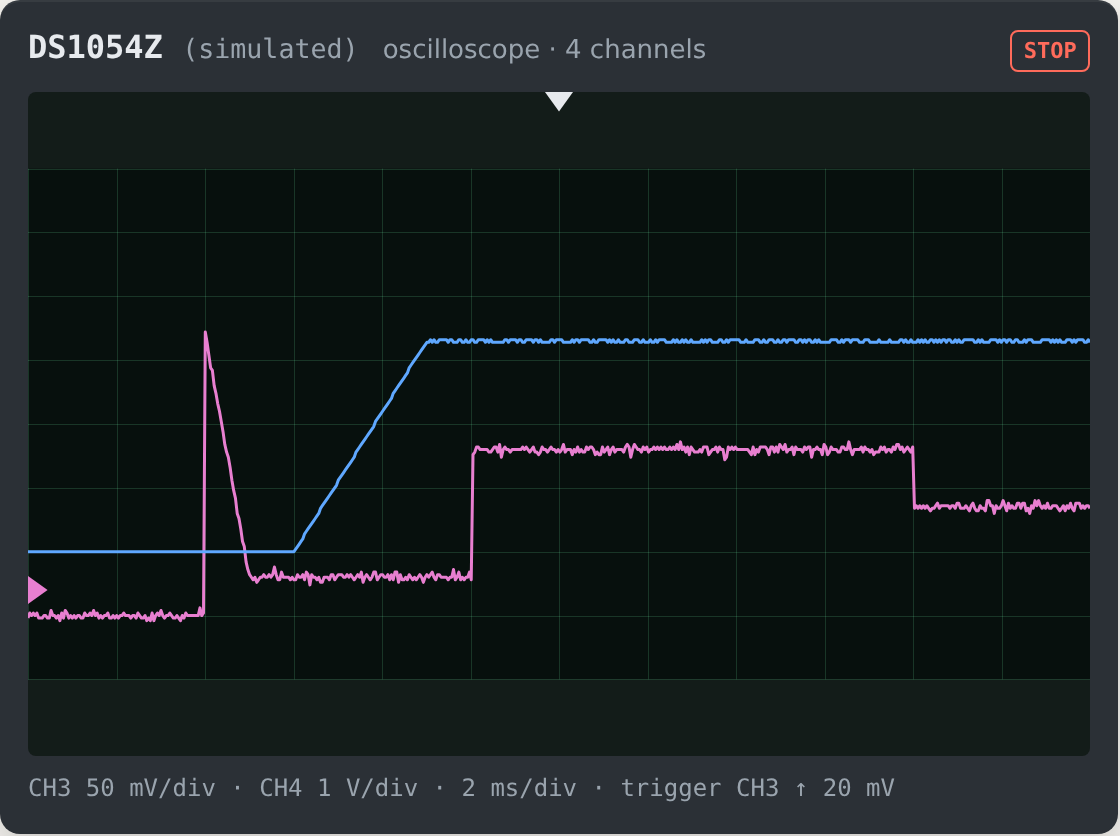
assert abs(float(scope.process(":MEAS:ITEM? FREQ,CHAN1")) - 1000) < 10Since 0.7.0 a device under test can say what a
scope sees on its outputs: a Signal, which repeats forever, or a Transient, which happens once. Arm a Single,
switch the supply on, and read the capture, as you would on the bench.
import time

from scpi_sim import Device, Signal, Transient
from scpi_sim.bench import Bench


class Board(Device):
    terminals = {"vin": "input", "rail": "output"}
    event = None

    def update(self):
        if self.input_voltage("vin") >= 10 and self.event is None:
            # (seconds after the event, volts); the ripple starts when the shape has settled
            self.event = Transient(time.monotonic(), ((0, 0), (2e-3, 0), (5e-3, 3.3)),
                                   ripple=Signal("sine", frequency=300e3, vpp=0.03))

    def waveform(self, terminal):
        return self.event

    def voltage(self, terminal):  # what a multimeter reads
        event = self.event
        return 0.0 if event is None else event.at(time.monotonic() - event.start)


bench = Bench.from_dict({
    "instruments": {"psu": {"type": "psu", "port": 0}, "scope": {"type": "scope", "port": 0}},
    "devices": {"board": {"class": "__main__:Board"}},
    "wiring": ["psu.ch1 -> board.vin", "scope.ch1 -> board.rail"],
})
psu, scope = bench.instruments["psu"], bench.instruments["scope"]

scope.process(":CHAN1:SCAL 1;:CHAN1:OFFS 2;:TIM:SCAL 2e-3;:TIM:POS 4e-3;:TRIG:LEV 1.65;:SING")
assert scope.process("*OPC?") is None      # nothing has happened yet: a real client would time out
psu.process("VOLT 12;CURR 1;:OUTP ON")
end = time.monotonic() + 0.01                # the edge is 3.5 ms after switching on; wait by
while time.monotonic() < end:                # the simulator's clock, which moves in 16 ms
    time.sleep(0.001)                        # steps on Windows: a plain sleep may not be enough
assert scope.process("*OPC?") == "1"
assert abs(float(scope.process(":MEAS:VMAX?")) - 3.3) < 0.1
A Single armed after the event keeps waiting, Normal fires again on each new event, and Auto shows the latest
samples. To see a current, add an output that gives volts per amp, like a current probe or a shunt.
examples/power_on checks inrush, a load
step, the rail ramp and its ripple through the scope, as a pytest suite.
On a real bench each instrument has its own connection, so make sure the scope is armed before you switch on:
send :SING;:OPER:COND? as a query instead of a bare :SING. Then wait while bit 3 of :OPER:COND? is set.
The part of a capture after the trigger is computed when the trigger fires: switching off right after it does not cut it short.
Bandwidth limits, math and FFT, digital channels, serial decoding, trigger types other than edge, averaging and peak detect, delay and phase measurements. A channel wired directly to a supply output shows its DC voltage only. Each profile's module docstring lists what it covers, where its manual is silent and what was assumed there.
The profiles follow the public programming manuals. rigol-ds1054z was also checked with the unmodified
ds1054z client library over VXI-11. None of them was verified on real
hardware. If you own one of these and something answers differently, please
open an issue.
A capture costs nothing until it is read, then about 1.7 Mpoints per second (pure Python). Reading 20 Mpoints takes some 12 s, so give the client a long enough timeout, or read in parts.