Arbitrary Wave Generator (AWG)
An arbitrary wave generator (AWG) is a key part of our experiment, especially for quantum gate operations. Here at NYU we use Keysight M3201A and Keysight M3201A for our AWG card and this server (keysight_awg) is thus implemented for these two AWG cards. The AWG is used in a similar way as a DDS, as we use it to control the analog signals of our experiment (mainly to AOMs and then modulate our laser light). But the difference between a DDS and an AWG is that it can take in an array of time-series data and output exactly what the array specifies with a time resolution of 1 or 2 ns. On the other hand, a DDS usually takes in inputs of frequency domain parameters such as a frequency, an amplitude, and a phase and outputs a sinewave with these parameters. So an AWG can have more degrees of freedom and is especially helpful when we need complicated pulses that modulate multiple frequencies together (e.g. a Molmer-Sorensen gate).
There are multiple ways of running LabRAD server. The easiest is to run this python script itself. At the end of this script, you will see
if __name__ == "__main__":
    from labrad import util
    util.runServer( Keysightawg() )
So if you run this script in the command_line like python PATH-TO\servers\control_instruments\awg\keysightawg.py it will run this chunk of code.
Similar to most other labrad servers, the awg server also calls the python API given by the manufacturer of the instrument (Keysight SD1) to realize different functions we need. Given the complicated configurations of an awg card, we will give a brief introduction to the AWG hardware, and the corresponding API respectively. We then talk about the functions of the awg server in detail.
If you want to learn more about how the awg work in detail (e.g. modulation, trigger, prescale e.t.c), feel free to check out the Keysight user manual section 1.2 9018-04448.pdf.
As shown by the figure below, a keysight AWG card has four channels of output (x=4). Every output channel consists of a function generator (sine wave, square wave, triangular wave) and a dual AWG generator, and these two generators can either be used separately or together via a fancy digital mixer.
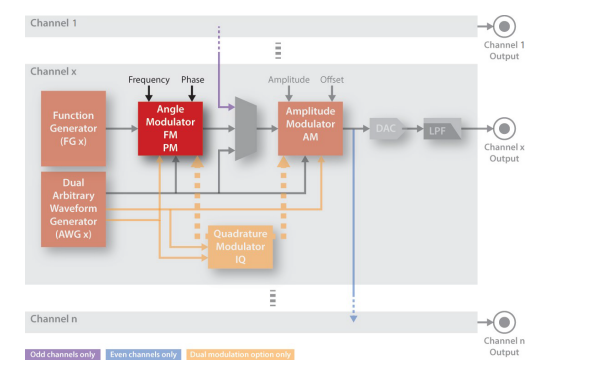
As a result, the awg card supports the following output modes:
- Function generator (FG) output
- AWG direct output
- Amplitude modulation output (use FG for the carrier signal and use AWG for the amplitude)
- Phase modulation output (Similar to 3, not used by us)
- IQ modulation output (use FG for the carrier and two AWGs for the modulation)
We use the modes 1,2,3,5 on our servers.
The keysight AWG has an external sma port for the external trigger. It also has digital pins that can be used as external triggers but we haven't played with them yet. So currently we can only trigger one channel without reconfiguration. (The software part for the pins is ready by keysight, we have to test the hardware and make the connection if we want to use this feature later).
The trigger is quite important for us to use the AWG in the experiment. Although in certain experiments (e.g. Rabi scan, Continous Sideband Cooling) we can use a TTL, a switch to control the timing of the AWG, in these scenarios the AWG will just keep playing some waves repeatedly. This cannot work if the waves have time asymmetries, which is the case for all quantum gate experiments (e.g. if we start at the first gate or start with the nth gate leads to different results). As a result, we leave the trigger to the channel that controls the gates, and we will talk in detail in the later sections when talking about the servers.
The trigger is also important as it can be used to control the queue of an AWG. Similar to the pulser, we also first program the waveforms and push the waveforms to chips on the AWG before the experiment so that the FPGA can do the timing during an experiment. As the AWG has a quite large RAM for this (1GB if I remembered correctly), you can push multiple waveforms on the AWG and use triggers to play them one by one. This is particularly useful when we want to play multiple different complicated waveforms in an experiment (e.g. in-circuit measurement but without conditioning logic). Although we did not implement it in our server, it is ready in the API and has been tested.
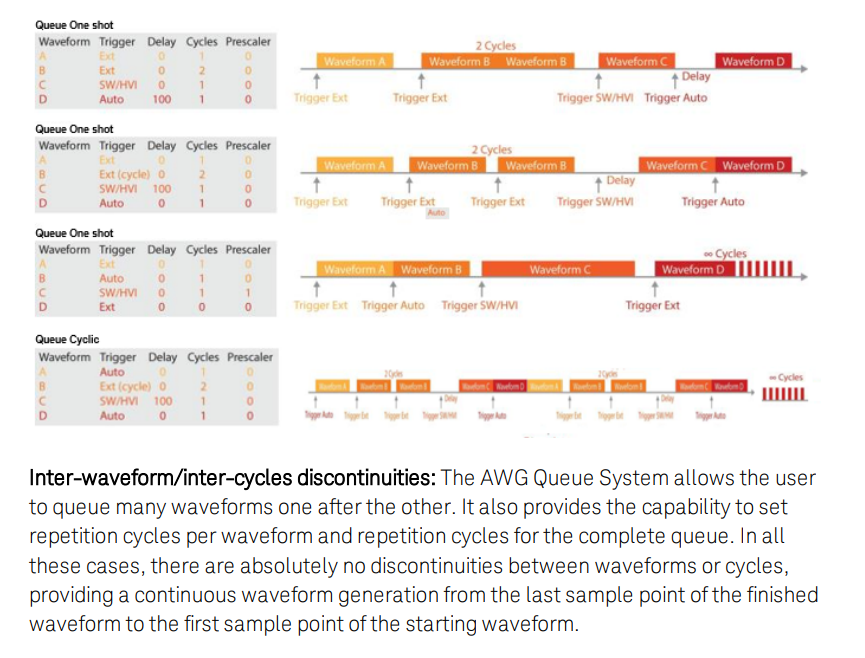
The graph above is an example of a combination of queue and triggers(beside the external trigger we used). Note that for a more complicated queue (e.g. with conditioning logic that Quantum Error Correction needed), we should be able to implement using the HVI packages keysight provided. We didn't play with it as this is an additional software we didn't purchase. Check out 9018-04449.pdf for more.
The AWG takes a time series signal (even for modulation modes) and outputs an analog signal that follows this waveform. So how is the time units work here? By default, the AWG always plays with the maximal sampling rate. This varies for the two awg cards, as shown by table 1 below.
However, at the same time, we sometimes do not want the AWG to play with the max sampling rate, especially when the signal we played is magnitudes slower than the max sampling rate (e.g. especially in modulation modes). With this prescaling factor, we are able to slow down our sampling rates and thus can save massive data. This would be very useful as it first saves the time for computing and pushing waveforms and also saves the memory so we can have a longer waveform with more gates.
Lastly, the AWG has a precision limit, namely the waveform's precision (amplitudes in Voltage). Again this differs from the two models as shown in table 1. Basically the two models are similar in memory, it is just one has x2 precisions and the other one has x2 sampling rate.
| Model | M3201A | M3202A |
|---|---|---|
| Sampling Rate | 500 MSample/s | 1000 MSample/s |
| Time Interval | 2ns | 1ns |
| Precision | 16 bit | 14 bit |
Note that the AWG has some problems with maintaining an accurate phase for a long time(e.g. few seconds), even with it locked with a clock. This limits us from doing deep circuits.
Also, the AWG connects with PC using a PCI-E card and normally does not require a driver. But you have to power up the AWG before the PC is powered up, as otherwise, we find it hard to detect the AWG. Also sometimes the PC just cannot find it, you can restart the PC or check if the PCIE connection is proper or not (the green light would light when the connection is valid)
One last thing is we have experienced two crashes with the AWG. You have to physically restart the AWG to get away from the crash by pressing the power button.
The Keysight SD1 is the official software for the AWG. We use the python API for the keysight_awg server but it is also nice to first try to use and test the AWG with its default software with their nice GUI.