Repository navigation
Shore 0.8.88


Search, screen time, widgets and Home Assistant
- Problem report. The phone companion’s TV settings tab downloads a report of crashes and errors to attach to a bug report. It stays on the TV until you download it and holds no settings or passwords. If the page stops, Shore now reloads it instead of closing.
- What’s new. After Shore updates itself, Home shows what changed once. You can read it again under Settings › Google TV › Shore updates.
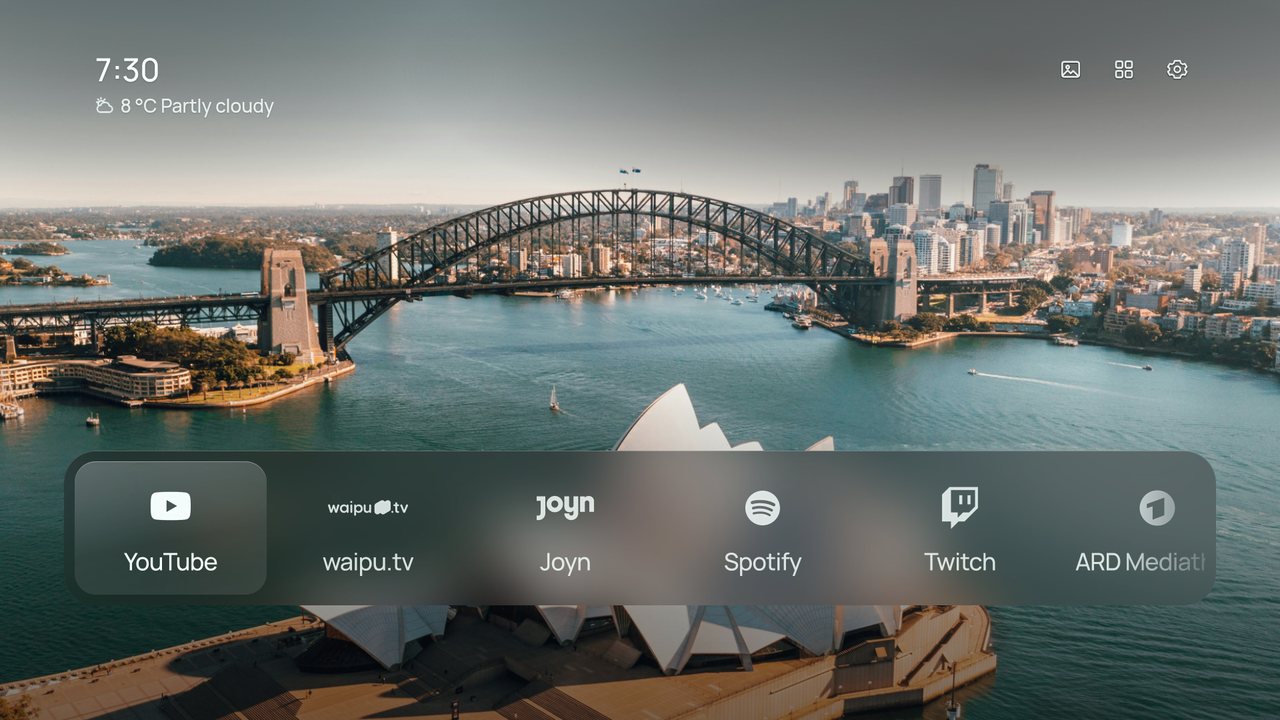
- Widgets. An optional row of cards under the clock (Settings › Clock › Widgets): the forecast for the next three days, your next three events, and with Home Assistant the inside temperature, lights on and any open door or window.
- Italiano e Türkçe. Shore and the phone companion now speak Italian and Turkish, with ANSA, la Repubblica, BBC News Türkçe and DW Türkçe as news sources.
- Type from your phone. The companion’s new Keyboard tab types on the TV: into Shore’s Search right away, and into other apps’ text fields once you turn on Shore phone keyboard in the TV’s Accessibility settings.
- Search. All apps has a Search button: type with the remote’s arrows or a keyboard to find apps, HDMI inputs and Settings pages. On a keyboard, just start typing on Home.
- Screen time. Give an app a daily limit, from 30 minutes to 3 hours (Settings › Google TV › Parental lock › Screen time). When it runs out Shore comes back, and the PIN gives 30 more minutes.
- Home Assistant can now show your door camera when the doorbell rings (Settings › Add-ons › Home Assistant › Doorbell). Over the screensaver or Home the live view opens by itself; over another app a short note appears.
- New add-on, Pi-hole and AdGuard (Settings › Add-ons): today's share of blocked ads under the clock, and a pause for 5, 30 or 60 minutes when a site or app needs it. Works with Pi-hole 5 and 6 and AdGuard Home; the address and password are typed on the phone and stay on the TV.
- A small dot on Settings tells you when something stopped working, such as the Home button after an update, notification access or a wallpaper source, or when a Shore update is waiting. Setup and health says what.
- New rotation: By time of day (Settings › Wallpaper › Rotation). Morning, day, evening and night each get their own photo: pin one to each part, or leave it on Automatic for darker photos in the evening and at night and brighter ones by day.
- HDMI inputs get an icon that fits: a controller for a PlayStation or Xbox, a box for a set-top box, a disc, a soundbar, a computer, a streaming stick or a camera, worked out from the device's name.
- Rename an input or change its icon: hold OK on its tile, or open Settings › Inputs and pick it. Common names are one click away, and the phone companion's Apps tab takes any name.
- A remote button can now run the sleep timer (Settings › Google TV › Remote buttons): each press sets 30, 60, 90 or 120 minutes and the next press after 120 turns it off, with a short note on screen, even inside other apps.
- Smart home fits more on screen: small rooms sit side by side, and an outline shows which room you're in.
- Hold OK on a light in Smart home to change its brightness and colour.
- Press OK on a thermostat to set its temperature and mode.
- The Smart home panel says which devices are unavailable.
- New Settings › Add-ons. Add-ons stay out of sight until you switch them on.
- Home Assistant add-on: see your rooms, switch lights, switches and fans, lock and unlock, and watch cameras live from a Smart home button on Home. Built by mozthewah, thank you!
- Connect Home Assistant from the phone companion; the access token stays on the TV and out of backups.
- With Home Assistant on, the line under the clock shows the temperature and humidity inside.
Get it
⬇ Download shore-0.8.88.apk · 21.7 MB
- Already using Shore? Install it over your current version. Settings, photos and your Home layout stay.
- New to Shore? Follow the install guide: sideload the APK with Downloader or
adb install, then make Shore your Home screen.
Free build, no accounts, no keys
Release APKs contain no API keys. Almost everything works straight away:
| Works right away | Needs a build from source with your own keys |
|---|---|
| Weather, Now Playing with album art, screensaver, phone companion, your own photos | Unsplash themes |
| NASA, Bing, Wikimedia and Picsum wallpapers, Shore’s own wallpapers and animated loops | Pexels and Klipy animated wallpapers |
| Top Shelf recommendations |
SHA-256 of shore-0.8.88.apk: 922e3420b80824f5dad2214b8cf31f6e9eaa57081d596d84c52f317b78e459b1
Changelog (20 commits since v0.8.68)
- Release notes: a headline for this release, no merge commits (
c44b863) - Problem report in the phone companion (
6282d80) - What's new after an update (
8bc7c64) - Widgets row under the clock (
9775623) - Italian and Turkish (
23f2519) - Type on the TV from the phone (
7ea29bb) - Search apps, inputs and Settings pages (
0b6bd2f) - Screen time limits for the parental lock (
ff261ab) - Credit mozthewah for the Home Assistant add-on (
8c6af0f) - Doorbell: the door camera when it rings (
15d84b6) - Pi-hole and AdGuard add-on (
1b047aa) - A dot on Settings when setup needs a look (
560a54f) - Wallpaper by time of day (
e5b325f) - Names and icons for HDMI inputs (
b4927a8) - Sleep timer on a remote button; Hisense A6N in the tested TVs (
dcb3e6c) - Merge pull request #1 from mozthewah/home-assistant-addon (
d4a198d) - Merge main into the Home Assistant add-on (
eff59f2) - Smart home: pack small rooms side by side, outline the focused room (
309f52a) - Smart home: light colour and thermostat controls, and say what's unavailable (
ac1c6d8) - Add a Home Assistant add-on: rooms, switches and cameras on Home (
e0d51c9)