Repository navigation
Releases
TMOP v0.7.0

TMOP 0.7.0 shows each of your GPUs on its own and what every process uses of it, can read the CPU temperature directly on Windows, and keeps tables readable in smaller windows.
🎮 Multiple GPUs and GPU activity
Right-click the GPU card on the Performance page, or the GPU section beside it.
- Show GPUs separately: each GPU gets its own card and figures. The grouped view stays the default, and the menu offers Show GPUs grouped to go back. The option is available when TMOP finds at least two GPUs, and your choice is remembered.
- View GPU activity: lists each GPU's utilization, dedicated memory, temperature, power and clock, then the processes using a GPU with their utilization, engines and memory. Double-click a process to open it. Per-process figures are available on Windows; other systems say so.
Temperature, power and clock come from the NVIDIA driver where it's present, so other GPUs may show a dash for these.
🌡️ CPU temperature through PawnIO (Windows, optional)
Settings → General → CPU temperature through PawnIO reads the CPU's own sensor on AMD Ryzen and Intel without a separate monitoring app (#15). It's off by default.
- What you need: the free PawnIO driver, which you install yourself, and TMOP running as administrator. It isn't available on Windows on ARM.
- Where to see it: the Thermals section on the Performance page shows the reading, or what's missing, such as "not installed" or "run TMOP as administrator".
- Anti-cheat: some anti-cheat software objects to PawnIO. If a game does, switching this off may not be enough, because the driver stays installed.
- Early feature: this has been checked against PawnIO's published sources and its logic is tested, but it hasn't yet been run on a PC with the driver installed. Tell us how it goes.
🐞 Fixes
- Services, Drivers, Apps and Connections: tables stay inside their box, so the service list no longer runs under the "What does this service do?" panel. Columns that don't fit are reached by scrolling sideways (Shift + mouse wheel or the scroll bar).
- Long values: hover over a cell shortened with "…" to see its full text.
- Small windows: short tables scroll all the way to their last row, and numbers keep their column width rather than being cut off.
Downloads
Easiest: tekikaito.github.io/tmop picks the right file. Or install with one command, and run it again to update:
- Windows (PowerShell):
irm https://tekikaito.github.io/tmop/install.ps1 | iex - Linux and macOS (Terminal):
curl -fsSL https://tekikaito.github.io/tmop/install.sh | sh
| File | For |
|---|---|
TMOP-v0.7.0-windows-x64.zip |
Most Windows PCs |
TMOP-v0.7.0-windows-arm64.zip |
Windows on ARM |
TMOP-v0.7.0-linux-x64.AppImage |
Linux on most PCs: one file, make it executable and run it |
TMOP-v0.7.0-linux-arm64.AppImage |
Linux on 64-bit ARM (e.g. Raspberry Pi) |
TMOP-v0.7.0-linux-x64.tar.gz, TMOP-v0.7.0-linux-arm64.tar.gz |
Linux: the plain tmop program with its menu entry and icons, to unpack yourself |
TMOP-v0.7.0-macos-universal.dmg |
macOS 11 or newer, Apple Silicon and Intel: open it and drag TMOP to Applications |
TMOP-v0.7.0-macos-universal.zip |
The same Mac app as a zip |
tmop-engine-v0.7.0-*.tar.gz |
TMOP's Docker engine for Windows; downloaded by the app when you set it up, no need to fetch it yourself |
The files without a version in their name (TMOP-windows-x64.exe, TMOP-linux-x64.AppImage, TMOP-linux-x64 …) are the same programs, for the download page and the install commands. Each file has a .sha256 checksum next to it. Linux builds need glibc 2.35 or newer (Ubuntu 22.04, Debian 12, Fedora 36 or later).
macOS: the app isn't notarized by Apple. On first start, click Done, then System Settings → Privacy & Security → Open Anyway. The install command avoids this.
The PawnIO modules TMOP carries are LGPL-2.1-or-later; their licence and source are in assets/pawnio.
Full changelog: v0.6.2...v0.7.0, PRs #27, #29, #30
TMOP v0.6.2
TMOP 0.6.2 fixes the Linux AppImage on systems without libxkbcommon-x11.
🐞 Fixes
- AppImage starts everywhere: on Linux systems without the
libxkbcommon-x11library, the AppImage closed straight away instead of opening a window. It now brings that library and the two it needs along, so you don't have to install anything. The.tar.gzand the plaintmopprogram are unchanged and still use your system's copy. - Theme System without a system setting: when TMOP can't tell whether your system prefers dark or light (Theme → System in Settings), it now uses Light instead of Dark.
Downloads
Easiest: tekikaito.github.io/tmop picks the right file. Or install with one command, and run it again to update:
- Windows (PowerShell):
irm https://tekikaito.github.io/tmop/install.ps1 | iex - Linux and macOS (Terminal):
curl -fsSL https://tekikaito.github.io/tmop/install.sh | sh
| File | For |
|---|---|
TMOP-v0.6.2-windows-x64.zip |
Most Windows PCs |
TMOP-v0.6.2-windows-arm64.zip |
Windows on ARM |
TMOP-v0.6.2-linux-x64.AppImage |
Linux on most PCs: one file, make it executable and run it |
TMOP-v0.6.2-linux-arm64.AppImage |
Linux on 64-bit ARM (e.g. Raspberry Pi) |
TMOP-v0.6.2-linux-x64.tar.gz, TMOP-v0.6.2-linux-arm64.tar.gz |
Linux: the plain tmop program with its menu entry and icons, to unpack yourself |
TMOP-v0.6.2-macos-universal.dmg |
macOS 11 or newer, Apple Silicon and Intel: open it and drag TMOP to Applications |
TMOP-v0.6.2-macos-universal.zip |
The same Mac app as a zip |
tmop-engine-v0.6.2-*.tar.gz |
TMOP's Docker engine for Windows; downloaded by the app when you set it up, no need to fetch it yourself |
The files without a version in their name (TMOP-windows-x64.exe, TMOP-linux-x64.AppImage, TMOP-linux-x64 …) are the same programs, for the download page and the install commands. Each file has a .sha256 checksum next to it. Linux builds need glibc 2.35 or newer (Ubuntu 22.04, Debian 12, Fedora 36 or later).
macOS: the app isn't notarized by Apple. On first start, click Done, then System Settings → Privacy & Security → Open Anyway. The install command avoids this.
Full changelog: v0.6.1...v0.6.2 · #25, #26
TMOP v0.6.1
TMOP 0.6.1 makes the Performance, Summary and Processes pages easier to read, and shows the Docker page only when you need it.
📊 Performance and Summary
- Clearer figures: the drawings beside the graphs name what each value measures (In use, Cached, Committed, Read, Write, Utilization …) instead of the drawn part. The memory figure no longer reads "Heat spreader: 24 GB".
- Calmer top consumers: Top CPU consumers on the Performance page now keeps a steady order like Top consumers on the Summary, and both pages share it. An app moves up only with a clear lead, values follow new samples more gently, and from 10% up CPU is shown in whole percents, so the lists no longer jump around while you read them.
📋 Processes
- Counts that add up: with Group by app on, the tabs and group headers counted entries of the tree, not processes ("Background 17" where Task Manager shows 150). All, Apps and Background now count every process, so All = Apps + Background.
🐳 Docker
- The Docker page appears when TMOP finds Docker. On Windows without Docker, switch on Settings → Other options → Show the Docker page to set up TMOP's own engine there; once the engine runs, the page stays.
Downloads
Easiest: tekikaito.github.io/tmop picks the right file. Or install with one command, and run it again to update:
- Windows (PowerShell):
irm https://tekikaito.github.io/tmop/install.ps1 | iex - Linux and macOS (Terminal):
curl -fsSL https://tekikaito.github.io/tmop/install.sh | sh
| File | For |
|---|---|
TMOP-v0.6.1-windows-x64.zip |
Most Windows PCs |
TMOP-v0.6.1-windows-arm64.zip |
Windows on ARM |
TMOP-v0.6.1-linux-x64.AppImage |
Linux on most PCs: one file, make it executable and run it |
TMOP-v0.6.1-linux-arm64.AppImage |
Linux on 64-bit ARM (e.g. Raspberry Pi) |
TMOP-v0.6.1-linux-x64.tar.gz, TMOP-v0.6.1-linux-arm64.tar.gz |
Linux: the plain tmop program with its menu entry and icons, to unpack yourself |
TMOP-v0.6.1-macos-universal.dmg |
macOS 11 or newer, Apple Silicon and Intel: open it and drag TMOP to Applications |
TMOP-v0.6.1-macos-universal.zip |
The same Mac app as a zip |
tmop-engine-v0.6.1-*.tar.gz |
TMOP's Docker engine for Windows; downloaded by the app when you set it up, no need to fetch it yourself |
The files without a version in their name (TMOP-windows-x64.exe, TMOP-linux-x64.AppImage, TMOP-linux-x64 …) are the same programs, for the download page and the install commands. Each file has a .sha256 checksum next to it. Linux builds need glibc 2.35 or newer (Ubuntu 22.04, Debian 12, Fedora 36 or later).
Full changelog: v0.6.0...v0.6.1 · #23, #24
TMOP v0.6.0
TMOP 0.6.0 runs on Linux and macOS as well as Windows.
🐧 Linux and 🍎 macOS
TMOP now starts on Linux (x64 and ARM64, X11 and Wayland) and macOS 11 or newer (one app for Apple Silicon and Intel). Almost every page works there, using what each system provides:
- Performance and Summary: CPU, memory (Swap instead of Page file), disks, network and graphics. On Linux, AMD and NVIDIA graphics cards (with NVIDIA's own driver); on macOS, usage and memory. Temperatures on Linux, clock speeds on Linux and Intel Macs.
- Processes: end task, end tree, suspend, priority and efficiency mode (idle scheduling on Linux, Background priority on macOS). On Linux, ending or renicing another user's process asks for your password.
- Services, Drivers, Startup apps: systemd units, kernel modules and autostart entries on Linux; launchd jobs, kernel extensions and launch agents on macOS.
- Installed apps: dpkg, rpm, pacman, Flatpak and Snap packages on Linux; .app bundles and Homebrew on macOS.
- Power & Freq: battery, CPU governor and power profile on Linux; battery and power settings on macOS.
- Connections, Users, System info, Benchmarks, Flight recorder: as on Windows.
- Disk Space: scan, treemap, delete, Move to Trash and Clean up, with categories for each system (caches, thumbnails, old downloads, developer build folders, Xcode DerivedData …). System folders, other users' homes, mount points and your own essential folders (
~/.ssh,~/Library…) are protected; links are never followed. Moving to the Trash never silently turns into a permanent delete. On macOS, grant TMOP Full Disk Access to scan everything. - Docker: containers, logs, terminal, files and stacks work with the Docker or Podman you already run. The new Local Docker panel shows which engine TMOP found, its version and resources, and what to do when it can't connect. TMOP's own Docker engine stays Windows-only.
- Looks: skins, palettes, fonts and the system light/dark theme. On GNOME Wayland, TMOP draws its own title bar.
Not available off Windows: opening TMOP instead of Task Manager and the screensaver. On Wayland, the popout can't stay on top. The README has the full table and where TMOP keeps its files on each system.
🪟 Windows
Nothing changes for you: same features, same settings file. In Disk Space, the button for items without a Recycle Bin now reads Delete all permanently instead…, because it always applied to the whole selection.
🛠️ Install
- Linux and macOS:
curl -fsSL https://tekikaito.github.io/tmop/install.sh | shinstalls TMOP for your user, without root, and checks the download. Run it again to update; add-s -- --uninstallaftershto remove exactly what it installed. - The download page now picks the right file for Windows, Linux and macOS.
- macOS: the app isn't notarized by Apple. If you download the
.dmgby hand, macOS asks on first start: click Done, then System Settings → Privacy & Security → Open Anyway. Because the app is not signed with a developer certificate, macOS forgets a Full Disk Access grant after each update; turn it on again in System Settings → Privacy & Security → Full Disk Access.
Downloads
Easiest: tekikaito.github.io/tmop picks the right file. Or install with one command, and run it again to update:
- Windows (PowerShell):
irm https://tekikaito.github.io/tmop/install.ps1 | iex - Linux and macOS (Terminal):
curl -fsSL https://tekikaito.github.io/tmop/install.sh | sh
| File | For |
|---|---|
TMOP-v0.6.0-windows-x64.zip |
Most Windows PCs |
TMOP-v0.6.0-windows-arm64.zip |
Windows on ARM |
TMOP-v0.6.0-linux-x64.AppImage |
Linux on most PCs: one file, make it executable and run it |
TMOP-v0.6.0-linux-arm64.AppImage |
Linux on 64-bit ARM (e.g. Raspberry Pi) |
TMOP-v0.6.0-linux-x64.tar.gz, TMOP-v0.6.0-linux-arm64.tar.gz |
Linux: the plain tmop program with its menu entry and icons, to unpack yourself |
TMOP-v0.6.0-macos-universal.dmg |
macOS 11 or newer, Apple Silicon and Intel: open it and drag TMOP to Applications |
TMOP-v0.6.0-macos-universal.zip |
The same Mac app as a zip |
tmop-engine-v0.6.0-*.tar.gz |
TMOP's Docker engine for Windows; downloaded by the app when you set it up, no need to fetch it yourself |
The files without a version in their name (TMOP-windows-x64.exe, TMOP-linux-x64.AppImage, TMOP-linux-x64 …) are the same programs, for the download page and the install commands. Each file has a .sha256 checksum next to it. Linux builds need glibc 2.35 or newer (Ubuntu 22.04, Debian 12, Fedora 36 or later).
Full changelog: v0.5.2...v0.6.0 · #21, #22
TMOP v0.5.2
TMOP 0.5.2 polishes the new design: hardware illustrations for every device on Performance, cleaner health rings, even lettering and a proper program icon.
🖼️ Hardware illustrations for every device
The exploded drawing that the CPU has on Performance now exists for every device, each with four layers and live values next to them:
- Memory: heat spreader, DRAM chips, PCB and slot, with memory in use, cached and commit.
- Disk: casing, NAND, controller and interface, with read and write rates and activity.
- GPU: shroud, die, VRAM and PCB, with the busiest engine and dedicated memory in use.
- Network: shield, controller, PHY and link, with receive and send rates and the link speed.
- Thermals: fins, heat pipes, sensor and base, with the temperatures TMOP can read.
- Docker: containers, engine, runtime and host.
Like the CPU drawing, they appear when the window is wide enough.
✨ Polish
- Health rings: the rings on Summary (and in the popout) are clean single-colour arcs with smooth rounded ends; the stray dots at the start and end are gone. Very small values show as a short rounded bar, 0 % shows only the track.
- Even lettering: spaced-out labels, such as the page names in the navigation rail and the section headings, now have even letter gaps that no longer shift when you hover or select an entry. Tabs no longer move their neighbours when you select one.
- Program icon: TMOP has its own icon, a CPU chip in teal, in the title bar, the taskbar, Alt+Tab and on the
.exeitself, instead of the generic one.
Downloads
| File | For |
|---|---|
TMOP-windows-x64.exe |
Most Windows PCs, ready to run |
TMOP-windows-arm64.exe |
Windows on ARM, ready to run |
TMOP-v0.5.2-windows-x64.zip |
Most Windows PCs, with README and licence |
TMOP-v0.5.2-windows-arm64.zip |
Windows on ARM, with README and licence |
tmop-engine-v0.5.2-*.tar.gz |
TMOP's Docker engine; downloaded by the app when you set it up, no need to fetch it yourself |
Each file has a .sha256 checksum next to it.
Full changelog: v0.5.1...v0.5.2, PR #20
TMOP v0.5.1
TMOP 0.5.1 makes the graphs smooth again.
📈 Smoother graphs
- Graphs glide again: on Performance, Processes and the other live graphs, the newest value scrolls in smoothly instead of jumping in steps, as it did before 0.5.0. This needs Settings → Appearance → High frequency visuals (on by default).
- No more jerking while the history fills: right after TMOP starts, the small graphs used to stretch their few values across the whole width and rescale with every new value. They now keep a fixed time scale and grow in from the right. Labels such as previews: last … and Logical processors · last … on Performance and Resources · last … on Processes show the time span you actually see.
- The same applies to the clock trace on Power & Freq and the traffic trend on Connections.
Downloads
| File | For |
|---|---|
TMOP-windows-x64.exe |
Most Windows PCs, ready to run |
TMOP-windows-arm64.exe |
Windows on ARM, ready to run |
TMOP-v0.5.1-windows-x64.zip |
Most Windows PCs, with README and licence |
TMOP-v0.5.1-windows-arm64.zip |
Windows on ARM, with README and licence |
tmop-engine-v0.5.1-*.tar.gz |
TMOP's Docker engine; downloaded by the app when you set it up, no need to fetch it yourself |
Each file has a .sha256 checksum next to it.
Full changelog: v0.5.0...v0.5.1, PR #19
TMOP v0.5.0
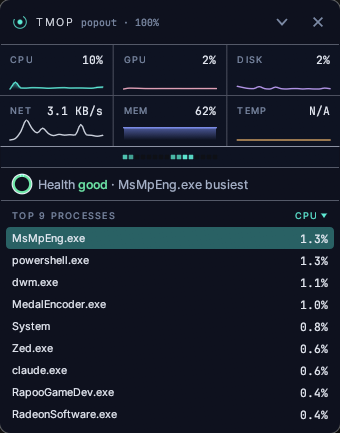
TMOP 0.5.0 is a complete redesign: a new look for every page, a Summary that tells you at a glance whether your PC is healthy, and an app-first process list.
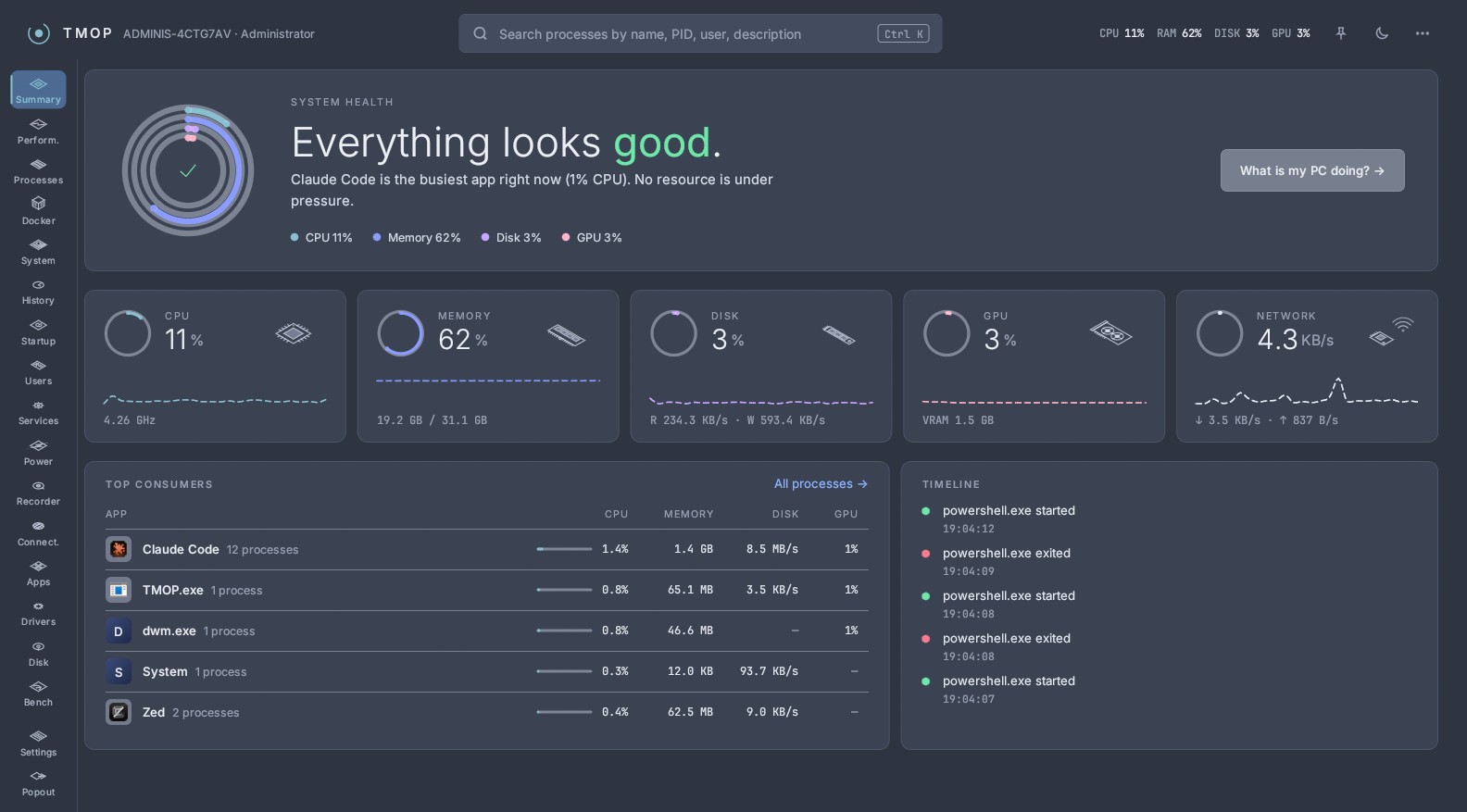
✨ New look
- Navigation rail on the left with an icon for every page, and a header bar with live CPU, RAM, disk and GPU readouts.
- Global search: press Ctrl+K anywhere to search processes by name, PID, user or description.
- Theme toggle and always on top right in the header.
- New Dark and Light palettes with a deep blue backdrop, the Inter and JetBrains Mono fonts, and line-drawn hardware illustrations (CPU, memory, disk, GPU, network, battery, mainboard).
- Accent colour: pick your own in Settings → Appearance.
- Prefer the old look? It's still there as Classic Dark and Classic Light in Settings → Appearance.
🩺 Summary: is my PC healthy?
- Health at a glance: rings for CPU, memory, disk and GPU, and a plain-language verdict ("Everything looks good.", "Memory is almost full.") naming the busiest app.
- What is my PC doing? explains what's using the bottleneck resource, with buttons to see or end that app's processes. Short spikes don't raise an alarm; CPU and disk have to stay high for 30 seconds. If the load is expected, This is expected calms the page for 30 minutes.
- Top consumers grouped by app, resource cards that open Performance, and a timeline of recent process starts and exits.
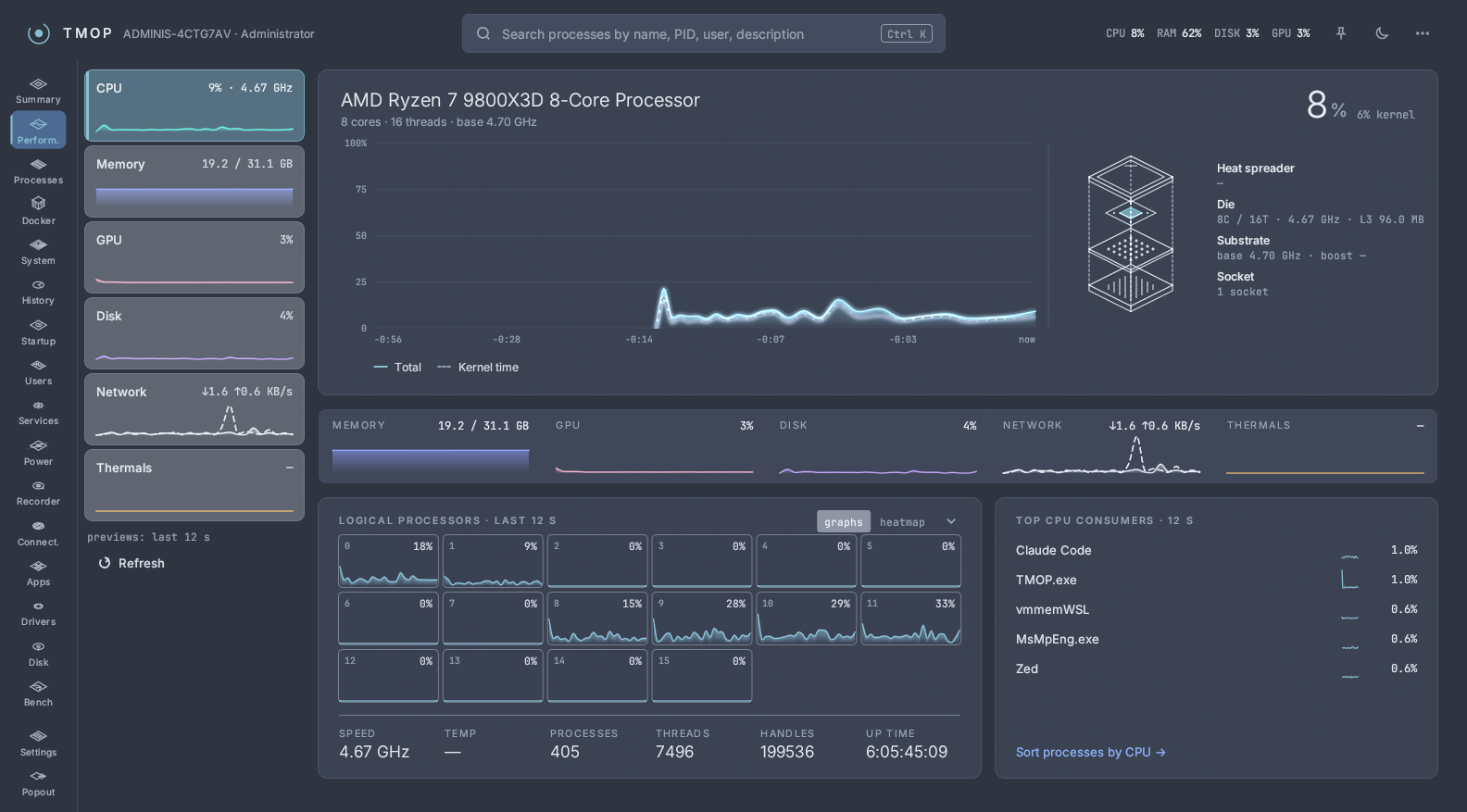
📋 Processes
- Group by app with expandable child processes, and filter tabs: All, Apps, Background, Windows, Services, Suspended.
- 60-second CPU and memory trends right in the table, plus a history strip for CPU, memory, disk and network.
- Columns menu to show or hide columns.
- Ending an app asks once for the whole process tree and shows what it frees, how many windows are open and whether system processes are affected; you can also end just the one process.
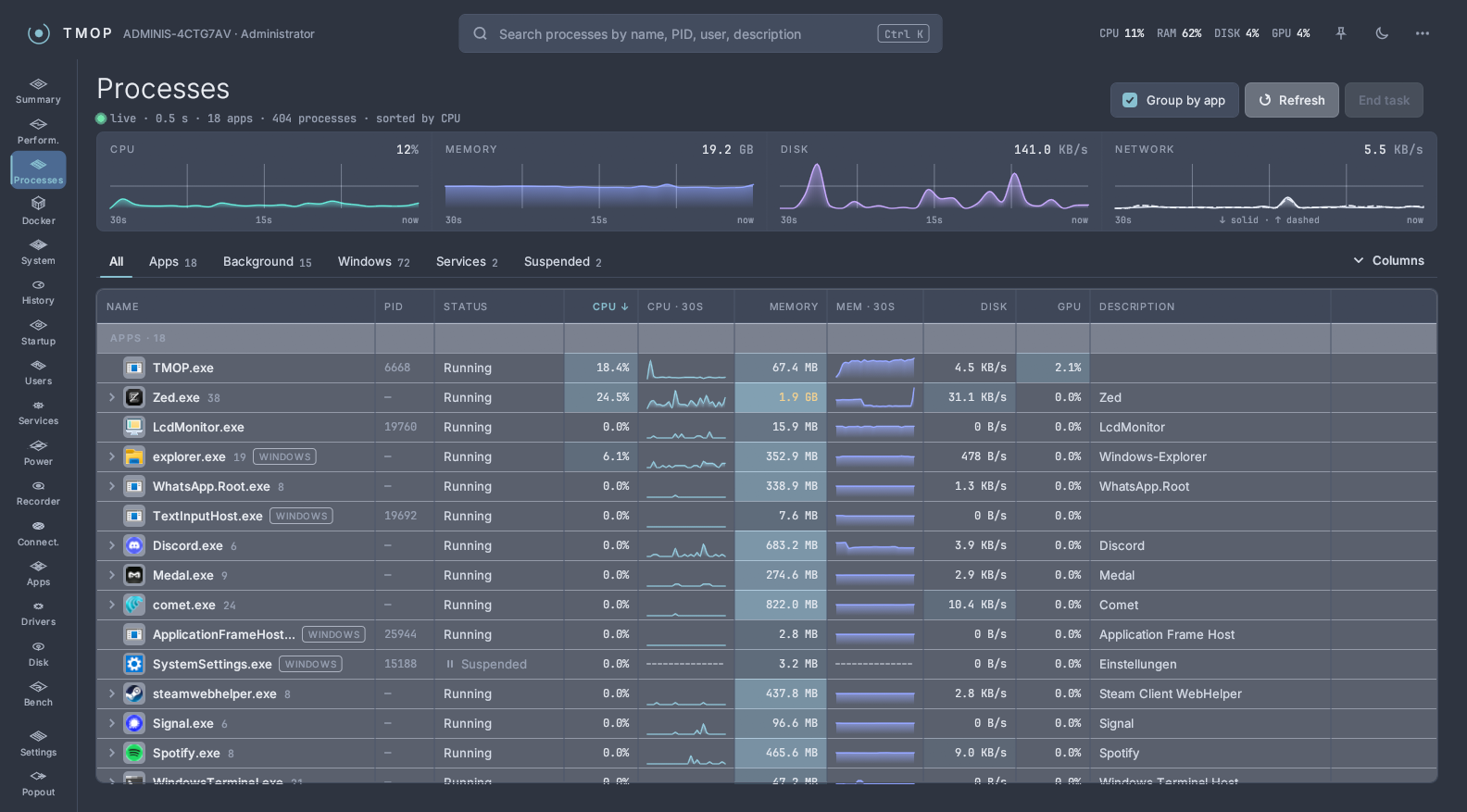
🧭 Every other page
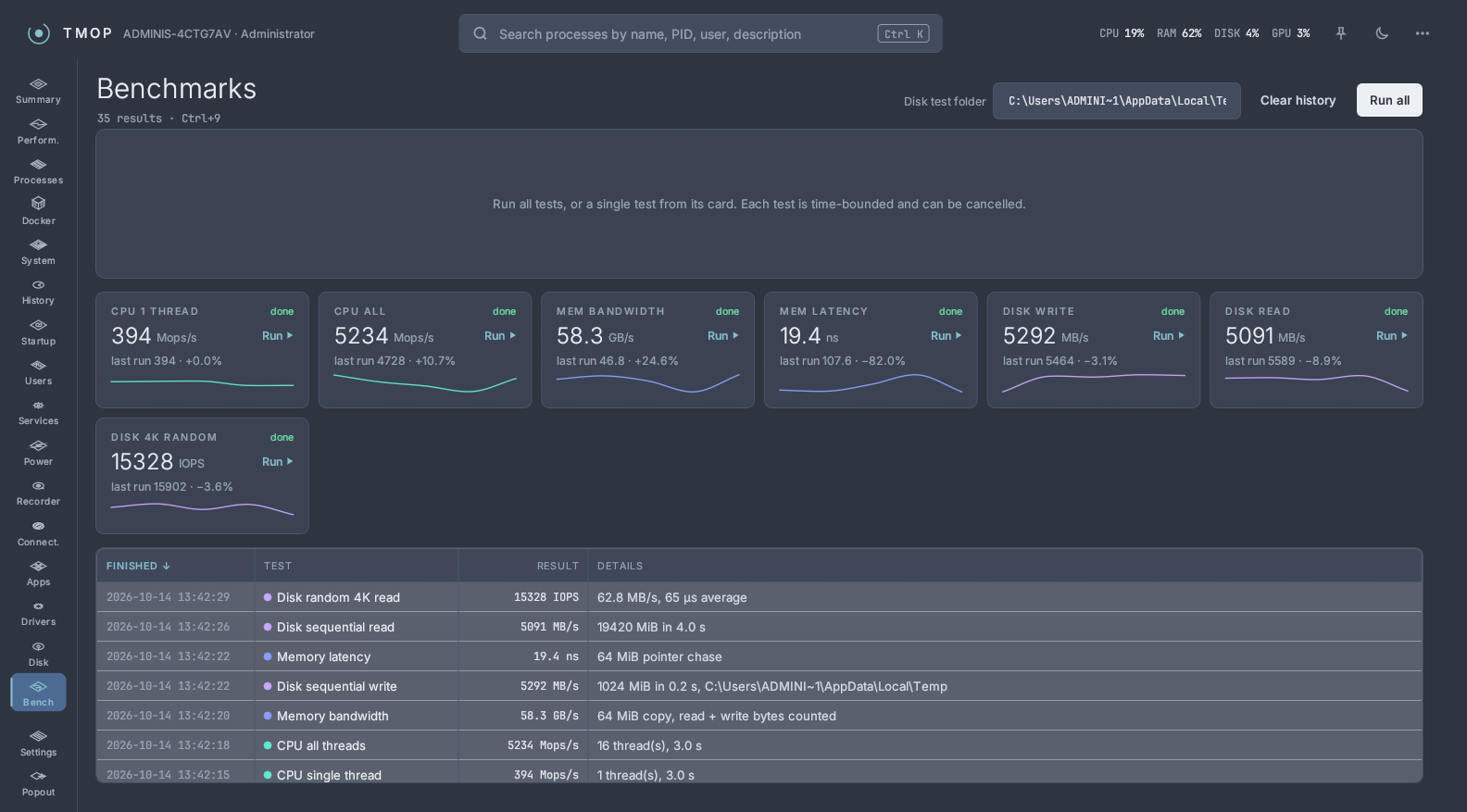
Performance, Docker, System Info, App history, Startup apps, Users, Services, Power & Freq, Flight Recorder, Connections, Installed Apps, Drivers, Disk Space, Benchmarks, Settings and the Classic popout all follow the new design, with summary tiles at the top and calmer tables. Everything that worked before still works.
| Benchmarks | Classic popout |
|---|---|
 |
 |
⚠️ Upgrading
Your settings are kept. The built-in Dark and Light palettes now have the new look; switch to Classic Dark or Classic Light to get the old one. Your own palette and skin files keep their look.
If you go back to 0.4.x while Classic Dark, Classic Light or a custom accent colour is selected, the older version doesn't know them and uses its default colours. Pick Dark or Light first if you plan to go back.
Downloads
| File | For |
|---|---|
TMOP-windows-x64.exe |
Most Windows PCs, ready to run |
TMOP-windows-arm64.exe |
Windows on ARM, ready to run |
TMOP-v0.5.0-windows-x64.zip |
Most Windows PCs, with README and licence |
TMOP-v0.5.0-windows-arm64.zip |
Windows on ARM, with README and licence |
tmop-engine-v0.5.0-*.tar.gz |
TMOP's Docker engine; downloaded by the app when you set it up, no need to fetch it yourself |
Each file has a .sha256 checksum next to it.
Full changelog: v0.4.0...v0.5.0, PR #17
TMOP v0.4.0
TMOP 0.4.0 turns the Disk Space page into a cleanup tool: delete what you find, clean up caches and temporary files in a few clicks, and scan much faster. It also fixes the CPU clock and temperature readings reported on Reddit.
🧹 Disk Space: Clean up
Open Disk Space (Ctrl+0) and switch from Analyze to Clean up. TMOP measures everything that is safe to remove and lets you pick what goes.
- Windows Disk Cleanup built in: the same cleaners Windows' own Disk Cleanup uses (Temporary files, Thumbnails, DirectX Shader Cache, Delivery Optimization Files, Windows Update Cleanup and more), each with the space it would free. The harmless ones are checked by default; things like the Recycle Bin or Windows Update Cleanup are opt-in. Your Downloads folder is never touched.
- TMOP's own categories: browser caches (Edge, Chrome, Firefox; never profiles, passwords or history), crash dumps, Windows Update downloads, Downloads older than 90 days and Developer artifacts (
node_modules, Rusttarget, Gradle/npm/pip/Yarn caches). The last two need a scan and go to the Recycle Bin. - Expand to check: open a category to see exactly which files and folders it would delete.
- Confirm first: Clean up selected… shows the total, what goes where (Recycle Bin or permanent), and anything that will be skipped and why.
🗑️ Disk Space: delete files and folders
In Analyze, select items in the Folders, Files and Largest files lists (Ctrl/Shift+click for several) and delete them from the bar at the bottom or the right-click menu.
- Recycle Bin by default: Del moves to the Recycle Bin, Shift+Del deletes permanently. If a file is too big for the Recycle Bin, or the drive has none, the dialog says so before anything happens.
- Safety rules: Windows, Program Files, boot files, user profiles and other system locations can't be deleted at all, also not through links or junctions. Risky items (program folders, files in use by a running app) are flagged with the reason, and you have to tick I know what I'm doing.
- Log: every delete is written to
%LOCALAPPDATA%\TMOP\deletions.log. - Context menu: Show in Explorer and Copy path on every item.
⚡ Faster scanning
- Much faster scans as administrator: TMOP reads the drive's file table (MFT) directly instead of walking every folder, which makes a full drive scan many times faster.
- Faster without admin too: the regular scan now runs in parallel.
- Admin hint: without administrator rights, a yellow panel explains what you're missing (slower scan, unreadable folders, protected files) and offers Restart as administrator.
- Include subfolders (#14): the Files tab can now list all files in the folder and everything below it.
- Percentages: file sizes in the lists are shown as a share of the folder you're viewing.
🌡️ CPU clock and temperature
- CPU speed no longer stuck at its maximum (#13): Speed on the Performance page and the CLOCK indicator now show the real current clock. The CPU details also show Base speed.
- CPU temperature on AMD Ryzen (#12): many Ryzen boards have no ACPI thermal zones, so TMOP showed no temperature. If HWiNFO is running with Shared Memory Support enabled (Settings → Main), TMOP now reads the CPU temperature from it. Thermals tells you which sources it checked when none works.
Thanks to the Reddit user who reported #12, #13 and #14.
No settings or file formats changed, so you can upgrade and go back freely.
Downloads
| File | For |
|---|---|
TMOP-windows-x64.exe |
Most Windows PCs, ready to run |
TMOP-windows-arm64.exe |
Windows on ARM, ready to run |
TMOP-v0.4.0-windows-x64.zip |
Most Windows PCs, with README and licence |
TMOP-v0.4.0-windows-arm64.zip |
Windows on ARM, with README and licence |
tmop-engine-v0.4.0-*.tar.gz |
TMOP's Docker engine; downloaded by the app when you set it up, no need to fetch it yourself |
Each file has a .sha256 checksum next to it.
Full changelog: v0.3.0...v0.4.0, PR #16
TMOP v0.3.0
TMOP 0.3.0 shows you the actual files on the Disk Space page: their names, when they were last changed, and which ones take up the room in the folder you're looking at.
💾 Disk Space: see the files
Open Disk Space (Ctrl+0), scan a drive or folder and click into it. The side panel now has four tabs: Folders, Files, Largest files and File types.
- Files tab (new): every file directly in the folder you're viewing, with its size and when it was last modified. Click Name, Size or Modified to sort, and click again to reverse. Hidden and system files are shown dimmed. If a folder can't be read, the tab tells you why.
- Largest files follows you: it now lists the 100 biggest files (1 MB and up) in the folder you're viewing and everything below it, not the whole scan. Each row shows the file's folder underneath its name.
- Dates: lists show how long ago a file changed ("3 days ago"). Hover a file to see its full path and the exact date and time.
- Open in Explorer: click a file in either tab to open its folder in Explorer with the file selected.
- "Files here" tile: in the folder map, clicking the Files here tile jumps to the Files tab. Folders too small to draw get their own More folders tile.
- Scrolling: the Folders, Files and Largest files lists now scroll, so long folders are no longer cut off.
No settings or file formats changed, so you can upgrade and go back freely.
Downloads
| File | For |
|---|---|
TMOP-windows-x64.exe |
Most Windows PCs, ready to run |
TMOP-windows-arm64.exe |
Windows on ARM, ready to run |
TMOP-v0.3.0-windows-x64.zip |
Most Windows PCs, with README and licence |
TMOP-v0.3.0-windows-arm64.zip |
Windows on ARM, with README and licence |
tmop-engine-v0.3.0-*.tar.gz |
TMOP's Docker engine; downloaded by the app when you set it up, no need to fetch it yourself |
Each file has a .sha256 checksum next to it.
Full changelog: v0.2.1...v0.3.0, PRs #10, #11
TMOP v0.2.1
TMOP 0.2.1 makes getting TMOP much easier: a download page, a one-command installer, and a plain .exe you can start without unzipping. The app itself is unchanged from 0.2.0.
⬇️ Download page
tekikaito.github.io/tmop has one Download for Windows button that gives you the right file for your PC (x64, or ARM64 when your browser reports an ARM processor). You get TMOP.exe directly, so there's nothing to unzip: double-click it and it runs.
🛠️ Install with one command
Open PowerShell (right-click Start → Terminal) and paste:
irm https://tekikaito.github.io/tmop/install.ps1 | iex- No admin rights: TMOP goes to
%LOCALAPPDATA%\Programs\TMOPfor your user only, gets a Start menu entry, and starts. - No "Windows protected your PC" window, and the download is checked against its SHA-256 checksum before anything is installed.
- Updates: run the same command again. Close TMOP first; your settings are kept.
- Removing: TMOP now appears in Settings → Apps → Installed apps. Uninstalling there also gives Ctrl+Shift+Esc back to Windows Task Manager if this copy had taken it over. Your settings stay in
%LOCALAPPDATA%\TMOP; delete that folder to remove them too.
If you already use TMOP from a folder of your own, you can keep doing that. If that copy replaces Task Manager and you switch to the installer, turn the replacement off in the old copy first and on again in the installed one.
Downloads
| File | For |
|---|---|
TMOP-windows-x64.exe |
Most Windows PCs, ready to run |
TMOP-windows-arm64.exe |
Windows on ARM, ready to run |
TMOP-v0.2.1-windows-x64.zip |
Most Windows PCs, with README and licence |
TMOP-v0.2.1-windows-arm64.zip |
Windows on ARM, with README and licence |
tmop-engine-v0.2.1-*.tar.gz |
TMOP's Docker engine; downloaded by the app when you set it up, no need to fetch it yourself |
Each file has a .sha256 checksum next to it.
Full changelog: v0.2.0...v0.2.1, PRs #8, #9