Repository navigation
Style Bar
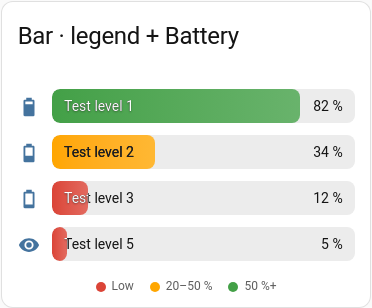
The default style: a full-width rounded bar with the icon on the left and the name and value written inside it. The fill is a gradient in the colour of the current band, and the target is a thin white marker.
Batteries, levels, anything 0–100.
type: custom:chartdeck-card
title: Batteries
entities:
  - sensor.front_door_battery
  - sensor.back_garden_battery
  - sensor.shed_battery
target: 50
severity:
  - from: 0
    color: red
    label: Low
  - from: 20
    color: amber
  - from: 50
    color: green
show:
  legend: true
To use this style, set style: bar (or pick Bar in the editor's Style section). It is the default, so the line can be left out.
-
targetdraws a thin marker at that value;show.target: falsehides it. -
severitycolours the fill. With no bands the fill uses your theme's primary colour (see Colour bands). -
sortorders the rows by how full each bar is. -
columnsplaces rows side by side; the default is one. - When
minis below zero andmaxabove it, the bar fills from zero: left for negative values, right for positive ones.
Layout: one row per entity. Every option is described on the Options page.
Next: Thin · All styles