🔧 Improved Accessibility Permissions handling#77
Conversation


 JoniVR
changed the title
JoniVR
changed the title


|
I don't know if we should do this, making the app unusable unless the user does an action isn't really great in an usability stand point. |

|
I agree, that's a better solution. |
|
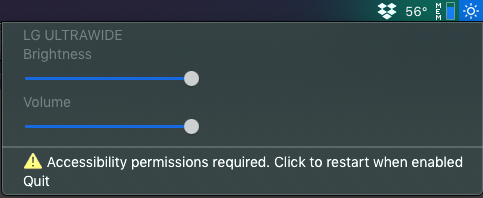
I was thinking maybe "⚠ Accessibility Permissions - Restart Now." but that doesn't really pass the message along well enough. Or just "⚠ Restart Now." |
|
Can we detect if permissions were changed ? In that case it could be If not I guess simply |
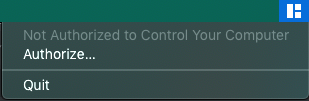
I initially thought this was impossible, but after doing some deep digging I think I found out a way to do this. It's almost entirely undocumented but some apps (like Magnet) do this already. Apparently, you can just observe the System Preferences "com.apple.accessibility.api" distributed notification. (source) like this: DistributedNotificationCenter.default().addObserver(self, selector: #selector(self.readPrivileges), name: NSNotification.Name(rawValue: "com.apple.accessibility.api"), object: nil)to detect a change in Accessibility permissions for your applications. edit: I'm currently having an issue with this sometimes locking up the system.. looking into it. Magnet.app even manages to not require a restart at all after changing permissions. So I'm trying to figure out how to do this too. This way we'd be able to show a warning with a button to set accessibility permissions in the menulet and not have to restart when the user grants the permission. Which I think would be most ideal. You can easily test this on Magnet if you have it, if you revoke their permissions their menulet shows: Once you authorize, it just works! So either we only use this observer to detect the initial change and then remove it or we can keep it in there in case the user for some reason removes the privilege while the app is running. |
 JoniVR
changed the title
JoniVR
changed the title
- restart mediakeytap after changing accessibility permissions
- add accessibility observer
|
Ok so I figured out what caused the freezing (was something really stupid), right now it works pretty well. No restarting required at all, It just restarts mediakeytap and that's enough, then it just works, I don't know how I overlooked that.. So if the user grants permission it will automatically start working without restarting the app. This is ready for testing/merging. No need for translations since no buttons were added. |
- Add an extension to NSNotification.Name
- Fix whitespaces

 the0neyouseek
changed the title
the0neyouseek
changed the title
3 participants


Small Quality of Life change.
Currently when the app shows the popup asking for accessibility permissions, the app doesn't work right after granting these permissions because the app is still launched with previous permissions (would be my guess).This just makes sure the app exits after asking for permissions and tells the user to restart manually after setting permissions. I think it's a bit more user friendly, as the app doesn't work without a manual restart after granting permissions, but let me know what you think.I looked into somehow listening for this setting but I don't think it's possible.Also, you might want to proofread those French and German translations, since I used DeepL for translationsedit:
Permissions now work once the user grants them without having to manually restart the app.