Repository navigation
Releases
Releases · therezor/PocketTerm35-OS
v0.4.6

Added
- The menu asks for a Wi-Fi password in a popup, not a terminal. X or Tab
shows the password. A saved network joins without asking. - The Network screen has a "Scan for networks" row.
- Fn with T, Y and U play, pause and skip tracks. mpv needs
mpv-mpris. - Fn + I locks the screen.
- Fn + M in the terminal scrolls back through its output. Fn + M again
goes back to the prompt.
Changed
- Fn with W, E and R set the volume the bar shows, not the speaker amp's
gain. Runsudo pt35-kbd flashto get this.
Fixed
- GL and X11 apps render on the GPU, not the CPU (#9). On a Pi 5, video in
mpv uses 12 times less CPU.
v0.4.5
Fixed
- Flashing the keyboard no longer stops it typing on units whose HID library
is namedadafruit_hid(#8).pt35-kbd restorehad the same fault.
v0.4.4
Added
- A new AI model, LFM3 1.7B. Pick it in the installer or with
sudo pt35-ai model lfm3-1.7b.
Changed
- 10x lower memory use: the bar and the menu take 10.5 MB (was 111 MB).
- The menu opens 4x faster: 27 ms (was 101 ms).
- Settings has new Bar and Menu screens, and Appearance is shorter. If you
changed[menu.settings]yourself, add{ builtin = "bar" }and
{ builtin = "menu" }to it. - Animations has a speed setting: Off, or 1 to 5.
- When the terminal on workspace 1 closes, another terminal takes its place,
so Super + 1 still finds one. - Updated llama.cpp and darkwire for the AI agent. To update an existing
agent, runsudo pt35-ai modelwith the model you use.
Fixed
v0.4.3
Added
- Settings > Appearance has an Animations switch. It stops the menu's motion
in the menu that is open, without a restart. GTK apps follow it too, unless
[apps] color_schemeiskeep. Qt apps do not, because Qt's GTK theme
never reads that setting (#4).
Changed
- The D-pad pills in the hint bar show arrows instead of
<>and^v. On a
keyboard with<and>keys,<>looked like those two keys (#5).
Fixed
- An app opened from the launcher now opens in front. If the app had a
workspace of its own, focus went back to the window you came from while
the app started, and the app opened out of sight (#2). - L closes a window that has its menu bar open. A GTK app ignored the close
while its menu was open, and the window came back after 3 seconds. pt35d
now closes the menu first (#3). - A
pt35ctl reloadthat fails keeps the config that was running. pt35d used
to keep the menu and apps files it had just rejected, half applied (#7). - The installer works on a system in another language. It looked for the
English "Candidate:" line inapt-cache policy. On a German system apt
translates that line, so the installer found no sway and stopped with
"no 'sway' package available". It now runs apt in English (#1).
v0.4.2
After upgrading, reflash the keyboard with sudo pt35-kbd flash.
Fixed
- The keyboard works after a boot again. The keyboard sends a terminal title
each time its console opens. Since 0.4.0, pt35d opened the console and only
then ransttyto turn the echo off. In that gap, Linux echoed the title
back to the keyboard with its emoji mangled into bytes that are not UTF-8.
The pt35 firmware failed to read them and stopped, and every key was dead
until the next power cycle. pt35d now turns the echo off itself, right
after it opens the port. The firmware reads its console as raw bytes, so a
bad byte no longer stops it. - The firmware keeps reading keys after an error, such as a busy USB link.
Before, any error stopped it until the next power cycle. pt35-kbdnow restarts the keyboard firmware when the keyboard does not
answer it. Before, it left the keyboard stopped.
v0.4.1
Fixed
- The installer no longer stops halfway when a config file the package ships
is already on disk. That happens on a move from a source install to the
package, and after editing/etc/keyd/pocketterm35.conf. dpkg asked which
copy to keep, and with no terminal the install failed. The installer now
keeps the file on disk and puts the package's copy beside it as
.dpkg-dist. - The installer no longer tells you to flash a keyboard that already runs the
pt35 firmware. It asks the running pt35d.
v0.4.0
After upgrading, reflash the keyboard with sudo pt35-kbd flash and run
pt35-ai agents --reset if you use the AI agent. The firmware and the agent
rules below only take effect then.
Security
- Joining a Wi-Fi network no longer runs its name as a shell command. Before,
picking a nearby network named$(...)ran that command. The menu now passes
the name to nmcli as an argument. - The Default and Code agents ask before they run
git difforgit log. The
--outputflag of either can overwrite any file.
Fixed
- Pressing
2on a confirmation such as Shut down or Close all no longer
answers Yes. - The face buttons keep working after a sway reload with
$mod+Shift+c. pt35d
sees the reload and binds them again. - The patched firmware prints nothing but its brightness answer. Its debug
output could fill the console buffer and stop the keyboard. B50now reads back 50, not 49. Fn-stops at 5% instead of turning the
panel off. Letting go of Fn before Select takes the screenshot and no longer
opens the switcher.- A typo in one theme file now drops only that file, and the menu shows which
file and line. The next Appearance pick no longer wipes a broken
appearance.toml. The shell writes picks, pins and recents to a temporary
file and renames it, so a power cut cannot leave half a file. - When a window closes, the switcher's cursor stays on the window it was on.
Closing a card behind you no longer moves you to another app. - A search you are typing stays when a Bluetooth or Wi-Fi scan refreshes the
list. - A tap on a filtered Quick panel changes the row you tapped. The sliders move
on each press instead of a press or two later. - Each app with a profile shows once in the launcher and always starts with
its profile. A.desktopfile in~/.local/share/applicationsoverrides the
system copy, and one withHidden=truehides the app. The launcher reads
XDG_DATA_DIRSand checksTryExec,OnlyShowInandNotShowIn. - You can join a Wi-Fi network whose name has a
:or\in it. The Quick
panel shows the network's SSID and whether the radio is on. - Apps started from the shell no longer stay behind as zombie processes.
- pt35d asks a stock keyboard for its firmware three times per plug-in instead
of every 10 seconds, sopt35-kbd flashgets through. It notices when
pt35-kbd restoretakes the patched firmware away. - With pt35d not running, the menu can still close. The sway config restarts
pt35d and the bar when they die. - A helper that hangs, such as wpctl, bluetoothctl, nmcli or grim, no longer
hangs the daemon or a menu screen. Each one now has a time limit. - The bar shows the wired icon only with a cable in, and never a
--battery.
With many windows open it shrinks the dock slots instead of drawing them
under the status icons. - The menu draws the last frame of each glide, so the highlight lands exactly
on its row. - Menu errors are visible. The hint bar used to cover the error line.
- The wheel stops at the end of a list instead of jumping to the other end.
Releasing a scrollbar drag over a row no longer opens that row. In Mouse
mode, tapping the B pill opens the row's options, as pressing B does. - Uninstalling a source install through curl now also undoes the greetd setup.
- postinst no longer creates a missing
~/.configowned by root. pt35-aidownloads a model again when its pinned checksum changes.pt35-kbd writechecks the new file before it replaces the old one.
Changed
- A, B and X no longer repeat in Buttons mode. Holding one while the menu
opened could crash sway 1.10. - Qt apps fall back to XWayland when the Qt Wayland plugin is missing.
v0.3.2
Fixed
- An app's context menu no longer covers the launcher. Opening the menu over
a right-click menu left the popup on top, holding the keyboard. The popup
now closes when the menu opens. - The DarkWire Default agent stops reaching for sudo. It tried
sudo journalctl, the sudo rule refused it, and it gave up. The prompt now
says logs need no sudo and shows the command for recent errors. Run
pt35-ai agents --resetto pick up the new prompt.
v0.3.1
pt35-desktop 0.3.0
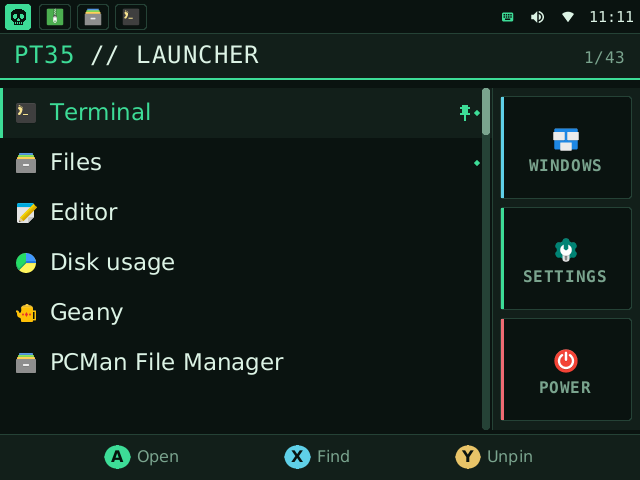
The first release of pt35-desktop: a pocket desktop for the Waveshare PocketTerm35.
Install
On a PocketTerm35 with Raspberry Pi OS (Trixie) 64-bit:
curl -fsSL https://raw.githubusercontent.com/therezor/PocketTerm35-Dersktop/main/install.sh | sudo bash
sudo pt35-kbd flash     # recommended: gives the buttons keys of their own
sudo reboot
What is in it
- Launcher with recents, pins and type-to-search.
- Taskbar: one icon per window, and clickable status icons.
- Window switcher with a picture of each window.
- Buttons mode and Mouse mode. R switches.
- A normal mouse UI in the menu: hover, click, right-click menu, wheel,
breadcrumbs, a draggable scrollbar. - Quick settings: Wi-Fi, Bluetooth, volume, brightness, input mode, touch.
- Wi-Fi and Ethernet. Six colour palettes. CPU profiles.
- Patched keyboard firmware: F13-F22 for the buttons, brightness over serial.
Files
pt35-desktop_arm64.deb: the package.install.shinstalls it for you.install.sh: the installer.SHA256SUMS: checksums.
Known limits
- Holding A and pressing the D-pad cannot drag. A real mouse or a finger can.
- There is no battery gauge: nothing on the board reports charge.
- Bookworm is not supported.