Repository navigation
Releases
v0.2.5 — applied proxy status and safer loopback exports

Highlights
- Show the last applied proxy policy, redacted endpoints and localized fallback reasons through an authenticated read-only status endpoint.
- Harden real-boot preflight with actionable errors and safe temporary-home handling.
- Preserve standard NO_PROXY loopback defaults across external-client syntax differences; add real curl IPv4/IPv6 regressions.
- Fix fallback-code localization and clarify that restoring the original dispatcher does not guarantee physical direct access.
Verification
- 57/57 tests passed, including 6 real curl checks; independent review passed.
- Isolated DSH 0.1.7-rc.1 and 0.2.0-rc.1 Web boot: 20/20 each.
- Node 22/24 CI and 12-file package whitelist passed.
- Uploaded via GitHub Actions with signed npm provenance (registry processing may take a few minutes).
Scope
Fixes #9. Status portion of #8 is delivered; active connection diagnostics remain deferred. The cross-client canonicalization proposed in #10 is intentionally not implemented. No automatic profile upgrade or runtime deployment.
PR: #12
v0.2.3
Fix DSH 0.1.7 Web activation after the v0.2.2 server-side settings migration.
- Switch the browser client from the removed
settingsScopeservice toconfigForms. - Use the UI icons exported by DSH 0.1.7, so the sidebar action and General settings row render.
- Add a regression check for both Web slots.
Verified against DSH 0.1.7-rc.1 in an isolated Web profile: both controls rendered, and changing the mode updated the UI and profile patch. The full test suite passed (36/36).
Update the Web profile dependency to @tr1v3r/dsh-proxy@^0.2.3 and restart DSH.
v0.2.2 — support DSH 0.1.7 settings API
Fixed
- Restore activation on DSH
0.1.7-rc.1by using the supported volatile profile config and Settings API. The previoussettings.installSection()call fails on this DSH version. - Keep proxy routing, child-process proxy variables, and the Web control in sync when Settings or the profile patch changes. Verified with a real DSH boot and live fetch routing.
- Require DSH
>=0.1.7-rc.1and the corresponding Cordis and Schemastery versions.
Install / upgrade
Set "@tr1v3r/dsh-proxy": "^0.2.2" in the target profile's package.json, then run:
dsh plugin --profile <name> install --no-frozen-lockfileRestart DSH once to load the new plugin. DSH 0.1.7 imports an existing $DSH_HOME/settings.yaml once into the active profile and renames it to settings.yaml.imported. Subsequent manual edits belong in profiles/<name>/cordis.patch.yml; Web Settings remains available and both paths hot-reload.
v0.2.1 — align the sidebar proxy control
What's fixed: the sidebar control now lines up
The icon-only proxy control sat 4px lower than the sibling triggers in the sidebar foot, and its icon was a size larger in the wide column.
Measured in a running profile (sidebar.footer.action, wide column):
| element | height | top | vertical centre | icon |
|---|---|---|---|---|
| sibling triggers | 36 | 538 | 556 | 16 |
.dshProxyQuick before |
36 | 542 | 560 | 18 |
.dshProxyQuick after |
36 | 538 | 556 | 16 |
The container carried margin:8px 0 0, borrowed from the Cordis panel's own .layer rule, which belongs to a different wrapper. The footer row is align-items:normal, so a registrant lines up with its siblings by centring itself; the shipped triggers are 36px tall with a 16px icon in the wide column and 18px in the rail. The control now follows that: align-self:center, no outer margin, wide ? 16 : 18.
No behavioural change — same menu, same dsh-proxy settings scope, same revision-fenced switching.
Install / upgrade
# in ~/.config/dsh/profiles/<name>/package.json
"dependencies": { "@tr1v3r/dsh-proxy": "^0.2.1" },
"dsh": { "profile": { "bundles": ["@deepseek-ai/dsh-base", "@tr1v3r/dsh-proxy"] } }

dsh plugin --profile <name> install --no-frozen-lockfile
Restart the Web service (its client bundle is cached at boot) and refresh the page. Requires DSH >=0.1.2-rc.1.
v0.2.0 — Web settings control and sidebar quick switch
What's new: a Web UI for the proxy switch
The dsh-proxy: settings section stays the single source of truth — this release adds two browser surfaces on top of it, both writing the same section (and both following external settings.yaml edits live).
Settings → General → Network proxy
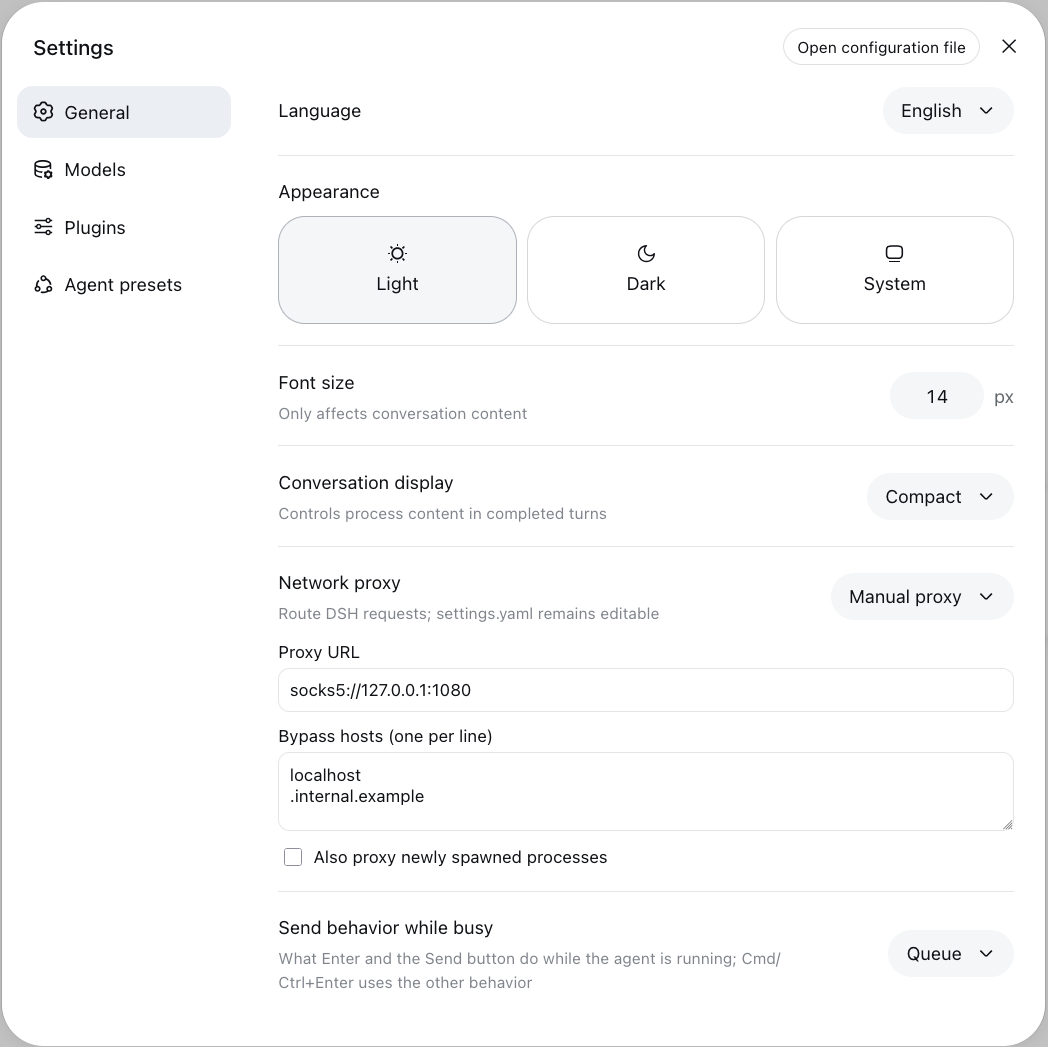
Pick Direct, Follow system, or Manual proxy from a dropdown that uses the native DSH menu; mode changes apply immediately, with no Apply button. In manual mode the URL and bypass list save on blur, the child-process env switch saves on change, and an invalid URL is never written. Saves are revision-fenced, so a stale edit cannot silently overwrite an external one.
Sidebar quick switch
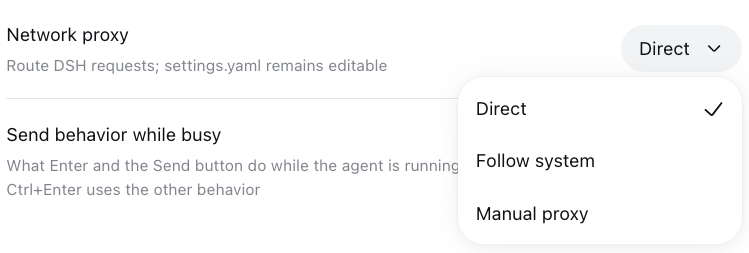
An icon-only control sits above Settings in the sidebar footer: hover, focus, or the menu shows the selected mode, and selecting a mode switches it on the spot. The manual endpoint is shown with credentials masked. Follow system reports the selected mode, not a promise that the host detected a usable proxy — the effective route is logged by DSH. Manual mode stays unpickable while no valid URL is configured.
Also in this release
- Reads the existing
dsh-proxysettings scope, sosettings.yamlhot reload and UI edits converge on one state; read-only and conflict states are surfaced instead of guessing. - Works in both the expanded sidebar and the collapsed rail.
- CI: a test matrix on Node 22/24, plus a packed-contents assertion so the published
fileslist cannot drift silently. - A gated
Publishworkflow (workflow_dispatch, npm trusted publishing with provenance) — nothing publishes on merge or plain push. - READMEs document the UI with screenshots, and carry the DSH Market listing badge.
Install
# in ~/.config/dsh/profiles/<name>/package.json
"dependencies": { "@tr1v3r/dsh-proxy": "^0.2.0" },
"dsh": { "profile": { "bundles": ["@deepseek-ai/dsh-base", "@tr1v3r/dsh-proxy"] } }

dsh plugin --profile <name> install --no-frozen-lockfile
Restart once to mount; afterwards switching needs no restart. Requires DSH >=0.1.2-rc.1.
Upgrading from 0.1.x: no configuration change — mode, proxy, noProxy, exportEnv, and the deprecated enabled alias behave exactly as before.
v0.1.2 — direct / system / manual routing modes
What's new: one mode key, three strategies
# ~/.config/dsh/settings.yaml  (hot-reloaded)
dsh-proxy:
  mode: system          # direct | system | manual
mode |
behavior |
|---|---|
direct |
No proxy. |
system |
Follow the host's proxy, re-detected on every save: HTTP_PROXY/HTTPS_PROXY/ALL_PROXY/NO_PROXY env everywhere (socks ALL_PROXY included), falling back to the macOS System Settings network proxy (scutil --proxy). proxy/noProxy/exportEnv are ignored. |
manual |
Route through proxy (http/https/socks5, URL credentials) with the shared noProxy matcher and exportEnv child-process mirroring. |
enabled: true/false still works as a deprecated alias (manual/direct).
Hardening in this release: a disabled protocol's stale scutil port can no longer leak into the normalized URL, and system mode never writes env vars (env export stays a manual-mode concept).
Also ships: demo GIF re-recorded in mode form with a live system scene — node scripts/demo.mjs reproduces it.
Install
# in ~/.config/dsh/profiles/<name>/package.json
"dependencies": { "@tr1v3r/dsh-proxy": "^0.1.2" },
"dsh": { "profile": { "bundles": ["@deepseek-ai/dsh-base", "@tr1v3r/dsh-proxy"] } }

dsh plugin --profile <name> install --no-frozen-lockfile
Restart once to mount; afterwards switching needs no restart.
v0.1.1 — Runtime-switchable outbound proxy
What you get
Route every in-process outbound request — LLM providers, web_search / web_fetch, streamable-http MCP — through an HTTP(S) CONNECT or SOCKS5 proxy, and flip it on / off / to another server at runtime by editing one settings section. Zero restarts.
# ~/.config/dsh/settings.yaml  (hot-reloaded)
dsh-proxy:
  enabled: true
  proxy: socks5://127.0.0.1:1080     # http(s):// also supported
  noProxy: [localhost, .internal.example]
  exportEnv: true                    # children (curl/git/MCP) follow too
Highlights
- Real hot switching:
dsh-proxy:settings section drives undici's global dispatcher; every save reroutes instantly (see the demo below) - HTTP(S) CONNECT via
EnvHttpProxyAgent; SOCKS5 (with URL credentials) via undici's native agent;socks5h:///socks://accepted - One noProxy matcher for both protocols (undici semantics: bare entries match host + dot-boundary subdomains,
host:portpins a port,*bypasses all); ambientNO_PROXY/HTTP_PROXYenv is deliberately ignored in-process exportEnvmirrors the switch into child-process env without ever clobbering operator-set values; mid-session operator edits are adopted and restored- Invalid config keeps traffic direct and logs why — the host never crashes on a typo
- Proxy URL credentials are redacted in logs
Install
# in ~/.config/dsh/profiles/<name>/package.json
"dependencies": { "@tr1v3r/dsh-proxy": "^0.1.1" },
"dsh": { "profile": { "bundles": ["@deepseek-ai/dsh-base", "@tr1v3r/dsh-proxy"] } }

dsh plugin --profile <name> install --no-frozen-lockfile
Restart once to mount; afterwards switching needs no restart.