Repository navigation
v0.2.0 — Web settings control and sidebar quick switch

What's new: a Web UI for the proxy switch
The dsh-proxy: settings section stays the single source of truth — this release adds two browser surfaces on top of it, both writing the same section (and both following external settings.yaml edits live).
Settings → General → Network proxy
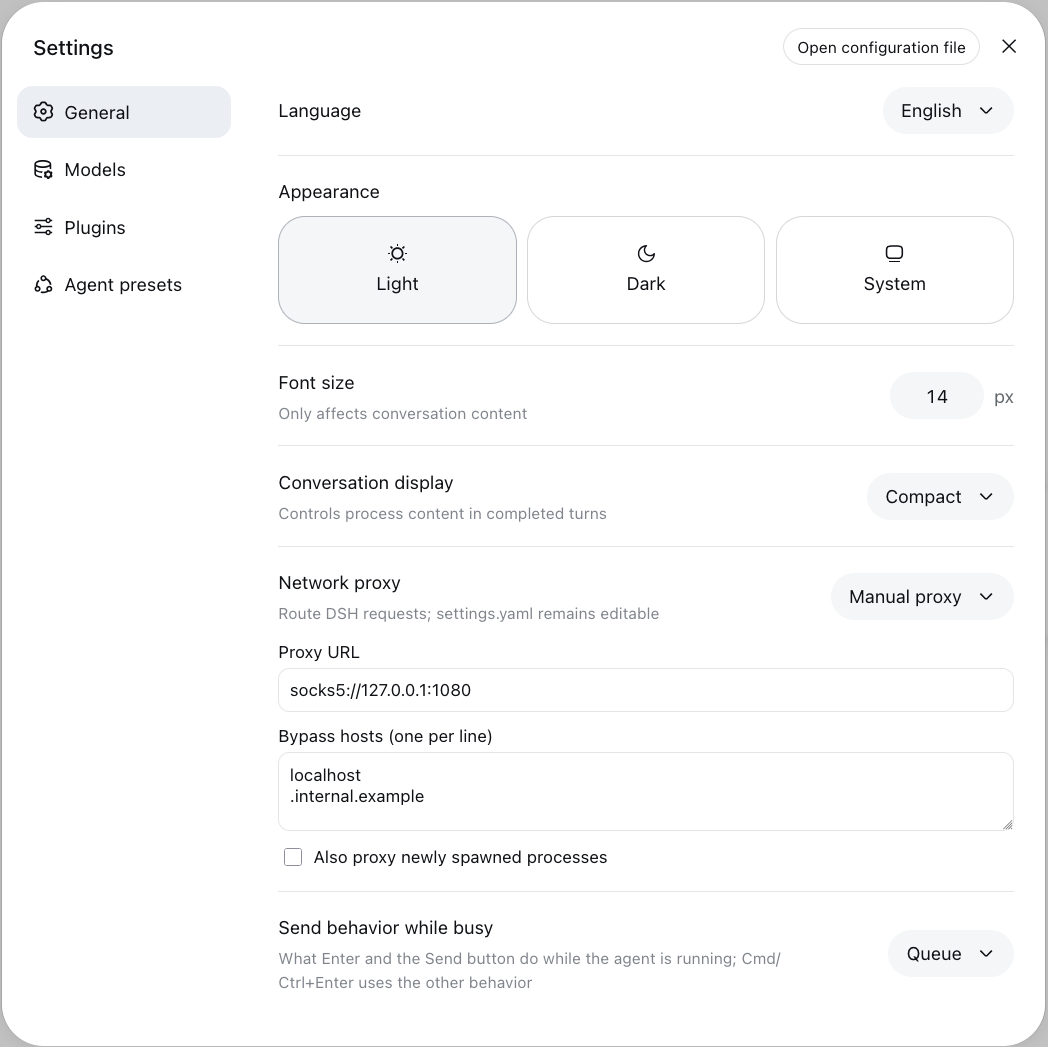
Pick Direct, Follow system, or Manual proxy from a dropdown that uses the native DSH menu; mode changes apply immediately, with no Apply button. In manual mode the URL and bypass list save on blur, the child-process env switch saves on change, and an invalid URL is never written. Saves are revision-fenced, so a stale edit cannot silently overwrite an external one.
Sidebar quick switch
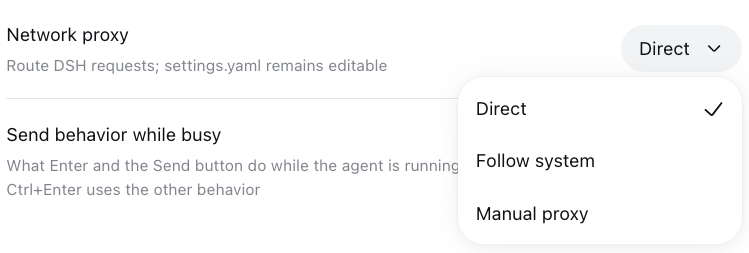
An icon-only control sits above Settings in the sidebar footer: hover, focus, or the menu shows the selected mode, and selecting a mode switches it on the spot. The manual endpoint is shown with credentials masked. Follow system reports the selected mode, not a promise that the host detected a usable proxy — the effective route is logged by DSH. Manual mode stays unpickable while no valid URL is configured.
Also in this release
- Reads the existing
dsh-proxysettings scope, sosettings.yamlhot reload and UI edits converge on one state; read-only and conflict states are surfaced instead of guessing. - Works in both the expanded sidebar and the collapsed rail.
- CI: a test matrix on Node 22/24, plus a packed-contents assertion so the published
fileslist cannot drift silently. - A gated
Publishworkflow (workflow_dispatch, npm trusted publishing with provenance) — nothing publishes on merge or plain push. - READMEs document the UI with screenshots, and carry the DSH Market listing badge.
Install
# in ~/.config/dsh/profiles/<name>/package.json
"dependencies": { "@tr1v3r/dsh-proxy": "^0.2.0" },
"dsh": { "profile": { "bundles": ["@deepseek-ai/dsh-base", "@tr1v3r/dsh-proxy"] } }

dsh plugin --profile <name> install --no-frozen-lockfile
Restart once to mount; afterwards switching needs no restart. Requires DSH >=0.1.2-rc.1.
Upgrading from 0.1.x: no configuration change — mode, proxy, noProxy, exportEnv, and the deprecated enabled alias behave exactly as before.