Repository navigation

Solstice 1.2.1 adds the Docker Tray: right-click on the canvas with a painting tool, or press its shortcut, and the dockers you choose open at the cursor in columns, each with its own size, including dockers hidden in the main window.
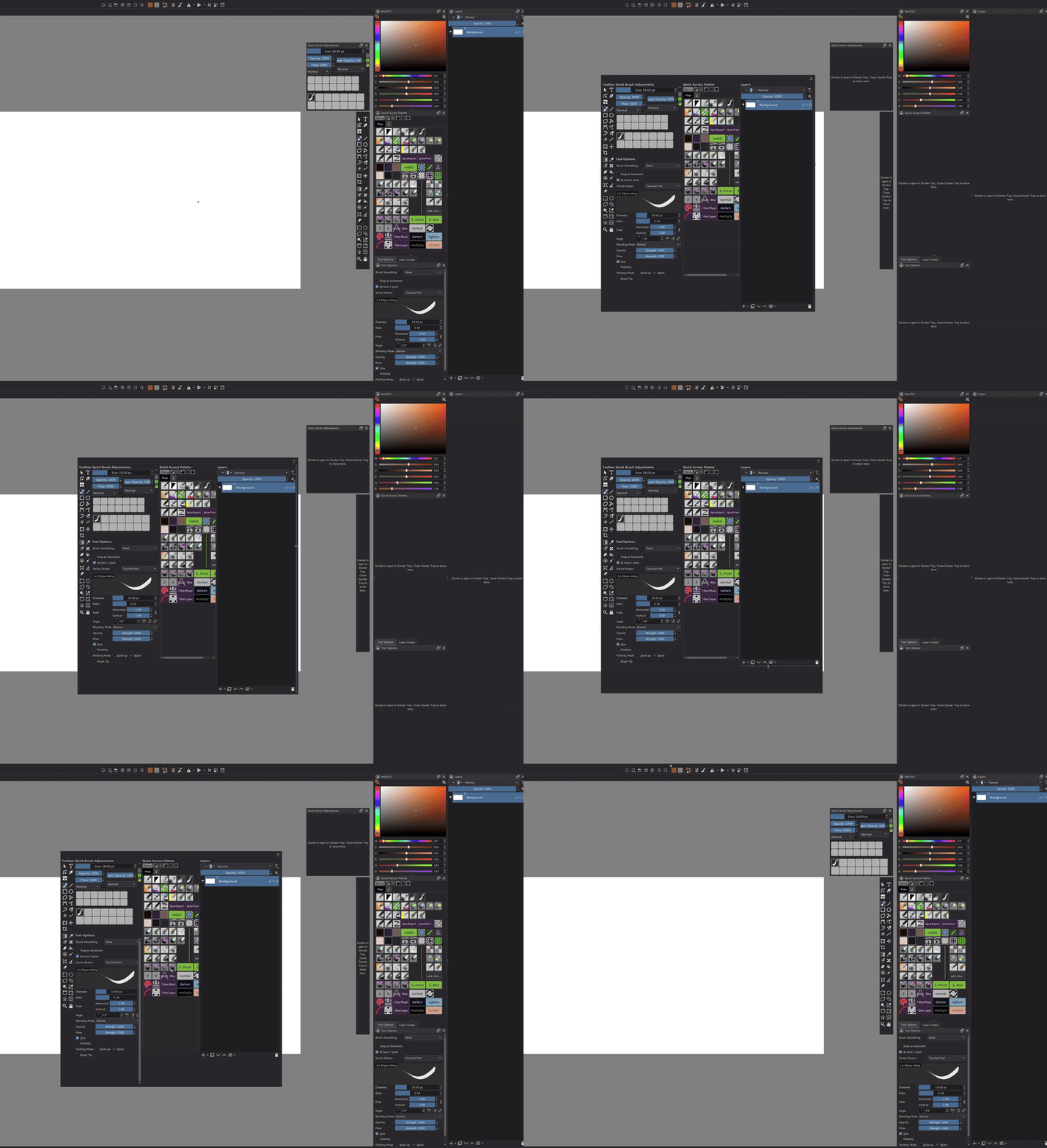
What's new since 1.2.0
- Docker Tray (#113): a popup with the dockers you choose, at the cursor. Guide: Docker Tray.
- Opening: right-click on the canvas with a painting tool (brushes, shapes, fill, gradient). Tools with their own right-click menu (selection, Transform, Crop, Path, Reference Images) keep it. The Show Docker Tray action has no key by default; assign one in Settings → Configure Solstice… → Keyboard Shortcuts.
- Closing: a click or right-click on the canvas, Esc, the shortcut again, or switching to another application. Every docker goes back to its place, visible or hidden as before.
- Hidden dockers: dockers hidden in the main window work on the tray. Layers thumbnails, Quick Brush Adjustments, Quick Access and Rest Note keep working there.
- Configure Docker Tray (the gear button on the tray): choose dockers, arrange them in columns, move them, and set each one's width and height. Without a setting, the tray shows Layers.
- Resizing on the tray: drag the strip to the right of a column to set its width, or the strip under a docker to set its height. Sizes are saved.
- A docker can be in one place at a time. While the toolbar docker box or Quick Brush Adjustments' Tool Options panel shows it, the tray says where it is open, and gets it back afterwards.
- HueSVC popup with a pen (#112): the popup no longer closes at once when its shortcut is pressed while a pen hovers over the canvas. It now closes when the pointer is actually outside it.
- The Simplified Chinese interface translates the new texts.
1.2.1 includes everything in 1.2.0.
Download
Windows x64: download Solstice-1.2.1-windows-x64-948ac276816b.zip, extract it and start Solstice.exe. No installer is needed.
- This is an unsigned package. Settings and resources remain in
%APPDATA%\Solstice, separate from Krita. - The
-dbg.zipcontains debug symbols for crash reports; it is not the application download. SHA256SUMS.txtcontains checksums for both ZIP files.- Explorer
.kra/.krzthumbnails can be registered withshellex\register-thumbnails.cmd(guide).
Scope and supported environment
- 1.2.1 is a regular release. Feature-specific limits remain as documented in the user guides.
- Tested locally on Windows 11, 64-bit; the downloadable package is built on GitHub's Windows runner.
- The Vulkan engine remains experimental. It is developed and tested on an RTX PRO 6000 Blackwell and starts by itself only on NVIDIA Blackwell; see the GPU Engine guide. The Docker Tray does not depend on it.
- Linux and macOS are not validated. Android is not supported.
- The Simplified Chinese interface uses an AI-translated catalog; terminology and layout may still need refinement.
Please report problems in Solstice Issues. Solstice is independent of the Krita project and KDE. See the website and user guides.
Build and verification
- Commit:
948ac276816b253b412681a66a677a569ff874af, the merge of #113. - Build: GitHub Actions run 44880267082.
- Build details and dependencies:
BUILD-INFO.txtandwindows-dependencies.lock.json. - Local tests before the release:
KisDockerBorrowRegistryTest11/11,KisDockerTrayTest22/22,QuickAdjustDockTest16/16,QuickAccessInteractionTest22/22 and the other Quick Access, Rest Note,TestNodeViewandKisInputManagerTestsuites (Windows).- Checked by hand in a local build (2026-11-21): every Docker Tray phase (opening and closing, hidden dockers, the settings dialog, drag resizing, the dockers that follow their content), and the HueSVC popup with a pen.
- These are local results, not tests of the release package. Cloud CI uses
BUILD_TESTING=OFF: it verifies compilation and packaging, not interactive behavior.
- Package checks:
- Windows compilation, installation and packaging passed, including the GPU engine, Python plugins and the bundled CPU G'MIC runtime.
- Application ZIP SHA-256:
6a868d67388f97d613b0d0f1bd3bb151e75aded2263582d837c9d5efbc34617a. - Both ZIPs passed SHA-256 and full CRC checks (5,323 application entries and 221 debug entries). The required runtimes, translation and shell integration files are present.
- The dependency lock matches the built revision after Windows line-ending normalization.
- The packaged executables report ProductName
Solstice, version1.2.1 (git 948ac27)in their Windows version metadata. - The first build attempt failed while downloading the pinned Krita shell extension from a KDE mirror (certificate error); the re-run of the same commit passed.
- The release package itself was not started.